
A Python package for organizing and visualizing list hierarchies.

Project description
[ demo ]
SetPrint(ver, 0.3.0) - Easily Format and Display High-Dimensional Data!
<> A Data Visualization Tool That Properly Formats Even 2D/NumPy Arrays and Image Data <>
TestPyPI: Test Release Location
https://test.pypi.org/project/setprint/
setprint is a powerful data formatting tool that extends Python’s built-in pprint. It not only formats lists and dictionaries but also properly formats NumPy arrays and 2D data (including image data). In particular, it enhances the visibility of missing data or dimensional mismatches, making debugging easier.
Update Information
https://github.com/mtur2007/SetPrint/blob/main/Development_files/update_0_3_d/SetPrint_update_image.md
✅ Features of setprint
-
Automatically Adjusts Missing or Mismatched Dimensions
It formats “storage bugs” and “mixed-dimension data,” which are easily overlooked with pprint, so that they are immediately recognizable.
The tool automatically fills missing parts with blanks, making data inconsistencies immediately apparent.
By comparing the expected arrays (such as samples or templates) with the actual arrays,
you can highlight anomalies, allowing you to instantly discern bugs and grasp the structure.
-
Debug and Visualize by Structure/Object
With setprint, you can debug and visualize data by each structure/object, eliminating issues such as uniform structure or unwanted line breaks.
Consequently,
arrays that are meant to maintain a 2D structure (such as image data or binary data) can be formatted and displayed while preserving their intended structure.Example from an OCR Program
https://github.com/mtur2007/SetPrint/blob/main/Development_files/format_data/y_x_yf_f.txt
-
Compact Representation of Containment Relationships
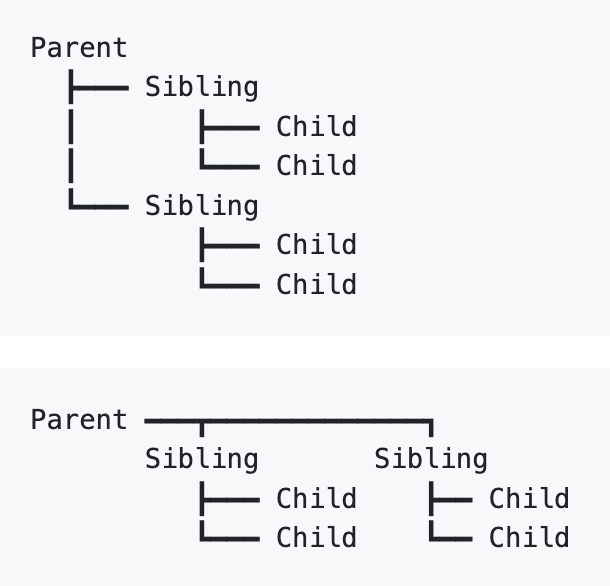
Instead of using brackets ([], (), {}) to represent parent-child relationships, setprint uses lines (┣ :┃:┗) and (┳ : ━ : ┓) to clearly show the connections.
-
[Planned Updates]
A feature to display indexes is planned, allowing for even clearer understanding of data structure relationships.
A feature to convert stored information (i.e., mapping of specific values) is planned, making data transformation processes easier.
🛠 Usage Examples of setprint
🔹 Example of visualizing three different formats of image data
📌 In cases where data of different dimensions coexist (a mix of RGB and grayscale images)
import numpy as np
from setprint import setprint

data = [

    # RGB image (3x3x3) - Sample array
    np.array([[[255,   0,   4],
               [255,  85,   0],
               [255, 170,   0]],

              [[170, 255,   0],
               [ 85, 255,   0],
               [  0, 255,   4]],

              [[  0, 170, 255],
               [  0,  85, 255],
               [  4,   0, 255]]]),

    # Sample array in a different format: BGR image
    np.array([[[  4,   0, 255],
               [  0,  85, 255],
               [  0, 170, 255]],

              [[  0, 255, 170],
               [  0, 255,  85],
               [  4, 255,   0]],

              [[255, 170,   0],
               [255,  85,   0],
               [255,   0,   4]]]),

    # Grayscale image (3x3) → This one has a different dimension
    np.array([[ 77, 126, 176],
              [200, 175, 150],
              [129,  79,  29]]),

    None

]

setprint(data)
🔹 Output of setprint

Version with Root Omission Settings
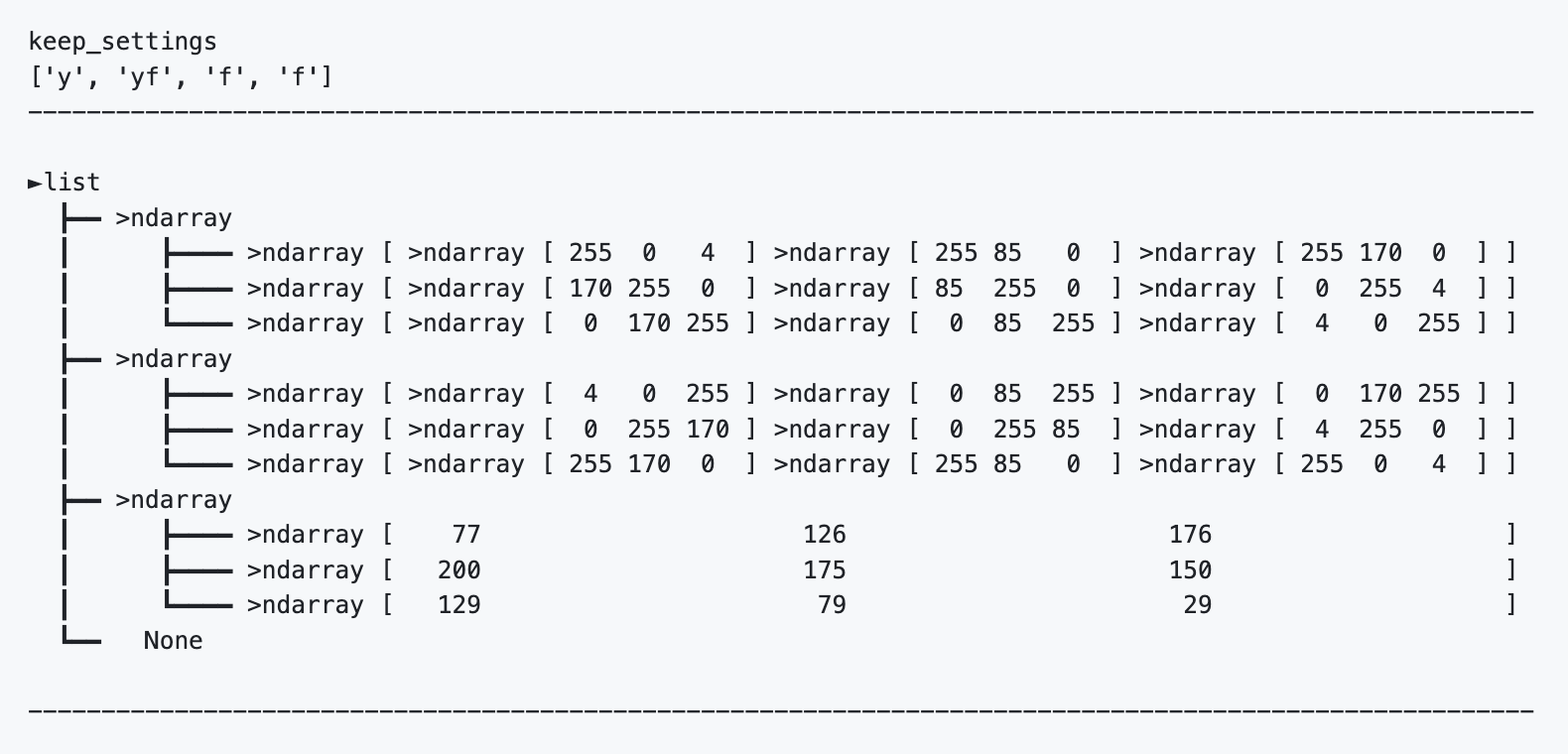
✅ Differences in dimensions (3D vs 2D) and missing data are visually clear
✅ You can immediately pinpoint abnormalities, making debugging easier
Methods
-
set_collectionMethodThe set_collection method of the SetPrint class provides functionality to neatly arrange multi-dimensional lists and complex data structures, outputting them in a visually understandable format.
By using this method, you can optimally format the data according to its dimensions.-
Parameters
-
route(bool or str): Whether to enable the root display.- If
True, lines representing the containment relationships are also output.
If set tomaintenance(str), it will output in maintenance notation, showing both enabled and disabled root display results.
- If
-
keep_setting{dict_type } ( deep/int: direction/str): Specifies the expansion direction for each dimension.-
For example, { 1:'y', 3:'x', 4:'yf' } specifies dimensions in descending order; dimensions not specified will inherit the parent's setting.
※ The default setting value is
x.
-
-
-
Return Value
format_texts: A list of formatted text information for each line.
-
Example Execution Template
from demo_setprint_0_3_0 import SetPrint

# Specify the array you want to format
#                         ∨
list_data    = SetPrint(datas)

# Specify the expansion direction (explained in detail below)
#                         ∨
keep_settings = {1:'x',3:'yf',4:'f'}

# Execute the formatting
format_texts  = list_data.set_collection ( route=True, keep_settings=keep_settings )

# Hide the output and write the result to a text file
with open('output.txt','w') as f:
    for line in format_texts:
        f.write(line+'\n')
[] Relationship between keep_setting and Data Alignment
The keep_setting parameter lets you specify the display direction for each dimension, allowing for flexible display tailored to the data’s structure and purpose.
Below are explanations of the different behaviors based on the values of keep_setting and the data formats that are most suitable.
-
Recommended Setting Examples
1.
xBehavior: Expands the specified dimension in the X direction.
Usage:
- When you want to check the alignment of array dimensions for each element.
- When you want to verify the order of array elements arranged in parallel in the x direction.
- When you want to verify the order of array elements arranged in parallel in the y direction.
※ Differences in array dimensions are automatically expanded in the y direction.
Effect: Expanding in the x direction results in arrays arranged in parallel along the y axis.
-
Array Example
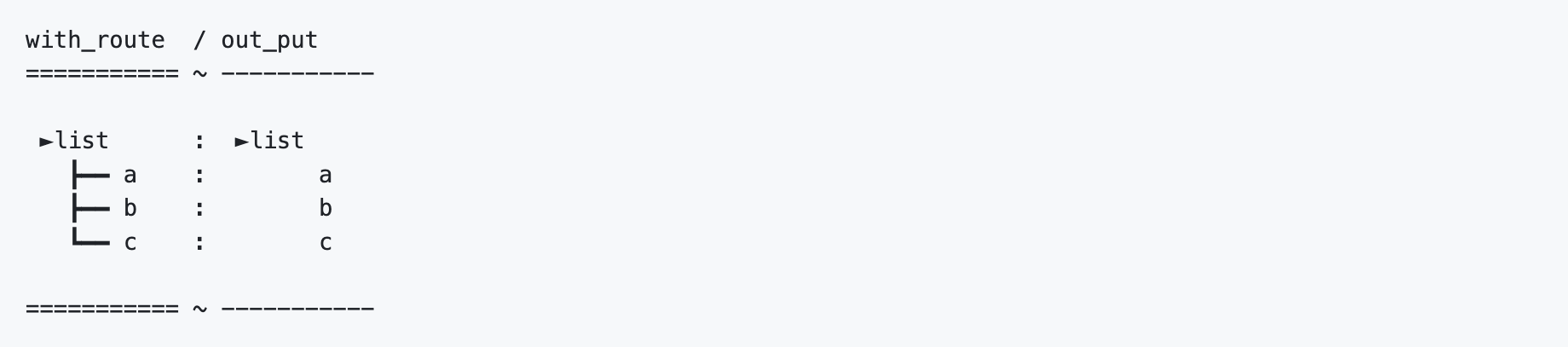
test_data = ['a','b','c']
-
Formatting Result
-
Setting Example
keep_settings = {1:'x'}
2.
yBehavior: Expands the specified dimension in the Y direction.
Usage:
-
When you want to check the order of array elements for each dimension.
[Not Recommended] The following specification can theoretically be reversed,
but it is not recommended as it leads to inconsistency in axes.- Array elements arranged in parallel in the y direction for order checking.
- Array elements arranged in parallel in the x direction for checking dimensional alignment.
※ Differences in array dimensions are automatically expanded in the x direction.
Effect: Expanding in the y direction results in arrays arranged in parallel along the x axis.
-
Array Example
test_data = ['a','b','c']
-
Formatting Result
-
Setting Example
keep_settings = {1:'y'}
3.
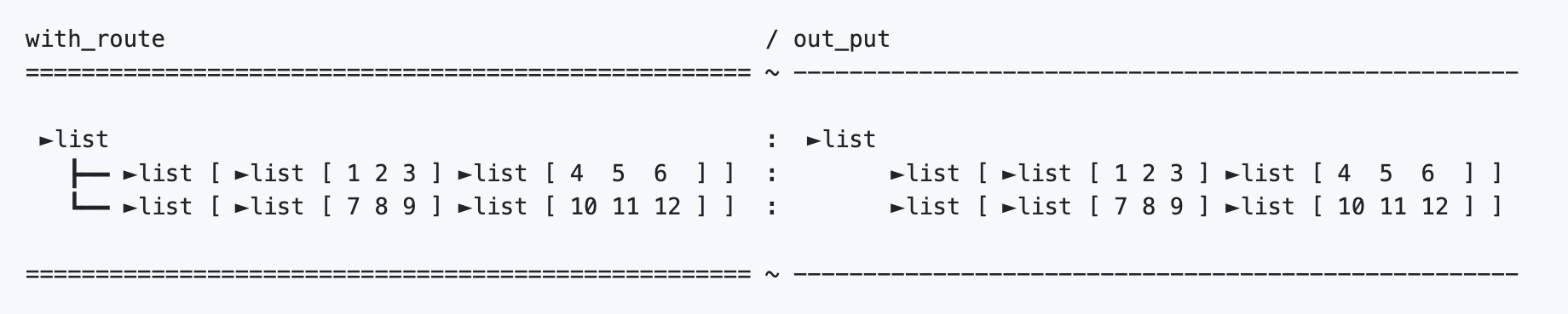
yf(y_flat)Behavior: Expands the specified dimension in the y direction, and subsequent dimensions within the range are displayed on the same line as an expansion in the x direction.
Ideal for compactly aligning densely packed array information, such as stored photo data.
Usage: Expands the specified dimension in the y direction and displays the subsequent arrays as parallel arrays in the x direction, concisely summarizing both the
order alignment(missing data) anddimensional matching(mismatched dimensions) in one line.-
Array Example
test_data = [
    [[1,2,3], [4,5,6]],
    [[7,8,9], [10,11,12]]
]
-
Formatting Result
-
Setting Example
keep_settings = {1:'yf',2:'f',3:'f'}
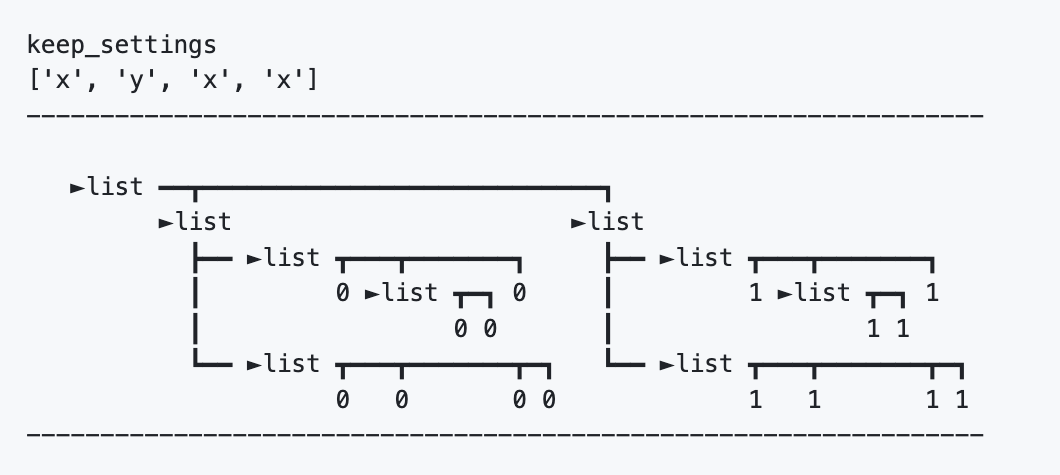
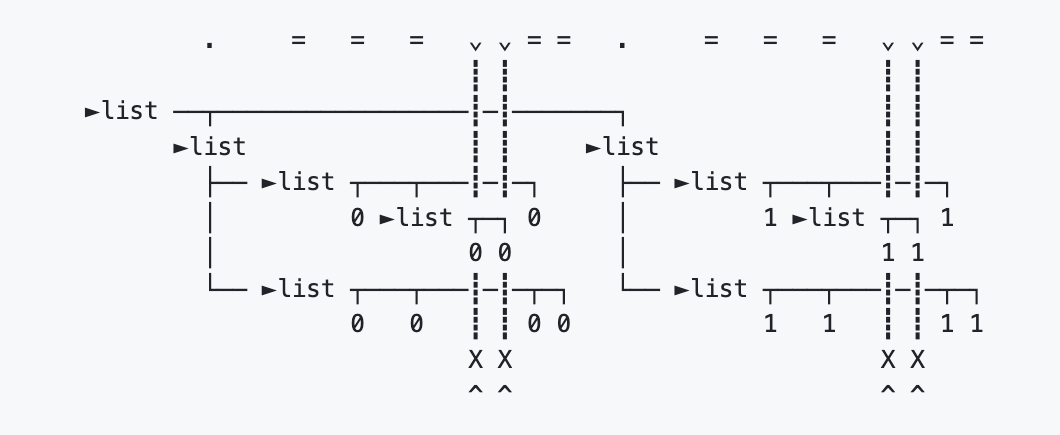
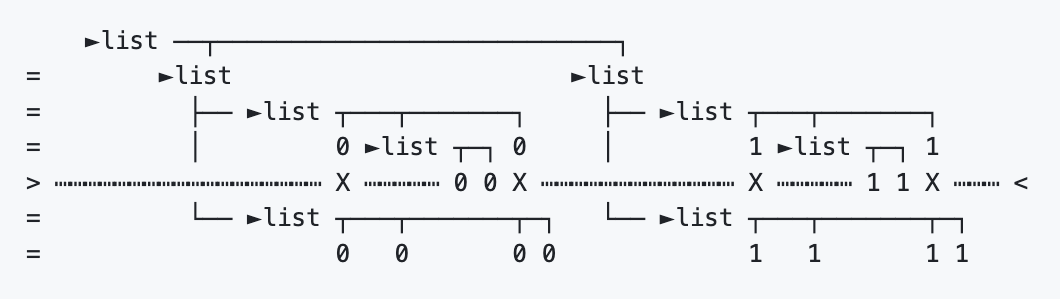
[] Parallel Arrays: Alignment of Array
Order/DimensionsAs part of its formatting, setprint visually represents “storage bugs” and “mixed-dimension data” by aligning the array’s
order/dimensionslinearly using duplicated axes.-
Test Array
-
y-Axis – Alignment of Array
Order/Parallel Elements in the y DirectionThis axis maintains the order alignment of parallel arrays expanded in the y direction.
※ With the settingf, even if dimensions differ, arrays within the same range are displayed in one line so that mismatches can still be recognized. -
x-Axis – Alignment of Array
Dimensions/Parallel Elements in the x DirectionThis axis maintains the dimensional alignment of parallel arrays expanded in the x direction.
※ About the Parallel Elements Represented by Both Axes
In setprint, to enable debugging and visualization by structure/object, arrays are arranged in parallel along the x and y directions to visualize the alignment of array order/dimensions.
In this process, the meaning of each axis can differ. Here is an explanation of such exceptions:
-
Parallel Elements( = )Parts expanded with settings
'x'or'f'serve as bothorder alignmentandparallel elements, with their interpretation left to the use case.
Parts expanded with settings'y'or'yf'represent solelyparallel elementsand do not imply dimensional alignment.Line breaks/representations that indicate dimensional alignment are automatically applied during expansion with
'x'or'f'.
※ Consistency is maintained only along the expansion direction and its perpendicular axis; for parallel axes, consistency is maintained only at the level of parallel elements.
[] Changing the Display Style
Currently, only the text image for array types can be modified.
-
Example Execution Template
'''
from demo_setprint_0_3_0 import SetPrint

# Specify the array you want to format
#                         ∨
list_data    = SetPrint(datas)
'''

#----------------------------------------------------
style_settings = (
  ("Collections" ,
    {  'image'   : { 'list'    : '►list' ,
                     'tuple'   : '▷tuple' ,
                     'ndarray' : '>nadarray' ,
                     'dict'    : '◆dict' }}),
)
list_data.update_data_with_arguments(style_settings)

#----------------------------------------------------
"""
# Specify the expansion direction (explained in detail below)
#                         ∨
keep_settings = {1:'x',3:'yf',4:'f'}

# Execute the formatting
format_texts = list_data.set_collection ( route=True, keep_settings=keep_settings )

# Hide the output and write the result to a text file
with open('output.txt','w') as f:
    for line in format_texts:
        f.write(line+'\n')
"""
-



Download files
Download the file for your platform. If you're not sure which to choose, learn more about installing packages.
Source Distribution
Built Distribution
Filter files by name, interpreter, ABI, and platform.
If you're not sure about the file name format, learn more about wheel file names.
Copy a direct link to the current filters
File details
Details for the file setprint-0.3.0.tar.gz.
File metadata
- Download URL: setprint-0.3.0.tar.gz
- Upload date:
- Size: 19.9 kB
- Tags: Source
- Uploaded using Trusted Publishing? No
- Uploaded via: twine/5.1.1 CPython/3.12.7
File hashes
| Algorithm | Hash digest | |
|---|---|---|
| SHA256 |
5b3cae5cc06a515e83da97da834f635b7c5a2a15115efe4d5f48bf6c56d1c675
|
|
| MD5 |
f7eddda8880b127c5ba500096fd50f8d
|
|
| BLAKE2b-256 |
035c27cdca2fcbf2fc1fcda1366db582e9ec9a255e93afb30e920fac6fba85c8
|
File details
Details for the file setprint-0.3.0-py3-none-any.whl.
File metadata
- Download URL: setprint-0.3.0-py3-none-any.whl
- Upload date:
- Size: 15.1 kB
- Tags: Python 3
- Uploaded using Trusted Publishing? No
- Uploaded via: twine/5.1.1 CPython/3.12.7
File hashes
| Algorithm | Hash digest | |
|---|---|---|
| SHA256 |
8c5f97855590a97e43f261549df9b9d2d35553d6c6b08eeb450a2b8ac331689b
|
|
| MD5 |
639491a7b599dd4158375ed41df3f218
|
|
| BLAKE2b-256 |
48bb91491bea516188971bd9fbf143a0e4f65dbeaf1011c9685aec7ea8dccc49
|






