
Setup-Badge




😎 Why you need setup-badge?
Setup-Badge creates dynamic and static endpoint badges to showcase on your README file. These badges can highlight key aspects such as build status, code coverage percentage, software version, license and more.
Note
- dynamic badge changes over time (e.g. code coverage percentage and software version)
- static badge doesn't change over time (e.g. license and programming language)
⭐ How setup-badge works
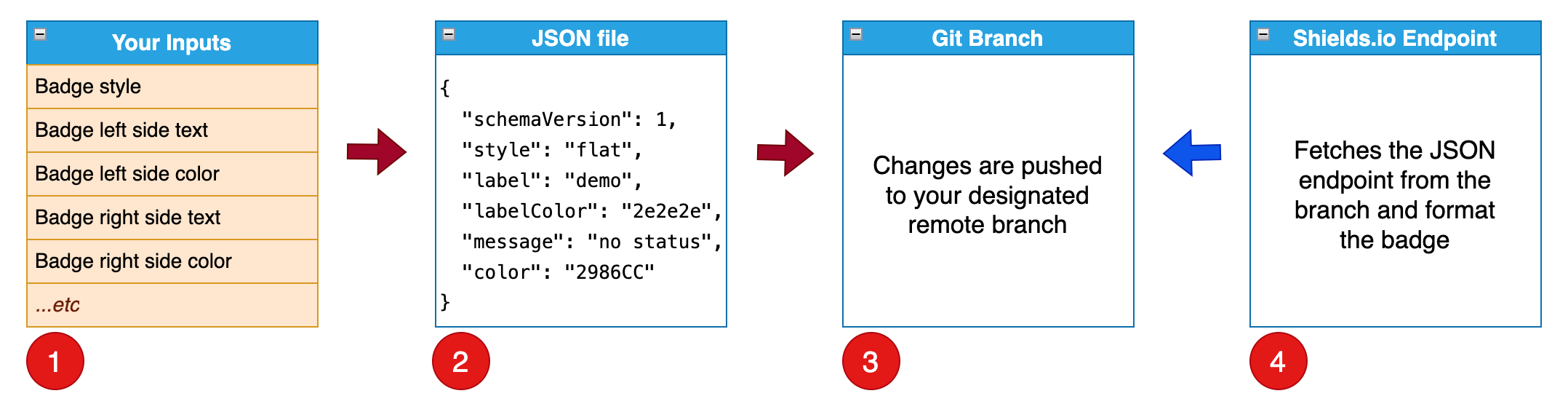
Under the hood, setup-badge creates a shields.io endpoint badge, which is composed of a shields.io endpoint and an URL to your JSON file (JSON Endpoint).

setup-badge workflow is outlined below.
- setup-badge runs with command line options.
- setup-badge adds/updates a json file from your options.
- setup-badge pushes a commit to the remote branch.
- endpoint badge is created with
shields.io endpointandyour json file.
Afterwards, you can put endpoint badge into your README file.
🎉 Use Case 1️⃣ - running on GitHub action
Summary: create multiple static badges
setup-badge:
- runs
on demand - creates two static badges:
languageandlicense- language badge does not have a badge url
- license badge has a badge url that links to the project's LICENSE file
Example: create multiple static badges
name: setup-badge

on:
  workflow_dispatch:

permissions:
  contents: read

jobs:
  language-badge:
    runs-on: ubuntu-latest

    permissions:
      contents: write

    steps:
    - id: language-badge
      uses: tagdots/setup-badge@<commit sha> # 1.2.3
      with:
        badge-name: language
        label: Language
        message: Python
        message-color: FFA500

  license-badge:
    runs-on: ubuntu-latest

    permissions:
      contents: write

    steps:
    - id: license-badge
      uses: tagdots/setup-badge@<commit sha> # 1.2.3
      with:
        badge-name: license
        badge-url: https://raw.githubusercontent.com/tagdots/setup-badge/refs/heads/main/LICENSE
        label: License
        message: MIT
        message-color: FFA500
Summary: create a dynamic badge
setup-badge:
- runs
on schedule at 5:30 pm UTCoron demand - runs a coverage test and get the coverage percentage from the test result
- creates a dynamic
Code Coveragebadge with the coverage % that changes over time
Example: create a dynamic badge
name: setup-badge

on:
  schedule:
    - cron: '30 17 * * *'

  workflow_dispatch:

permissions:
  contents: read

jobs:
  coverage-badge:
    runs-on: ubuntu-latest

    permissions:
      contents: write

    outputs:
      COV_PER: ${{ steps.get-coverage-results.outputs.COV_PER }}

    steps:
    - id: coverage-run
      run: coverage run

    - id: get-coverage-results
      run: |
        echo "COV_PER=$(...coverage run results...)" >> "$GITHUB_OUTPUT"

    - id: coverage-badge
      uses: tagdots/setup-badge@<commit sha> # 1.2.3
      with:
        badge-name: coverage
        label: "Code Coverage"
        message: "${{ steps.get-coverage-results.outputs.COV_PER }}"
🎉 Use Case 2️⃣ - running CLI locally
In this use case, you run setup-badge manually with the steps below:
- install setup-badge.
- run setup-badge.
🔆 install setup-badge
In the example below, we first install setup-badge in a Python virtual environment.
~/work/<your project> $ uv pip install -U setup-badge
🔧 run setup-badge command line options
| Input | Description | Default | Notes |
|---|---|---|---|
badge-name |
JSON endpoint filename | badge |
JSON endpoint filename |
branch-name |
Branch to hold JSON endpoint | badges |
a single branch can hold multiple JSON endpoint files |
badge-style |
Badge style | flat |
other options: flat-square, plastic, for-the-badge, social |
badge-url |
Badge URL | '' |
no default value (enter a url if necessary) |
label |
Left side text | demo |
- |
label-color |
Left side background color | 2e2e2e |
hex color |
message |
Right side text | no status |
place dynamic/static data here |
message-color |
Right side background color | 2986CC |
hex color |
remote-name |
Git remote source branch | origin |
leave it as-is in general |
gitconfig-name |
Git config user name | Mona Lisa |
need this option for CI or GitHub action |
gitconfig-email |
Git config user email | mona.lisa@github.com |
need this option for CI or GitHub action |
🏃 CLI Options: --badge-name license --label License --message MIT --message-color FFA500 --badge-url https://raw.githubusercontent.com/tagdots/setup-badge/refs/heads/main/LICENSE
~/work/<your project> $ uv run setup-badge --badge-name license --label License --message MIT --message-color FFA500 --badge-url https://raw.githubusercontent.com/tagdots/setup-badge/refs/heads/main/LICENSE
🚀 Starting to create a badge (license.json) in branch (badges)...
✅ validated inputs from command line options
✅ checkout local branch (badges)
✅ created badges/license.json
✅ found changes ready to stage, commit, and push to origin
✅ pushed commit (dd8906c) to remote branch (badges)
🎉 Endpoint Badge: [](https://raw.githubusercontent.com/tagdots/setup-badge/refs/heads/main/LICENSE)
🤩 Branch restored to original active branch: main
Endpoint Badge

🏃 CLI Options: --badge-name marketplace --label Marketplace --message setup-badge --message-color FF6360 --badge-url https://github.com/marketplace/actions/setup-badge
(setup-badge) ~/work/setup-badge $ setup-badge --badge-name marketplace --label Marketplace --message setup-badge --message-color FF6360 --badge-url https://github.com/marketplace/actions/setup-badge
🚀 Starting to create a badge (marketplace.json) in branch (badges)...
✅ validated inputs from command line options
✅ checkout local branch (badges)
✅ created badges/marketplace.json
✅ found changes ready to stage, commit, and push to origin
✅ pushed commit (8991c28) to remote branch (badges)
🎉 Endpoint Badge: [](https://github.com/marketplace/actions/setup-badge)
🤩 Branch restored to original active branch: main
Endpoint Badge
✨ Summary of running the above commands
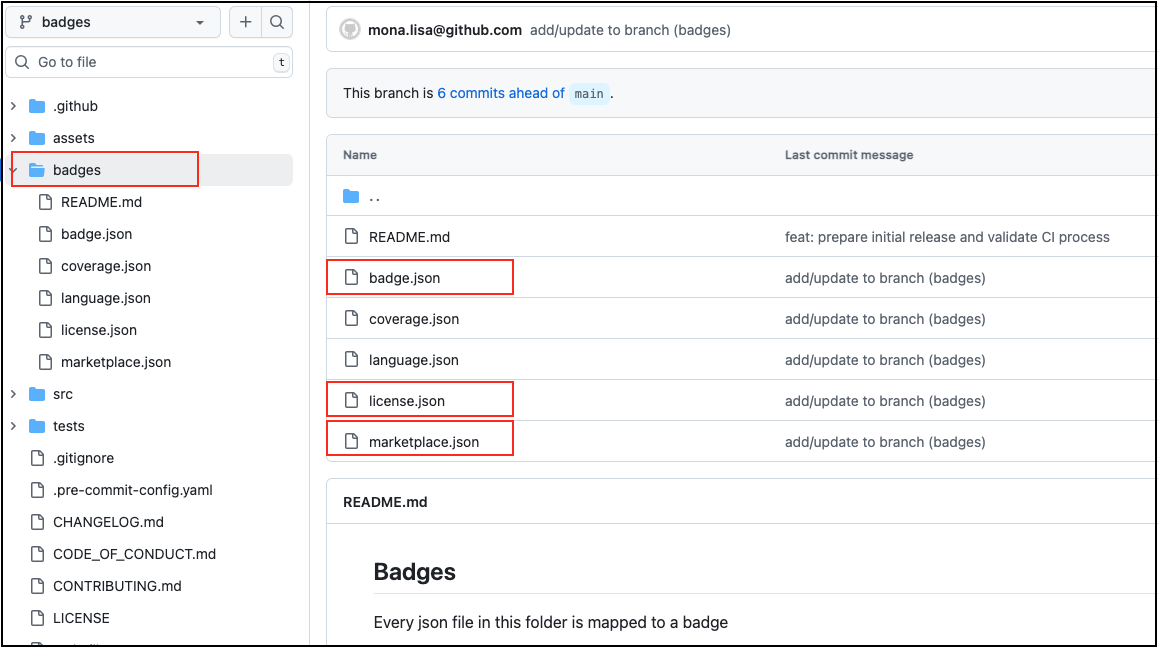
- badges branch can hold multiple JSON files.
- badges folder can hold json files from different branches.
🔔 What is next after creating the endpoint badge?
- copy
endpoint badgeoutput and paste to your README file - write a commit and merge your code
😕 Troubleshooting
Open an issue
🙏 Contributing
For pull requests to be accepted on this project, you should follow PEP8 when creating/updating Python codes.
See Contributing
🙌 Appreciation
If you find this project helpful, please ⭐ star it. Thank you.
📚 References
1 maintainer

Metadata
1 maintainer
Release files for setup-badge 1.2.3
For a detailed explanation of source distributions (sdists) and built distributions (wheels), please see the package formats documentation.
Source distribution (sdist)
| File | Size | Uploaded | |
|---|---|---|---|
| setup_badge-1.2.3.tar.gz | 352.8 kB | Details |
Built distribution (wheel)
| File | Interpreter | ABI | Platform | Reset |
|---|---|---|---|---|
| setup_badge-1.2.3-py3-none-any.whl | Python 3 | none | any | Details |
Total release size: 363.6 kB
Release files / setup_badge-1.2.3.tar.gz
| Download URL | setup_badge-1.2.3.tar.gz |
|---|---|
| Size | 352.8 kB |
| Tags | Source |
|
SHA-256 checksum How to use checksums |
f90e069b5318af976f493d8cc508a25744dcf4dae0ff473ed8e322923ca23471
|
|
BLAKE2b-256 checksum How to use checksums |
cbe002cf80ebcc358b10be630371bb51d3139ca3bb57e1fe6d8cb6523daec604
|
| Upload date | |
|
Uploaded using Trusted Publishing? What is trusted publishing? |
No |
| Uploaded via |
twine/7.0.0 CPython/3.13.14
|
Release files / setup_badge-1.2.3-py3-none-any.whl
| Download URL | setup_badge-1.2.3-py3-none-any.whl |
|---|---|
| Size | 10.9 kB |
| Tags | Python 3 |
|
SHA-256 checksum How to use checksums |
02dcd85ac3265b5a1c78d2833688b7c1fa791ff05076ae2d19015bef7aead4d4
|
|
BLAKE2b-256 checksum How to use checksums |
1e57718c3e63476135604c3629b169bebdc3cb23fa121cc3b411d840447aad6e
|
| Upload date | |
|
Uploaded using Trusted Publishing? What is trusted publishing? |
No |
| Uploaded via |
twine/7.0.0 CPython/3.13.14
|














