
SharedServer




Scan to move files, share text and images between browsers, or transfer from a headless terminal. No login by default.
Start in seconds
Run inside a dedicated transfer folder on trusted Wi-Fi:
uvx sharedserver
# Or run without a permanent installation:
pipx run sharedserver
# Or install normally:
python -m pip install sharedserver
sharedserver
Scan the terminal QR code on your phone. Both devices need the same network. Keep the terminal open and press Ctrl+C when finished. Python 3.10+ is required. Install uv or pipx separately if needed.
Default access is open to every reachable device. Use sharedserver --token for a private QR link, and share only the folder you intend to expose.
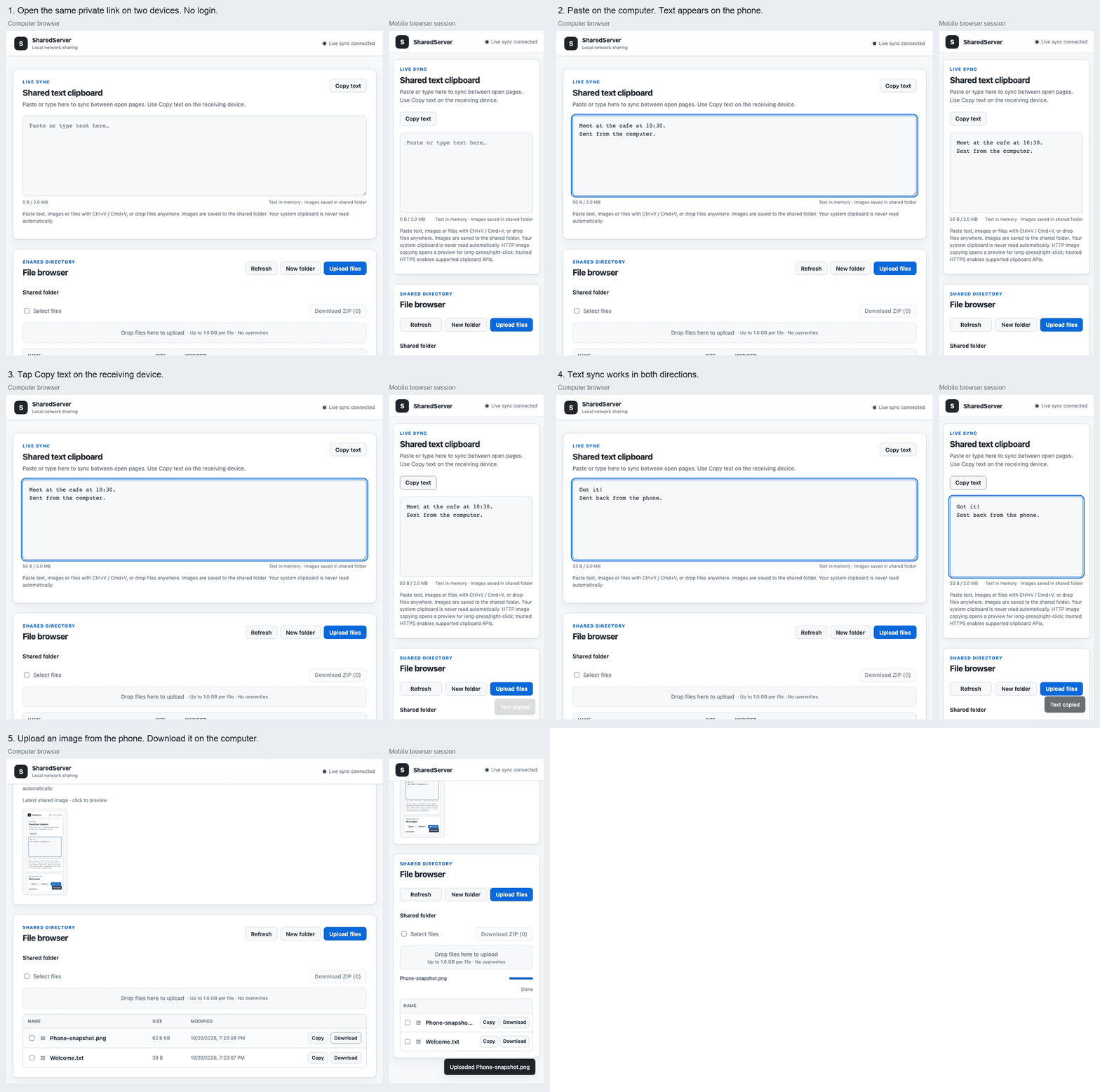
The short demo uses a desktop and a mobile-sized Chromium session, including ordinary LAN HTTP. It is not a physical iOS/Android certification.
Files, text and images
- Upload from the file picker, paste images/files with Ctrl+V / Cmd+V, or drag files anywhere onto the page. Uploads show percentage, average speed and estimated remaining time.
- Paste text anywhere outside another input to fill the shared text box. Full mode synchronizes edits live; receiving devices choose Copy text.
- Uploaded supported images appear on connected pages. Use Copy image in a trusted secure context; otherwise a preview opens for long-press/right-click copying or saving. Files stay in the shared folder; this does not automatically read or write the OS clipboard.
- Select up to 200 files in the current folder and choose Download ZIP. ZIPs are staged on disk and downloaded natively, without buffering the archive into browser memory.
- Downloads support HTTP Range, including resume and HEAD requests. Uploads stream in chunks and never silently overwrite a file. Add
--rename-on-conflictto keep both copies asname (1).ext. - Text is limited to 2 MiB of UTF-8 by default. Full/readonly text is kept in memory; drop-only submissions are saved as unique
text_*.txtfiles. Images are files, not large WebSocket messages.
Access modes
| Mode | Browse / download / ZIP | Upload files | Read shared text/images | Submit text/images |
|---|---|---|---|---|
--mode full (default) |
Yes | Yes | Yes | Yes |
--mode readonly |
Yes | No | Yes | No |
--mode droponly |
No | Yes, inbox root | No history | Text via Submit text, images via upload |
Drop-only users cannot create folders or read earlier submissions through HTTP or WebSocket. The operator reads collected files directly on the host. Duplicate text submissions are saved separately.
The legacy --read-only switch still means file writes off, text editable. Use --mode readonly to lock text too. It cannot be combined with --mode droponly.
CLI reference
| Option | Default | Purpose |
|---|---|---|
[port] |
8000 |
Original positional port, still supported |
-p, --port PORT |
Config or 8000 |
Named port; cannot be combined with positional port |
-b, --bind, --host HOST |
0.0.0.0 |
Bind address; 127.0.0.1 limits access to this computer |
-d, --directory PATH |
Current directory | Shared root |
-c, --config PATH |
Auto-load sharedserver.yaml if present |
YAML configuration |
--mode full|readonly|droponly |
full |
HTTP, WebSocket and UI permissions |
--read-only / --no-read-only |
Off | Legacy file-only protection |
--max-size, --max-upload-size MB |
1024 |
Per-file limit in MiB; explicit 0 means unlimited |
--rename-on-conflict |
Off | Append a number instead of returning 409 Conflict |
--token |
Off | Generate a strong random token in the QR link |
--pin PIN |
Off | 4–6 ASCII digits in ?pin=...; choose PIN or token |
--random-url |
Off | Serve only under a random /s/<secret>/ prefix |
--auth USER:PASS |
Off | Optional HTTP Basic Auth; can combine with a link or PIN |
--https |
Off | Temporary self-signed certificate, valid for one day |
--qr / --no-qr |
On in interactive terminals | Force / suppress QR output |
--version, -h / --help |
— | Version / help |
Examples:
sharedserver -p 8080 -d ~/Transfer --token
sharedserver --mode readonly --random-url
sharedserver --mode droponly --pin 123456 --rename-on-conflict
sharedserver --max-size 0 --rename-on-conflict
python -m sharedserver 8080 --host 127.0.0.1
For secrets that should not appear in process arguments, use SHAREDSERVER_AUTH (username:password) or SHAREDSERVER_TOKEN (16–256 printable ASCII characters without whitespace). CLI overrides the environment, which overrides YAML; --token generates a new token. Tokens/PINs bootstrap an HttpOnly, SameSite browser session and disappear from the URL. Sessions expire at restart. Basic Auth uses the browser's built-in prompt; no account database is created. PINs allow five failed attempts per client address per minute, with bounded tracking; strong token links are preferable to short PINs. Random paths and secrets are omitted from request access logs when protection is enabled.
HTTPS and clipboard trust
--https generates a fresh certificate and key in a private, hidden temporary directory, then removes them on exit. It uses installed OpenSSL, or the optional cryptography extra:
python -m pip install 'sharedserver[https]'
sharedserver --https --token
# Run temporarily with HTTPS support:
uvx --from 'sharedserver[https]' sharedserver --https
Self-signed HTTPS does not automatically establish device trust. The program never installs a root certificate, changes browser security, or bypasses a certificate warning. Image clipboard access still depends on certificate trust, browser support and permissions. A new certificate is generated on each run. For ordinary HTTP, text-copy fallback and image preview/download remain available. See MDN secure contexts.
Headless / curl cheat sheet
These commands use the default full mode without access protection:
# Upload a file; PUT is the supported curl upload interface (not multipart -F).
curl --fail --upload-file ./report.pdf http://192.168.1.23:8000/upload/report.pdf
# Download, or resume a partial download.
curl --fail -o report.pdf 'http://192.168.1.23:8000/api/download?path=report.pdf'
curl --fail -C - -o report.pdf 'http://192.168.1.23:8000/api/download?path=report.pdf'
# Read, save or update UTF-8 shared text. Inspect text before executing anything.
curl --fail --silent http://192.168.1.23:8000/api/clipboard/raw
curl --fail --silent http://192.168.1.23:8000/api/clipboard/raw > clipboard.txt
curl --fail --data-binary 'hello world' http://192.168.1.23:8000/api/clipboard/raw
# Download selected files as a ZIP.
curl --fail -H 'Content-Type: application/json' -d '{"paths":["one.txt","two.txt"]}' \
  -o selected.zip http://192.168.1.23:8000/api/zip
Use the complete printed base URL for --random-url: endpoints then live under /s/<secret>/api/... and /s/<secret>/upload/.... Token clients send Authorization: Bearer <token>; PIN clients append ?pin=<pin>; Basic clients use curl --user username to prompt for the password. With Basic plus token, use Basic credentials plus ?token=... (one Authorization header cannot carry both). For HTTPS use a CA/certificate you have verified with curl's --cacert; the examples do not disable certificate verification. curl/Wget upload clients receive OK: filename uploaded with HTTP 201. Other API clients receive JSON.
Configuration and troubleshooting
See sharedserver.example.yaml. CLI values override YAML. Relative shared roots resolve from the config file's directory. Copy-format allowlists replace defaults, case-insensitively. Active HTML/SVG/JS/XML types are never served as inline images, even through a custom allowlist. Default image preview formats are PNG, JPEG and WebP, with signature checks. Other formats remain downloadable as attachments.
If a phone cannot connect, check same Wi-Fi, guest-device isolation, and the host firewall. With a VPN or multiple adapters, choose the correct address explicitly: sharedserver -b 192.168.1.23. Use another port if 8000 is busy, and --qr for redirected terminal output. If the executable is missing, try python -m sharedserver with the same Python used to install it. For externally managed Python installations, use uvx/pipx or the PyPA virtual environment guide.
Security and development
Share a dedicated directory on a trusted network and stop the process when finished. Basic/PIN/token/path protection controls access; HTTP does not encrypt traffic. This is not a public-internet hosting service. Hidden paths, symlinks, special files and the active config are blocked. Paths are resolved under the shared root; MIME sniffing is disabled and downloads are attachments. Names/text use DOM textContent, not HTML interpolation. Upload and archive work uses bounded chunks and disk staging. The shared directory must be controlled by its owner; untrusted local path replacement is outside the threat model.
git clone https://github.com/NihaoKangkang/sharedserver.git
cd sharedserver
python -m venv .venv
# Activate the virtual environment with your shell, then:
python -m pip install -e '.[dev,https]'
python -m pytest
python -m build
python -m twine check dist/*
CI tests Linux/macOS/Windows on Python 3.10–3.14, packaged assets, and two Chromium suites. Browser reproduction: npm install --no-save playwright, npx playwright install chromium, then SHARED_PYTHON=.venv/bin/python node scripts/browser_vnext.cjs (shell environment syntax varies). LAN_SMOKE=1 additionally tests a real LAN HTTP address. Release runbook.
1 maintainer

Metadata
1 maintainer
Release files for sharedserver 0.3.0
For a detailed explanation of source distributions (sdists) and built distributions (wheels), please see the package formats documentation.
Source distribution (sdist)
| File | Size | Uploaded | Provenance | |
|---|---|---|---|---|
| sharedserver-0.3.0.tar.gz | 505.0 kB | With provenance | Details |
Built distribution (wheel)
| File | Interpreter | ABI | Platform | Reset |
|---|---|---|---|---|
| sharedserver-0.3.0-py3-none-any.whl | Python 3 | none | any | Details |
Total release size: 545.7 kB
Release files / sharedserver-0.3.0.tar.gz
| Download URL | sharedserver-0.3.0.tar.gz |
|---|---|
| Size | 505.0 kB |
| Tags | Source |
|
SHA-256 checksum How to use checksums |
183d02ef90d89ac6b8a06113b74bba9d5dab625423fc2315b73bfb9607c96f47
|
|
BLAKE2b-256 checksum How to use checksums |
bc3f71ede770e60c8f7c8978eda6fc2a8a6242aee6ae11169a70247ce8407080
|
| Upload date | |
|
Uploaded using Trusted Publishing? What is trusted publishing? |
Yes |
| Uploaded via |
twine/7.0.0 CPython/3.13.14
|
Provenance
Provenance describes where a file came from. On PyPI, provenance is shared via attestations, which provide a verifiable record of the build or publishing details. View details, limitations and caveats.


PyPI Publish Attestation
PyPI verified that this artifact, at this checksum, originated from the publisher listed below.
Signed by GitHub Actions, verified by PyPI on Oct 20, 2026.
Transparency logRelease files / sharedserver-0.3.0-py3-none-any.whl
| Download URL | sharedserver-0.3.0-py3-none-any.whl |
|---|---|
| Size | 40.7 kB |
| Tags | Python 3 |
|
SHA-256 checksum How to use checksums |
dbaac370a26b5e9eb41d3198aa84753556e303978ca85ab47c7f1a8b26a5bd26
|
|
BLAKE2b-256 checksum How to use checksums |
7170e4d69cf0c471ddc824dd4e59e9d5d9fb93f4a9d8dbccfb1833d107f0c91d
|
| Upload date | |
|
Uploaded using Trusted Publishing? What is trusted publishing? |
Yes |
| Uploaded via |
twine/7.0.0 CPython/3.13.14
|
Provenance
Provenance describes where a file came from. On PyPI, provenance is shared via attestations, which provide a verifiable record of the build or publishing details. View details, limitations and caveats.
PyPI Publish Attestation
PyPI verified that this artifact, at this checksum, originated from the publisher listed below.
Signed by GitHub Actions, verified by PyPI on Oct 20, 2026.
Transparency logSecurity for sharedserver 0.3.0
Provenance
Provenance describes where a file came from. On PyPI, provenance is shared via attestations, which provide a verifiable record of the build or publishing details. View details, limitations and caveats.
Full provenance
All 2 files in this release have been uploaded with provenance metadata.
Attestation for sharedserver-0.3.0.tar.gz
PyPI Publish Attestation
PyPI verified that this artifact, at this checksum, originated from the publisher listed below.
Signed by GitHub Actions, verified by PyPI on Oct 20, 2026.
Transparency logA note on package security
PyPI is a repository for distributing packages, not a service for auditing them. While third-party security researchers and our staff do their best to detect and remove malicious packages, PyPI cannot guarantee the quality, security or suitability of any given package.














