
SharedServer
Like http.server, with uploads, a live text clipboard, and a QR code for your phone.
Share files and text between devices on the same Wi-Fi. No accounts, no login, no cloud.
python -m pip install sharedserver
sharedserver
Run from a dedicated transfer folder, scan the terminal QR code, and open the page on your phone. Keep the terminal open; press Ctrl+C when you are done. Python 3.10+ required.
The default share is open to every device that can reach it. Use trusted Wi-Fi. For a private QR link with no login screen, run
sharedserver --token.
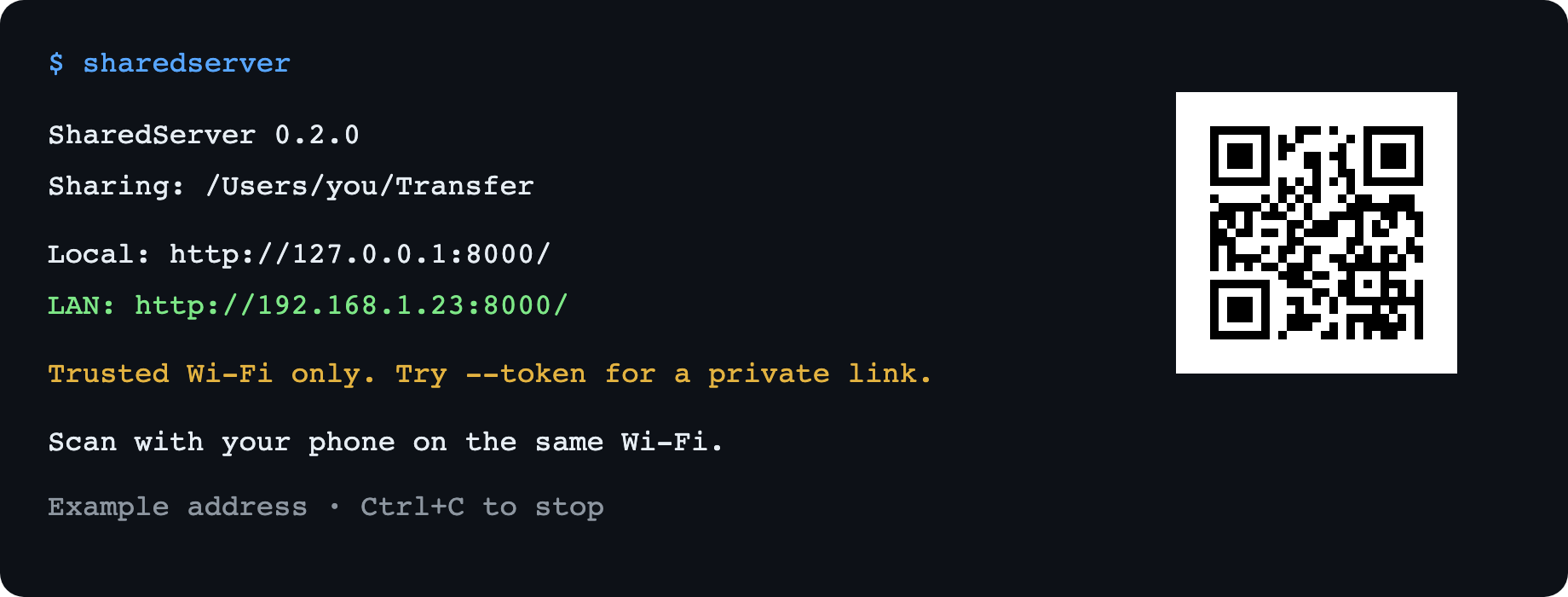
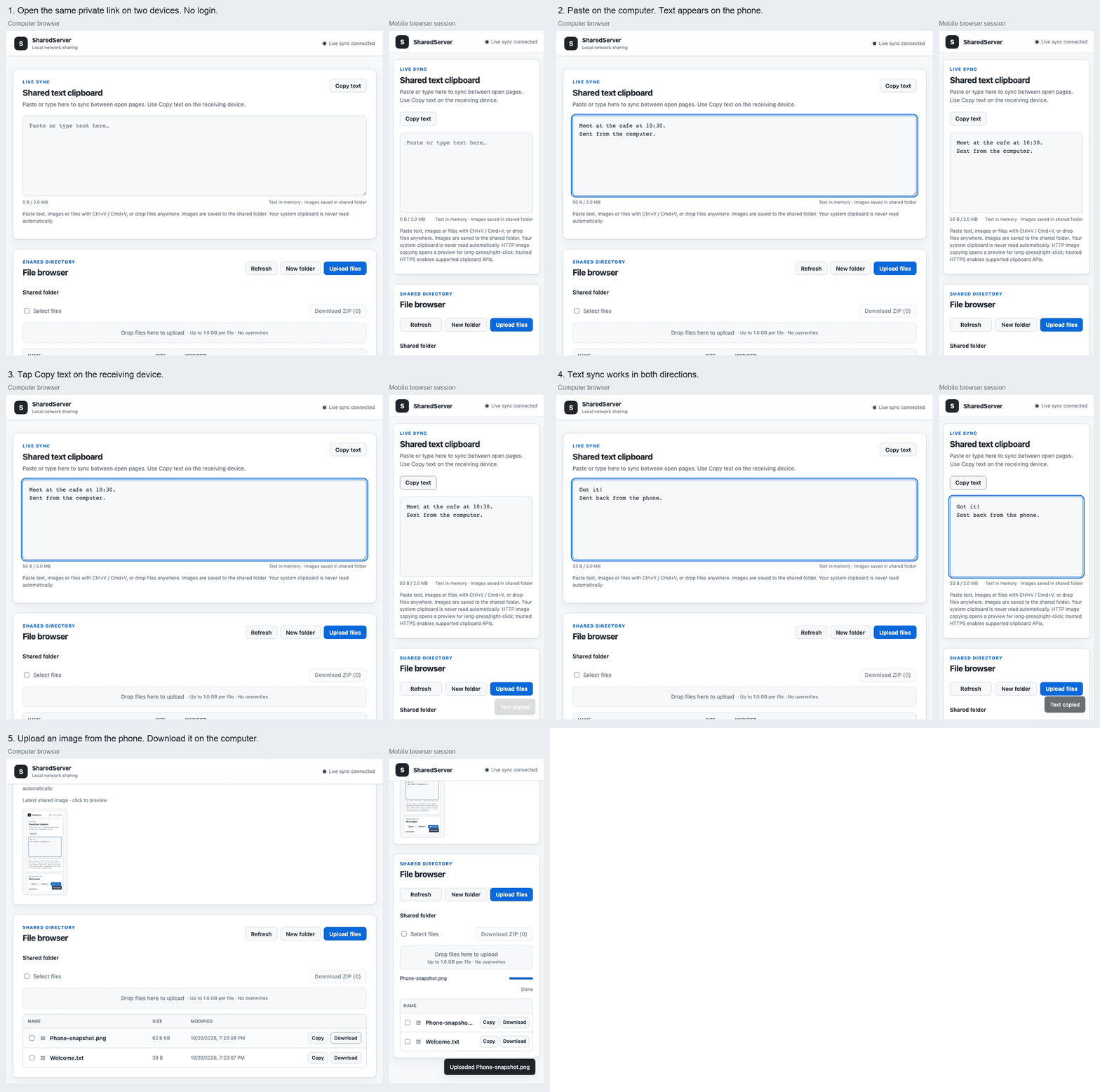
12-second demo with a desktop browser and a mobile-sized browser session using a LAN HTTP address. Paste text on one device, copy it on the other, then upload an image back. The terminal preview uses an example address.
Three things, one command
- Files: browse folders, upload from your phone or drag files from your desktop, and download. Existing files are never overwritten.
- Text: paste into the shared text box and other open pages update live. Select Copy text on the receiving device.
- Scan to connect: the terminal prints a QR code automatically. Your phone needs only a browser and the same network.
SharedServer synchronizes text between browser pages. It does not monitor or automatically read your operating system clipboard. There is no native clipboard dependency, so missing xclip or Wayland tools cannot break file sharing.
Useful options
sharedserver --token                    # Generate a fresh private QR link
sharedserver --read-only                # Downloads and text sync; no file writes
sharedserver --token --read-only        # Combine the two
sharedserver 8080 -d ~/Downloads        # Choose a port and folder
sharedserver --host 127.0.0.1           # This computer only
sharedserver --no-qr                    # Hide the QR code
sharedserver --qr                       # Force QR output, even when redirected
python -m sharedserver 8080             # Also works as a Python module
| Option | Default | Purpose |
|---|---|---|
port |
8000 |
Listening port |
--host HOST |
0.0.0.0 |
Bind address; a specific address is reflected in the printed link |
-d, --directory PATH |
Current folder | Folder to share |
-c, --config PATH |
Auto-load sharedserver.yaml, if present |
YAML configuration |
--max-upload-size MB |
1024 |
Per-file upload limit in MiB |
--token |
Off | Generate a random access token, included in the URL and QR code |
--read-only / --no-read-only |
Off | Disable / enable uploads and folder creation; shared text stays editable |
--qr / --no-qr |
On in interactive terminals | Show / hide terminal QR code |
--version |
— | Installed version |
For a reusable private link, set SHAREDSERVER_TOKEN to a random token of 16–256 printable ASCII characters with no whitespace. The environment overrides YAML; --token generates a fresh token and overrides both. Avoid putting tokens in shell arguments, screenshots, or public issue reports.
A private link opens the page directly, sets an HttpOnly, SameSite session cookie, and redirects to a clean URL. Downloads and WebSockets use that session. Restarting the server expires browser sessions. Direct API clients can send Authorization: Bearer <token>. Server access logging is suppressed in token mode to keep the link out of request logs.
Configuration
No config file is required. See sharedserver.example.yaml for an example:
server:
  host: 0.0.0.0
  port: 8000
share:
  directory: ./
  max_upload_size: 1073741824  # 1 GiB per file
  read_only: false
clipboard:
  max_text_size: 2097152      # 2 MiB of UTF-8 text, in the box and copied text files
CLI arguments override YAML values. Relative folder paths in YAML are resolved from the configuration file's folder. Custom clipboard.text_extensions and clipboard.image_extensions replace the default copy allowlists; matching is case-insensitive.
Text copy defaults: .txt .md .json .xml .yaml .yml .csv .log .py .js .html .css .java .c .cpp.
Image copy defaults: .png .jpg .jpeg .webp. Other formats are download-only.
If your phone cannot connect
- Put both devices on the same Wi-Fi. Guest networks may isolate devices even on the same router.
- Allow Python through your computer's firewall for the private network.
- If a VPN or multiple network adapters select the wrong IP, bind explicitly:
sharedserver --host 192.168.1.23. The QR code then uses that address. - If port 8000 is busy, use
sharedserver 8080. - A QR code is printed only in interactive terminals by default. Use
--qrto force it, or open the printed link manually.
If your shell cannot find sharedserver, try python -m sharedserver with the same Python used to install it. On a system that blocks global pip installs, follow the PyPA virtual environment guide first, or use pipx install sharedserver if you already have pipx.
Text copying includes a fallback for ordinary HTTP LAN pages. Image copying requires browser support and a secure context (HTTPS or localhost); downloading works without clipboard permission. Shared text is plain text only, up to 2 MiB of UTF-8 by default. Upload images and large files through the file browser instead.
Security and scope
This is a temporary LAN tool. Share a dedicated folder and stop the server after use. Token links control access; HTTP does not encrypt traffic. Do not expose SharedServer directly to the public internet.
- Without a token, every reachable device can read files, upload files, create folders, and edit shared text. Read-only mode disables file writes only.
- Hidden files and folders (including
.envand.git), symlinks, special files, and the active configuration file are excluded. Other visible files inside the shared folder are shared. - Paths are checked against the shared root. Traversal, absolute paths, and symlink paths are rejected. Upload names are sanitized for common desktop platforms.
- Uploads are size-limited as they stream, staged in a hidden temporary file, and published without overwriting. Interrupted uploads clean up the temporary file.
- HTTP and WebSocket requests validate browser origin and reject unrecognized hostnames to reduce cross-site requests and DNS rebinding. IP addresses, localhost, the computer hostname /
.localname, and the explicitly configured bind hostname are supported. - Text is kept only in process memory. Duplicate updates do not rebroadcast, and acknowledgements do not replace the sender's newer edits. Reconnecting pages preserve unsent drafts until you choose to send them. Simultaneous edits use the last server-accepted update; this is not a collaborative document editor.
- The shared folder must be controlled by its owner. Do not let untrusted local processes replace paths while the server is running.
QR codes make manual discovery unnecessary. mDNS browsing is not available to ordinary browser pages; SharedServer needs no discovery daemon, multicast setup, or extra phone app.
Development
git clone https://github.com/NihaoKangkang/sharedserver.git
cd sharedserver
python -m venv .venv
# Activate .venv with the command for your shell, then:
pip install -e ".[dev]"
python -m pytest
python -m build
python -m twine check dist/*
CI runs on Linux, macOS, and Windows with Python 3.10–3.14. A published GitHub Release builds, tests, validates, and publishes distributions using PyPI Trusted Publishing. Configure the pypi environment and trusted publisher in your PyPI account before publishing. Match the release tag to the package version (v0.2.0).
1 maintainer

Metadata
1 maintainer
Release files for sharedserver 0.2.0
For a detailed explanation of source distributions (sdists) and built distributions (wheels), please see the package formats documentation.
Source distribution (sdist)
| File | Size | Uploaded | Provenance | |
|---|---|---|---|---|
| sharedserver-0.2.0.tar.gz | 440.1 kB | With provenance | Details |
Built distribution (wheel)
| File | Interpreter | ABI | Platform | Reset |
|---|---|---|---|---|
| sharedserver-0.2.0-py3-none-any.whl | Python 3 | none | any | Details |
Total release size: 469.1 kB
Release files / sharedserver-0.2.0.tar.gz
| Download URL | sharedserver-0.2.0.tar.gz |
|---|---|
| Size | 440.1 kB |
| Tags | Source |
|
SHA-256 checksum How to use checksums |
118d6560cd5915c993a418a3a78f014c066478277f4444af939dfd1e328cbd7a
|
|
BLAKE2b-256 checksum How to use checksums |
a554984a8f7c95e231c8299fc6398fe84993be67840884fe1ae0f513d784ee1e
|
| Upload date | |
|
Uploaded using Trusted Publishing? What is trusted publishing? |
Yes |
| Uploaded via |
twine/7.0.0 CPython/3.13.14
|
Provenance
Provenance describes where a file came from. On PyPI, provenance is shared via attestations, which provide a verifiable record of the build or publishing details. View details, limitations and caveats.


PyPI Publish Attestation
PyPI verified that this artifact, at this checksum, originated from the publisher listed below.
Signed by GitHub Actions, verified by PyPI on Oct 20, 2026.
Transparency logRelease files / sharedserver-0.2.0-py3-none-any.whl
| Download URL | sharedserver-0.2.0-py3-none-any.whl |
|---|---|
| Size | 29.0 kB |
| Tags | Python 3 |
|
SHA-256 checksum How to use checksums |
36d0137060d3eaea7adc8965b91a8daba740cd4aaafb1a5228a2fa454705dec0
|
|
BLAKE2b-256 checksum How to use checksums |
2e39b981ca0302c47c6785760734478a5fd7806cd52ce816259c2a86bd8970c3
|
| Upload date | |
|
Uploaded using Trusted Publishing? What is trusted publishing? |
Yes |
| Uploaded via |
twine/7.0.0 CPython/3.13.14
|
Provenance
Provenance describes where a file came from. On PyPI, provenance is shared via attestations, which provide a verifiable record of the build or publishing details. View details, limitations and caveats.
PyPI Publish Attestation
PyPI verified that this artifact, at this checksum, originated from the publisher listed below.
Signed by GitHub Actions, verified by PyPI on Oct 20, 2026.
Transparency logSecurity for sharedserver 0.2.0
Provenance
Provenance describes where a file came from. On PyPI, provenance is shared via attestations, which provide a verifiable record of the build or publishing details. View details, limitations and caveats.
Full provenance
All 2 files in this release have been uploaded with provenance metadata.
Attestation for sharedserver-0.2.0.tar.gz
PyPI Publish Attestation
PyPI verified that this artifact, at this checksum, originated from the publisher listed below.
Signed by GitHub Actions, verified by PyPI on Oct 20, 2026.
Transparency logA note on package security
PyPI is a repository for distributing packages, not a service for auditing them. While third-party security researchers and our staff do their best to detect and remove malicious packages, PyPI cannot guarantee the quality, security or suitability of any given package.














