
It's a Network configuration parser, which translates the show outputs


Project description
Show Configuration Parser (shconfparser)



- Introduction
- Docs
- Pre-requisites
- Installation and Downloads
- FAQ
- Other Resources
- Bug Tracker and Support
- Unit-Tests
- License and Copyright
- Author and Thanks
Introduction
Show configuration parser i.e. shconfparser is a Python library, whcih parser Network configurations. This library examines the config and breaks it into a set of parent and clild relationships.
shconfparser is a vendor independent library where you can parse the following formats:
- Tree structure
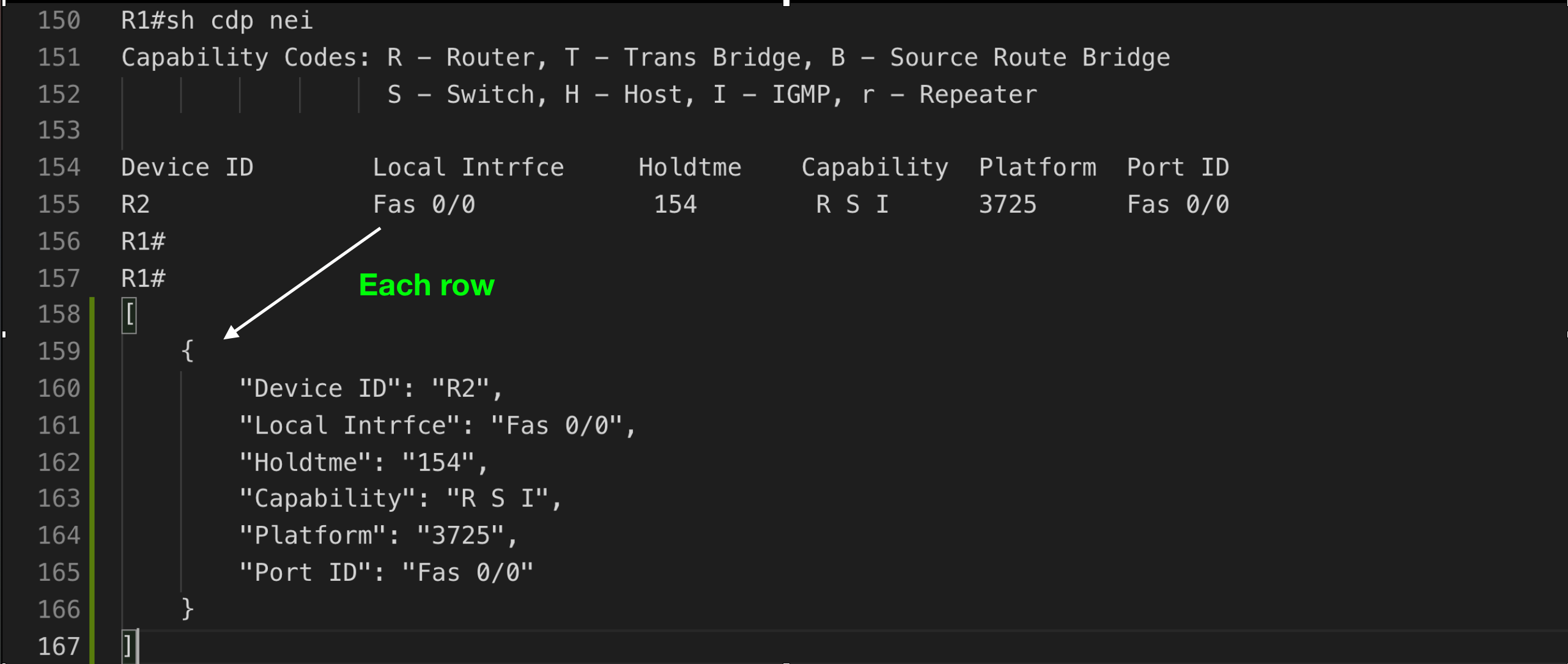
i.e. show running - Table structure
i.e. show ip interface - Data
i.e. show version
Tree Structure

Table Structure
Docs
How to use shconfparser?
- How to split show commands from a file
>>> from shconfparser.parser import Parser
>>> from os import path
>>> file_path = path.abspath('data/shcommands.txt')
>>> p = Parser()
>>> data = p.read(file_path) # read file content
>>> data = p.split(data) # split each show commands and it's data
>>> data.keys()
odict_keys(['running', 'version', 'cdp_neighbors', 'ip_interface_brief']) # keys
- How to convert
running configto Tree structure
>>> data['running'] = p.parse_tree(data['running']) # translating show running data to tree format
>>> p.dump(data['running'], indent=4) # running data in tree format
{
    "R1#sh run": "None",
    "Building configuration...": "None",
    "Current configuration : 891 bytes": "None",
    "version 12.4": "None",
    "service timestamps debug datetime msec": "None",
    "service timestamps log datetime msec": "None",
    "no service password-encryption": "None",
    "hostname R1": "None",
    "boot-start-marker": "None",
    "boot-end-marker": "None",
    "no aaa new-model": "None",
    "memory-size iomem 5": "None",
    "no ip icmp rate-limit unreachable": "None",
    "ip cef": "None",
    "no ip domain lookup": "None",
    "ip auth-proxy max-nodata-conns 3": "None",
    "ip admission max-nodata-conns 3": "None",
    "ip tcp synwait-time 5": "None",
    "l2vpn": {
        "bridge group test-group": {
            "bridge-domain test-domain1": {
                "interface FastEthernet 0/0": {
                    "static-mac-address AB:CD:ED:01": "None"
                }
            },
            "bridge-domain test-domain2": {
                "interface FastEthernet 0/1": {
                    "static-mac-address AC:ED:12:34": "None"
                }
            }
        }
    },
    "interface FastEthernet0/0": {
        "ip address 1.1.1.1 255.255.255.0": "None",
        "duplex auto": "None",
        "speed auto": "None"
    },
    "interface FastEthernet0/1": {
        "no ip address": "None",
        "shutdown": "None",
        "duplex auto": "None",
        "speed auto": "None"
    },
    "ip forward-protocol nd": "None",
    "no ip http server": "None",
    "no ip http secure-server": "None",
    "no cdp log mismatch duplex": "None",
    "control-plane": "None",
    "line con 0": {
        "exec-timeout 0 0": "None",
        "privilege level 15": "None",
        "logging synchronous": "None"
    },
    "line aux 0": {
        "exec-timeout 0 0": "None",
        "privilege level 15": "None",
        "logging synchronous": "None"
    },
    "line vty 0 4": {
        "login": "None"
    }
}
- How to convert Table structure
>>> header_names = ['Device ID', 'Local Intrfce', 'Holdtme', 'Capability', 'Platform', 'Port ID']
>>> data['cdp_neighbors'] = p.parse_table(data['cdp_neighbors'], header_names=header_names)
>>> p.dump(data['cdp_neighbors'], indent=4)
[
    {
        "Device ID": "R2",
        "Local Intrfce": "Fas 0/0",
        "Holdtme": "154",
        "Capability": "R S I",
        "Platform": "3725",
        "Port ID": "Fas 0/0"
    }
]
- How to convert data to Tree
>>> data['version'] = p.parse_data(data['version'])
>>> p.dump(data['version'], indent=4)
{
    "R1#sh ver": "None",
    "Cisco IOS Software, 3700 Software (C3725-ADVENTERPRISEK9-M), Version 12.4(25d), RELEASE SOFTWARE (fc1)": "None",
    "Technical Support: http://www.cisco.com/techsupport": "None",
    "Copyright (c) 1986-2010 by Cisco Systems, Inc.": "None",
    "Compiled Wed 18-Aug-10 07:55 by prod_rel_team": "None",
    "": "None",
    "ROM: ROMMON Emulation Microcode": "None",
    "ROM: 3700 Software (C3725-ADVENTERPRISEK9-M), Version 12.4(25d), RELEASE SOFTWARE (fc1)": "None",
    "R1 uptime is 10 minutes": "None",
    "System returned to ROM by unknown reload cause - suspect boot_data[BOOT_COUNT] 0x0, BOOT_COUNT 0, BOOTDATA 19": "None",
    "System image file is \"tftp://255.255.255.255/unknown\"": "None",
    "This product contains cryptographic features and is subject to United": "None",
    "States and local country laws governing import, export, transfer and": "None",
    "use. Delivery of Cisco cryptographic products does not imply": "None",
    "third-party authority to import, export, distribute or use encryption.": "None",
    "Importers, exporters, distributors and users are responsible for": "None",
    "compliance with U.S. and local country laws. By using this product you": "None",
    "agree to comply with applicable laws and regulations. If you are unable": "None",
    "to comply with U.S. and local laws, return this product immediately.": "None",
    "A summary of U.S. laws governing Cisco cryptographic products may be found at:": "None",
    "http://www.cisco.com/wwl/export/crypto/tool/stqrg.html": "None",
    "If you require further assistance please contact us by sending email to": "None",
    "export@cisco.com.": "None",
    "Cisco 3725 (R7000) processor (revision 0.1) with 124928K/6144K bytes of memory.": "None",
    "Processor board ID FTX0945W0MY": "None",
    "R7000 CPU at 240MHz, Implementation 39, Rev 2.1, 256KB L2, 512KB L3 Cache": "None",
    "2 FastEthernet interfaces": "None",
    "DRAM configuration is 64 bits wide with parity enabled.": "None",
    "55K bytes of NVRAM.": "None",
    "Configuration register is 0x2102": "None"
}
- Search all occurrences in Tree
>>> pattern = 'interface\s+FastEthernet.*'
>>> m = p.search.search_all_in_tree(pattern, data['running'])
>>> m.values()
dict_values(['interface FastEthernet0/0', 'interface FastEthernet0/1'])
- Search first occurrences in Tree
>>> pattern = 'Cisco\s+IOS\s+Software.*'
>>> m = p.search.search_in_tree(pattern, data['version'])
>>> m.group(0)
'Cisco IOS Software, 3700 Software (C3725-ADVENTERPRISEK9-M), Version 12.4(25d), RELEASE SOFTWARE (fc1)'
- Search first occurrences in Table
>>> pattern = 'R\d+'
>>> header = 'Device ID'
>>> m = p.search.search_in_table(pattern, data['cdp_neighbors'], header)
>>> m
{'Device ID': 'R2', 'Local Intrfce': 'Fas 0/0', 'Holdtme': '154', 'Capability': 'R S I', 'Platform': '3725', 'Port ID': 'Fas 0/0'}
- Search all occurrences in Table
>>> header = ['Interface', 'IP-Address', 'OK?', 'Method', 'Status', 'Protocol']
>>> data['ip_interface_brief'] = p.parse_table(data['ip_interface_brief'], header)
>>> pattern = 'FastEthernet.*'
>>> header = 'Interface'
>>> m = p.search.search_all_in_table(pattern, data['ip_interface_brief'], header)
>>> m
[
    {
        "Interface":"FastEthernet0/0",
        "IP-Address":"1.1.1.1",
        "OK?":"YES",
        "Method":"manual",
        "Status":"up",
        "Protocol":"up"
    },
    {
        "Interface":"FastEthernet0/1",
        "IP-Address":"unassigned",
        "OK?":"YES",
        "Method":"unset",
        "Status":"administratively down",
        "Protocol":"down"
    }
]
Pre-requisites
shconfparser supports both trains of python 2.7+ and 3.1+, the OS should not matter.
Installation and Downloads
The best way to get shconfparser is with setuptools or pip. If you already have setuptools, you can install as usual:
python -m pip install shconfparser
Otherwise download it from PyPi, extract it and run the setup.py script
python setup.py install
If you're Interested in the source, you can always pull from the github repo:
- From github
git clone https://github.com/kirankotari/shconfparser.git
FAQ
-
Question: I want to use shconfparser with Python3, is that safe?
Answer: As long as you're using python 3.3 or higher, it's safe. I tested every release against python 3.1+, however python 3.1 and 3.2 not running in continuous integration test. -
Question: I want to use shconfparser with Python2, is that safe?
Answer: As long as you're using python 2.7 or higher, it's safe. I tested against python 2.7.
Other Resources
- Python3 documentation is a good way to learn python
- Python GeeksforGeeks
- Ordered Dictionary
- JSON
Bug Tracker and Support
- Please report any suggestions, bug reports, or annoyances with shconfparser through the Github bug tracker. If you're having problems with general python issues, consider searching for a solution on Stack Overflow.
- If you can't find a solution for your problem or need more help, you can ask a question.
- You can also ask on the Stack Exchange Network Engineering site.
Unit Tests
-
Travis CI project tests shconfparser on Python versions
2.7through3.7. -
The current build status is:
License and Copyright
- shconfparser is licensed MIT 2016-2018
Author and Thanks
shconfparser was developed by Kiran Kumar Kotari
Release history Release notifications | RSS feed


Download files
Download the file for your platform. If you're not sure which to choose, learn more about installing packages.
Source Distribution
Built Distribution
Filter files by name, interpreter, ABI, and platform.
If you're not sure about the file name format, learn more about wheel file names.
Copy a direct link to the current filters
File details
Details for the file shconfparser-2.0.2.tar.gz.
File metadata
- Download URL: shconfparser-2.0.2.tar.gz
- Upload date:
- Size: 9.3 kB
- Tags: Source
- Uploaded using Trusted Publishing? No
- Uploaded via: twine/1.12.1 pkginfo/1.4.2 requests/2.21.0 setuptools/40.6.3 requests-toolbelt/0.8.0 tqdm/4.28.1 CPython/3.7.1
File hashes
| Algorithm | Hash digest | |
|---|---|---|
| SHA256 |
7689a8f33373179930549f134740976aa59f8164c650739549263624c129e24f
|
|
| MD5 |
024162655b3f47116c88875bf135fa52
|
|
| BLAKE2b-256 |
98ff680294c095c85254f588ecf4d15c3f3a63e8ff98e4e1431771cfe1137b66
|
File details
Details for the file shconfparser-2.0.2-py3-none-any.whl.
File metadata
- Download URL: shconfparser-2.0.2-py3-none-any.whl
- Upload date:
- Size: 11.2 kB
- Tags: Python 3
- Uploaded using Trusted Publishing? No
- Uploaded via: twine/1.12.1 pkginfo/1.4.2 requests/2.21.0 setuptools/40.6.3 requests-toolbelt/0.8.0 tqdm/4.28.1 CPython/3.7.1
File hashes
| Algorithm | Hash digest | |
|---|---|---|
| SHA256 |
3494d39cf02a356b4e042c2d841d64b823b52ad6d0257e628efeb5182ebdaeea
|
|
| MD5 |
6df7376ba4485594ac65466dcbe1fe4f
|
|
| BLAKE2b-256 |
eddb8968d073d218952f4b0a3080568366845934fcfb3f39b4dfffafffc7fa5d
|






