
Generate graphs from spreadsheets

Project description
sheet2graph
sheet2graph is a command developed as part of the Full-stack command commandline course at fromzerotofulsstack
Examples
Printing the spreadsheet contents
sheet2graph sales_data.csv --print-only
                                            A      B      C      D      E
1  Sales per week (Firm: Glengarry Glen Ross)    NaN    NaN    NaN    NaN
2                                    Salesman  Week1  Week2  Week3  Week4
3                                  Ricky Roma     20     15     17     11
4                                     Shelley      1      2      0      1
5                              George Aaronow      6      5      2      4
6                                   Dave Moss      8      7      8      7
Selecting data
sheet2graph sales_data.xlsx -x "a3:a6" -y "b3:b6" --print-only
                x   y
0      Ricky Roma  20
1         Shelley   1
2  George Aaronow   6
3       Dave Moss   8
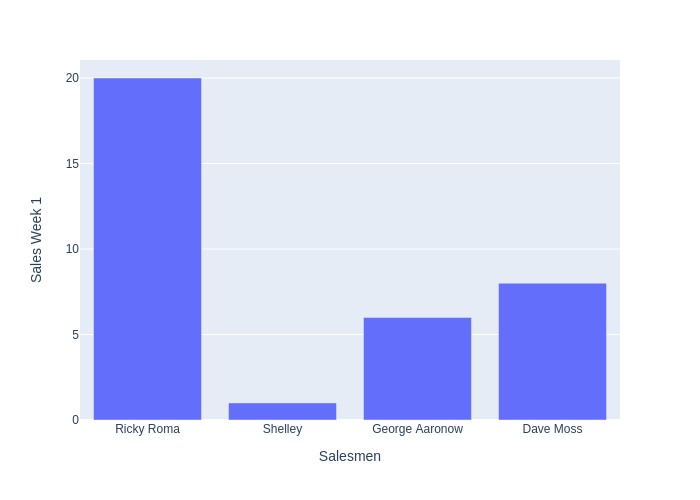
Example output graph
sheet2graph sales_data.xlsx -x "a3:a6" -y "b3:b6" --output-filename output/tests/out.png -xlabel "Salesmen" -ylabel "Sales Week 1"
Usage
usage: sheet2graph [-h] [-x [X]] [-y [Y]] [-xlabel [XLABEL]] [-ylabel [YLABEL]] [--graph-type [GRAPH_TYPE]] [--output-folder [OUTPUT_FOLDER]] [--output-filename [OUTPUT_FILENAME]]
                      [--output-format [OUTPUT_FORMAT]] [--size [SIZE]] [--print-only [PRINT_ONLY]] [--run-tests [RUN_TESTS]] [--version [PRINT_VERSION]]
                      [input_file]

Graph spreadsheet data easily Takes a spreadsheet file as input and outputs an image file (bitmap, vector) with graphs of the data contained in the file. Accepted input files are csv and
xlsx file extensions

positional arguments:
  input_file            input file (csv, xlsx)

optional arguments:
  -h, --help            show this help message and exit
  -x [X]                An expression to select the x axis. Ex. '-x A2:A6' or '-x a2,a3,a4,a5'. The range works like in a spreadsheeet, with columns being letters, and row numbers starting
                        at 1. Case-insensitive
  -y [Y]                An expression to select the y axis. Ex. '-x b2:b6' or '-x B2,B3,B4,B5'. The range works like in a spreadsheeet, with columns being letters, and row numbers starting
                        at 1. Case-insensitive
  -xlabel [XLABEL]      The label for the x axis. By default 'x'
  -ylabel [YLABEL]      The label for the y axis. By default 'y'
  --graph-type [GRAPH_TYPE], -gt [GRAPH_TYPE]
                        [bar|line|scatter]: default is bar
  --output-folder [OUTPUT_FOLDER], -of [OUTPUT_FOLDER]
                        output_folder (ending without slash): default is 'output'. Can be serveral folders. ex. 'sales/graphs'
  --output-filename [OUTPUT_FILENAME], -ofi [OUTPUT_FILENAME]
                        output_filename: default is 'output/output.png'. Overrides --output-folder,--output-format if present
  --output-format [OUTPUT_FORMAT], -ofo [OUTPUT_FORMAT]
                        [png|jpg|svg]: default is png
  --size [SIZE], -s [SIZE]
                        size: widthxheight. Default '700x500'
  --print-only [PRINT_ONLY], -p [PRINT_ONLY]
                        Prints the selected data, without generating any file output
  --run-tests [RUN_TESTS]
                        Runs all the tests (might take a while). Overloads any other option
  --version [PRINT_VERSION], -v [PRINT_VERSION]
                        Show version information
Release history Release notifications | RSS feed

Download files
Download the file for your platform. If you're not sure which to choose, learn more about installing packages.
Source Distribution
sheet2graph-0.0.1.tar.gz
(8.4 kB
view details)
Built Distribution
Filter files by name, interpreter, ABI, and platform.
If you're not sure about the file name format, learn more about wheel file names.
Copy a direct link to the current filters
File details
Details for the file sheet2graph-0.0.1.tar.gz.
File metadata
- Download URL: sheet2graph-0.0.1.tar.gz
- Upload date:
- Size: 8.4 kB
- Tags: Source
- Uploaded using Trusted Publishing? No
- Uploaded via: twine/3.4.1 importlib_metadata/3.10.0 pkginfo/1.7.0 requests/2.25.1 requests-toolbelt/0.9.1 tqdm/4.59.0 CPython/3.8.8
File hashes
| Algorithm | Hash digest | |
|---|---|---|
| SHA256 |
0872727c8c795f5d7dc031fea8f3fb761b470953dd8657f7b81abd7ec8b27ae2
|
|
| MD5 |
384d3a62b7ec06edf3505616c791ea6d
|
|
| BLAKE2b-256 |
ee2a058906ddd4610f9f7542a2d05cfd317306eeae3e194d9db53bfcbbe674dc
|
File details
Details for the file sheet2graph-0.0.1-py3-none-any.whl.
File metadata
- Download URL: sheet2graph-0.0.1-py3-none-any.whl
- Upload date:
- Size: 19.7 kB
- Tags: Python 3
- Uploaded using Trusted Publishing? No
- Uploaded via: twine/3.4.1 importlib_metadata/3.10.0 pkginfo/1.7.0 requests/2.25.1 requests-toolbelt/0.9.1 tqdm/4.59.0 CPython/3.8.8
File hashes
| Algorithm | Hash digest | |
|---|---|---|
| SHA256 |
34b522947d6650d69f5b15ff7658494c0a5cb0aa0eea2e603c91b336c3a5f68a
|
|
| MD5 |
3906c4fc096c3074ec8b155109e2469c
|
|
| BLAKE2b-256 |
dbd13c4b1b98bff3749f68ef40bc8bb2ea7f4744a60662a75fb805a766849650
|






