

shelldeck
Your terminals, organised by project. In the browser, on your own machine.
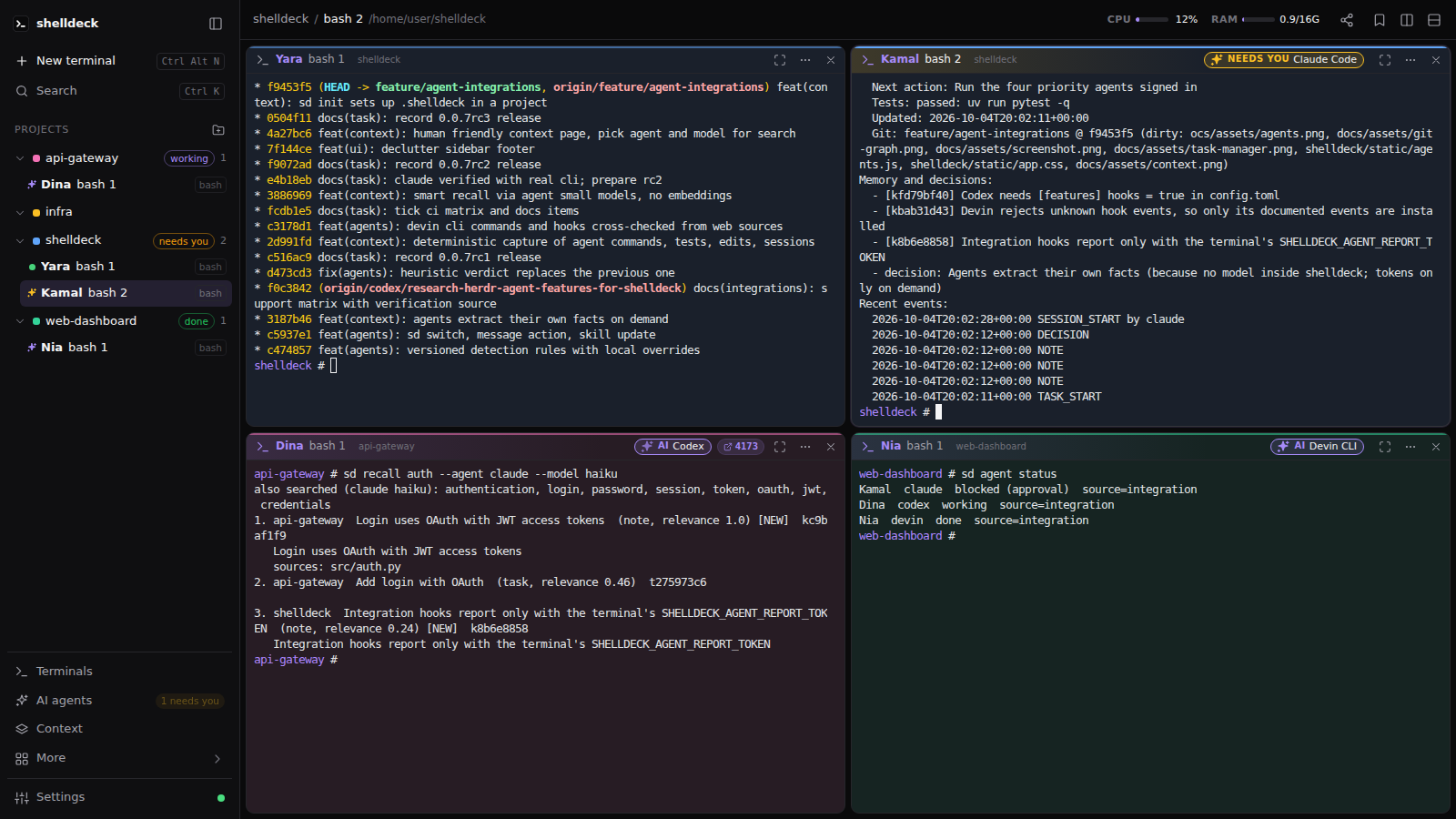
Real shells (PowerShell, cmd, Git Bash, WSL, bash, zsh, fish) grouped by project,
in split or free-floating panes that survive restarts.





Install · Features · CLI · Remote access · Security · Contributing
Install
Windows (PowerShell):
irm https://raw.githubusercontent.com/codejunction/shelldeck/main/install.ps1 | iex
Linux (macOS should work too, but is untested):
curl -fsSL https://raw.githubusercontent.com/codejunction/shelldeck/main/install.sh | sh
The installer sets up uv if you don't have it, then installs shelldeck with its own Python 3.12+. Already use Python tooling? Any of these work too:
uv tool install shelldeck      # or: pipx install shelldeck, or: pip install shelldeck
uvx shelldeck                  # try it without installing
Requirements: Windows 10 1809+ (for ConPTY) or Linux, and a modern browser.
Quick start
sd                 # start shelldeck in the background and open it in your browser
sd ~/code/api      # add a folder as a project and open a terminal in it
sd is short for shelldeck. The first visit asks you to create a password. After that, every terminal keeps running in the background until you close it, even when the browser tab is closed.
Features
Terminals that feel like editor panes
- Real shells, detected per OS. On Windows:
pwsh(default), Windows PowerShell, cmd, Git Bash and WSL (pick a distro). On Linux: every shell in/etc/shells, defaulting to your$SHELL. - Tiled layout. Split right or down, drag titles onto edges to split or onto a pane to swap, drag gutters to resize, double-click a title to maximize.
- Free layout. Every terminal becomes a floating window on a scrolling canvas. Tile all puts them back in a grid.
- Nothing gets lost. Closing the tab keeps terminals running, and reopening replays their output. After a restart or reboot, each terminal reopens in its last folder with its history above a "restored" marker.
- Shell integration for pwsh, PowerShell, cmd, bash, zsh and fish. Each pane's title shows the last command (red if it failed),
Ctrl+Shift+Up/Downjumps between prompts, and your own prompt (oh-my-posh, starship, …) still loads.
Projects first
- Projects sidebar. Add folders with the built-in folder browser, then drag to reorder. Each project gets its own color on its sidebar dot, pane border and a subtle background tint.
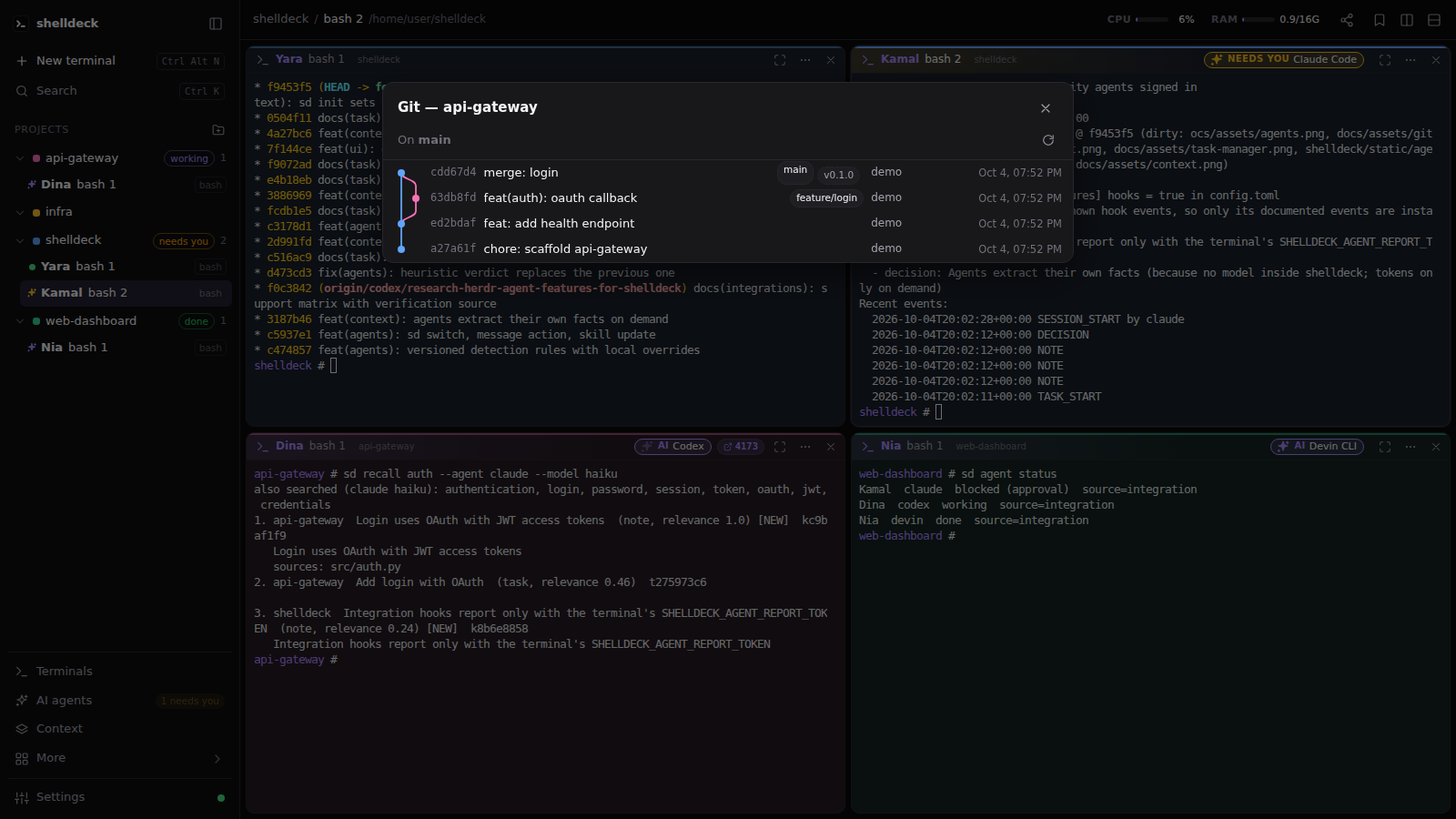
- Git graph. A branch icon on every git project opens its full commit graph, with branches, merges and tags drawn as colored lanes. Click a branch or tag, or right-click a commit, to check it out.
- Clickable paths.
src/app.py:12:5,C:\x\y.ts(3,4)and Python tracebacks become links that open in VS Code at that line. - Port detection. Start a dev server and a chip with its port appears on the pane. Click it to open the page.
Built for long sessions
- Command palette (
Ctrl+Shift+P) for terminals, bookmarks, layouts and themes. - Command history with exit codes, durations and folders. Search it and re-run anything.
- Search every terminal's output (
Ctrl+Shift+F), including terminals that aren't on screen. - Finished-command alerts. When a long command finishes while you're looking elsewhere, you get a toast, or a desktop notification if you enable them.
- Bookmarks for commands you run often, global or per project.
- Scheduler for cron jobs that run in a project folder, with run history and logs.
- Task board with due dates and reminder alarms.
- Task manager with live CPU, RAM and GPU (NVIDIA) usage for the machine and for each terminal's process tree.
 |
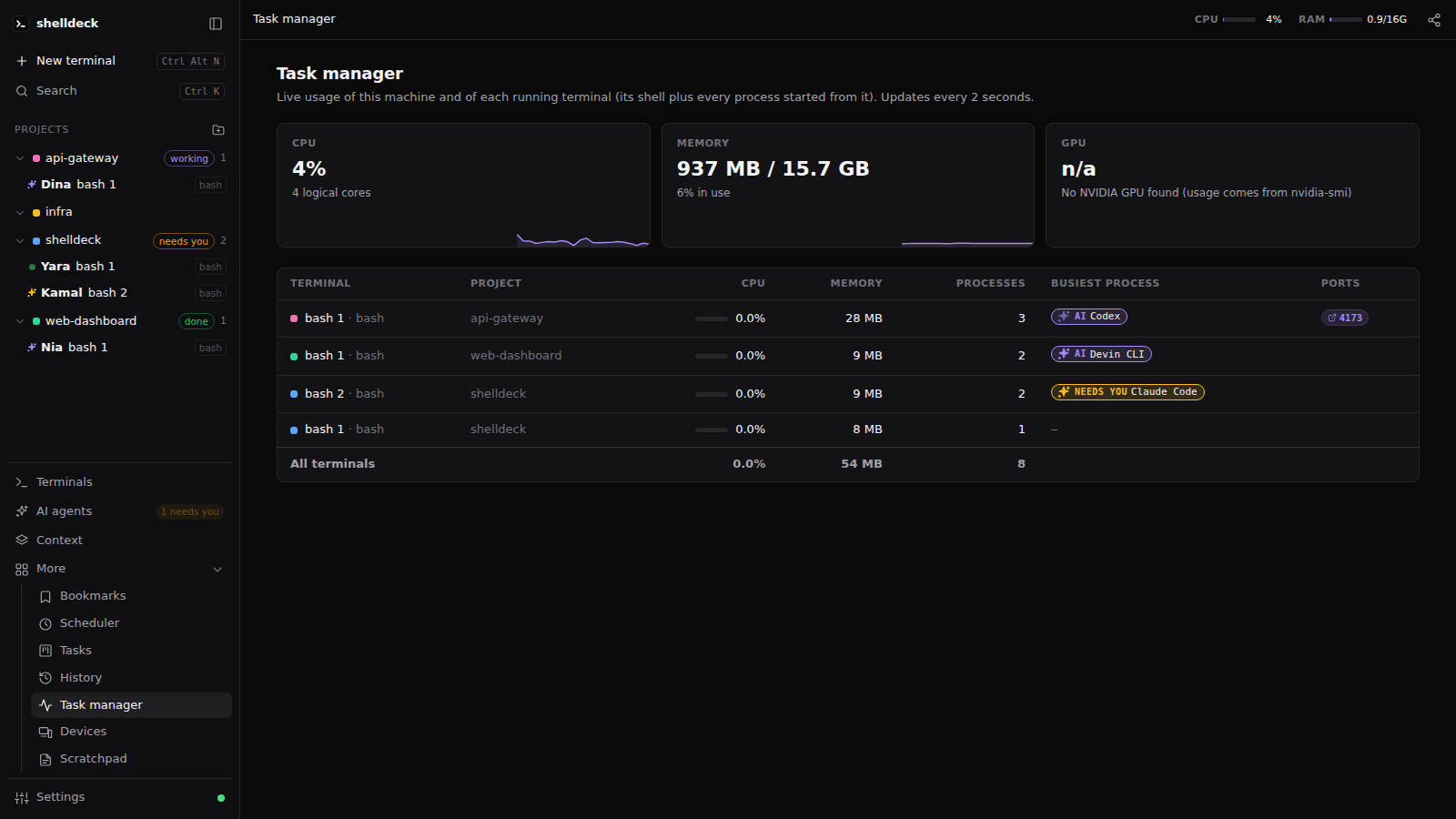 |
| Git graph with one-click checkout | Task manager, per terminal |
Secure by default
- Password required. Every browser logs in separately and locks after 30 minutes idle.
- Local only. shelldeck listens on
127.0.0.1and refuses requests from other websites. - Remote use goes over an SSH tunnel or HTTPS. See Remote access.
Keyboard shortcuts
| Keys | Action |
|---|---|
Ctrl+Shift+P |
Command palette (Ctrl+K also works outside a terminal) |
Ctrl+Alt+N |
New terminal in the current project |
Ctrl+Alt+\ / Ctrl+Alt+- |
Split right / down |
Ctrl+Alt+Arrows |
Focus the pane in that direction |
Ctrl+Alt+1…9 |
Focus pane 1–9 |
Ctrl+Alt+Enter |
Maximize / restore the pane |
Ctrl+Alt+Q |
Close the focused terminal |
Ctrl+Alt+B |
Bookmark picker (Space selects several, Shift+Enter runs) |
Ctrl+Alt+E |
Toggle the sidebar |
Ctrl+Alt+S / Ctrl+Alt+T |
Scheduler / Tasks |
Ctrl+Alt+M |
Task manager |
Ctrl+Alt+R |
Command history |
Ctrl+Shift+F |
Search all terminals |
Ctrl+Alt+, |
Settings |
Ctrl+Alt+L |
Lock |
Ctrl+Alt+H |
Show shortcuts |
Ctrl+C / Ctrl+V |
Copy the selection (otherwise sends Ctrl+C) / paste |
Ctrl+F |
Find in the terminal |
Ctrl+Shift+Up / Down |
Jump to the previous / next prompt |
In the sidebar, Ctrl+click or middle-click a terminal to open it in a split. Right-click a project or terminal for its menu.
Settings
| Setting | Values | Default |
|---|---|---|
| Default shell | Windows: pwsh, powershell, cmd, gitbash, wsl · Linux: shells from /etc/shells |
pwsh / $SHELL |
| WSL distribution | any installed distro, or the system default | system default |
| Theme | dark, light, system | dark |
| Terminal font size | 8–32 | 13 |
| Pane layout | tiled, free | tiled |
| Project colors | tint on, off | on |
| Terminal colors | default (follows theme), Dracula, One Dark, Nord, Gruvbox Dark, Solarized Dark, Solarized Light, GitHub Light | default |
| Terminal font | any installed monospace font; empty uses Cascadia / Nerd Font | empty |
| Open file paths with | VS Code (at the line), system default app | VS Code |
| Password | created on first visit, changed here (current + new) | required |
CLI
sd [--port N] [--no-window] [--app]  start the server if needed, print the banner and open the browser
sd web                               same as plain `sd`
sd PATH                              shorthand for `sd open PATH`
sd open [PATH] [--shell wsl]         add PATH as a project and open a terminal in it
sd list                              terminals grouped by project
sd info                              details of the shelldeck terminal you're in
sd search QUERY [--root DIR]         LLM-free code search with ranked, highlighted snippets
sd render FILE                       pretty-print code or markdown
sd schedule list|add|run|toggle|delete|logs
sd task list|add|move|delete|alarms
sd serve [--host H]                  run the server in the foreground
sd stop                              stop the background server (closes all terminals)
sd login-link                        emergency: one-time login URL (host only)
sd reset-password                    emergency: forget the password (host only)
- Startup banner.
sdprints the version and the Local and Network URLs. When you start it from Win+R, the Start menu or a shortcut, its window stays open until you press Enter. - Port. The default port is
5455. Change it with--portorSHELLDECK_PORT. - Browser.
--appopens a chromeless Edge/Chrome window instead of a browser tab. - Inside terminals. Inside a shelldeck terminal,
SHELLDECK_SESSION_IDis set. - Code search.
sd searchbuilds a persistent index and returns ranked snippets with confidence scores. Useful options:--ext py,ts,--glob "src/*",--top N,--format text|json|pathsand--reindex.
Remote access
Run shelldeck on a server or VM and use it from your laptop.
SSH tunnel (recommended). Nothing is exposed to the network.
sd serve                                  # on the VM: stays on 127.0.0.1:5455
ssh -N -L 5455:127.0.0.1:5455 you@vm      # on your machine, then open http://127.0.0.1:5455
HTTPS on the VM's address, with a real certificate (Tailscale tailscale cert, Let's Encrypt, your reverse proxy) or a self-signed one:
sd serve --host 0.0.0.0 --cert cert.pem --key key.pem
- No plain HTTP. shelldeck refuses plain HTTP on a non-local address, because passwords and terminal traffic would cross the network unencrypted.
--insecure-httpoverrides that, for trusted networks only. - First visit. A first visit from another machine also asks for a setup code, which
sd serveprints on the server. - Dropped connections (sleep, Wi-Fi change, VPN) reconnect on their own. The terminal redraws from the server's scrollback.
Security
- Local only. The server binds to
127.0.0.1and rejects HTTP and WebSocket requests whoseHostorOriginisn't the app itself, so other websites can't reach your shells. - Passwords are stored as PBKDF2-SHA256 (600k iterations). A login is a random token in an
HttpOnly,SameSite=Strictcookie, and only its SHA-256 is stored. After 5 wrong passwords, each further try waits longer. - The CLI authenticates with a token file in the data folder, readable only by your account and rotated on every server start.
- Forgot the password? On the host machine,
sd login-linkprints a one-time login URL valid for 5 minutes, andsd reset-passwordremoves the password. There is deliberately no way to do either from the browser. - Your data lives in
~/.config/shelldeck/(database, log and saved terminal history). SetSHELLDECK_HOMEto move it.
Found a vulnerability? Please report it privately; see SECURITY.md.
Development
git clone https://github.com/codejunction/shelldeck && cd shelldeck
uv sync
uv run shelldeck --port 5466 serve     # dev server, http://127.0.0.1:5466
uv run pytest -q                       # includes a real PTY round trip (ConPTY or POSIX pty)
uv run ruff check
- Stack. FastAPI and uvicorn,
pywinpty(ConPTY) on Windows or the stdlibptyelsewhere, and SQLite. - Frontend. Plain HTML, CSS and JavaScript with vendored xterm.js, and no build step.
- Contributing. See CONTRIBUTING.md for the workflow and release steps.
License
MIT. xterm.js is MIT-licensed too (see shelldeck/static/vendor/LICENSE-xterm.txt).
1 maintainer

Metadata
1 maintainer
Release files for shelldeck 0.0.1
For a detailed explanation of source distributions (sdists) and built distributions (wheels), please see the package formats documentation.
Source distribution (sdist)
| File | Size | Uploaded | |
|---|---|---|---|
| shelldeck-0.0.1.tar.gz | 253.5 kB | Details |
Built distribution (wheel)
| File | Interpreter | ABI | Platform | Reset |
|---|---|---|---|---|
| shelldeck-0.0.1-py3-none-any.whl | Python 3 | none | any | Details |
Total release size: 508.3 kB
Release files / shelldeck-0.0.1.tar.gz
| Download URL | shelldeck-0.0.1.tar.gz |
|---|---|
| Size | 253.5 kB |
| Tags | Source |
|
SHA-256 checksum How to use checksums |
9771d1207efcffe581f62726ef55360b97d8c5861574cbdf3a4d8bfb6d0c40ac
|
|
BLAKE2b-256 checksum How to use checksums |
f895a04f915f04013e2c7d4c5babe2bd6cd34173ea162cc2c8f17e3ceeeea1ef
|
| Upload date | |
|
Uploaded using Trusted Publishing? What is trusted publishing? |
Yes |
| Uploaded via |
twine/7.0.0 CPython/3.13.14
|
Provenance
Provenance describes where a file came from. On PyPI, provenance is shared via attestations, which provide a verifiable record of the build or publishing details. View details, limitations and caveats.


PyPI Publish Attestation
PyPI verified that this artifact, at this checksum, originated from the publisher listed below.
Signed by GitHub Actions, verified by PyPI on Sep 28, 2026.
Transparency logRelease files / shelldeck-0.0.1-py3-none-any.whl
| Download URL | shelldeck-0.0.1-py3-none-any.whl |
|---|---|
| Size | 254.8 kB |
| Tags | Python 3 |
|
SHA-256 checksum How to use checksums |
9d9f55f6295bc9e6ca0f684e4204d3b5d9e782af7e5270b8a1d4a958ee49c343
|
|
BLAKE2b-256 checksum How to use checksums |
5c64e85d624cb6d823d7c678ff8afb1f53fc3f9deddcb7948dcae43d6aefb273
|
| Upload date | |
|
Uploaded using Trusted Publishing? What is trusted publishing? |
Yes |
| Uploaded via |
twine/7.0.0 CPython/3.13.14
|
Provenance
Provenance describes where a file came from. On PyPI, provenance is shared via attestations, which provide a verifiable record of the build or publishing details. View details, limitations and caveats.
PyPI Publish Attestation
PyPI verified that this artifact, at this checksum, originated from the publisher listed below.
Signed by GitHub Actions, verified by PyPI on Sep 28, 2026.
Transparency log













