
ShellGPT



Chat with LLM in your terminal, be it shell generator, story teller, linux-terminal, etc.
Install
pip install -U shgpt
or if you prefer to use uvtool
uv tool install shgpt
This will install two commands: sg and shellgpt, which are identical.
After install, use sg --init to create the required directory and a default configuration file (~/.shellgpt/config.toml).
Usage
ShellGPT has three modes:
- Direct mode:
sg [question]or via pipeline:echo question | sg. - REPL mode:
sg --replfor an interactive chat. - TUI mode:
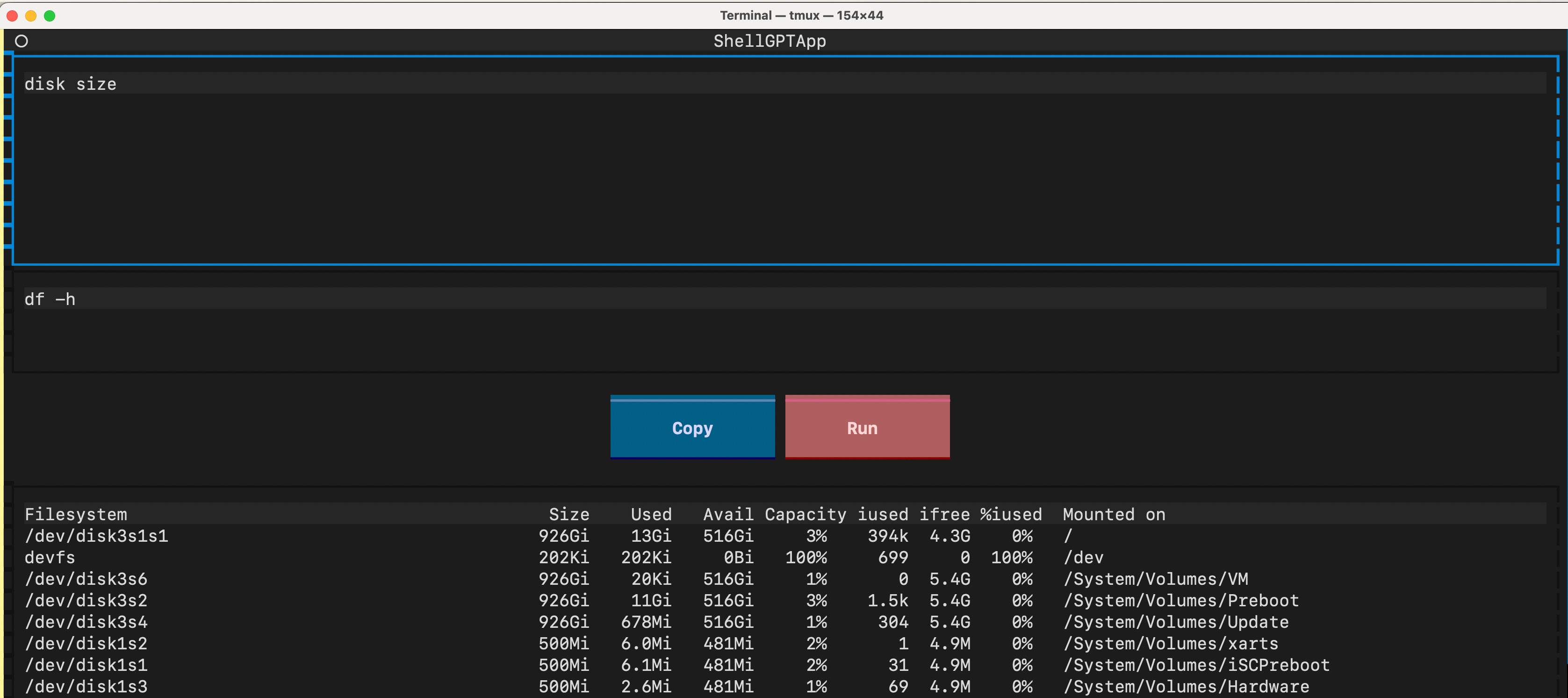
sg --tuifor a text user interface, tailored for shell command inference.
Configuration
ShellGPT is configured via ~/.shellgpt/config.toml. You can change the configuration directory by setting the SHELLGPT_CONF_DIR environment variable.
Multiple Profiles
Define your API settings in the [profiles] section and switch between them using the -p / --profile flag.
# ~/.shellgpt/config.toml
default_profile = "ollama"

[profiles.ollama]
base_url = "http://localhost:11434/v1"
model = "llama3"

[profiles.openai]
base_url = "https://api.openai.com/v1"
# You can provide api_key directly
api_key = "sk-xxxx"
# Or provide the name of the environment variable that contains the API key
# api_key_env = "OPENAI_API_KEY"
model = "gpt-4o"
# Headers support environment variable substitution ($VAR or ${VAR})
headers = { "Authorization" = "Bearer $OPENAI_API_KEY", "X-My-Header" = "value" }

# https://docs.github.com/en/github-models/quickstart
[profiles.github]
base_url = "https://models.github.ai/inference"
api_key = "ghp_xxxx"
model = "gpt-4o"

# https://developers.cloudflare.com/workers-ai/configuration/open-ai-compatibility/
[profiles.cloudflare]
base_url = "https://api.cloudflare.com/client/v4/accounts/<account-id>/ai/v1"
api_key = "<token>"
model = "@cf/meta/llama-3-8b-instruct"

# https://developers.cloudflare.com/ai-gateway/usage/chat-completion/
[profiles.cloudflare-gateway]
base_url = "https://gateway.ai.cloudflare.com/v1/<account-id>/<gateway-id>/compat"
api_key = "sk-xxxx"
model = "gpt-4o"
Usage:
# Uses default_profile (ollama)
sg How to center a div?

# Uses OpenAI profile
sg -p openai Write a poem about rust
Global Settings
You can override global defaults at the top level of the config file:
timeout = 60
stream = true
temperature = 0.8
Roles
Roles allow you to define specific system prompts for different tasks. They are managed in the [roles] section of your config.
Built-in examples (created during sg --init):
shell: Infer shell commands.typo: Correct text typos.code: Coding assistant.summary: Summarize text in Markdown.polish: Polish writing.
Usage:
# List all available roles and their contents
sg --list

# Use a specific role
sg -s typo I is a enginer
git diff | sg -s commit
Custom Roles
Add your own roles to config.toml:
[roles]
translator = "You are a professional translator. Translate everything to Japanese."
Then use it with sg -s translator Hello world.
TUI
Key bindings in TUI mode:
ctrl+j: Infer answerctrl+r: Run commandctrl+y: Yank command
License
1 maintainer

Metadata
1 maintainer
Release files for shgpt 0.7.1
For a detailed explanation of source distributions (sdists) and built distributions (wheels), please see the package formats documentation.
Source distribution (sdist)
| File | Size | Uploaded | |
|---|---|---|---|
| shgpt-0.7.1.tar.gz | 18.2 kB | Details |
Built distribution (wheel)
| File | Interpreter | ABI | Platform | Reset |
|---|---|---|---|---|
| shgpt-0.7.1-py3-none-any.whl | Python 3 | none | any | Details |
Total release size: 35.4 kB
Release files / shgpt-0.7.1.tar.gz
| Download URL | shgpt-0.7.1.tar.gz |
|---|---|
| Size | 18.2 kB |
| Tags | Source |
|
SHA-256 checksum How to use checksums |
bb4a841211373602bce7ed8f95ffabb020925f8ed484fda9b6902615af7a9700
|
|
BLAKE2b-256 checksum How to use checksums |
d6d9a1a79ef6fce24c74aeca880c225822e86a91584d3106fc1e46ebe44bd866
|
| Upload date | |
|
Uploaded using Trusted Publishing? What is trusted publishing? |
No |
| Uploaded via |
uv/0.11.2 {"installer":{"name":"uv","version":"0.11.2","subcommand":["publish"]},"python":null,"implementation":{"name":null,"version":null},"distro":{"name":"Ubuntu","version":"24.04","id":"noble","libc":null},"system":{"name":null,"release":null},"cpu":null,"openssl_version":null,"setuptools_version":null,"rustc_version":null,"ci":true}
|
Release files / shgpt-0.7.1-py3-none-any.whl
| Download URL | shgpt-0.7.1-py3-none-any.whl |
|---|---|
| Size | 17.3 kB |
| Tags | Python 3 |
|
SHA-256 checksum How to use checksums |
916260f6af08eb01ff002d5ad7c4d45cf8608b0e74239c70d73f3a2ac2023a7e
|
|
BLAKE2b-256 checksum How to use checksums |
c14ca3e4b747e9b0b5a42574b08e62aae73b06225ee87a02d8ba8880ecd5db2e
|
| Upload date | |
|
Uploaded using Trusted Publishing? What is trusted publishing? |
No |
| Uploaded via |
uv/0.11.2 {"installer":{"name":"uv","version":"0.11.2","subcommand":["publish"]},"python":null,"implementation":{"name":null,"version":null},"distro":{"name":"Ubuntu","version":"24.04","id":"noble","libc":null},"system":{"name":null,"release":null},"cpu":null,"openssl_version":null,"setuptools_version":null,"rustc_version":null,"ci":true}
|














