
Chat with LLM in your terminal, be it shell generator, story teller, linux-terminal, etc.

Project description
ShellGPT



Chat with LLM in your terminal, be it shell generator, story teller, linux-terminal, etc.
Install
pip install -U shgpt
or if you prefer to use uvtool
uv tool install shgpt
This will install two commands: sg and shellgpt, which are identical.
After install, use sg --init to create the required directory and a default configuration file (~/.shellgpt/config.toml).
Usage
ShellGPT has three modes:
- Direct mode:
sg [question]or via pipeline:echo question | sg. - REPL mode:
sg --replfor an interactive chat. - TUI mode:
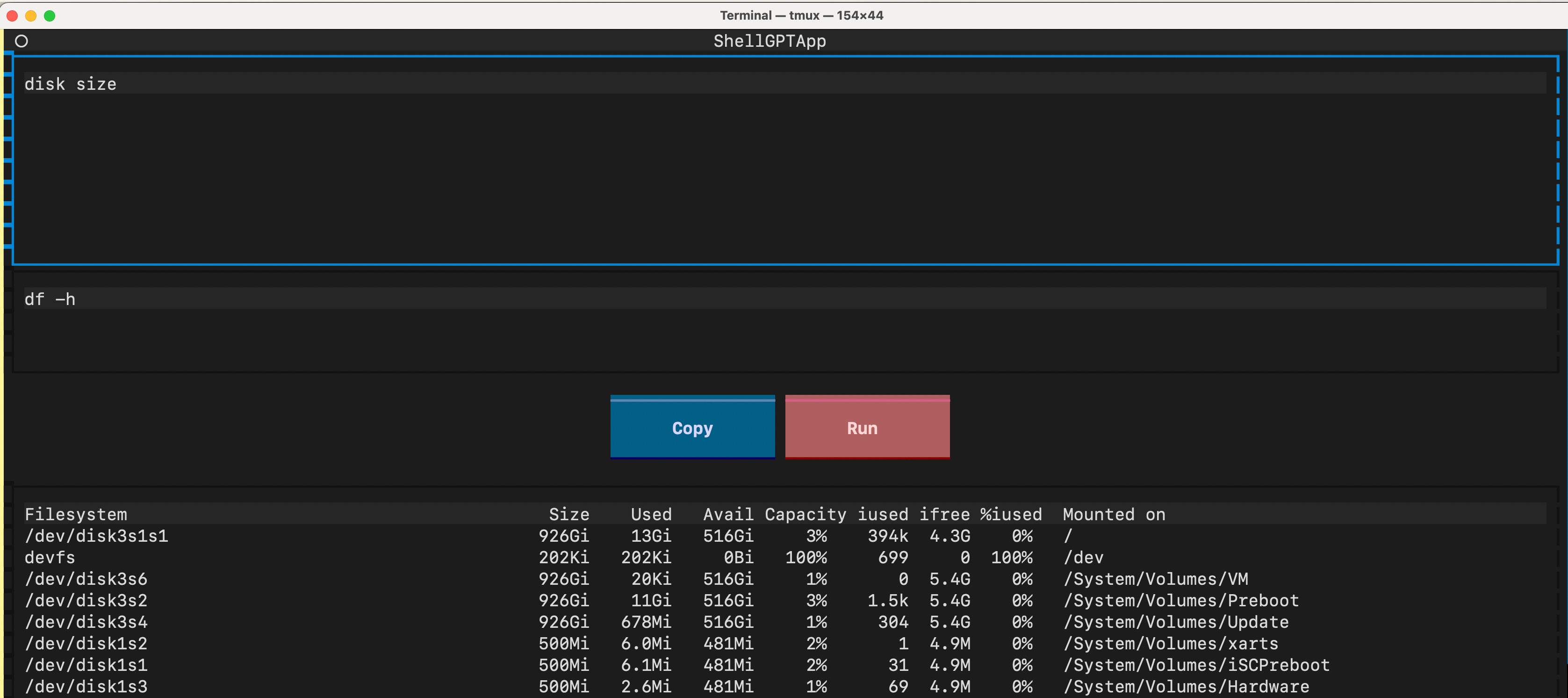
sg --tuifor a text user interface, tailored for shell command inference.
Configuration
ShellGPT is configured via ~/.shellgpt/config.toml. You can change the configuration directory by setting the SHELLGPT_CONF_DIR environment variable.
Multiple Profiles
Define your API settings in the [profiles] section and switch between them using the -p / --profile flag.
# ~/.shellgpt/config.toml
default_profile = "ollama"

[profiles.ollama]
base_url = "http://localhost:11434/v1"
model = "llama3"

[profiles.openai]
base_url = "https://api.openai.com/v1"
# You can provide api_key directly
api_key = "sk-xxxx"
# Or provide the name of the environment variable that contains the API key
# api_key_env = "OPENAI_API_KEY"
model = "gpt-4o"
# Headers support environment variable substitution ($VAR or ${VAR})
headers = { "Authorization" = "Bearer $OPENAI_API_KEY", "X-My-Header" = "value" }

# https://docs.github.com/en/github-models/quickstart
[profiles.github]
base_url = "https://models.github.ai/inference"
api_key = "ghp_xxxx"
model = "gpt-4o"

# https://developers.cloudflare.com/workers-ai/configuration/open-ai-compatibility/
[profiles.cloudflare]
base_url = "https://api.cloudflare.com/client/v4/accounts/<account-id>/ai/v1"
api_key = "<token>"
model = "@cf/meta/llama-3-8b-instruct"

# https://developers.cloudflare.com/ai-gateway/usage/chat-completion/
[profiles.cloudflare-gateway]
base_url = "https://gateway.ai.cloudflare.com/v1/<account-id>/<gateway-id>/compat"
api_key = "sk-xxxx"
model = "gpt-4o"
Usage:
# Uses default_profile (ollama)
sg How to center a div?

# Uses OpenAI profile
sg -p openai Write a poem about rust
Global Settings
You can override global defaults at the top level of the config file:
timeout = 60
stream = true
temperature = 0.8
Roles
Roles allow you to define specific system prompts for different tasks. They are managed in the [roles] section of your config.
Built-in examples (created during sg --init):
shell: Infer shell commands.typo: Correct text typos.code: Coding assistant.summary: Summarize text in Markdown.polish: Polish writing.
Usage:
# List all available roles and their contents
sg --list

# Use a specific role
sg -s typo I is a enginer
git diff | sg -s commit
Custom Roles
Add your own roles to config.toml:
[roles]
translator = "You are a professional translator. Translate everything to Japanese."
Then use it with sg -s translator Hello world.
TUI
Key bindings in TUI mode:
ctrl+j: Infer answerctrl+r: Run commandctrl+y: Yank command
License
Release history Release notifications | RSS feed


Download files
Download the file for your platform. If you're not sure which to choose, learn more about installing packages.
Source Distribution
Built Distribution
Filter files by name, interpreter, ABI, and platform.
If you're not sure about the file name format, learn more about wheel file names.
Copy a direct link to the current filters
File details
Details for the file shgpt-0.7.0.tar.gz.
File metadata
- Download URL: shgpt-0.7.0.tar.gz
- Upload date:
- Size: 17.9 kB
- Tags: Source
- Uploaded using Trusted Publishing? No
- Uploaded via: uv/0.10.4 {"installer":{"name":"uv","version":"0.10.4","subcommand":["publish"]},"python":null,"implementation":{"name":null,"version":null},"distro":{"name":"Ubuntu","version":"24.04","id":"noble","libc":null},"system":{"name":null,"release":null},"cpu":null,"openssl_version":null,"setuptools_version":null,"rustc_version":null,"ci":true}
File hashes
| Algorithm | Hash digest | |
|---|---|---|
| SHA256 |
c4c35f8c8a22fb4e10a6d69a893f2da4c1d87edb1197abc7f554fb1ea352add6
|
|
| MD5 |
27473e8fa83b4ecfcbcda2e666ae957f
|
|
| BLAKE2b-256 |
f713d0cfa50e4531ec7445cef96cf0e0019abeb074d5f006370521bd6100998c
|
File details
Details for the file shgpt-0.7.0-py3-none-any.whl.
File metadata
- Download URL: shgpt-0.7.0-py3-none-any.whl
- Upload date:
- Size: 17.1 kB
- Tags: Python 3
- Uploaded using Trusted Publishing? No
- Uploaded via: uv/0.10.4 {"installer":{"name":"uv","version":"0.10.4","subcommand":["publish"]},"python":null,"implementation":{"name":null,"version":null},"distro":{"name":"Ubuntu","version":"24.04","id":"noble","libc":null},"system":{"name":null,"release":null},"cpu":null,"openssl_version":null,"setuptools_version":null,"rustc_version":null,"ci":true}
File hashes
| Algorithm | Hash digest | |
|---|---|---|
| SHA256 |
d33586e42eedcb18d221e0de6c60193f966f351628ffed2d6c57ca43fd6aadb2
|
|
| MD5 |
3b063c08e599a85960a2ed45ef8bd70d
|
|
| BLAKE2b-256 |
378313f04af39585fa76e6042beebd3aa024d8574120015acc9b1fedd23f54d9
|






