
This release is a pre-release and may not be stable for production use.

shirube
You hand-write less SQL than ever.
You still own the schema.
標べ (shirube) — Japanese for a signpost. It reads your database as a map.







🚧 Status: Beta. Both the explorer and the AI navigator work today. shirube is pre-1.0, so things may still change.
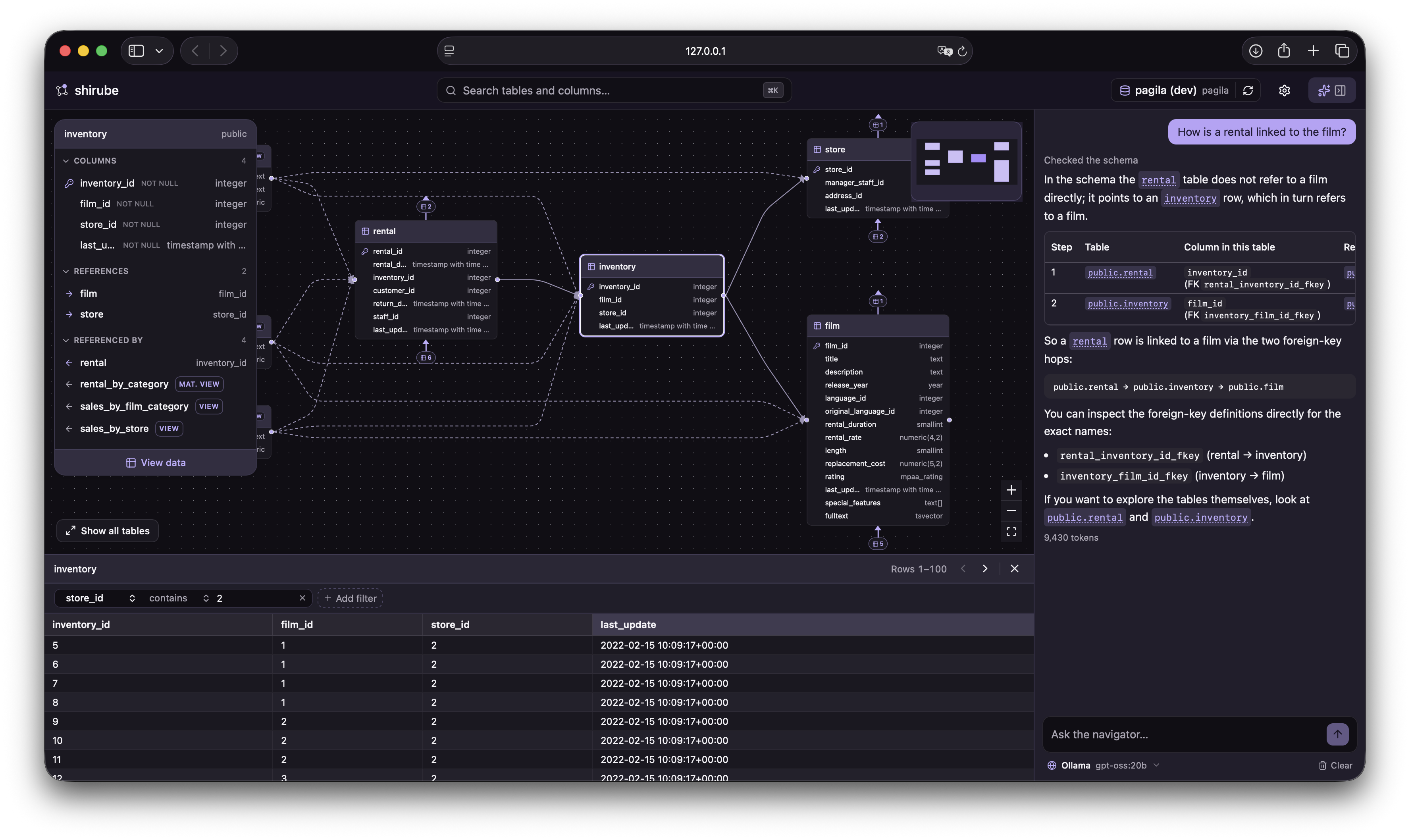
Ask a question — see the answer on the map.
💡 Why shirube
You hand-write less SQL than you used to — tables become models and methods in your code, and in the AI-coding era much of even that code is written for you. But the schema is still there underneath, and it is still yours to understand: to judge whether the code an AI wrote is right — which tables it reads, which columns it touches, which relationships it follows — and to ask the tools for the right thing in the first place.
A plain list of tables is a poor place to see that. Open them one at a time and you get columns, not connections — not what a table references, what references it, or which hops lead to the data you are after. Relationships are the very thing you need to follow, and a list is where they hide, so shirube lets you read a database as a map instead — just as useful when you drop into a project with hundreds of undocumented tables and need your footing fast.
AI changed who writes the SQL. shirube changes how we understand databases.
🎯 What shirube does
shirube turns a database into a map you can read. It opens on an interactive ER diagram and gives you two ways to find your footing: steer it yourself — search for a table, focus on it, follow its relationships outward — or just ask, and the AI navigator answers on the map. Either way you see how everything connects without reading DDL or writing a single query.
It is not another SQL IDE or database administration console — there is no query editor, and nothing that ever writes. shirube is a tool for understanding a database.
✨ Features
Everything below works today, in the beta:
- 🤖 AI navigator — ask in plain language and get an answer on the map, lighting up the tables involved. Bring your own Claude or OpenAI key, or point it at a local model.
- 🗺️ ER diagram home — auto-generated and centred on the most-connected table; see a table and its immediate neighbours, and travel outward one hop at a time.
- 📋 Table detail — columns with their types, primary keys and nullability, plus relationships split into references and referenced by.
- 🔗 Relationship navigation — click a related table to glide the map over to it.
- ✏️ Draw your own relationships — when the database declares no foreign key, shirube can't see that two tables are related; draw the missing link yourself, column to column, as a dotted edge, saved per connection and never touching your database.
- 🌳 Browse the schema as a tree — a collapsible tree of the whole database (schemas → tables and views → columns); click any object to travel the map to it.
- 👁️ Data preview — read a table or view's actual rows in a drawer, with click-to-sort columns, simple filters and paging.
- ⚡ Instant search — jump straight to any table or column.
- 🔐 Saved connections — passwords kept in your operating system's keychain, never in a config file.
- 🌗 Light and dark themes.
🤖 The AI navigator
Ask in plain language and get your answer on the map: the navigator reads your schema metadata to guide you and lights up the tables involved, with every object name a link that flies the map to it. It is a navigator, not a SQL generator — it never writes or runs a query.
Use your own Claude or OpenAI key, or a local model such as Ollama, configured in Settings → AI navigator. Whichever you pick, the request goes straight from your machine to that model — never through a shirube server (see Safe by design below). The navigator is entirely optional; the explorer works fully without it.
🛡️ Safe by design
- 🔒 Read-only — every connection is opened read-only with a statement timeout. shirube cannot modify your database — no writes, no schema changes, ever.
- 💻 Local-first — it runs on your machine and binds to
127.0.0.1only. Your database credentials and data never leave your computer. - 📝 Metadata-only logging — the local log records errors and request timings, but never the values in your data.
- 🤖 Your data, your provider — the AI navigator talks straight from your machine to the model you chose; only question-relevant schema metadata is sent, and a local model sends nothing off your machine at all.
🚀 Getting started
You won't need a database of your own to start — shirube ships with a small sample you can open straight away. To explore your own data, have a PostgreSQL or SQLite database ready. Either way you'll want a way to run a Python application without installing it permanently.
pipx run shirube   # with pipx
# or
uvx shirube        # with uv
💡
pipxanduvxrun a Python command-line app in its own throwaway environment, so shirube is never installed permanently (uvxships with uv).
Either command starts a small local server and opens shirube in your browser. A Sample database (Chinook) is already in your saved connections — open it to explore straight away — or add your own connection (PostgreSQL or SQLite), and shirube inspects the schema and opens the ER diagram.
💡 shirube connects with whatever credentials you give it. A read-only role with
CONNECTandSELECTis all it needs — and all it should have.
🤖 To use the AI navigator, add a provider in Settings → AI navigator — your own Claude or OpenAI key, or a local model. It's optional; the explorer works fully without it.
📚 Learn more
- Full README and roadmap — https://github.com/shou-taro/shirube
- Contributing — https://github.com/shou-taro/shirube/blob/main/CONTRIBUTING.md
- Licence — GNU AGPL-3.0
1 maintainer

Metadata
1 maintainer
Release files for shirube 0.3.0b9
For a detailed explanation of source distributions (sdists) and built distributions (wheels), please see the package formats documentation.
Source distribution (sdist)
| File | Size | Uploaded | |
|---|---|---|---|
| shirube-0.3.0b9.tar.gz | 806.4 kB | Details |
Built distribution (wheel)
| File | Interpreter | ABI | Platform | Reset |
|---|---|---|---|---|
| shirube-0.3.0b9-py3-none-any.whl | Python 3 | none | any | Details |
Total release size: 1.6 MB
Release files / shirube-0.3.0b9.tar.gz
| Download URL | shirube-0.3.0b9.tar.gz |
|---|---|
| Size | 806.4 kB |
| Tags | Source |
|
SHA-256 checksum How to use checksums |
07a615c638a5b6e77e94d2dde961864d2db6a399d0c993b8587a1cca26f924f6
|
|
BLAKE2b-256 checksum How to use checksums |
e5d959b283f879453a59cd921aa9fd2ab91fa83c034356869d02432067158409
|
| Upload date | |
|
Uploaded using Trusted Publishing? What is trusted publishing? |
Yes |
| Uploaded via |
uv/0.12.5 {"installer":{"name":"uv","version":"0.12.5","subcommand":["publish"]},"python":null,"implementation":{"name":null,"version":null},"distro":{"name":"Ubuntu","version":"24.04","id":"noble","libc":null},"system":{"name":null,"release":null},"cpu":null,"openssl_version":null,"setuptools_version":null,"rustc_version":null,"ci":true}
|
Release files / shirube-0.3.0b9-py3-none-any.whl
| Download URL | shirube-0.3.0b9-py3-none-any.whl |
|---|---|
| Size | 842.5 kB |
| Tags | Python 3 |
|
SHA-256 checksum How to use checksums |
d9b655aa189540c717fbb16710b831f594b32db30750b9b5630e447c43547a04
|
|
BLAKE2b-256 checksum How to use checksums |
7d64a0aabb6692ac8d62e6fcf8f32a8d2a8315200343a068bbc12c2507f82277
|
| Upload date | |
|
Uploaded using Trusted Publishing? What is trusted publishing? |
Yes |
| Uploaded via |
uv/0.12.5 {"installer":{"name":"uv","version":"0.12.5","subcommand":["publish"]},"python":null,"implementation":{"name":null,"version":null},"distro":{"name":"Ubuntu","version":"24.04","id":"noble","libc":null},"system":{"name":null,"release":null},"cpu":null,"openssl_version":null,"setuptools_version":null,"rustc_version":null,"ci":true}
|














