
shotbox




Eyes, ears and hands on a real graphical program, for an AI agent, a script or CI.
An agent working on a program with a window can't see it or hear it.
shotbox runs the program in a sealed session of its own, X11 or Wayland,
and lets whatever is driving it look, listen and act: read the accessible
tree, take screenshots, record what it plays, click by a button's name,
type, hold keys and gamepad buttons, and wait until the program is
actually ready. Then measure what it finds: names a screen reader can't
say, contrast, the Tab order, pixels changed against a reference, where
it flickers, how fast it follows the pointer, where its sound drops out,
and what it used.
Nothing it runs reaches your desktop or speakers by accident, and with
--net loopback, not your network either.
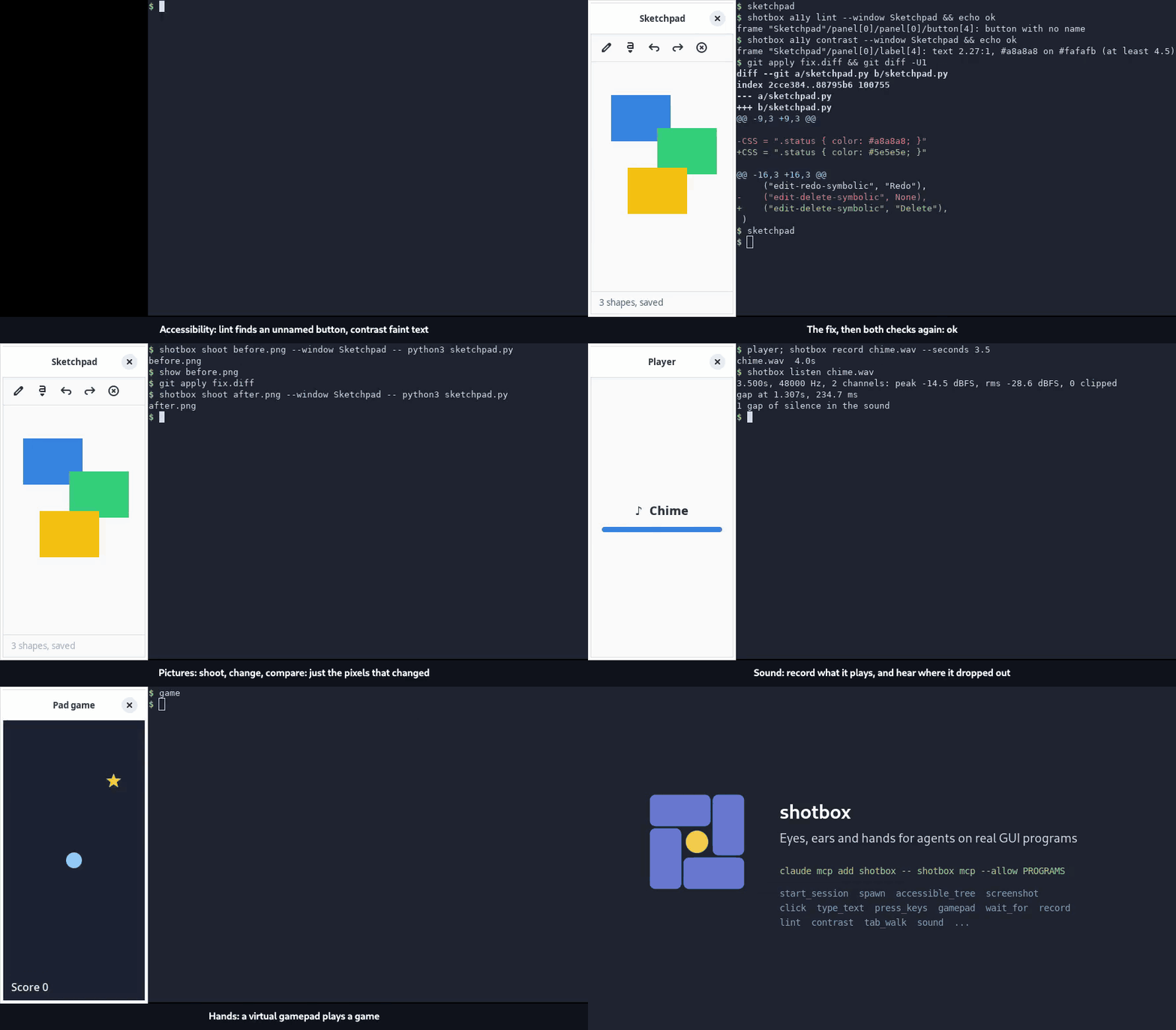
Made with shotbox: each scene is a play script in a sealed
session, recorded by shotbox record. With sound.
claude mcp add shotbox -- shotbox mcp --allow ~/src/app/shotbox-programs
Without an agent, it's the same session from the command line:
shotbox shoot editor.png --window 'Text Editor' -- gnome-text-editor notes.md
Worked examples, from checking a change to a game's smoke test: docs/recipes.md. How it differs from other tools that drive a GUI: docs/comparison.md.
For agents
shotbox mcp --allow PROGRAMS gives an agent sealed sessions over the
Model Context Protocol (stdio). It can start a session, spawn programs
from the list in PROGRAMS (NAME = COMMAND a line, and nothing else),
and then:
- read the accessible tree, and take screenshots, which come back as images;
- click by a node's name, press keys, type and work a gamepad;
- wait for windows, stillness and announcements;
- lint, measure contrast and walk the Tab order;
- record what a session plays, and hear where it dropped out.
That's enough for an agent to check its own change in a GUI, test a game by playing it, audit what a screen reader hears, or reproduce a bug report in a session that's the same each time. The accessible tree is the cheap way to look, a thousand or two tokens of text; a screenshot is for what only pixels say. An agent can't run anything off the list, and its sessions stop when the server does.
What it's for, the tools, and how it's built: docs/mcp.md.
An agent that runs a program itself, from its shell, runs it on your
desktop: a window opens on your screen, a sound plays through your
speakers, a browser run under xvfb-run finds your Wayland display all
the same. To keep it in a session, put this in the project's CLAUDE.md
or AGENTS.md, or your own:
## Graphical programs, browsers and sound

Never run a graphical program, a browser (headless too) or anything that
makes sound straight on this machine: it reaches my desktop and speakers.
Run it in a shotbox session:

- a picture: `shotbox shoot OUT.png --window RE -- COMMAND`
- a script or a test suite with windows: `shotbox run [--audio] -- COMMAND`
- with none, a headless browser say: `shotbox exec [--audio] -- COMMAND`;
  the shotbox package's `sealed()` seals a browser's environment, but
  not the speakers
- a session to come back to: `shotbox start --name NAME`, then
  `shotbox spawn --session NAME -- COMMAND`, and `shotbox stop NAME`

Not `xvfb-run`: it lets `WAYLAND_DISPLAY` and the session bus through. A
server started for a test listens on 127.0.0.1, not 0.0.0.0.
Why
An agent checking its change, a screenshot for a README, and a test in CI all want the same things, and every project was growing its own copy:
- Sealed. Nothing of yours leaks in by accident, and nothing the program does reaches your desktop or speakers, where bubblewrap can make a sandbox (it says when it can't): What's sealed.
- Ready, not slept. Waits are for things: a window mapped, a port open, a
file written, text on a terminal's screen, or the picture holding still.
No
sleep 6and hope. - Deterministic. X11 on Xvfb, GTK's software renderer,
LANG=C.UTF-8,TZ=UTC, text carets that don't blink (GTK's, Qt 6.5's, browsers'; and GTK's animations off), GTK 4's text drawn at its color, as its manual font rendering does, not fainter by however much a GTK release's automatic one draws it (more), and PNGs with no timestamps in them. It's the same every time, not the same as a desktop: differences from a desktop. - Cleaned up. Every program runs in its own process group, and the group is killed on the way out: signalling a wrapper script alone leaves its children running.
Install
On Debian, with what every command and option can use:
sudo apt install xvfb xauth dbus-daemon imagemagick x11-utils python3-gi gir1.2-vte-2.91 \
  at-spi2-core gir1.2-atspi-2.0 python3-gi-cairo gir1.2-pango-1.0 libglib2.0-bin pipewire \
  wireplumber ffmpeg bubblewrap libfaketime
pipx install --system-site-packages shotbox
--system-site-packages lets it see the system's PyGObject, which
shotbox term and --a11y use; pip install shotbox works too. Or run
it from a checkout: ln -s "$PWD/bin/shotbox" ~/.local/bin/shotbox.
shotbox doctor says what's here and what's missing, a line each, and
how to get it. What each command and option needs:
Needs.
No Python packages: it's the standard library and those tools. Wayland sessions need more; see Wayland.
In a GitHub Actions job on Ubuntu, the Action installs it and what it runs, as of the release (or branch) it's used at, with what each feature needs asked for by name (all off unless set), and lets bubblewrap make its sandbox, which Ubuntu's AppArmor holds back:
- uses: mishan/shotbox@v0.9.0
  with:
    a11y: true        # --a11y and `shotbox a11y`
    speak: true       # `shotbox a11y speak`: Orca, and what a11y installs
    term: true        # `shotbox term`
    # wayland, audio, record, gamepads and clock too
- run: shotbox shoot app.png --window 'My App' -- ./my-app
A quick tour
shotbox shoot app.png --window 'My App' -- ./my-app          # a picture, once it's up
shotbox shoot app.png --twice --window 'My App' -- ./my-app  # the same every time?
shotbox compare ref.png app.png --diff diff.png              # what changed, and where
shotbox run -- ./take-pictures.sh       # a script that waits, clicks and captures inside
shotbox exec --audio -- npx playwright test        # sealed, with no display
shotbox start --name ed --a11y          # a session to come back to
shotbox spawn --session ed -- gnome-text-editor
shotbox --session ed a11y click Open
shotbox --session ed capture open.png
shotbox stop ed
Commands
| Command | What it does |
|---|---|
shoot |
runs a program, waits, takes the picture; --twice proves it comes out the same |
run |
runs a command in a sealed session and exits with its status |
exec |
the same, with no display: a headless browser, a test suite |
start, spawn, stop, sessions |
a session that lasts, the programs in it, stopping one, listing them |
term |
a terminal to take pictures of |
wait |
waits for a window, a port, a file, stillness, a picture, a change, a log line |
capture |
takes a picture, or a burst of them |
record |
records a video, the sound, or both |
key, type, click, move, scroll, drag |
presses keys, types, works the pointer; held too |
park, focus |
moves the pointer out of the way; gives a window the keyboard |
play |
plays a script of timed input, on one clock |
latency |
how fast what's drawn follows the pointer |
flicker |
finds a part of the screen that flickers or flashes |
pad |
works a virtual gamepad |
a11y, wait announce |
the accessible tree: read, lint, Tab order, click by name, contrast, announcements |
compare |
counts the pixels that differ, picture by picture or directory by directory |
vision |
a picture as colorblind eyes see it |
listen |
a recording's level, clipping and dropouts |
mcp |
sessions for an agent, over MCP |
doctor |
what's here of what each command needs |
The options sessions take, --wayland, --a11y, --audio,
--gamepads, --net loopback, --identity, --clock, --dark and
the rest: Session options.
What's sealed
A session keeps a program from reaching your desktop by accident, not one that sets out to:
- Its environment is rebuilt from an allowlist;
HOMEand every XDG directory are a scratch dir. - Its display, session bus and system bus, and with
--a11yand--audioits accessibility bus and sound server, are its own; the sound server plays to nowhere. It has no printers (but CUPS on localhost:631, unless--net loopback).--machine-busgives it the machine's system bus and printers. - Where bubblewrap can make a sandbox (it says when it can't), nothing reaches the machine's sound devices or your desktop's Wayland, PulseAudio, PipeWire and bus sockets.
- Your network is reachable unless
--net loopback, your user and host name show unless--identity, and the real time unless--clock. - Not sealed: the files outside the scratch home, your X server, and other processes.
All of it, and what each option covers and doesn't: docs/sealed.md.
Accessibility
--a11y starts an accessibility (AT-SPI) bus of the session's own, so
what a screen reader would hear can be read and checked. Without it, a
session has none: GTK is told not to look. Your desktop's bus is never
touched either way.
shotbox a11y prints the tree, lints it for what has no name to say,
walks the Tab order, clicks by name and measures contrast, and shotbox wait announce waits for what's announced; for GTK, Qt, AccessKit's
toolkits and Chromium. The commands, how it's put together, and what
each check can and can't tell: docs/accessibility.md.
Wayland
--wayland makes a session a Wayland one: the program runs under a
headless sway, drawing in software, instead of on Xvfb. --xwayland adds
an Xwayland to it, and DISPLAY, so an X client runs the way it does on a
Wayland desktop, GTK programs made to with --env GDK_BACKEND=x11.
Needs sway and grim, Xwayland for --xwayland, and wf-recorder
for record: sudo apt install sway grim xwayland wf-recorder. Why
sway, how it fits, and what differs from X11:
docs/wayland.md.
Docs
- Commands: every command and session option, what each needs, resource use and the clock
- What's sealed
- Recipes: worked examples
- How it compares with other tools that drive a GUI
- MCP: the tools an agent gets, and how they're built
- Accessibility
- Wayland
- Differences from a desktop: drawing, window manager, animations, language, scale, input, measurements
- Gamepads
- Python:
shotbox.Sessionandhere(), for a script that drives the display itself - Node: helpers for browser checks with Playwright
- Contributing: the tests
- Code of conduct, security and accessibility
- Releasing
- Changelog
License
MIT. See LICENSE.
1 maintainer

Metadata
1 maintainer
Release files for shotbox 0.9.0
For a detailed explanation of source distributions (sdists) and built distributions (wheels), please see the package formats documentation.
Source distribution (sdist)
| File | Size | Uploaded | Provenance | |
|---|---|---|---|---|
| shotbox-0.9.0.tar.gz | 179.3 kB | With provenance | Details |
Built distribution (wheel)
| File | Interpreter | ABI | Platform | Reset |
|---|---|---|---|---|
| shotbox-0.9.0-py3-none-any.whl | Python 3 | none | any | Details |
Total release size: 362.7 kB
Release files / shotbox-0.9.0.tar.gz
| Download URL | shotbox-0.9.0.tar.gz |
|---|---|
| Size | 179.3 kB |
| Tags | Source |
|
SHA-256 checksum How to use checksums |
476c974a5c4eca30d6a201d83e1e202ced6049ba8dd35d886a7e34f60c785d5b
|
|
BLAKE2b-256 checksum How to use checksums |
3c426626729768f3dd88bf1f6660bfffd3aee3f114e768d178dcc59ea6d1fe1e
|
| Upload date | |
|
Uploaded using Trusted Publishing? What is trusted publishing? |
Yes |
| Uploaded via |
twine/7.0.0 CPython/3.13.14
|
Provenance
Provenance describes where a file came from. On PyPI, provenance is shared via attestations, which provide a verifiable record of the build or publishing details. View details, limitations and caveats.


PyPI Publish Attestation
PyPI verified that this artifact, at this checksum, originated from the publisher listed below.
Signed by GitHub Actions, verified by PyPI on Oct 19, 2026.
Transparency logRelease files / shotbox-0.9.0-py3-none-any.whl
| Download URL | shotbox-0.9.0-py3-none-any.whl |
|---|---|
| Size | 183.4 kB |
| Tags | Python 3 |
|
SHA-256 checksum How to use checksums |
9cbde77bc26401cd6563b1a4aa7cd6f53cbad0db9263c4e4a278222c80c591ef
|
|
BLAKE2b-256 checksum How to use checksums |
a69a8762b10cdfcabef4028e6e04eb7633a30a66e5bf95206ebd00eb973ed561
|
| Upload date | |
|
Uploaded using Trusted Publishing? What is trusted publishing? |
Yes |
| Uploaded via |
twine/7.0.0 CPython/3.13.14
|
Provenance
Provenance describes where a file came from. On PyPI, provenance is shared via attestations, which provide a verifiable record of the build or publishing details. View details, limitations and caveats.
PyPI Publish Attestation
PyPI verified that this artifact, at this checksum, originated from the publisher listed below.
Signed by GitHub Actions, verified by PyPI on Oct 19, 2026.
Transparency logSecurity for shotbox 0.9.0
Provenance
Provenance describes where a file came from. On PyPI, provenance is shared via attestations, which provide a verifiable record of the build or publishing details. View details, limitations and caveats.
Full provenance
All 2 files in this release have been uploaded with provenance metadata.
Attestation for shotbox-0.9.0.tar.gz
PyPI Publish Attestation
PyPI verified that this artifact, at this checksum, originated from the publisher listed below.
Signed by GitHub Actions, verified by PyPI on Oct 19, 2026.
Transparency logA note on package security
PyPI is a repository for distributing packages, not a service for auditing them. While third-party security researchers and our staff do their best to detect and remove malicious packages, PyPI cannot guarantee the quality, security or suitability of any given package.
To learn more about protecting yourself from malicious actors, visit our package security documentation.














