
Eval & show typst code outputs inline with their source

Project description
Showman

Automagic tools to smooth the package documentation & development process.
-
Package your files for local typst installation or PR submission in one command
-
Provide your readme in typst format with code block examples, and let
showmando the rest! In one command, it will the readme to markdown and render code block outputs as included images.- Bonus points – let
showmanknow your repository path and it will ensure images will properly appear in your readme even after your package has been distributed through typst’s registry.
- Bonus points – let
-
Execute non-typst code blocks and render their outputs
Installation
Prerequisites: Make sure you have typst and pandoc available
from the command line. Then, in a python virtual environment, run:
pip install showman
Converting your readme to markdown
Create a typst file with ```example code blocks that show the
output you want to include in your readme. For instance:
#import "@preview/cetz:0.1.2"
// Just to avoid showing this heading in the readme itself
#set heading(outlined: false)

= Hello, world!
Let's do something complicated:

#cetz.canvas({
  import cetz.plot
  import cetz.palette
  cetz.draw.set-style(axes: (tick: (length: -.05)))
  // Plot something
  plot.plot(size: (3,3), x-tick-step: 1, axis-style: "left", {
      for i in range(0, 3) {
      plot.add(domain: (-4, 2),
      x => calc.exp(-(calc.pow(x + i, 2))),
      fill: true, style: palette.tango)
    }
  })
})
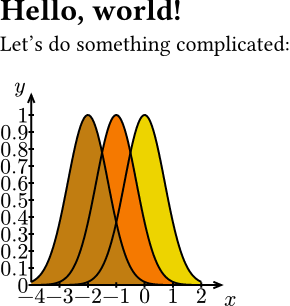
Then, run the following command:
showman md <path-to-typst-file>
Congrats, you now have a readme with inline images 🎉
You can optionally specify your workspace root, output file name, image
folder, etc. These options are visible under showman md --help.
Note: You can customize the appearance of these images by providing
showman the template to use when creating them. In your file to be
rendered, create a variable called showman-config at the outermost
scope:
// Render images with a black background and red text
#let showman-config = (
  template: it => {
    set text(fill: red)
    rect(fill: black, it)
  }
)
Behind the scenes, showman imports your file as a module and looks for this variable. If it is found, your template and a few other options are injected into the example rendering process.
Note: If every example has the same setup (package imports, etc.),
and you don’t want the text to be included in your examples, you can
pass eval-kwargs in this config as well to specify a string that gets
prefixed to every example. Alternatively, pass variables in a scope
directly:
// Setup either through providing scope or import prefixes
#let my-variable = 5
#let showman-config = (
  eval-kwargs: (
    prefix: "#import \"@preview/cetz:0.1.2\"
  ),
  // Now you can use `my-var` in your examples
  scope: (my-var: my-variable)
)
Caveats
-
showmanuses the beautifulpandocto do most of the markdown conversion heavy lifting. So, if your document can’t be processed by pandoc, you may need to adjust your syntax until pandoc is happy making a markdown document. -
Typst doesn’t allow page styling inside containers. Since
showmanmust use containers to extract each rendered example, you can’t use#set page(...)or#pagebreak()inside your examples.
Rendering examples in typst
If you don’t care about converting your readme to markdown, it’s even easier to have example rendered alongside their code. Simply add the following preamble to your file:
#import "@preview/showman:0.1.0"
#show: showman.formatter.template
The code below will be rendered side by side with its output:
``` typst
= Hello world!
```

Several keywords can be privded to customize appearance and more. See `showman.formatter.template` for more details.
Publishing your package
You’ve done the hard work of creating a beautiful, well-documented
manual. Now it’s time to share it with the world. showman can help you
package your files for distribution in one command, after some minimal
setup.
-
Make sure you have a
typst.tomlfile that follows typst packaging guidelines -
Add a new block to your toml file as follows:
[tool.packager]
paths = [...]
Where paths is a list of files and directories you want to include in
your package.
- Run the following command from the root of your repository:
showman package <path-to-toml-file>
-
Without any other arguments, you’ve just installed your package in your system’s local typst packages folder. Now you can import it with
typst #import "@local/mypackage:<version>".- You can alternatively specify the path to your fork of
typst/packagesto prep your files for a PR, or specify a--namespaceother thanlocal.
- You can alternatively specify the path to your fork of
Note: You can see the full list of command options with
showman package --help.
Executing code
This package also executes non-typst code (currently bash on
non-windows, python, and c++). You can use
showman execute ./path/to/file.typ to execute code blocks in these
languages, and the output will be captured in a .coderunner.json file
in the root directory you specified. To enable this feature, you need to
add the following preamble to your file:
#import "@preview/showman:0.1.0": runner

#let cache = json("/.coderunner.json").at("path/to/file.typ", default: (:))
#let show-rule = runner.external-code.with(result-cache: cache)

// Now, apply the show rule
#show: show-rule
You can optionally style <example-input> and <example-output> labels
to customize how input and output blocks appear.
Release history Release notifications | RSS feed


Download files
Download the file for your platform. If you're not sure which to choose, learn more about installing packages.
Source Distribution
Built Distribution
Filter files by name, interpreter, ABI, and platform.
If you're not sure about the file name format, learn more about wheel file names.
Copy a direct link to the current filters
File details
Details for the file showman-0.1.0.tar.gz.
File metadata
- Download URL: showman-0.1.0.tar.gz
- Upload date:
- Size: 64.3 kB
- Tags: Source
- Uploaded using Trusted Publishing? No
- Uploaded via: twine/4.0.2 CPython/3.10.12
File hashes
| Algorithm | Hash digest | |
|---|---|---|
| SHA256 |
3f1c4825db9540fb087335eb820f8fd6cd5f57853b1c000f23dc5f91172a35be
|
|
| MD5 |
c2d64dd1f1d6d24393386d3716f5cc52
|
|
| BLAKE2b-256 |
8ba02d521e20b468e4c0d290bebac9c1e3104da1027c221d54d84bf41e8f9a61
|
File details
Details for the file showman-0.1.0-py3-none-any.whl.
File metadata
- Download URL: showman-0.1.0-py3-none-any.whl
- Upload date:
- Size: 15.3 kB
- Tags: Python 3
- Uploaded using Trusted Publishing? No
- Uploaded via: twine/4.0.2 CPython/3.10.12
File hashes
| Algorithm | Hash digest | |
|---|---|---|
| SHA256 |
e3d2b30388046a50b8b3a0b117bc367cc621fd39795bf1744338528dc38da722
|
|
| MD5 |
2bd2a304a6666f2783d608b1406229b2
|
|
| BLAKE2b-256 |
817372be9bf0bb8acd29b58da166afad3f919e36707fba73e3b9be81ccd9d366
|






