

shtab







What: Automatically generate shell tab completion scripts for Python CLI apps
Why: Speed & correctness. Alternatives like argcomplete and pyzshcomplete are slow and have side-effects
How: shtab processes an argparse.ArgumentParser object to generate a tab completion script for your shell
Features
Outputs tab completion scripts for
bash
zsh
tcsh
fish
Supports
Supports arguments, options and subparsers
Supports choices (e.g. --say={hello,goodbye})
Supports file and directory path completion
Supports custom path completion (e.g. --file={*.txt})
Installation
Choose one of:
pip install shtab, or
conda install -c conda-forge shtab
Usage
There are two ways of using shtab:
CLI Usage: shtab’s own CLI interface for external applications
may not require any code modifications whatsoever
end-users execute shtab your_cli_app.your_parser_object
Library Usage: as a library integrated into your CLI application
adds a couple of lines to your application
argument mode: end-users execute your_cli_app --print-completion {bash,zsh,tcsh,fish}
subparser mode: end-users execute your_cli_app completion {bash,zsh,tcsh,fish}
Examples
FAQs
Not working? Check out frequently asked questions.
Alternatives
-
executes the underlying script every time <TAB> is pressed (slow and has side-effects)
-
executes the underlying script every time <TAB> is pressed (slow and has side-effects)
only provides zsh completion
-
different framework completely replacing the builtin argparse
solves multiple problems (rather than POSIX-style “do one thing well”)
Contributions
Please do open issues & pull requests! Some ideas:
support powershell
support python -m prefix (#55)
See CONTRIBUTING.md for more guidance.
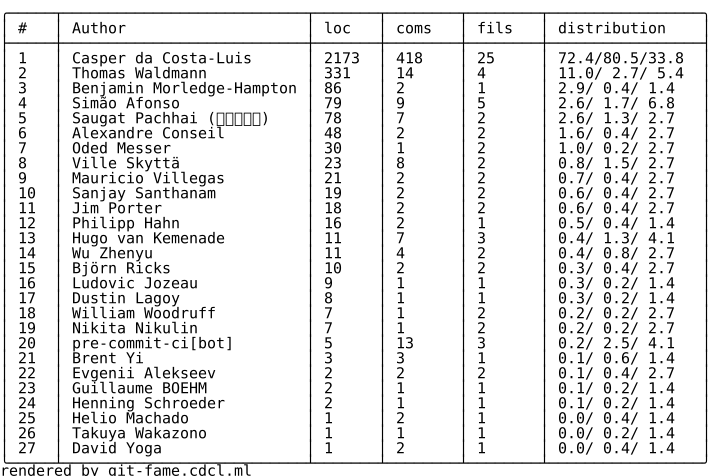

4 maintainers


Download files
Download the file for your platform. If you're not sure which to choose, learn more about installing packages.
Source Distribution
Built Distribution
Filter files by name, interpreter, ABI, and platform.
If you're not sure about the file name format, learn more about wheel file names.
Copy a direct link to the current filters
File details
Details for the file shtab-1.9.0.tar.gz.
File metadata
- Download URL: shtab-1.9.0.tar.gz
- Upload date:
- Size: 48.6 kB
- Tags: Source
- Uploaded using Trusted Publishing? Yes
- Uploaded via: twine/7.0.0 CPython/3.14.6
File hashes
| Algorithm | Hash digest | |
|---|---|---|
| SHA256 |
cb59baa64587799ff9123a3a649573d7bf3f183d848bcad1264890136552ef9f
|
|
| MD5 |
dad02e6601ae40e28cd81df2343fa2a9
|
|
| BLAKE2b-256 |
98d2a3888d39793b08af7153e4c62d7f18b1dfafb592d1d690a7e2867c5c1599
|
Provenance
The following attestation bundles were made for shtab-1.9.0.tar.gz:
Publisher:
test.yml on tqdm/shtab
-
Statement:
-
Statement type:
https://in-toto.io/Statement/v1 -
Predicate type:
https://docs.pypi.org/attestations/publish/v1 -
Subject name:
shtab-1.9.0.tar.gz -
Subject digest:
cb59baa64587799ff9123a3a649573d7bf3f183d848bcad1264890136552ef9f - Sigstore transparency entry: 2300684694
- Sigstore integration time:
-
Permalink:
tqdm/shtab@9c8202a62f33bcc01bd559c82e619096c2a008e4 -
Branch / Tag:
refs/tags/v1.9.0 - Owner: https://github.com/tqdm
-
Access:
public
-
Token Issuer:
https://token.actions.githubusercontent.com -
Runner Environment:
github-hosted -
Publication workflow:
test.yml@9c8202a62f33bcc01bd559c82e619096c2a008e4 -
Trigger Event:
push
-
Statement type:
File details
Details for the file shtab-1.9.0-py3-none-any.whl.
File metadata
- Download URL: shtab-1.9.0-py3-none-any.whl
- Upload date:
- Size: 14.9 kB
- Tags: Python 3
- Uploaded using Trusted Publishing? Yes
- Uploaded via: twine/7.0.0 CPython/3.14.6
File hashes
| Algorithm | Hash digest | |
|---|---|---|
| SHA256 |
f1059c145289ad17e25244cde5242f6d39075af656e03e1f0543549450ef9c37
|
|
| MD5 |
dfdd2b5cd751567ca672f68b6126e91e
|
|
| BLAKE2b-256 |
0d036d323ed9497bd2c067a3b4e6e78ea9d5dcf4f941692181e67d67f7e2c39f
|
Provenance
The following attestation bundles were made for shtab-1.9.0-py3-none-any.whl:
Publisher:
test.yml on tqdm/shtab
-
Statement:
-
Statement type:
https://in-toto.io/Statement/v1 -
Predicate type:
https://docs.pypi.org/attestations/publish/v1 -
Subject name:
shtab-1.9.0-py3-none-any.whl -
Subject digest:
f1059c145289ad17e25244cde5242f6d39075af656e03e1f0543549450ef9c37 - Sigstore transparency entry: 2300684644
- Sigstore integration time:
-
Permalink:
tqdm/shtab@9c8202a62f33bcc01bd559c82e619096c2a008e4 -
Branch / Tag:
refs/tags/v1.9.0 - Owner: https://github.com/tqdm
-
Access:
public
-
Token Issuer:
https://token.actions.githubusercontent.com -
Runner Environment:
github-hosted -
Publication workflow:
test.yml@9c8202a62f33bcc01bd559c82e619096c2a008e4 -
Trigger Event:
push
-
Statement type:







