
siege-cli
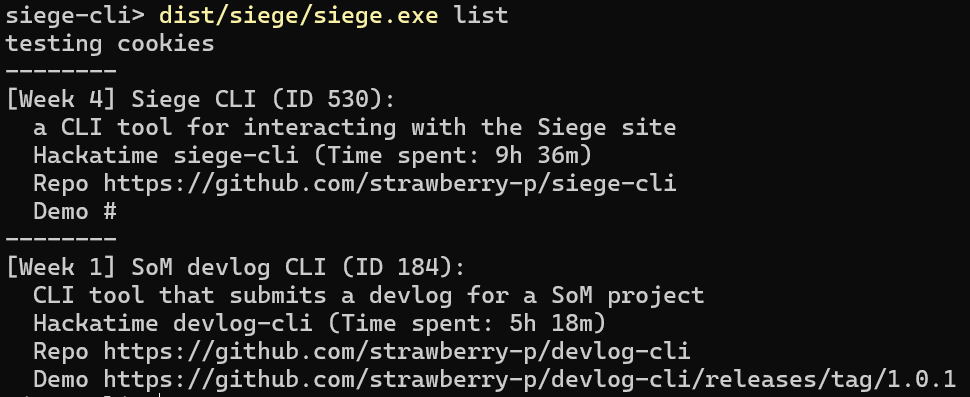
siege-cli is a CLI tool for interacting with the Siege website. Currently, listing your projects and updating their information is supported.
Cookies
siege-cli requires your _siege_session and sometimes cf_clearance cookies to work.
You might be asked to retrieve them from time to time, if a request gets denied because of them expiring.
In case you are being asked for a cf_clearance and it is not present in the cookie list, it is most likely okay to just create/overwrite the session.json file with {"cf_clearance":""} to suppress the warning.
This can also be done by pressing Enter to the cf_clearance prompt without pasting anything.
Firefox
- Open devtools with F12 or right click>Inspect
- Switch to the Storage tab
- In the devtools sidebar, select Cookies>https://siege.hackclub.com
- Triple click the value of the respective cookie and copy it
Chromium
- Open devtools with F12 or right click>Inspect
- Switch to the Application tab
- In the devtools sidebar, under the Storage group, select Cookies>https://siege.hackclub.com
- Triple click the value of the respective cookie and copy it
Usage
py siege.py/siege.exe take subcommands:
list - no other args needed, lists your Siege projects
show - --id arg needed, shows info about one of your Siege projects matching the ID
edit - --id arg needed, updates properties of your Siege project matching the ID according to the Update flags you pass:\
-t TITLE--title TITLEProject display name-b DESC--description DESCProject description-d LINK--demo LINKLink to the project's demo-r LINK--repo LINKLink to the project's repository-s PATH--screenshot PATHLocal path from the cwd to the screenshot you want to upload-x--remove-screenshotFlag for removing the current project screenshot-w--hackatime HACKATIME_NAMEName of the hackatime project associated with this project
Installation
Note: for any pip packages, depending on your system you might need to use your normal package manager to install python packages, or pass --break-system-packages to pip. A venv can also be used.
For the first run, you will be asked to enter your Siege cookies. Read above for an explanation of that process.
Package
- Create and navigate to the directory you want siege-cli to reside in.
- Run
pipx install siege-clioruvx install siege-cli - Run
siege-clito get started
Pyinstaller
- Create and navigate to the directory you want siege-cli to reside in.
- Download the siege.exe build from the release (
git clone https://github.com/strawberry-p/siege-cli.gitandcd siege-clialso works for these steps) - Run
dist/siege.exe listorsiege.exe listto get started
Python
- Create and navigate to the directory you want siege-cli to reside in.
- Download the
siege.pyfile from the repo or from the release (git clone https://github.com/strawberry-p/siege-cli.gitandcd siege-clialso works for these steps) - Run
py siege.py listto get started.
1 maintainer

Metadata
1 maintainer
Release files for siege-cli 1.0.2
For a detailed explanation of source distributions (sdists) and built distributions (wheels), please see the package formats documentation.
Source distribution (sdist)
| File | Size | Uploaded | |
|---|---|---|---|
| siege_cli-1.0.2.tar.gz | 22.3 kB | Details |
Built distribution (wheel)
| File | Interpreter | ABI | Platform | Reset |
|---|---|---|---|---|
| siege_cli-1.0.2-py3-none-any.whl | Python 3 | none | any | Details |
Total release size: 43.9 kB
Release files / siege_cli-1.0.2.tar.gz
| Download URL | siege_cli-1.0.2.tar.gz |
|---|---|
| Size | 22.3 kB |
| Tags | Source |
|
SHA-256 checksum How to use checksums |
b308adbb8360c71d1b2886febbac513b626cdefe31f5c19ec28864c32a15c7b3
|
|
BLAKE2b-256 checksum How to use checksums |
989e646f6dcc562a441ee945628ac4a6e7075493f9860d2ae18cfe97c5901b9c
|
| Upload date | |
|
Uploaded using Trusted Publishing? What is trusted publishing? |
No |
| Uploaded via |
uv/0.8.22
|
Release files / siege_cli-1.0.2-py3-none-any.whl
| Download URL | siege_cli-1.0.2-py3-none-any.whl |
|---|---|
| Size | 21.5 kB |
| Tags | Python 3 |
|
SHA-256 checksum How to use checksums |
b40d7885cfb5be25d6b39d5b00f2bc7be46cfbb5f09d80a06e3649b84cb6e426
|
|
BLAKE2b-256 checksum How to use checksums |
f870d3af198252ca6106315a3d00fd7d5366b29760a4515c3a48400f3a26e2d4
|
| Upload date | |
|
Uploaded using Trusted Publishing? What is trusted publishing? |
No |
| Uploaded via |
uv/0.8.22
|














