
A CLI tool for interacting with HC's Siege website

Project description
siege-cli
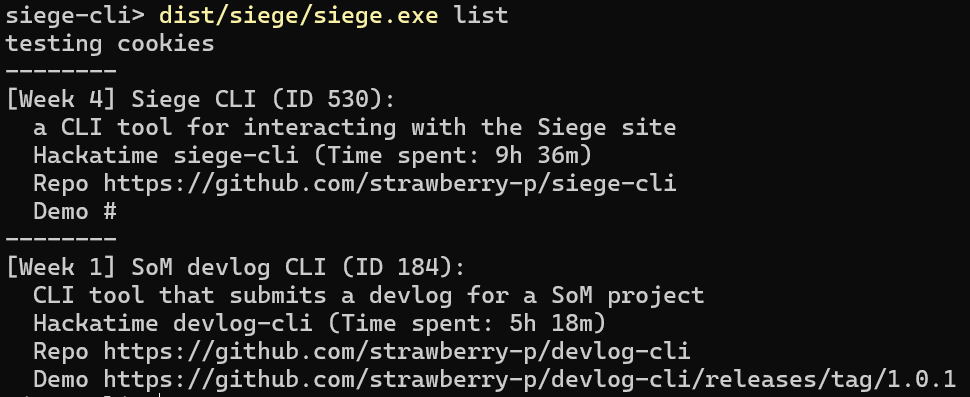
siege-cli is a CLI tool for interacting with the Siege website. Currently, listing your projects and updating their information is supported.
Cookies
siege-cli requires your _siege_session and sometimes cf_clearance cookies to work.
You might be asked to retrieve them from time to time, if a request gets denied because of them expiring.
In case you are being asked for a cf_clearance and it is not present in the cookie list, it is most likely okay to just create/overwrite the session.json file with {"cf_clearance":""} to suppress the warning.
This can also be done by pressing Enter to the cf_clearance prompt without pasting anything.
Firefox
- Open devtools with F12 or right click>Inspect
- Switch to the Storage tab
- In the devtools sidebar, select Cookies>https://siege.hackclub.com
- Triple click the value of the respective cookie and copy it
Chromium
- Open devtools with F12 or right click>Inspect
- Switch to the Application tab
- In the devtools sidebar, under the Storage group, select Cookies>https://siege.hackclub.com
- Triple click the value of the respective cookie and copy it
Usage
py siege.py/siege.exe take subcommands:
list - no other args needed, lists your Siege projects
show - --id arg needed, shows info about one of your Siege projects matching the ID
edit - --id arg needed, updates properties of your Siege project matching the ID according to the Update flags you pass:\
-t TITLE--title TITLEProject display name-b DESC--description DESCProject description-d LINK--demo LINKLink to the project's demo-r LINK--repo LINKLink to the project's repository-s PATH--screenshot PATHLocal path from the cwd to the screenshot you want to upload-x--remove-screenshotFlag for removing the current project screenshot-w--hackatime HACKATIME_NAMEName of the hackatime project associated with this project
Installation
Note: for any pip packages, depending on your system you might need to use your normal package manager to install python packages, or pass --break-system-packages to pip. A venv can also be used.
For the first run, you will be asked to enter your Siege cookies. Read above for an explanation of that process.
Pyinstaller
- Create and navigate to the directory you want siege-cli to reside in.
- Download the siege.exe build from the release (
git clone https://github.com/strawberry-p/siege-cli.gitandcd siege-clialso works for these steps) - Run
dist/siege/siege.exe listorsiege.exe listto get started
Python
- Create and navigate to the directory you want siege-cli to reside in.
- Download the
siege.pyfile from the repo or from the release (git clone https://github.com/strawberry-p/siege-cli.gitandcd siege-clialso works for these steps) - Run
py siege.py listto get started.
Release history Release notifications | RSS feed


Download files
Download the file for your platform. If you're not sure which to choose, learn more about installing packages.
Source Distribution
Built Distribution
Filter files by name, interpreter, ABI, and platform.
If you're not sure about the file name format, learn more about wheel file names.
Copy a direct link to the current filters
File details
Details for the file siege_cli-1.0.0.tar.gz.
File metadata
- Download URL: siege_cli-1.0.0.tar.gz
- Upload date:
- Size: 8.6 kB
- Tags: Source
- Uploaded using Trusted Publishing? No
- Uploaded via: uv/0.8.22
File hashes
| Algorithm | Hash digest | |
|---|---|---|
| SHA256 |
849e8c5ae21798d895eab22b8c84a163bdd4b3cb02f2c6fca24175fba935e4fa
|
|
| MD5 |
4b7d0ef62418ecdd34ae231a08397e66
|
|
| BLAKE2b-256 |
88811eeeec703c0f7ec6696853765aae3cb01fa109666d1c5ac4e29c7ca030e0
|
File details
Details for the file siege_cli-1.0.0-py3-none-any.whl.
File metadata
- Download URL: siege_cli-1.0.0-py3-none-any.whl
- Upload date:
- Size: 7.9 kB
- Tags: Python 3
- Uploaded using Trusted Publishing? No
- Uploaded via: uv/0.8.22
File hashes
| Algorithm | Hash digest | |
|---|---|---|
| SHA256 |
6023c68f26f2b26d01e4652fcdcff9c771e1a5b521447a6b68483d5ecba95b6e
|
|
| MD5 |
3713d21fefb80c9ac22005fbbe117423
|
|
| BLAKE2b-256 |
e5da063de8cdaed851845e2e6561aa953372b3ab383092046344918d3667c0e9
|






