
Sightglass
Live dashboards for a running program, a microcontroller, a PLC, or anything that can make an HTTP request. Send values by name and they appear in the browser (or the terminal) as they change: a window onto a running system, like the sight glass on a tank.
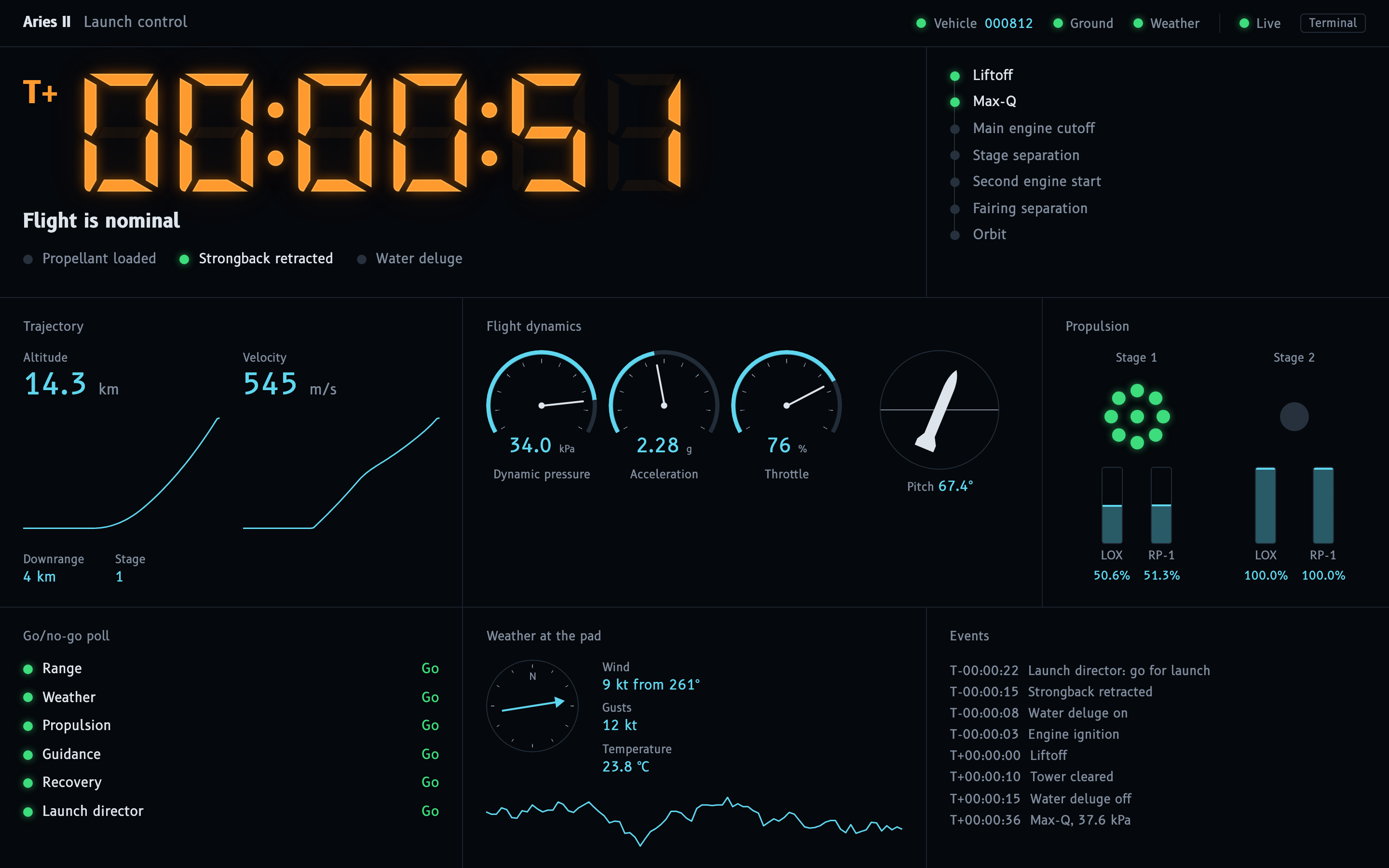
That's the launch control demo, a plain HTML page fed live by three separate programs. Run it with one command:
uvx --from "sightglass[web]" sightglass --demo launch --open
- One line to start.
start()serves a dashboard and prints its address;monitor.set("progress", 5)works from any thread. - No code needed. Pipe a program into
sightglass,curlvalues to it, or point it at a serial port, ZeroMQ, a Beckhoff PLC, a REST API or InfluxDB. - Plain HTML pages. Mark an element
data-bind="<id>"and it stays live; CSS turns values into gauges and lamps. Or let sightglass draw a generic page. - Honest about staleness. Pages reconnect by themselves, dim values that stopped arriving, and leave a gap rather than a stale value.
- See what arrives. Press
`on any page for the signals view: every id received, as sent, with a chart of its last minute.
Install
Python 3.11 or newer.
pip install "sightglass[web]" # add serial, zmq, ads, rest, influxdb, or use [all]
sightglass --demo --open shows every kind of display on the generic page.
Send your first values
From inside a Python program
import time

from sightglass import start

monitor = start()  # prints "Dashboard: http://127.0.0.1:8080/"

for i in range(1, 101):
    time.sleep(0.1)  # your work
    monitor.set("progress", i)
    monitor.set("status", "running" if i < 100 else "done")
set() returns at once and is safe from any thread. Each new id becomes an
element: a lamp for True/False, text otherwise. Dotted ids like
"job.rate" are grouped under job. The dashboard stops when your program
exits.
Without writing code
# Pipe a program: lines like "progress=5 status=running" or JSON objects
# become values; every other line is printed as usual.
my_program | sightglass

# Push values from anything: shell scripts, cron jobs, other languages.
sightglass &
curl -d 'temperature=21.5 status=ok' http://127.0.0.1:8080/update
curl -d '{"job": {"progress": 5}}' http://127.0.0.1:8080/update
curl http://127.0.0.1:8080/values     # what the dashboard shows, as JSON
sightglass --help lists every option, including --terminal to draw in the
terminal instead of the browser.
From a separate Python program
Client uses only the standard library, so the sending program doesn't need
the dashboard's dependencies:
from sightglass import Client

dashboard = Client()  # http://127.0.0.1:8080
dashboard.set("progress", 5)
dashboard.update({"rate": 18.6, "status": "running"})
Updates are sent in order in the background, retried until the dashboard is
up, and flushed when your program exits. Pass token= if the dashboard has
one.
Connect a device, PLC or API
| To read | Run |
|---|---|
| a serial device printing CSV | sightglass --serial auto --csv temperature,humidity (or --json, --binary) |
| a ZeroMQ publisher | sightglass --zmq tcp://localhost:5556 (--pull for PUSH senders: nothing is lost) |
| a Beckhoff TwinCAT PLC over ADS | sightglass --ads 5.12.34.56.1.1 --vars 'MAIN.*', or an interface file: sightglass --ads plc.toml |
| a JSON REST API | sightglass --rest http://localhost:8000/metrics --rest-interval 2 |
| several sources, or InfluxDB | a config file |
Each needs its extra: serial, zmq, ads or rest.
Sources
covers each one, its Python class, the wire formats, and writing to a PLC.
Choose how values look
Declare elements for bars, charts, units and number formats. Anything you don't declare still appears, as text.
from sightglass import Monitor, ProgressBar, Sparkline, TextFormat

monitor = Monitor()
monitor.add(
    ProgressBar("progress", total=500, label="Progress"),
    Sparkline("rate", label="Items/s", format=TextFormat(precision=1)),
)
monitor.start()
| Element | Shows | Update with |
|---|---|---|
TextElement |
a value, optionally scaled and formatted | any value |
Sparkline |
a number and a chart of its recent values | a number |
ProgressBar |
a bar filling from 0 to total |
a number |
RangeBar |
a marker on a track from min to max |
a number |
IndicatorLamp |
on/off | True/False, 1/0, on/off |
MachineState |
named on/off states packed into one integer | an integer (bit 0 = first state) |
Coordinate |
a multi-axis position | a list, or per axis: "<id>.x" |
Table |
a grid of cells | per cell: "<id>.<row>.<column>" |
LogMonitor |
the latest messages | a string |
Elements that show a number take format=TextFormat(precision=1); lamps take
on_style= and off_style=. Monitor(strict=True) rejects ids you didn't
declare, and max_elements (2000 by default) stops a runaway feed creating
elements without end.
A monitor runs in the background (monitor.start()), in the foreground until
Ctrl+C (monitor.serve()), or inside your asyncio program
(await monitor.run(...)).
Build your own page
Write plain HTML and bind elements by id. Serve it with
WebDashboard("page.html"):
<link rel="stylesheet" href="/_sightglass/instruments.css">
<span data-bind="temperature"></span>
<div class="led" data-bind="pump" data-mode="state"></div>
<div class="needle" data-bind="pressure.ratio" data-mode="var"></div>
<div data-plot="wave.*" data-seconds="60" style="height: 300px"></div>
<script src="/_sightglass/sightglass.js"></script>
Pages
covers every binding, the signals view, plots against time (--history), the
terminal theme, and drawing your own layout in the terminal.
Describe a dashboard in a file
sightglass --config dashboard.toml builds a whole dashboard from a file:
its sources and the panels that show them, with no page to write.
title = "Plant"

[[source]]
type = "rest"
url = "http://localhost:8000/api/readings"
prefix = "plant"

[[panel]]
type = "gauge"
title = "Pressure"
id = "plant.pressure"
units = "bar"
max = 10

[[panel]]
title = "Temperatures"
ids = ["plant.*.temperature"]   # plotted against time
Dashboards from a config file lists every source, panel and setting.
Open it to other machines safely
The dashboard listens on 127.0.0.1 by default, so only the same machine can
see it. With --host 0.0.0.0 (host="0.0.0.0"), anyone who can reach the
port can view the values and, unless you set --token, post updates. Viewing
has no authentication and traffic is not encrypted: on untrusted networks,
reach the dashboard through an SSH tunnel or a reverse proxy with TLS and
authentication.
Values for a device (a PLC variable marked write = true) are only accepted
with the token. The token crosses the network as plain text unless the
dashboard is behind TLS, so a dashboard that writes to a PLC from other
machines needs the tunnel or proxy too.
Examples
examples/ is a gallery where each example shows one way to feed a dashboard, and runs with one command and nothing to install beyond uv: a Python program, the shell, a pipe, many processes, Docker, the terminal, a serial device on a custom page, a PLC, and three config-file dashboards.
More documentation
- Sources: serial, ZeroMQ, PLCs over ADS, REST, InfluxDB, and the wire formats.
- Dashboards from a config file: every source, panel and setting.
- Pages: bindings, the signals view, plots, themes and the terminal.
- How fast it is: the load demo, and what 1000 to 5000 signals cost.
- Extending sightglass: your own elements, decoders, sources and outputs.
- CONTRIBUTING.md: development and releases.
For AI coding agents
sightglass --guide prints a concise, recipe-first guide to building monitors,
written for coding agents. To make it discoverable in another project, add a
line like this to that project's CLAUDE.md or AGENTS.md:
- Live dashboards for this project: `sightglass`; run `sightglass --guide` before building one.
License
MIT. The bundled fonts are under the SIL Open Font License 1.1: DSEG
(© keshikan), B612 (© The B612 Project Authors), VT323 (© The VT323 Project
Authors), Micro 5 (© The Soft Type Project Authors) and Silkscreen (© The
Silkscreen Project Authors). Their licence files are beside them, in
src/sightglass/web/static/fonts/ and src/sightglass/launch/static/fonts/.
1 maintainer

Metadata
1 maintainer
Release files for sightglass 0.5.0
For a detailed explanation of source distributions (sdists) and built distributions (wheels), please see the package formats documentation.
Source distribution (sdist)
| File | Size | Uploaded | Provenance | Actions |
|---|---|---|---|---|
| sightglass-0.5.0.tar.gz | 304.7 kB | With provenance | Details for sightglass-0.5.0.tar.gz |
Built distribution (wheel)
| File | Interpreter | ABI | Platform | Actions Reset |
|---|---|---|---|---|
| sightglass-0.5.0-py3-none-any.whl | Python 3 | none | any | Details for sightglass-0.5.0-py3-none-any.whl |
Total release size: 580.3 kB
Release files / sightglass-0.5.0.tar.gz
| Download URL | sightglass-0.5.0.tar.gz |
|---|---|
| Size | 304.7 kB |
| Tags | Source |
|
SHA-256 checksum How to use checksums |
a369127c36ab528b9d6dc4dbdd38ce81537cd179986a5272090cdfede9d35609
|
|
BLAKE2b-256 checksum How to use checksums |
e5bd508ed6549c6c68b1a6f3ef885ae48c56e47bf2243bc219e7ac8c7f66918f
|
| Upload date | |
|
Uploaded using Trusted Publishing? What is trusted publishing? |
Yes |
| Uploaded via |
twine/7.0.0 CPython/3.13.16
|
Provenance
Provenance describes where a file came from. On PyPI, provenance is shared via attestations, which provide a verifiable record of the build or publishing details. View details, limitations and caveats.


PyPI Publish Attestation
PyPI verified that this artifact, at this checksum, originated from the publisher listed below.
Signed by GitHub Actions, verified by PyPI on Nov 27, 2026.
Transparency logRelease files / sightglass-0.5.0-py3-none-any.whl
| Download URL | sightglass-0.5.0-py3-none-any.whl |
|---|---|
| Size | 275.6 kB |
| Tags | Python 3 |
|
SHA-256 checksum How to use checksums |
437f928ebfd0b1ce4021fd0192390bedf0ca26dffd34a48c4c87d6edbf5c4656
|
|
BLAKE2b-256 checksum How to use checksums |
4811b3117502684fbe0650d283ac0378b538598c3c34000f8d8c32b99b726e6c
|
| Upload date | |
|
Uploaded using Trusted Publishing? What is trusted publishing? |
Yes |
| Uploaded via |
twine/7.0.0 CPython/3.13.16
|
Provenance
Provenance describes where a file came from. On PyPI, provenance is shared via attestations, which provide a verifiable record of the build or publishing details. View details, limitations and caveats.
PyPI Publish Attestation
PyPI verified that this artifact, at this checksum, originated from the publisher listed below.
Signed by GitHub Actions, verified by PyPI on Nov 27, 2026.
Transparency logSecurity for sightglass 0.5.0
Provenance
Provenance describes where a file came from. On PyPI, provenance is shared via attestations, which provide a verifiable record of the build or publishing details. View details, limitations and caveats.
Full provenance
Both files in this release have been uploaded with provenance metadata.
Attestation for sightglass-0.5.0.tar.gz
PyPI Publish Attestation
PyPI verified that this artifact, at this checksum, originated from the publisher listed below.
Signed by GitHub Actions, verified by PyPI on Nov 27, 2026.
Transparency logA note on package security
PyPI is a repository for distributing packages, not a service for auditing them. While third-party security researchers and our staff do their best to detect and remove malicious packages, PyPI cannot guarantee the quality, security or suitability of any given package.
To learn more about protecting yourself from malicious actors, visit our package security documentation.














