





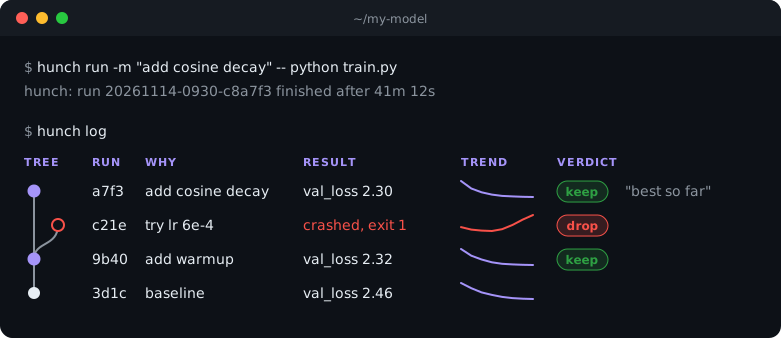
A journal for your ML experiments. Every training run saves its code, config, environment and metrics, why you ran it, and which run it built on.
pip install sigmoid-hunch


If you know git, you know Hunch
| git | hunch |
|---|---|
git commit -m "why" |
hunch run -m "why" -- python train.py |
git log |
hunch log |
git show a7f3 |
hunch show a7f3 |
git diff 9b40 a7f3 |
hunch diff 9b40 a7f3 |
git notes add |
hunch note a7f3 "helps" --keep |
git tag |
hunch milestone "warmup beats baseline" |
Why not just git? Twenty runs of the same code with different learning rates are one commit to git. Hunch keeps all twenty, each with its settings and results.
In your code
hunch run already saves the code, command and environment. Add two lines and Hunch also tracks your
settings and metrics, so you can see what changed between runs and how each one trained:
import hunch

hunch.init(config=args)                           # your settings: argparse args, a dict or a dataclass
for step in range(steps):
    ...
    hunch.log({"val_loss": val_loss}, step=step)  # your metrics, drawn as curves
Running python train.py without hunch run? hunch.init() records the run on its own; add why="..." to say why.
In a Jupyter notebook it also keeps every cell the kernel ran, in order, so out-of-order cells can't hide what made a result.
Same names as W&B: import hunch as wandb works.
In your editor
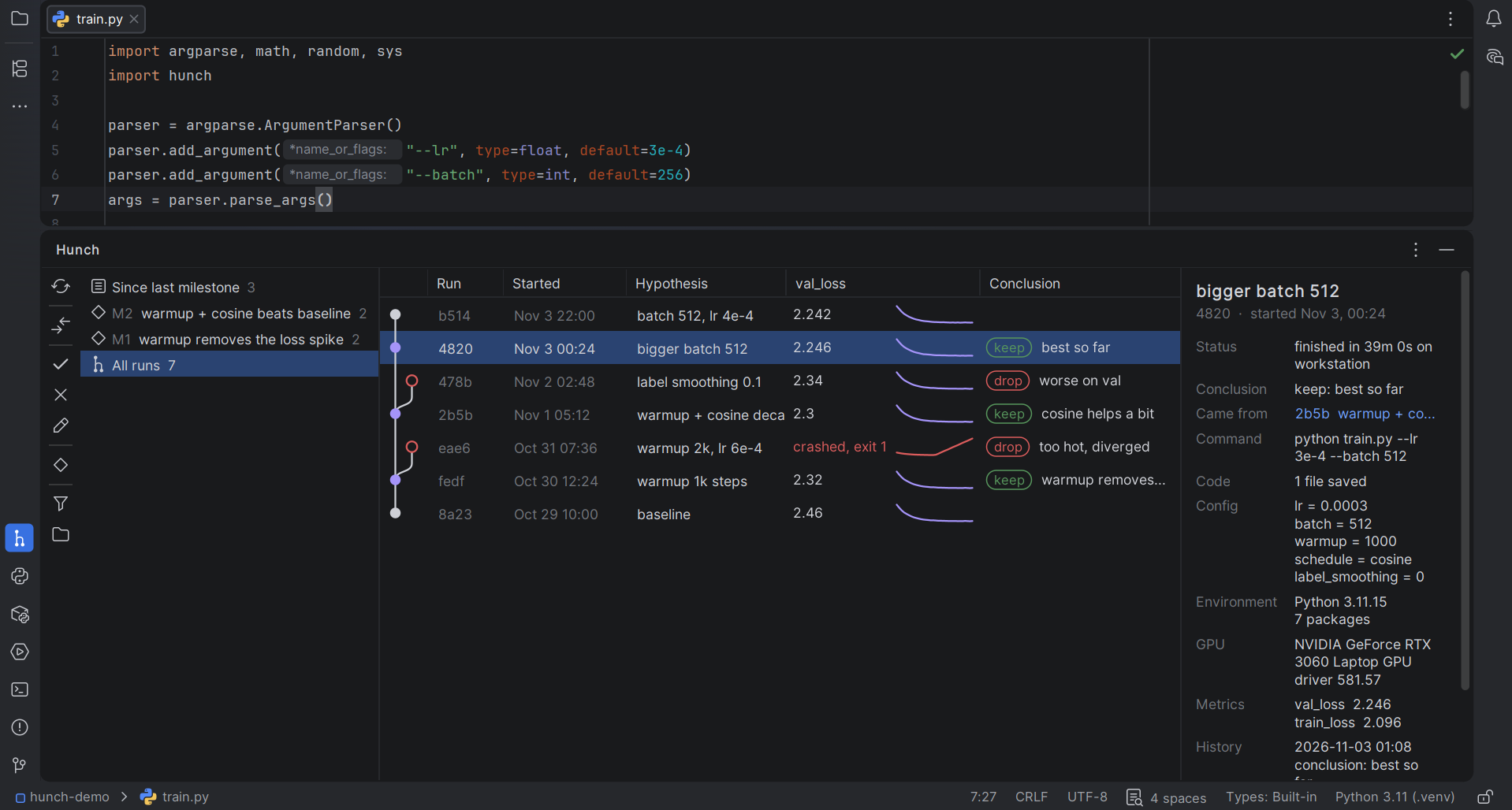
Hunch for PyCharm: your runs as a tree, keep or drop them, compare any two in the diff viewer, and start runs with one click. Install it from Settings | Plugins in PyCharm.
Hunch for VS Code: the same in VS Code, one click away in the Activity Bar. For Cursor, Windsurf and VSCodium, get it from Open VSX.
Your disk, your files
No server, no account, no telemetry. Just files in .hunch/.
Guide · File format · Questions · Contributing
Share it
Saved you a "what did I run last month?" moment? Tell one person, or post your hunch log in
Show and tell.




Tracking a research repo with Hunch? Show it:

[](https://github.com/sigmoid-ide/hunch)
Apache-2.0 · Part of Sigmoid IDE · Like it? Give it a star.
1 maintainer

Metadata
1 maintainer
Release files for sigmoid-hunch 0.4.0
For a detailed explanation of source distributions (sdists) and built distributions (wheels), please see the package formats documentation.
Source distribution (sdist)
| File | Size | Uploaded | Provenance | Actions |
|---|---|---|---|---|
| sigmoid_hunch-0.4.0.tar.gz | 37.3 kB | Without provenance | Details for sigmoid_hunch-0.4.0.tar.gz |
Built distribution (wheel)
| File | Interpreter | ABI | Platform | Actions Reset |
|---|---|---|---|---|
| sigmoid_hunch-0.4.0-py3-none-any.whl | Python 3 | none | any | Details for sigmoid_hunch-0.4.0-py3-none-any.whl |
Total release size: 80.3 kB
Release files / sigmoid_hunch-0.4.0.tar.gz
| Download URL | sigmoid_hunch-0.4.0.tar.gz |
|---|---|
| Size | 37.3 kB |
| Tags | Source |
|
SHA-256 checksum How to use checksums |
8be858d93ee0652b4e02222868705b8c208cfd31ffc16071a803b135d6411cc5
|
|
BLAKE2b-256 checksum How to use checksums |
74a87765b0db5339d42a512bc68ddc2fb5a2ee20797b9d21ecf9785ca7c71d3d
|
| Upload date | |
|
Uploaded using Trusted Publishing? What is trusted publishing? |
Yes |
| Uploaded via |
uv/0.13.7 {"installer":{"name":"uv","version":"0.13.7","subcommand":["publish"]},"python":null,"implementation":{"name":null,"version":null},"distro":{"name":"Ubuntu","version":"26.04","id":"resolute","libc":null},"system":{"name":null,"release":null},"cpu":null,"openssl_version":null,"setuptools_version":null,"rustc_version":null,"ci":true}
|
Release files / sigmoid_hunch-0.4.0-py3-none-any.whl
| Download URL | sigmoid_hunch-0.4.0-py3-none-any.whl |
|---|---|
| Size | 43.0 kB |
| Tags | Python 3 |
|
SHA-256 checksum How to use checksums |
9d12050ddc73731be47f453e3753e84a197d34ea884d45c6c9de8f85c13e50d8
|
|
BLAKE2b-256 checksum How to use checksums |
533bd6e10e988342c6b1ca90ac277a966e1bbae235c6c8286feff9987b40e919
|
| Upload date | |
|
Uploaded using Trusted Publishing? What is trusted publishing? |
Yes |
| Uploaded via |
uv/0.13.7 {"installer":{"name":"uv","version":"0.13.7","subcommand":["publish"]},"python":null,"implementation":{"name":null,"version":null},"distro":{"name":"Ubuntu","version":"26.04","id":"resolute","libc":null},"system":{"name":null,"release":null},"cpu":null,"openssl_version":null,"setuptools_version":null,"rustc_version":null,"ci":true}
|
Security for sigmoid-hunch 0.4.0
Provenance
Provenance describes where a file came from. On PyPI, provenance is shared via attestations, which provide a verifiable record of the build or publishing details. View details, limitations and caveats.
No provenance found
None of the files in this release were uploaded with provenance metadata.
A note on package security
PyPI is a repository for distributing packages, not a service for auditing them. While third-party security researchers and our staff do their best to detect and remove malicious packages, PyPI cannot guarantee the quality, security or suitability of any given package.
To learn more about protecting yourself from malicious actors, visit our package security documentation.














