
Python library for creating piecewise linear signals

Project description
PySignalBuilder

Overview
This Python package allows for the creation and on-the-fly modification of piecewise linear systems. It utilizes the open-source Numpy library and it is supported on Linux, Windows, and OSX.
For automation, testing, and control, it is often necessary to pre-generate signals and setpoints to make changes based on time. Whether it's actuator movement, voltage output, or attribute control, it is often necessary to pre-script automation curves. While simple time-dependent signals aren't too difficult to generate by programatically or by hand, complex and compound signals can become exponentially difficult to work with on-the fly. This library helps simplify that.
- Project Homepage: https://github.com/JetpackYoshi/PySignalBuilder
MIT license, (C) 2019-Present Yoshin Govender yoshin.govender@gmail.com
Documentation
SignalBuilder works on the concept of piecewise signals, which consist of various functions along with a domain in where it applies.
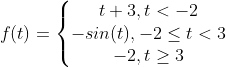
The SignalBuilder class allows a user to generate a function that incorporates these conditions, which can be used to generate automation arrays at whatever frequency is desired.
Use
Import Signal Builder and create an instance of the SignalBuilder class.
from SignalBuilder import SignalBuilder
S = SignalBuilder()
Set the start and end time of the signal. These values can be changed later if desired.
We'll also set a sample frequency, although this can be set later if desired.
start_time = 0
end_time = 10
S.signalStart = start_time
S.signalEnd = end_time

freq = 50
S.sampleFrequency = freq
You can check the structure of the signal thus far using the report function
S.report()
Start Node:
    <SignalBuilder.builder.Node object at 0x10dc01c18>
    time: 0
----

Piece:
    <SignalBuilder.builder.Piece object at 0x10dc93080>
    Type: constant
----

End Node:
    <SignalBuilder.builder.Node object at 0x10dc01eb8>
    time: 10
----
By default, there are three objects present in out signal chain: two nodes and a piece. The two nodes are start and end nodes whose order cannot be changed. SignalBuilder creates pieces between every two nodes in a chain that represent functions which can be modified at any time. The default function for a piece is a constant.
Let's use Matplotlib to visualize what's going on.
import matplotlib as mpl
import matplotlib.pyplot as plt
import numpy as np
%matplotlib notebook

num_samples = (end_time - start_time) * freq
t = np.linspace(start_time, end_time, num=num_samples)

def show_signal():
    t, Y, nodes = S.genPiecew()
    plt.plot(t, Y, '-', color='k')
    for xc in nodes:
        plt.axvline(x=xc, linewidth=0.5, linestyle='--', color='m')
    plt.show()
show_signal()

The vertical dotted line represents the location of the nodes present in the signal, which right now are the start and end nodes.
You can start adding in nodes using the insertNode method:
insertNode(index, t=None):
Where index is the node location in reference to the other nodes, and t is the time value of the node.
S.insertNode(1, 1.5)
S.insertNode(2, 3.5)
S.insertNode(3, 6)
S.insertNode(4, 8)
Looking at the report, our signal now looks like this:
S.report()
Start Node:
    <SignalBuilder.builder.Node object at 0x10dc01c18>
    time: 0
----

Piece:
    <SignalBuilder.builder.Piece object at 0x10dc93080>
    Type: constant
----

Node:
    <SignalBuilder.builder.Node object at 0x1c1ed80d68>
    time: 1.5
----

Piece:
    <SignalBuilder.builder.Piece object at 0x1c1ed80e80>
    Type: constant
----

Node:
    <SignalBuilder.builder.Node object at 0x1c1ed80438>
    time: 3.5
----

Piece:
    <SignalBuilder.builder.Piece object at 0x1c1ed80e48>
    Type: constant
----

Node:
    <SignalBuilder.builder.Node object at 0x1c1dcdeb00>
    time: 6
----

Piece:
    <SignalBuilder.builder.Piece object at 0x1c1ed80470>
    Type: constant
----

Node:
    <SignalBuilder.builder.Node object at 0x1c1ed80b00>
    time: 8
----

Piece:
    <SignalBuilder.builder.Piece object at 0x1c1ed80ef0>
    Type: constant
----

End Node:
    <SignalBuilder.builder.Node object at 0x10dc01eb8>
    time: 10
----
show_signal()

We can now grab those pieces and modify each one as we wish.
pieces = S.pieces
pieces[1].func.setValue(2)
pieces[2].fType = 'square'
pieces[2].func.setAmplitude(0.5)
pieces[2].func.setDutyCycle(0.7)
pieces[3].fType = 'sinusoid'
pieces[3].func.setAmplitude(0.25)
pieces[3].func.setVShift(1)
pieces[4].fType = 'ramp'
pieces[4].getFunc().setTimeRange([8, 10])
show_signal()

To move a node, use the setNodeTime method
setNodeTime(index, t)
Where index is the node index and t is the new time
S.setNodeTime(1, 2)
show_signal()

You can also delete nodes using the deleteNode method.
deleteNode(index, right=True)
The method will also automatically remove a piece and re-link the chain.
S.deleteNode(4)
show_signal()

By default, the piece to the right of the piece is deleted.
This can be changed by setting the right flag to False
S.deleteNode(4, False)
show_signal()

Examples
Examples and unit tests are in the directory examples.
Installation
Navigate into directory
cd PySignalBuilder
Install using
python setup.py install
Release history Release notifications | RSS feed

Download files
Download the file for your platform. If you're not sure which to choose, learn more about installing packages.
Source Distribution
Built Distribution
Filter files by name, interpreter, ABI, and platform.
If you're not sure about the file name format, learn more about wheel file names.
Copy a direct link to the current filters
File details
Details for the file signalbuilder-0.1.tar.gz.
File metadata
- Download URL: signalbuilder-0.1.tar.gz
- Upload date:
- Size: 9.8 kB
- Tags: Source
- Uploaded using Trusted Publishing? No
- Uploaded via: twine/6.1.0 CPython/3.12.2
File hashes
| Algorithm | Hash digest | |
|---|---|---|
| SHA256 |
29e29095d1bf78ab41c4b42da5ae9a1a5683fdc5fa90cb188ca09d0ee2e9ad89
|
|
| MD5 |
2d1e0c4f0eac10079e179989ffce2eab
|
|
| BLAKE2b-256 |
24efb0355a85a65527a4d03d0353c69c0c429dfc6a2653fced93e5a57e2ec227
|
File details
Details for the file signalbuilder-0.1-py3-none-any.whl.
File metadata
- Download URL: signalbuilder-0.1-py3-none-any.whl
- Upload date:
- Size: 8.2 kB
- Tags: Python 3
- Uploaded using Trusted Publishing? No
- Uploaded via: twine/6.1.0 CPython/3.12.2
File hashes
| Algorithm | Hash digest | |
|---|---|---|
| SHA256 |
0c0e3b41c62ca4097a2749d0d246b1123da4afe37d5f0bc2d4a3fcab5f381e50
|
|
| MD5 |
11f87b1dc9b7d3bde7a0604884fbfee4
|
|
| BLAKE2b-256 |
9c0a45f572c2113590a9392dff1058cdc6ced61eaf7fd718a2f2afacca9ae134
|






