
Python wrapper for SignaVis Player (HTML/Streamlit embedding)

Project description
signavis (Python wrapper)
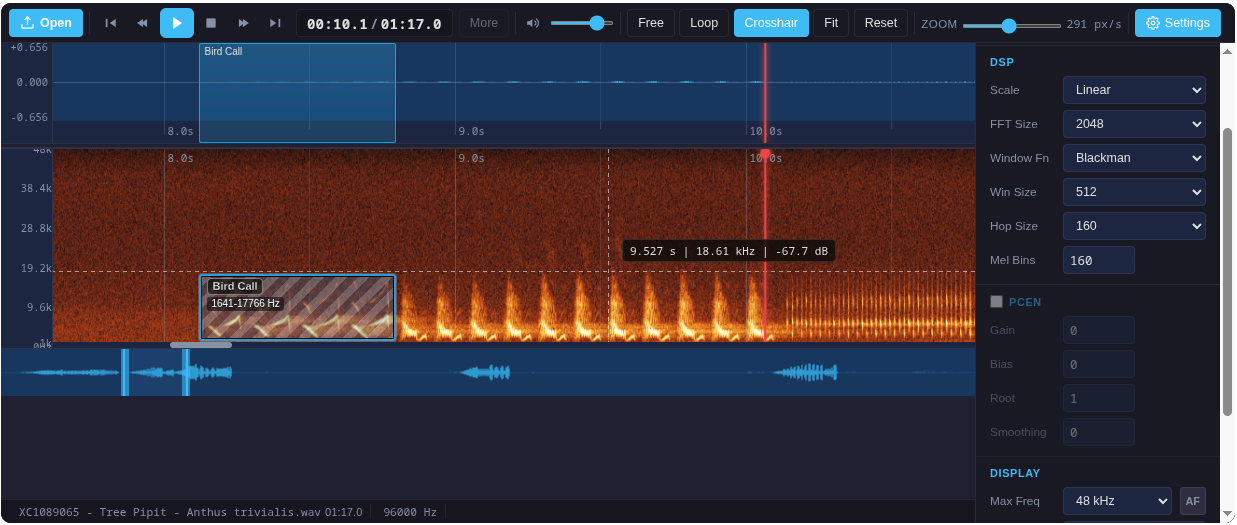


Python package to embed the SignaVis DAW player in Streamlit, Jupyter, Gradio, and any HTML-capable UI. Supports waveform & spectrogram visualization, annotation, and custom player layouts.
Live demo: https://limitlessgreen.github.io/SignaVis/
Installation
pip install signavis
Optional for demos:
pip install "signavis[streamlit]"
pip install "signavis[gradio]"
Example: Load and Display Your Own Audio
You can load your own audio file (WAV, MP3, etc.) and display it as a spectrogram or waveform in any supported environment. Just read the file as bytes and pass it to render_daw_player:
Jupyter Notebook:
from signavis import render_daw_player

with open("your_audio.wav", "rb") as f:
    audio_bytes = f.read()

html = render_daw_player(audio_bytes, viewMode="spectrogram")

# Display in Jupyter:
from IPython.display import HTML
HTML(html)
Streamlit:
import streamlit as st
from signavis import render_daw_player
import streamlit.components.v1 as components

uploaded = st.file_uploader("Choose an audio file", type=["wav", "mp3", "ogg", "flac"])
if uploaded is not None:
    html = render_daw_player(uploaded.read(), viewMode="spectrogram")
    components.html(html, height=620, scrolling=False)
You can use all other options as described above to customize the player.
Quickstart
Embed a DAW player for your own audio in Streamlit, Jupyter, or any HTML UI:
from signavis import render_daw_player
html = render_daw_player(
        audio_bytes,  # bytes (WAV/MP3)
        viewMode="spectrogram",   # 'both' | 'waveform' | 'spectrogram'
        transportStyle="hero",    # 'default' | 'hero'
        showOverview=False,        # Hide overview navigator
        showFileOpen=False,        # Hide file open button
        showStatusbar=False,       # Hide status bar
        labelTaxonomy=[{"name": "Species", "color": "#0ea5e9"}],
        # ...any other BirdNETPlayer option
)
Display in Streamlit:
import streamlit.components.v1 as components
components.html(html, height=620, scrolling=False)
Display in Jupyter:
from IPython.display import HTML
HTML(html)
Player Options
| Option | Example | Description |
|---|---|---|
viewMode |
'spectrogram' |
Show only the spectrogram |
transportStyle |
'hero' |
Large centered play button |
showOverview |
False |
Hide overview navigator |
showFileOpen |
False |
Hide file open button |
showStatusbar |
False |
Hide status bar |
labelTaxonomy |
[{'name': 'Species', 'color': '#0ea5e9'}] |
Custom label presets |
iframe_height |
320 |
Set iframe height (default: 620) |
For all options, see the Web API docs.
Presets & Layouts
The package includes several ready-to-use presets (see demo_streamlit.py):
- Full DAW: All controls, waveform & spectrogram, annotation
- Compact: Minimal controls, no overview/statusbar
- Preview Waveform Hero: Large play button, waveform only
- Preview Spectrogram Hero: Large play button, spectrogram only
- Ultra Compact Hero: Smallest possible embed
You can combine or override any option for your use case.
Advanced: Custom Spectrograms
You can inject your own pre-computed spectrogram data or images:
spectrogram_data: 2D numpy array (nFrames × nMels, float32)spectrogram_image: PNG/JPEG bytes, data-URL, matplotlib Figure, PIL Image, or numpy uint8 array
See the Web API for details.
Demos
Streamlit:
streamlit run demo_streamlit.py
Gradio:
pip install gradio
python demo_gradio.py
Google Colab:

Try the interactive notebook demo directly in your browser—no setup required!
License
GNU AGPL-3.0


Download files
Download the file for your platform. If you're not sure which to choose, learn more about installing packages.
Source Distribution
Built Distribution
Filter files by name, interpreter, ABI, and platform.
If you're not sure about the file name format, learn more about wheel file names.
Copy a direct link to the current filters






