
Hunt for C2 beacons, DNS anomalies, and cloud-account weirdness in your own logs - no SIEM, no agents.

Project description
sigwood

sigwood is a local-first command-line threat-hunting workbench for self-hosters. You point it at the logs you already have - Zeek, Pi-hole/dnsmasq, syslog, CloudTrail - and it tells you what's in them and runs transparent detectors over them: beaconing, suspicious DNS, port scans, rare syslog events, abnormally long connections, and unusual CloudTrail activity. Every run names the technique behind each detector, so you always know whether a finding came from a published algorithm or an honest heuristic.
Not a SIEM. Not an agent. Not magic. Nothing to deploy, no database, no daemon, no account. Install it, point it at a directory of logs, read the output. It runs on the admin's own box, over logs at rest.


Status: early / pre-1.0 (
0.1.0). The six detectors below work and are covered by tests, but interfaces may still move before 1.0. Feedback is welcome.
Docs: FAQ & how the detectors work · Roadmap · Known issues · Schemas
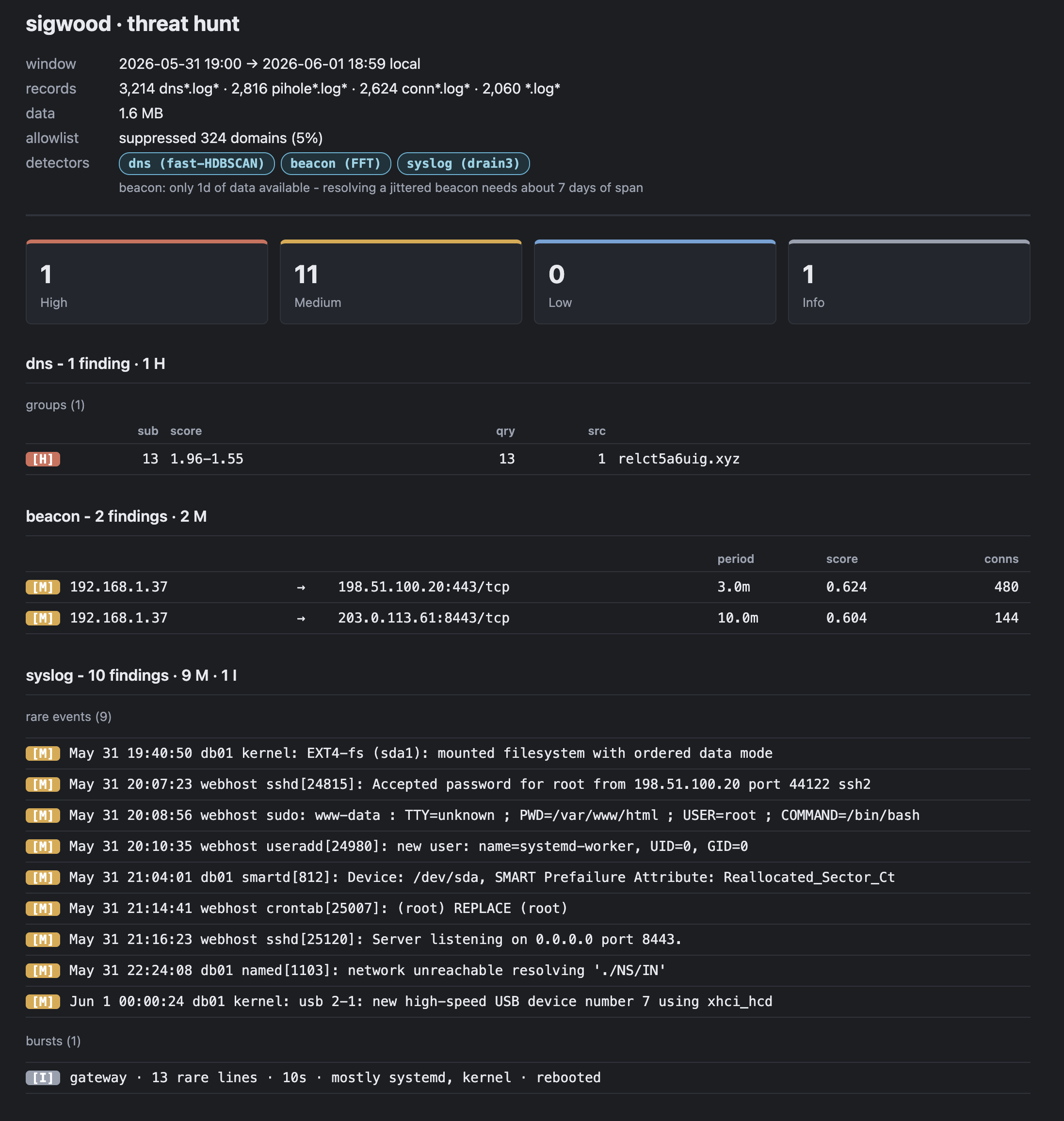
A run opens with a summary banner - what was loaded, and which technique each detector used - then groups findings by detector, rendered as plain text in your terminal (default) or in richer formats such as html. The output below is illustrative; addresses are RFC 5737 documentation space:

Quick start
pipx install sigwood        # or pip install sigwood in a venv - see Installation

# hunt across everything enabled in your config
sigwood hunt

# or point at a directory / file directly (the path is the intent)
sigwood ~/zeek-logs
sigwood syslog /var/log

# orient before you hunt - a fast, factual profile of a single file
sigwood digest /var/log/messages

# one-time, detection-driven setup - finds your logs and writes a config
sigwood init
No config file is required to get started - sigwood <path> works against a directory or
a single file. sigwood init just makes it repeatable.
Why use sigwood?
- It runs where your logs are. No services, no database, no daemon, no agent to push.
pipx install sigwood, point it at a directory, get output. The only setup step that exists at all is optional:sigwood init, and that only writes plain text files under~/.sigwood/as a convenience. - Real methods, made visible. Beaconing is found with an FFT over connection timing; DNS with HDBSCAN clustering over per-query behavior; rare syslog events with drain3 log-templating plus rarity scoring; CloudTrail with a transparent per-principal z-score composite. Every run tells you which technique ran. You can read why something was surfaced - no black box.
- Big-tent ingestion. One tool reads Zeek (NDJSON and TSV, flat or date-partitioned
directories), Pi-hole/dnsmasq, flat RFC 3164 syslog (Debian and RHEL/Fedora layouts),
and CloudTrail. Rotation and
.gz/.bz2/.xzcompression are handled transparently. - Orient before you hunt.
sigwood digest FILEreads a log and reports facts about it - time span, top talkers, the shape of the mix - with zero verdicts. Tells you what's there so you know where to point the detectors. - Filter before analyze. A curated allowlist of known-harmless infrastructure ships on by
default and suppresses that noise before any detector sees the data - toggle any list off
by name, drop the whole thing with
--no-allowlist, or add your own. Your noise floor is yours to set; detectors never know it exists, and every run discloses how much it hid. - Honest output. Findings carry a severity, the evidence behind the score, and (with
-v/-vv) the analyst pivots to chase next. Pick the shape for the job: a report to read (text,html,pdf), a lossless feed to script against (json), or a worklist to triage from (csv).
What it hunts
| Detector | Surfaces | Method | Source |
|---|---|---|---|
beacon |
periodic C2-style callbacks | FFT over connection timing | Zeek conn.log |
dns |
DGA / tunneling / anomalous lookups | HDBSCAN clustering | Zeek dns.log or Pi-hole |
syslog |
rare events & reboots | drain3 templating + rarity | syslog (flat) or Zeek syslog.log |
scan |
vertical / horizontal / block / slow port scans | pattern (heuristic) | Zeek conn.log |
duration |
abnormally long-lived connections | heuristics | Zeek conn.log |
aws |
per-principal anomalous CloudTrail behavior | statistical (z-score composite) | CloudTrail *.json* (incl. .gz) |
dns and syslog each answer one question across two source families - Zeek and
Pi-hole for DNS, flat rsyslog and Zeek's own syslog.log for syslog - and adapt to whichever
fidelity they're handed.
Run them all (sigwood hunt), select some (sigwood hunt --detect=beacon,dns), or exclude
(sigwood hunt --detect='all,!syslog'). Each detector is also its own subcommand:
sigwood beacon ~/zeek.
sigwood and RITA / AC-Hunter
If you know RITA (or its commercial sibling
AC-Hunter), the beacon-hunting goal will look familiar - both hunt C2 in Zeek logs, and
RITA is excellent at it. sigwood differs in conception rather than ambition: there is no
database and no import step (it reads Zeek - and Pi-hole, syslog, and CloudTrail - in
place), it spans several log families rather than conn/dns alone, it ships an
orientation verb (digest) for logs you haven't met yet, and it names the technique
behind every finding on the report itself. If you already run RITA against a dedicated
Zeek sensor, keep it - sigwood is for the box where the logs already live and the
analyst who wants one lightweight tool across all of them.
How a run works
discover & parse → allowlist (suppress) → detect → render
Responsibilities don't bleed across that line. The loader finds files, decompresses, normalizes every connection source to one canonical schema, and absorbs storage variation (TSV vs. NDJSON, flat vs. dated directories, rotation). The allowlist suppresses known-good traffic before analysis. Detectors only analyze - they never open files, read config, or suppress. Output handlers only render. The CLI is the one place that turns an error into an actionable message and owns the exit code.
Because detectors are pure analysis, every one is importable and callable as an ordinary Python function - useful in a notebook when you want to experiment.
Analysis window
Pointed at a directory, an unqualified run looks back over the last default_window
(7d out of the box) of that source's own data - the right default for a live log dir
you don't want to read in full every time. Pointed at a single file, it reads the whole
file. Override either way:
sigwood --since=7d ~/zeek            # last 7 days
sigwood --since=2026-05-01 --until=2026-05-08 ~/zeek
sigwood --days=2-4 ~/zeek            # 2 to 4 days ago
sigwood --all ~/zeek                 # the entire archive
CloudTrail is the one source that opts out of the default window - novelty detection needs full history, so it always loads in full unless you narrow it explicitly.
Times render in your local timezone and are labeled as such. Pass --utc (or set
use_utc = true in config) to render in UTC instead - the setting also reads offset-less
--since/--until dates and --days day boundaries as UTC, and export's no-timeframe
default window follows it. A date with an explicit offset (--since=2026-05-01T09:00+02:00)
is always honored as written. json output is always ISO-8601 UTC either way.
Orient before the hunt: digest
sigwood digest /var/log/messages
sigwood digest /var/log/pihole/pihole.log   # a great first move on a Pi-hole box
sigwood digest conn.log dns.log             # several files → several cards
digest content-sniffs each file, routes it to the right summarizer (conn, dns, syslog,
cloudtrail), and falls back to a fast byte-profiler - blob - for anything it doesn't
recognize. A card is flush-left and factual: the file's time window, line count and size, a
scale-anchored histogram, and a handful of plain-language insights ("one client accounts for
71% of queries"). It states facts and superlatives, never verdicts - no "suspicious," no
"anomalous." It reads your data before the allowlist, because everything in the file,
allowlisted or not, is part of "what's in here." The blob profiler is bounded: it samples a
big file rather than reading it, so a one-gigabyte mystery file costs the same as a
one-kilobyte one.
Installation
One name everywhere: the PyPI distribution, the command, the import package, and the
config section are all sigwood. Requires Python 3.11+.
The recommended install is pipx, which gives sigwood its own
isolated environment and puts the command on your PATH - and sidesteps the
externally-managed-environment refusal (PEP 668) that a bare pip install hits on
Debian 12+, Raspberry Pi OS, Ubuntu 23.04+, and Fedora:
Debian / Raspberry Pi OS / Ubuntu
sudo apt install pipx
pipx ensurepath              # once - then reopen your shell
pipx install sigwood
sigwood --help
Fedora
sudo dnf install pipx
pipx ensurepath
pipx install sigwood
sigwood --help
macOS (Homebrew)
brew install pipx
pipx ensurepath
pipx install sigwood
sigwood --help
Prefer uv? uv tool install sigwood does the same job on
any platform uv supports. A plain virtualenv also works
(python3 -m venv venv && venv/bin/pip install sigwood; a minimal Debian may need
sudo apt install python3-venv first). What to avoid: sudo pip install - it does not
bypass PEP 668, and it pollutes the system Python either way. Upgrade with
pipx upgrade sigwood (or pip install -U sigwood in your venv).
Optional extras (same spelling under pipx or pip):
pipx install 'sigwood[all]'           # fast + splunk + cloudtrail (recommended)
pipx install 'sigwood[splunk]'        # Splunk exporter
pipx install 'sigwood[cloudtrail]'    # CloudTrail (S3) exporter
pipx install 'sigwood[fast]'          # force fast-hdbscan for DNS clustering
pipx install 'sigwood[hdbscan]'       # stock hdbscan for DNS clustering
pipx install 'sigwood[pdf]'           # PDF reports - opt-in, see note below
A bare install works without a C compiler on the platforms people run this on. On 64-bit machines (x86-64 and
aarch64/arm64, including 64-bit Raspberry Pi OS) sigwood installs fast-hdbscan from
pure wheels; on 32-bit ARM (armv7l/armv6l) it keeps stock hdbscan from piwheels. The
tool names the active clustering backend on every run that includes the dns detector. Expect the first run on a
small box to be slow: the scientific stack's cold import plus a one-time numba JIT
warm-up can take a couple of minutes on a Raspberry Pi, both cached on disk - every run
after is fast. [fast] remains a stable way to force fast-hdbscan, and [hdbscan]
installs stock hdbscan (used on 32-bit ARM and available for calibration/testing on
64-bit). If both backends are present, sigwood prefers fast-hdbscan.
[pdf] is deliberately separate from [all] because it needs two things: the python package
(pip install 'sigwood[pdf]') AND the native text libraries WeasyPrint renders with
(Pango, HarfBuzz, fontconfig), which pip can't install. Add those with your platform's package
manager - brew install pango on macOS, apt install libpango-1.0-0 (or dnf install pango)
on Linux. Every other format works with no extra setup.
From source:
git clone https://github.com/helixmap/sigwood
cd sigwood
pip install -e '.[all]'
Configuration
Configuration is optional - sigwood runs against a path with none. When you want it
repeatable, sigwood init looks at the conventional locations on your box, profiles what
it finds (which log families, rough size, freshness - reading only enough of a file to recognize its format, never its contents),
and writes an annotated config under ~/.sigwood/ (or /etc/sigwood for a system-wide
install). Re-run it any time: it offers to merge into an existing config (each prompt shows
what you've already set - hit Enter to keep it; merge never clobbers settings you already
have) or reset it, and either way it shows a summary of what will change before it writes
anything.
Config is loaded from the first of:
--config=FILE~/.sigwood/config.toml/etc/sigwood/config.toml
Everything sigwood owns lives under the hidden ~/.sigwood/ - config, allowlists,
exports, reports - so it can't collide with a project directory. A trimmed example:
[sigwood]
detect     = "all"                 # "all" | "dns,beacon" | "all,!syslog"
zeek_dir   = "/var/log/zeek"
syslog_dir = "/var/log"
# pihole_dir     = "/var/log/pihole"
# cloudtrail_dir = "/var/log/cloudtrail"

home_net       = ["10.0.0.0/8", "172.16.0.0/12", "192.168.0.0/16"]
default_window = "7d"              # lookback for a directory; "" or "all" = full
output_format  = "text"           # text | json | csv | html | pdf
Findings print to your terminal by default - keep it pipeable. Set report_dir (or pass
--out=PATH) to write report files instead. Every tunable a detector exposes is documented
as a commented "engine room" at the bottom of the generated config (you rarely need it), and
sigwood <detector> --help lists that command's flags.
Log sources it speaks
- Zeek -
conn.log,dns.log,syslog.log, in NDJSON or TSV, from a flat directory or date-partitioned subdirectories. Rotation and gzip/bzip2/xz compression are transparent. - Pi-hole / dnsmasq - DNS event logs, aggregated per domain for clustering.
- syslog - flat RFC 3164. Discovery is content-sniffed, not filename-matched, so it
handles both the Debian convention (
syslog,auth.log,kern.log) and the RHEL/Fedora one (extensionlessmessages,secure,maillog) - and won't mistakednf.logor a binary likewtmpfor a log stream. - CloudTrail - gzipped JSON event records, read locally or pulled from S3 (below).
The allowlist
sigwood filters before it analyzes: known-harmless traffic is dropped before any detector sees it, so signal isn't buried in plumbing. Two kinds of allowlist file:
- Flat files = suppression. One rule per line - an IP, a CIDR, a
:port/proto, or a domain glob/regex. Matching traffic is dropped before any detector runs. - TOML stanzas = classification. When a detector needs to know what something is (a nameserver, a backup client) rather than whether to drop it.
sigwood ships three curated domain lists, toggled by name:
| list | default | covers |
|---|---|---|
common |
on | broad internet infrastructure - CDNs, cloud, NTP, certificate validation, public DNS, OS update channels |
devices |
on | consumer IoT / smart-home phone-home |
homelab |
off | self-hosted tooling (Splunk, Proxmox, UniFi, …) - opt-in, since suppressing a product you run is a real blind spot |
Nothing ad-, tracking-, or destination-specific ships - opinions differ and you may want to see those. sigwood never ships numeric connection suppressions (those depend on your hosts, and shipping them could hide real findings).
Inspect and manage it with the allowlist verb:
sigwood allowlist                 # what's loaded, each list's on/off state and size
sigwood allowlist show common     # the patterns in a list
sigwood allowlist enable homelab  # turn a shipped list on (writes [allowlist.lists])
sigwood allowlist disable common  # …or off
sigwood allowlist copy common     # fork a shipped list into your allowlist.d to edit
Toggles can also be set directly under [allowlist.lists] in your config; the whole allowlist
turns off for one run with --no-allowlist or permanently with enabled = false. Every detect
run discloses its coverage on the run-summary banner (allowlist: suppressed 1,284 connections (12%) and 312 domains (59%) - the share of loaded rows suppressed, per kind, so a surprising
suppression rate is visible at a glance), so suppression is never silent.
Add your own in any domains_* under ~/.sigwood/allowlist.d/ (the shipped
domains_user is a starter). Drop-ins are always additive and survive upgrades; to
replace a shipped list, disable it and add your own. Drop-ins carry no extension, so a
dotted copy like domains_user.bak won't load (the readout nudges you to rename it); to park
a retired list quietly, add a trailing ~ or drop the domains_/connections_ prefix. A malformed regex line is skipped with a
notice naming its file and line, not a crash, so one typo can't take down a run or silently
disable the rest of a list. A bare host IP with no port suppresses
all traffic involving that host - powerful but dangerous, and called out as such wherever it
appears.
Pulling logs in: exporters
sigwood can fetch logs from external systems to local files, which it then analyzes like any other source - the syslog detector can't tell whether the data came from rsyslog or a Splunk export.
sigwood export splunk            # run the configured "default" query
sigwood export splunk auth       # run the configured named query: "auth"
sigwood export cloudtrail        # pull logs from S3
- Splunk - named SPL queries under
[export.splunk.query.<name>]. It's preferred to use theSIGWOOD_SPLUNK_USER/SIGWOOD_SPLUNK_PASSenvironment variables over plaintext credentials in config, but sigwood will not judge you. - CloudTrail - pulls gzipped JSON from an S3 prefix. AWS authentication is not handled here: you authenticate your shell, and boto3 resolves the ambient credential chain. sigwood never reads, stores, or prompts for AWS credentials, and warns before a large egress.
Output formats
Choose by what you're doing with the findings - --format=NAME (or set output_format in
config):
text(default) - a grouped, summarized report for the terminal, with a per-detector table of the signals behind each finding.html- the same report, with the same per-detector signal tables, as a self-contained styled file you can open in a browser, print, or share. No extra dependencies; dark mode and print styles included.pdf- the html report rendered to PDF (one renderer, two outputs). Opt-in:pip install 'sigwood[pdf]', plus the native text libraries (Pango/HarfBuzz/fontconfig- see the install note above). A wide report prints landscape, and wide cells wrap rather than clip.
json- the lossless machine feed: a single object withrun_summaryandfindings, correctly typed forjqor a SIEM, always the full set. Carries aschema_version.csv- a remediation worklist: one row per finding with the next-steps, the "why", and emptystatus/notescolumns to track as you knock items down.
text, html, and pdf are reading views - they show the same content and honor -v (the
curated "why it scored") and -vv (raw debug: template strings, cluster membership, full
evidence). json and csv always carry the full set.
Where it goes. Every text format - including html - prints to stdout by default; redirect
or pipe to save (sigwood dns -f=html > report.html). pdf is binary, so it needs a
destination: a pipe (-f=pdf > report.pdf) or a file. Set --out=PATH or report_dir to write
files; a directory target auto-names sigwood-report_<detector>_<date> (a single detector, else
<first>-plusN) and reports the path it wrote. -o=- forces stdout even when report_dir is
set.
Building from source & running tests
git clone https://github.com/helixmap/sigwood
cd sigwood
pip install -e '.[dev]'
python -m pytest
main is kept runnable. Architecture tests cover the boundaries that matter - detector
discovery, run planning, loader metadata, allowlist suppression, output registration, and
CLI error formatting.
Acknowledgments
sigwood's mathematics-based detection - FFT for beacon periodicity, unsupervised clustering for DNS behavior - was inspired by David Hoelzer's SANS SEC595. The techniques themselves (FFT, HDBSCAN, drain3) are public-domain mathematics and open-source libraries; this implementation is independent and original, and any errors are mine. sigwood is not affiliated with or endorsed by SANS or GIAC.
License
sigwood is licensed under the MIT License.
Release history Release notifications | RSS feed


Download files
Download the file for your platform. If you're not sure which to choose, learn more about installing packages.
Source Distribution
Built Distribution
Filter files by name, interpreter, ABI, and platform.
If you're not sure about the file name format, learn more about wheel file names.
Copy a direct link to the current filters
File details
Details for the file sigwood-0.1.0.tar.gz.
File metadata
- Download URL: sigwood-0.1.0.tar.gz
- Upload date:
- Size: 699.4 kB
- Tags: Source
- Uploaded using Trusted Publishing? No
- Uploaded via: twine/6.2.0 CPython/3.11.15
File hashes
| Algorithm | Hash digest | |
|---|---|---|
| SHA256 |
f53b7aea73a23f1e06fef3f34aff31846f36f893f5b962c9fa3e59fba034b63d
|
|
| MD5 |
0ac7264b3d1b71f6d752080eca6c2124
|
|
| BLAKE2b-256 |
c4aa36e1381711d65d6305d391e20081589f9441cc9bdb83e02bc3484aeb2401
|
File details
Details for the file sigwood-0.1.0-py3-none-any.whl.
File metadata
- Download URL: sigwood-0.1.0-py3-none-any.whl
- Upload date:
- Size: 352.9 kB
- Tags: Python 3
- Uploaded using Trusted Publishing? No
- Uploaded via: twine/6.2.0 CPython/3.11.15
File hashes
| Algorithm | Hash digest | |
|---|---|---|
| SHA256 |
d64919f49d7b00d963b08ad81302c052c7af19a7b03ab744ede6d3bb0cdb3fa2
|
|
| MD5 |
db5aefd3f2d968ba1c5056731abb3336
|
|
| BLAKE2b-256 |
40f8064f9854229ecd270590e98de152cec53aea9b39d794b43b6397fcbd4594
|






