
SiliconSuite-SymbolGenerator
Generate symbol schematics for hardware IP cores.
Installation
To install the package using pip, run the following command:
pip install siliconsuite-symbol-generator
Example
The tool takes a symbol descriptor file in a custom format as input. The first line is the title, it should be the human readable name of the component. The second line is the subtitle, it should be the programming name of the component. All the other lines describe ports.
Each port has a label (without spaces) and is characterized by an arrow. The arrow comes before the label for the ports on the left side, and the opposite for the right side. The arrow direction indicates the direction of the port (input or output), and the line indicates the bus type (- for a single bit and = for multi-bit). An optional secondary label can be added on the port line by specifying it within square brackets [...] between two line characters, this is expected to indicate the width of the signal. On each line of the file, there can be ports on either sides, both, or neither to jump a line.
Here is an example of a simple symbol descriptor file named simple_buffer.sss :
Simple Buffer
valid_ready_simple_buffer
-----------> clock
-----------> resetn
==[WIDTH]==> write_data     read_data ==[WIDTH]==>
-----------> write_valid   read_valid ----------->
<----------- write_ready   read_ready <-----------
<----------- empty               full ----------->
To generate the symbol schematic from this descriptor file, run the following command in your terminal. Note that you can use the --scale argument to apply a scaling factor to the whole schematic. A scaling factor of 2 to 4 is recommended for most usecases.
symbol-generator simple_buffer.sss --scale 2
This will create the following SVG file named simple_buffer.svg :
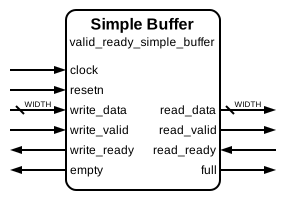
Note that if you view this readme in a website or application that doesn't support dark mode correctly (such as PyPI), the example diagram might not be visible. Dark mode support can be disabled when generating the diagram (see section below).
If multiple files are provided (with a list or a wildcard pattern), each descriptor will be processed individually and rendered in the corresponding location.
The tool also generates a DrawIO symbol that differs slightly from the SVG :

Theme
The visual appearance of the generated symbol (e.g., padding, font sizes, arrow dimensions, colors) can be customized through a YAML theme file. The tool comes with a default theme (default_theme.yaml) located within the package.
You can create your own theme file and specify only the settings you want to change. Any settings omitted from your custom theme file will retain their values from the default theme. Use the --theme or -t command-line argument to specify your custom theme file:
symbol-generator input.sss --theme path/to/your/theme.yaml
The theme file can also contain target specific attributes that overwrite the root ones by putting them in a svg: or drawio: section.
Refer to the default_theme.yaml file in the package source for the available options and their structure.
Dark mode
By default, the SVG symbol will be generated with a CSS style that automatically inverts the luminance of all colors when the SVG is viewed in dark mode. This can be disabled by passing the command-line argument --no-dark-mode.
Transparent background
For certain applications, it is desirable that the background of the box be transparent. The command-line argument --no-background overrides the theme and sets the box background to transparent.
1 maintainer

Metadata
1 maintainer
Release files for siliconsuite-symbol-generator 1.5.1
For a detailed explanation of source distributions (sdists) and built distributions (wheels), please see the package formats documentation.
Source distribution (sdist)
| File | Size | Uploaded | Provenance | Actions |
|---|---|---|---|---|
| siliconsuite_symbol_generator-1.5.1.tar.gz | 93.1 kB | Without provenance | Details for siliconsuite_symbol_generator-1.5.1.tar.gz |
Built distribution (wheel)
| File | Interpreter | ABI | Platform | Actions Reset |
|---|---|---|---|---|
| siliconsuite_symbol_generator-1.5.1-py3-none-any.whl | Python 3 | none | any | Details for siliconsuite_symbol_generator-1.5.1-py3-none-any.whl |
Total release size: 215.5 kB
Release files / siliconsuite_symbol_generator-1.5.1.tar.gz
| Download URL | siliconsuite_symbol_generator-1.5.1.tar.gz |
|---|---|
| Size | 93.1 kB |
| Tags | Source |
|
SHA-256 checksum How to use checksums |
f1b42580a5eab546b983d7558a560abade8f39d9cfc481b81585d9882cdb312c
|
|
BLAKE2b-256 checksum How to use checksums |
da9f4846e6808f10ae576327f5a8209fc3cac46865f7d10a644895f570529c7a
|
| Upload date | |
|
Uploaded using Trusted Publishing? What is trusted publishing? |
No |
| Uploaded via |
twine/6.1.0 CPython/3.13.1
|
Release files / siliconsuite_symbol_generator-1.5.1-py3-none-any.whl
| Download URL | siliconsuite_symbol_generator-1.5.1-py3-none-any.whl |
|---|---|
| Size | 122.4 kB |
| Tags | Python 3 |
|
SHA-256 checksum How to use checksums |
6ed40eb31149939119e4151409b7891de49a0e7dc8182400a3cf8f67c56c95f6
|
|
BLAKE2b-256 checksum How to use checksums |
97e9738ae1284d4c08c9ada101cf6e4a13145e6860fedae4b2a910762db5a029
|
| Upload date | |
|
Uploaded using Trusted Publishing? What is trusted publishing? |
No |
| Uploaded via |
twine/6.1.0 CPython/3.13.1
|
Security for siliconsuite-symbol-generator 1.5.1
Provenance
Provenance describes where a file came from. On PyPI, provenance is shared via attestations, which provide a verifiable record of the build or publishing details. View details, limitations and caveats.
No provenance found
None of the files in this release were uploaded with provenance metadata.
A note on package security
PyPI is a repository for distributing packages, not a service for auditing them. While third-party security researchers and our staff do their best to detect and remove malicious packages, PyPI cannot guarantee the quality, security or suitability of any given package.
To learn more about protecting yourself from malicious actors, visit our package security documentation.














