
Generate symbol schematics for hardware IP cores.

Project description
SiliconSuite-SymbolGenerator
Generate symbol schematics for hardware IP cores.
Installation
To install the package using pip, run the following command:
pip install siliconsuite-symbol-generator
Example
The tool takes a symbol descriptor file in a custom format as input. The first line is the title, it should be the human readable name of the component. The second line is the subtitle, it should be the programming name of the component. All the other lines describe ports.
Each port has a label (without spaces) and is characterized by an arrow. The arrow comes before the label for the ports on the left side, and the opposite for the right side. The arrow direction indicates the direction of the port (input or output), and the line indicates the bus type (- for a single bit and = for multi-bit). On each line, there can be ports on either sides, both, or neither to jump a line.
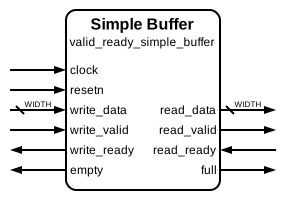
Here is an example of a simple symbol descriptor file named simple_buffer.sss :
Simple Buffer
valid_ready_simple_buffer
-> clock
-> resetn
<- empty               full ->
=> write_data     read_data =>
-> write_valid   read_valid ->
<- write_ready   read_ready <-
To generate the symbol schematic from this descriptor file, run the following command in your terminal. Note that you can use the --scale argument to apply a scaling factor to the whole schematic. A scaling factor of 3 or 4 is recommended for most usecases.
symbol-generator simple_buffer.sss --scale 4
This will create the following SVG file named simple_buffer.svg :
Theme
The visual appearance of the generated symbol (e.g., padding, font sizes, arrow dimensions, colors) can be customized through a YAML theme file. The tool comes with a default theme (default_theme.yaml) located within the package.
You can create your own theme file and specify only the settings you want to change. Any settings omitted from your custom theme file will retain their values from the default theme. Use the --theme or -t command-line argument to specify your custom theme file:
symbol-generator input.sss --theme path/to/your/theme.yaml
Refer to the default_theme.yaml file in the package source for the available options and their structure.
Release history Release notifications | RSS feed


Download files
Download the file for your platform. If you're not sure which to choose, learn more about installing packages.
Source Distribution
Built Distribution
Filter files by name, interpreter, ABI, and platform.
If you're not sure about the file name format, learn more about wheel file names.
Copy a direct link to the current filters
File details
Details for the file siliconsuite_symbol_generator-1.1.0.tar.gz.
File metadata
- Download URL: siliconsuite_symbol_generator-1.1.0.tar.gz
- Upload date:
- Size: 88.8 kB
- Tags: Source
- Uploaded using Trusted Publishing? No
- Uploaded via: twine/6.1.0 CPython/3.11.0
File hashes
| Algorithm | Hash digest | |
|---|---|---|
| SHA256 |
4ae972af173825a0910338a743a271c0b859a6b1ac9bb24682dbe977dbf189c9
|
|
| MD5 |
9bf9adc0e02f2388c7fac47baa478e31
|
|
| BLAKE2b-256 |
b005678a37c2b44d88c5a81bcee17e6ec80e64eeda9a8b7345569b82b17901ec
|
File details
Details for the file siliconsuite_symbol_generator-1.1.0-py3-none-any.whl.
File metadata
- Download URL: siliconsuite_symbol_generator-1.1.0-py3-none-any.whl
- Upload date:
- Size: 118.2 kB
- Tags: Python 3
- Uploaded using Trusted Publishing? No
- Uploaded via: twine/6.1.0 CPython/3.11.0
File hashes
| Algorithm | Hash digest | |
|---|---|---|
| SHA256 |
e7346ca89a0988516e803715dd61e3c44c45f519ca5bada5241d50829f182af3
|
|
| MD5 |
93e97a2e956c84fd260972332563ccef
|
|
| BLAKE2b-256 |
e3e61342722ed4eb7347553a20928a35ec25dac87edd064e9e0fe3fe75124ea9
|






