
simple-proxy :rocket:



A very simple TCP proxy tool empowered by nio tcp framework py-netty
There is a simple traffic control mechenism between 2 segments of TCP connection:
USER <---------> simple-proxy <---------> REAL SERVER
          |                         |
          |---- traffic control ----|
Installation
pip install simple-proxy -U
Usage
Usage: simple-proxy [OPTIONS]

Options:
  Common configuration:           Configuration for local/remote
                                  endpoints
    -l, --listening-host TEXT     Listening server address
                                  [default: localhost]
    -lp, -p, --listening-port INTEGER
                                  Listening port  [default: 8080]
    -g, --global                  Listening on all interfaces
    -r, --remote-host TEXT        Remote host  [default: localhost]
    -rp, --remote-port INTEGER    Remote port  [default: 80]
    -s, --tls                     Denote remote is listening on
                                  secure port
    -ss                           Listening on secure port
  TCP proxy configuration:        Configuration for TCP proxy mode
    --read-delay-millis INTEGER   Read delay(ms)  [default: 0]
    --write-delay-millis INTEGER  Write delay(ms)  [default: 0]
    -sni, --server-name-indication TEXT
                                  Server Name Indication(SNI) for
                                  TLS connection to remote server
  Thread configuration:           Configuration for thread
    --workers INTEGER             Number of worker threads
                                  [default: 1]
    --proxy-workers INTEGER       Number of proxy threads  [default:
                                  1]
  Traffic dump configuration:     Configuration for traffic dump
    -c, --tcp-flow                Dump traffic/request details to console
    -f, --save-tcp-flow           Save tcp flow to file
  TLS certificate configuration:
                                  Configuration for TLS certificate
    -kf, --key-file PATH          Key file for local server
    -cf, --cert-file PATH         Certificate file for local server
    --alpn                        Set ALPN protocol as [h2,
                                  http/1.1]
  Traffic monitor configuration:
                                  Configuration for traffic monitor
    -m, --monitor                 Print speed info to console for
                                  established connection
    -mi, --monitor-interval INTEGER
                                  Speed monitor interval(seconds)
                                  [default: 3]
  TLS Disguise configuration:     Configuration for protection
                                  against unwanted inspection
    -dti, --disguise-tls-ip TEXT  Disguised upstream TLS IP
    -dtp, --disguise-tls-port INTEGER
                                  Disguised upstream TLS port
                                  [default: 443]
    --run-disguise-tls-server     Run builtin disguise TLS server
                                  without specifying external one
    -wl, --white-list TEXT        IP White list for legal incoming
                                  TLS connections (comma separated)
  File server configuration:      Configuration for file server mode
    --file-server                 Run as file server
    -d, --directory DIRECTORY     Directory to serve  [default: .]
  Proxy configuration:            Configuration for application
                                  proxies
    -e, --echo-proxy              Run as Echo server
    --shell-proxy                 Run as shell proxy server
    --http-proxy                  Run as HTTP proxy server
    --http-stub                   Run as HTTP stub server
    --socks5-proxy                Run as SOCKS5 proxy server
    --proxy-username TEXT         Proxy username for HTTP/SOCKS5
                                  proxy
    --proxy-password TEXT         Proxy password for HTTP/SOCKS5
                                  proxy
    -t, --proxy-transform <TEXT INTEGER TEXT INTEGER>...
                                  List of target
                                  transformations(origin_host,
                                  origin_port, transformed_host,
                                  transformed_port) for HTTP/SOCKS5
                                  proxy
  Misc configuration:
    -v, --verbose
    --log-file PATH               Log file
    --internal-socks5-host TEXT   [Internal] SOCKS5 proxy host
    --internal-socks5-port INTEGER
                                  [Internal] SOCKS5 proxy port
  --version                       Show the version and exit.
  -h, --help                      Show this message and exit.
Features
Basic proxy (TLS termination)
> simple-proxy --tls -r www.google.com -rp 443 -p 8080
Proxy server started listening: localhost:8080 => www.google.com:443(TLS) ...
console:False, file:False, disguise:n/a, whitelist:*
> curl -I -H 'Host: www.google.com'  http://localhost:8080
HTTP/1.1 200 OK
...
> simple-proxy -r www.google.com -rp 80 -p 8443 -ss
Proxy server started listening: localhost:8443(TLS) => www.google.com:80 ...
console:False, file:False, disguise:n/a, whitelist:*
> curl -I -H 'Host: www.google.com' -k https://localhost:8443
HTTP/1.1 200 OK
...
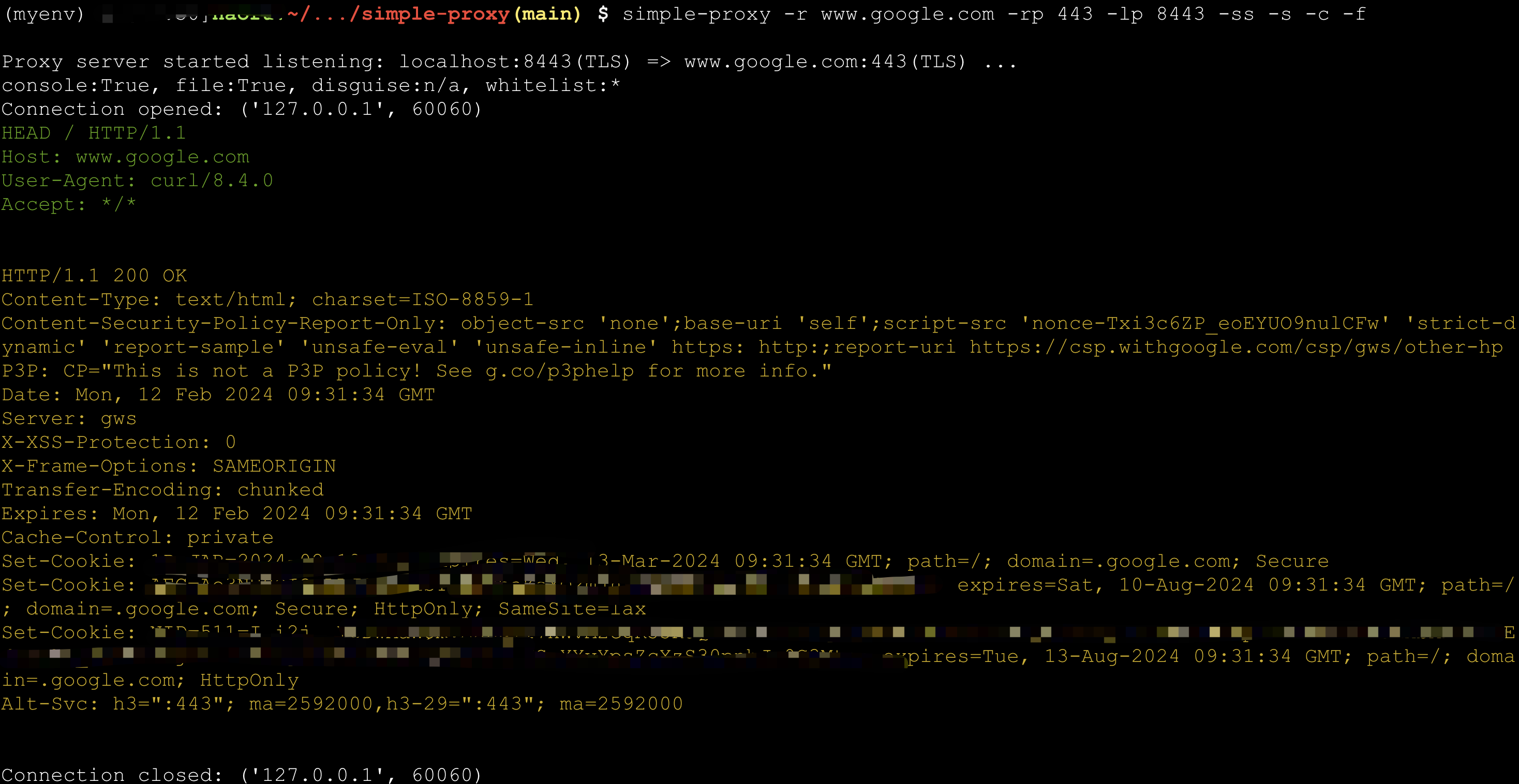
Dump TCP flow
TCP flow can be dumped into console or files (under directory tcpflow)
> simple-proxy -r www.google.com -rp 443 -p 8443 -ss -s -c -f
Proxy server started listening: localhost:8443(TLS) => www.google.com:443(TLS) ...
console:True, file:True, disguise:n/a, whitelist:*
> curl -k -I -H 'Host: www.google.com'  https://localhost:8443
Connection status monitor
> $ simple-proxy -r echo-server.proxy.com -rp 8080 -p 48080 -m
Proxy server started listening: localhost:48080 => echo-server.proxy.com:8080 ...
console:False, file:False, disguise:n/a, whitelist:*
Connection opened: ('127.0.0.1', 60937)
Connection opened: ('127.0.0.1', 60938)
Connection opened: ('127.0.0.1', 60939)
Connection opened: ('127.0.0.1', 60940)
Connection opened: ('127.0.0.1', 60941)
Connection opened: ('127.0.0.1', 60942)
Connection opened: ('127.0.0.1', 60943)
Connection opened: ('127.0.0.1', 60944)
---------------------------2024-02-12 17:43:02.337268 (total:8, rounds:1)---------------------------
[  1] | 127.0.0.1:60937       | Speed Rx:32.00 K/s  Tx:32.00 K/s  | Total Rx:235.00 K   Tx:235.00 K   | duration: 7s
[  2] | 127.0.0.1:60938       | Speed Rx:32.00 K/s  Tx:32.00 K/s  | Total Rx:235.00 K   Tx:234.00 K   | duration: 7s
[  3] | 127.0.0.1:60939       | Speed Rx:32.00 K/s  Tx:32.00 K/s  | Total Rx:235.00 K   Tx:234.00 K   | duration: 7s
[  4] | 127.0.0.1:60940       | Speed Rx:32.00 K/s  Tx:32.00 K/s  | Total Rx:235.00 K   Tx:234.00 K   | duration: 7s
[  5] | 127.0.0.1:60941       | Speed Rx:32.00 K/s  Tx:32.00 K/s  | Total Rx:235.00 K   Tx:234.00 K   | duration: 7s
[  6] | 127.0.0.1:60942       | Speed Rx:32.00 K/s  Tx:32.00 K/s  | Total Rx:234.00 K   Tx:234.00 K   | duration: 7s
[  7] | 127.0.0.1:60943       | Speed Rx:32.00 K/s  Tx:32.00 K/s  | Total Rx:234.00 K   Tx:234.00 K   | duration: 7s
[  8] | 127.0.0.1:60944       | Speed Rx:32.00 K/s  Tx:32.00 K/s  | Total Rx:234.00 K   Tx:234.00 K   | duration: 7s
Average Read Speed:  32765.0 bytes/s, Average Write Speed: 32752.88 bytes/s
Echo Server
> simple-proxy --as-echo-server
HTTP Proxy
You can set global envs http_proxy or https_proxy after http proxy server started.
> simple-proxy --http-proxy

> simple-proxy --http-proxy --proxy-username=test --proxy-password=test

> simple-proxy --http-proxy --proxy-transform www.google.com 443 man-in-middle.com 8443

# Use this when an application supports only HTTP proxy,
# but your upstream proxy is SOCKS5.
> simple-proxy --http-proxy --internal-socks5-host=localhost --internal-socks5-port=1080
HTTP Stub
Run an HTTP/1.x server that accepts any request and always returns 200 OK.
Requests are summarized on the console; add -c to include headers and up to
1 KiB of the request body.
> simple-proxy --http-stub -p 8080

> simple-proxy --http-stub -g -p 8080 -c

> simple-proxy --http-stub -ss -p 8443
File Server
Share the current directory over HTTP. Files can be downloaded from the
directory index, and /upload provides a browser upload page with progress.
The server listens on localhost by default; add -g to expose it on all
interfaces.
> simple-proxy --file-server

> simple-proxy --file-server -d /path/to/files -p 9000

> curl -F "file=@./example.txt" http://localhost:8080/upload
Use -ss to enable HTTPS. Supply both a certificate and key, or omit both to
use a temporary self-signed certificate:
> simple-proxy --file-server -ss -p 8443

> simple-proxy --file-server -ss -cf cert.pem -kf key.pem -p 8443

> curl -k -F "file=@./example.txt" https://localhost:8443/upload
SOCKS5 Proxy
You can set global envs https_proxy or https_proxy after socks5 proxy server startd.
> simple-proxy --socks5-proxy

> simple-proxy --socks5-proxy --proxy-username=test --proxy-password=test

> simple-proxy --socks5-proxy --proxy-transform www.google.com 443 man-in-middle.com 8443
Shell Proxy
Make shell accessible through TCP. Please run this mode with caution.
:warning: Stop the server as soon as you finish your work.
> simple-proxy --shell-proxy

# How to connect:
# socat file:`tty`,raw,echo=0 tcp:<server-ip>:<server-port> # for Bash proxy in Linux
# socat - tcp:<server-ip>:<server-port> # for cmd.exe proxy in Windows
Disguise as HTTPS server with whitelist
Any connection beyond whitelist will be served by a mock https server. Real service can thus be hided.
For example, you can protect your Scurrying Squirrel against attack from Grim Foolish Weasel.
> simple-proxy -rp 8388 -p 443 -g  --run-disguise-tls-server -wl=<your ip>,<your girlfriend's ip>,<your friend's girlfriend's ip>
# only you and your girlfriends can access :8388

> simple-proxy -rp 8388 -p 443 -g  --disguise-tls-ip=www.google.com --disguise-tls-port=443
# only non-https can access :8388, https traffic through :443 will be directed to google

1 maintainer

Metadata
1 maintainer
Release files for simple-proxy 1.0.6
For a detailed explanation of source distributions (sdists) and built distributions (wheels), please see the package formats documentation.
Source distribution (sdist)
| File | Size | Uploaded | |
|---|---|---|---|
| simple_proxy-1.0.6.tar.gz | 50.7 kB | Details |
Built distribution (wheel)
| File | Interpreter | ABI | Platform | Reset |
|---|---|---|---|---|
| simple_proxy-1.0.6-py3-none-any.whl | Python 3 | none | any | Details |
Total release size: 2.0 MB
Release files / simple_proxy-1.0.6.tar.gz
| Download URL | simple_proxy-1.0.6.tar.gz |
|---|---|
| Size | 50.7 kB |
| Tags | Source |
|
SHA-256 checksum How to use checksums |
9c006b86f442bdaa7cc412a6be0f0ea1f8b58d10549ca2bdd9490e1133754515
|
|
BLAKE2b-256 checksum How to use checksums |
e23865df51c12bd9eff8a142517b81e24d8f2e3ca89d13b258cd75d880ecb448
|
| Upload date | |
|
Uploaded using Trusted Publishing? What is trusted publishing? |
No |
| Uploaded via |
twine/6.2.0 CPython/3.12.10
|
Release files / simple_proxy-1.0.6-py3-none-any.whl
| Download URL | simple_proxy-1.0.6-py3-none-any.whl |
|---|---|
| Size | 1.9 MB |
| Tags | Python 3 |
|
SHA-256 checksum How to use checksums |
bcf4e50938a0e7813497a76362b802e3059e70387d6959dc89b8bc2627a2612b
|
|
BLAKE2b-256 checksum How to use checksums |
093bf89bcab3a9e785534144eb26d7d6709e3e598836f7c6283c904da21815ca
|
| Upload date | |
|
Uploaded using Trusted Publishing? What is trusted publishing? |
No |
| Uploaded via |
twine/6.2.0 CPython/3.12.10
|














