
simple-proxy :rocket:



A very simple TCP proxy tool empowered by nio tcp framework py-netty
There is a simple traffic control mechenism between 2 segments of TCP connection:
USER <---------> simple-proxy <---------> REAL SERVER
          |                         |
          |---- traffic control ----|
Installation
pip install simple-proxy -U
Usage
Usage: simple-proxy [OPTIONS]

Options:
  Common configuration:           Configuration for local/remote
                                  endpoints
    -l, --listening-host TEXT     Listening server address
                                  [default: localhost]
    -lp, -p, --listening-port INTEGER
                                  Listening port  [default: 8080]
    -g, --global                  Listening on all interfaces
    -r, --remote-host TEXT        Remote host  [default: localhost]
    -rp, --remote-port INTEGER    Remote port  [default: 80]
    -s, --tls                     Denote remote is listening on
                                  secure port
    -ss                           Listening on secure port
  TCP proxy configuration:        Configuration for TCP proxy mode
    --read-delay-millis INTEGER   Read delay(ms)  [default: 0]
    --write-delay-millis INTEGER  Write delay(ms)  [default: 0]
    -sni, --server-name-indication TEXT
                                  Server Name Indication(SNI) for
                                  TLS connection to remote server
  Thread configuration:           Configuration for thread
    --workers INTEGER             Number of worker threads
                                  [default: 1]
    --proxy-workers INTEGER       Number of proxy threads  [default:
                                  1]
  Traffic dump configuration:     Configuration for traffic dump
    -c, --tcp-flow                Dump traffic/request details to console
    -f, --save-tcp-flow           Save tcp flow to file
  TLS certificate configuration:
                                  Configuration for TLS certificate
    -kf, --key-file PATH          Key file for local server
    -cf, --cert-file PATH         Certificate file for local server
    --alpn                        Set ALPN protocol as [h2,
                                  http/1.1]
  Traffic monitor configuration:
                                  Configuration for traffic monitor
    -m, --monitor                 Print speed info to console for
                                  established connection
    -mi, --monitor-interval INTEGER
                                  Speed monitor interval(seconds)
                                  [default: 3]
  TLS Disguise configuration:     Configuration for protection
                                  against unwanted inspection
    -dti, --disguise-tls-ip TEXT  Disguised upstream TLS IP
    -dtp, --disguise-tls-port INTEGER
                                  Disguised upstream TLS port
                                  [default: 443]
    --run-disguise-tls-server     Run builtin disguise TLS server
                                  without specifying external one
    -wl, --white-list TEXT        IP White list for legal incoming
                                  TLS connections (comma separated)
  File server configuration:      Configuration for file server mode
    --file-server                 Run as file server
    -d, --directory DIRECTORY     Directory to serve  [default: .]
  Proxy configuration:            Configuration for application
                                  proxies
    -e, --echo-proxy              Run as Echo server
    --shell-proxy                 Run as shell proxy server
    --http-proxy                  Run as HTTP proxy server
    --http-stub                   Run as HTTP stub server
    --socks5-proxy                Run as SOCKS5 proxy server
    --proxy-username TEXT         Proxy username for HTTP/SOCKS5
                                  proxy
    --proxy-password TEXT         Proxy password for HTTP/SOCKS5
                                  proxy
    -t, --proxy-transform <TEXT INTEGER TEXT INTEGER>...
                                  List of target
                                  transformations(origin_host,
                                  origin_port, transformed_host,
                                  transformed_port) for HTTP/SOCKS5
                                  proxy
  Misc configuration:
    -v, --verbose
    --log-file PATH               Log file
    --internal-socks5-host TEXT   [Internal] SOCKS5 proxy host
    --internal-socks5-port INTEGER
                                  [Internal] SOCKS5 proxy port
  --version                       Show the version and exit.
  -h, --help                      Show this message and exit.
Features
Basic proxy (TLS termination)
> simple-proxy --tls -r www.google.com -rp 443 -p 8080
Proxy server started listening: localhost:8080 => www.google.com:443(TLS) ...
console:False, file:False, disguise:n/a, whitelist:*
> curl -I -H 'Host: www.google.com'  http://localhost:8080
HTTP/1.1 200 OK
...
> simple-proxy -r www.google.com -rp 80 -p 8443 -ss
Proxy server started listening: localhost:8443(TLS) => www.google.com:80 ...
console:False, file:False, disguise:n/a, whitelist:*
> curl -I -H 'Host: www.google.com' -k https://localhost:8443
HTTP/1.1 200 OK
...
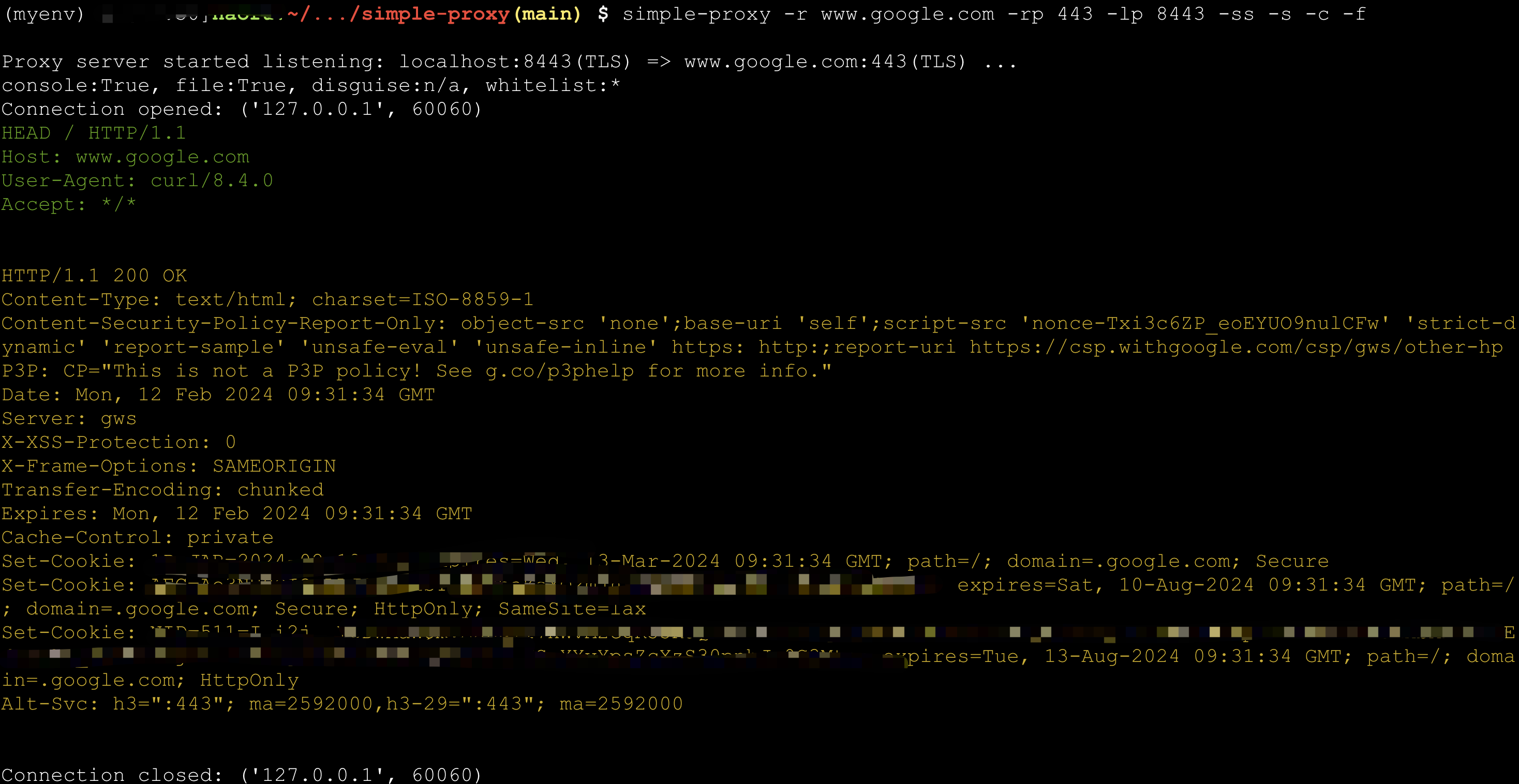
Dump TCP flow
TCP flow can be dumped into console or files (under directory tcpflow)
> simple-proxy -r www.google.com -rp 443 -p 8443 -ss -s -c -f
Proxy server started listening: localhost:8443(TLS) => www.google.com:443(TLS) ...
console:True, file:True, disguise:n/a, whitelist:*
> curl -k -I -H 'Host: www.google.com'  https://localhost:8443
Connection status monitor
> $ simple-proxy -r echo-server.proxy.com -rp 8080 -p 48080 -m
Proxy server started listening: localhost:48080 => echo-server.proxy.com:8080 ...
console:False, file:False, disguise:n/a, whitelist:*
Connection opened: ('127.0.0.1', 60937)
Connection opened: ('127.0.0.1', 60938)
Connection opened: ('127.0.0.1', 60939)
Connection opened: ('127.0.0.1', 60940)
Connection opened: ('127.0.0.1', 60941)
Connection opened: ('127.0.0.1', 60942)
Connection opened: ('127.0.0.1', 60943)
Connection opened: ('127.0.0.1', 60944)
---------------------------2024-02-12 17:43:02.337268 (total:8, rounds:1)---------------------------
[  1] | 127.0.0.1:60937       | Speed Rx:32.00 K/s  Tx:32.00 K/s  | Total Rx:235.00 K   Tx:235.00 K   | duration: 7s
[  2] | 127.0.0.1:60938       | Speed Rx:32.00 K/s  Tx:32.00 K/s  | Total Rx:235.00 K   Tx:234.00 K   | duration: 7s
[  3] | 127.0.0.1:60939       | Speed Rx:32.00 K/s  Tx:32.00 K/s  | Total Rx:235.00 K   Tx:234.00 K   | duration: 7s
[  4] | 127.0.0.1:60940       | Speed Rx:32.00 K/s  Tx:32.00 K/s  | Total Rx:235.00 K   Tx:234.00 K   | duration: 7s
[  5] | 127.0.0.1:60941       | Speed Rx:32.00 K/s  Tx:32.00 K/s  | Total Rx:235.00 K   Tx:234.00 K   | duration: 7s
[  6] | 127.0.0.1:60942       | Speed Rx:32.00 K/s  Tx:32.00 K/s  | Total Rx:234.00 K   Tx:234.00 K   | duration: 7s
[  7] | 127.0.0.1:60943       | Speed Rx:32.00 K/s  Tx:32.00 K/s  | Total Rx:234.00 K   Tx:234.00 K   | duration: 7s
[  8] | 127.0.0.1:60944       | Speed Rx:32.00 K/s  Tx:32.00 K/s  | Total Rx:234.00 K   Tx:234.00 K   | duration: 7s
Average Read Speed:  32765.0 bytes/s, Average Write Speed: 32752.88 bytes/s
Echo Server
> simple-proxy --as-echo-server
HTTP Proxy
You can set global envs http_proxy or https_proxy after http proxy server started.
> simple-proxy --http-proxy

> simple-proxy --http-proxy --proxy-username=test --proxy-password=test

> simple-proxy --http-proxy --proxy-transform www.google.com 443 man-in-middle.com 8443

# Use this when an application supports only HTTP proxy,
# but your upstream proxy is SOCKS5.
> simple-proxy --http-proxy --internal-socks5-host=localhost --internal-socks5-port=1080
HTTP Stub
Run an HTTP/1.x server that accepts any request and always returns 200 OK.
Requests are summarized on the console; add -c to include headers and up to
1 KiB of the request body.
> simple-proxy --http-stub -p 8080

> simple-proxy --http-stub -g -p 8080 -c

> simple-proxy --http-stub -ss -p 8443
File Server
Share the current directory over HTTP. Files can be downloaded from the
directory index, and /upload provides a browser upload page with progress.
The server listens on localhost by default; add -g to expose it on all
interfaces.
> simple-proxy --file-server

> simple-proxy --file-server -d /path/to/files -p 9000

> curl -F "file=@./example.txt" http://localhost:8080/upload
Use -ss to enable HTTPS. Supply both a certificate and key, or omit both to
use a temporary self-signed certificate:
> simple-proxy --file-server -ss -p 8443

> simple-proxy --file-server -ss -cf cert.pem -kf key.pem -p 8443

> curl -k -F "file=@./example.txt" https://localhost:8443/upload
SOCKS5 Proxy
You can set global envs https_proxy or https_proxy after socks5 proxy server startd.
> simple-proxy --socks5-proxy

> simple-proxy --socks5-proxy --proxy-username=test --proxy-password=test

> simple-proxy --socks5-proxy --proxy-transform www.google.com 443 man-in-middle.com 8443
Shell Proxy
Make shell accessible through TCP. Please run this mode with caution.
:warning: Stop the server as soon as you finish your work.
> simple-proxy --shell-proxy

# How to connect:
# socat file:`tty`,raw,echo=0 tcp:<server-ip>:<server-port> # for Bash proxy in Linux
# socat - tcp:<server-ip>:<server-port> # for cmd.exe proxy in Windows
Disguise as HTTPS server with whitelist
Any connection beyond whitelist will be served by a mock https server. Real service can thus be hided.
For example, you can protect your Scurrying Squirrel against attack from Grim Foolish Weasel.
> simple-proxy -rp 8388 -p 443 -g  --run-disguise-tls-server -wl=<your ip>,<your girlfriend's ip>,<your friend's girlfriend's ip>
# only you and your girlfriends can access :8388

> simple-proxy -rp 8388 -p 443 -g  --disguise-tls-ip=www.google.com --disguise-tls-port=443
# only non-https can access :8388, https traffic through :443 will be directed to google

1 maintainer

Download files
Download the file for your platform. If you're not sure which to choose, learn more about installing packages.
Source Distribution
Built Distribution
Filter files by name, interpreter, ABI, and platform.
If you're not sure about the file name format, learn more about wheel file names.
Copy a direct link to the current filters
File details
Details for the file simple_proxy-1.0.6.tar.gz.
File metadata
- Download URL: simple_proxy-1.0.6.tar.gz
- Upload date:
- Size: 50.7 kB
- Tags: Source
- Uploaded using Trusted Publishing? No
- Uploaded via: twine/6.2.0 CPython/3.12.10
File hashes
| Algorithm | Hash digest | |
|---|---|---|
| SHA256 |
9c006b86f442bdaa7cc412a6be0f0ea1f8b58d10549ca2bdd9490e1133754515
|
|
| MD5 |
9bea762ca504de99845c1b812ec5b44c
|
|
| BLAKE2b-256 |
e23865df51c12bd9eff8a142517b81e24d8f2e3ca89d13b258cd75d880ecb448
|
File details
Details for the file simple_proxy-1.0.6-py3-none-any.whl.
File metadata
- Download URL: simple_proxy-1.0.6-py3-none-any.whl
- Upload date:
- Size: 1.9 MB
- Tags: Python 3
- Uploaded using Trusted Publishing? No
- Uploaded via: twine/6.2.0 CPython/3.12.10
File hashes
| Algorithm | Hash digest | |
|---|---|---|
| SHA256 |
bcf4e50938a0e7813497a76362b802e3059e70387d6959dc89b8bc2627a2612b
|
|
| MD5 |
ec9dbddc3b2c4e257f7671ee82b2ba22
|
|
| BLAKE2b-256 |
093bf89bcab3a9e785534144eb26d7d6709e3e598836f7c6283c904da21815ca
|







