
simple-trade





simple-trade is a Python package for downloading market data, computing 100+ technical indicators, and backtesting trading strategies with ease. Build, backtest, and optimize your own trading strategies—or choose from 100+ premade trading strategies—without extra boilerplate.
Why simple-trade
- 100+ built-in indicators spanning trend, momentum, volume, and volatility.
- Plug-and-play 100+ premade trading strategies plus tools for custom strategy design.
- Integrated backtesting and optimization, and signal-combining tools in one package.
- Unified plotting, metrics, and reporting so results are easy to compare and share.
Features
- Data Fetching: Easily download historical stock data using
yfinance. - Technical Indicators: Compute more than 100+ technical indicators such as:
- Trend (e.g., MACD, ADX)
- Momentum (e.g., RSI, Stochastics)
- Volatility (e.g., Bollinger Bands, ATR)
- Volume (e.g., On-Balance Volume)
- Trading Strategies: Implement custom trading strategies or select from 100+ premade ones.
- Backtesting: Evaluate the performance of your trading strategies on historical data.
- Optimization: Optimize strategy parameters using techniques like grid search.
- Plotting: Visualize data, indicators, and backtest results using
matplotlib. - Combining: Combine different strategies to create more complex strategies.
Installation
Python
pip install simple-trade
or
python -m pip install simple-trade
QuickStart
Compute a technical indicator in just three lines of code.
from simple_trade import download_data, compute_indicator
data = download_data('TSLA', '2024-01-01', '2025-01-01', '1d')
data, columns, _ = compute_indicator(data, 'adx')
Choose, backtest, and optimize a premade strategy in just six lines of code.
from simple_trade import download_data, run_premade_trade, premade_optimizer
data = download_data('TSLA', '2024-01-01', '2025-01-01', '1d')
param_grid = {'short_window': [10, 20, 30], 'long_window': [50, 100, 150]}
_, best_results, _ = premade_optimizer(data, 'sma', param_grid)
sma_params = {'short_window': best_results['short_window'], 'long_window': best_results['long_window']}
sma_results, sma_portfolio, _ = run_premade_trade(data, "sma", sma_params)
Basic Usage
Table of Contents for Code Snippets
Calculate Indicators
Use download_data function to download data using yfinance and use compute_indicator function to compute a technical indicator.
# Example for downloading data and computing a technical indicator

# Load packages and functions
from simple_trade import compute_indicator, download_data
from simple_trade import list_indicators

# Step 1: Download data
symbol = 'TSLA'
start = '2024-01-01'
end = '2025-01-01'
interval = '1d'
print(f"\nDownloading data for {symbol}...")
data = download_data(symbol, start, end, interval=interval)

# Step 2: Calculate indicator
parameters = dict()
columns = dict()
parameters["window"] = 14
data, columns, fig = compute_indicator(
    data=data,
    indicator='adx',
    parameters=parameters
)

# Step 3: Display result
fig.show()
Plot of Results
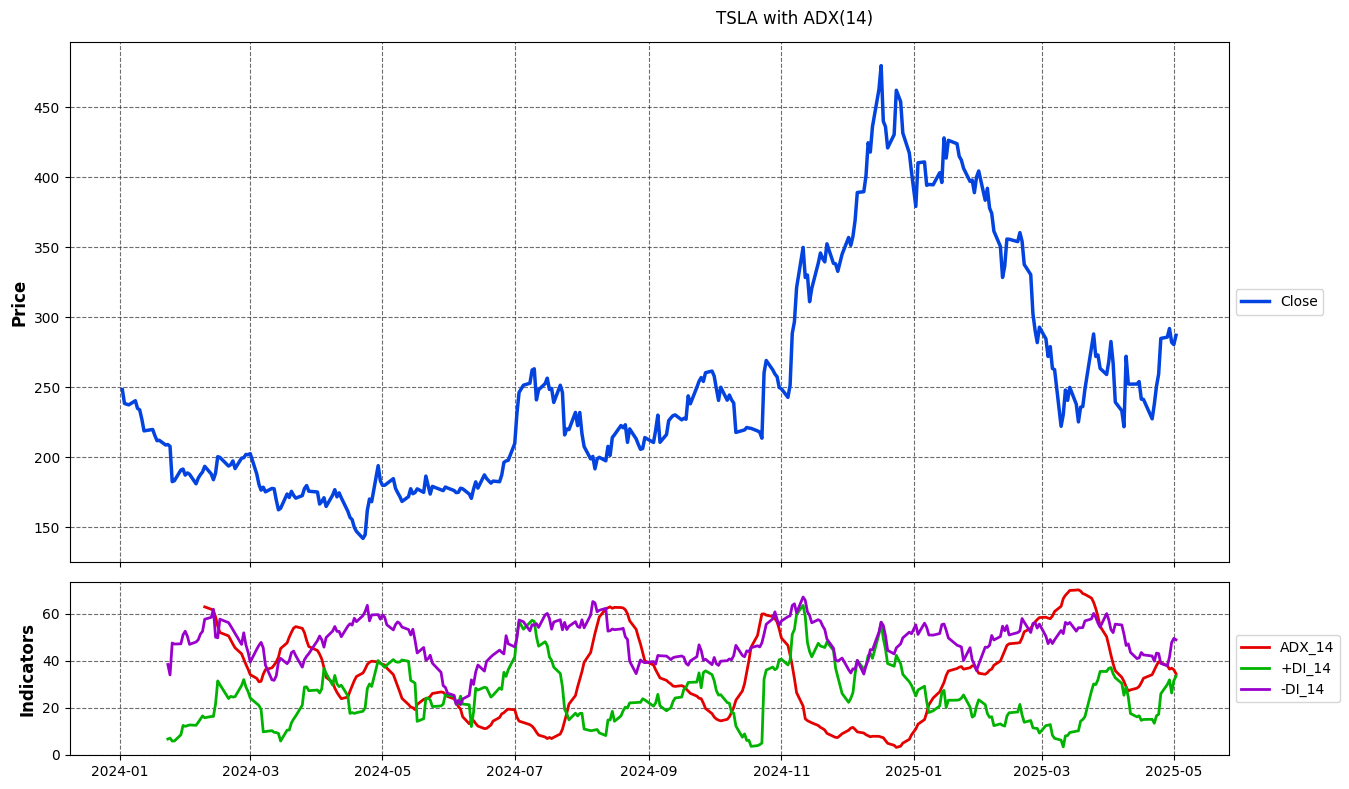
To see a list of all indicators, use list_indicators() function.
Backtesting Strategies
Use the run_premade_trade function to select from premade strategies or create your custom strategies using run_cross_trade/run_band_trade functions.
# Example for backtesting a premade strategy

# Load packages and functions
from simple_trade import download_data
from simple_trade import run_premade_trade
from simple_trade import list_premade_strategies
from simple_trade import print_results

# Step 1: Download data
symbol = 'AAPL'
start_date = '2020-01-01'
end_date = '2022-12-31'
interval = '1d'
data = download_data(symbol, start_date, end_date, interval=interval)

# Step 2: Set global parameters
global_parameters = {
    'initial_cash': 10000,
    'commission_long': 0.001,
    'commission_short': 0.001,
    'short_borrow_fee_inc_rate': 0.0,
    'long_borrow_fee_inc_rate': 0.0,
    'trading_type': 'long',
    'day1_position': 'none',
    'risk_free_rate': 0.0,
}

# Step 3: Set strategy parameters
strategy_name = 'sma'
specific_parameters = {
    'short_window': 25,
    'long_window': 75,
    'fig_control': 1,
}

# Step 4: Run backtest
parameters = {**global_parameters, **specific_parameters}
results, portfolio, fig = run_premade_trade(data, strategy_name, parameters)

# Step 5: Display and print results
fig.show()
print_results(results)
Plot of Results
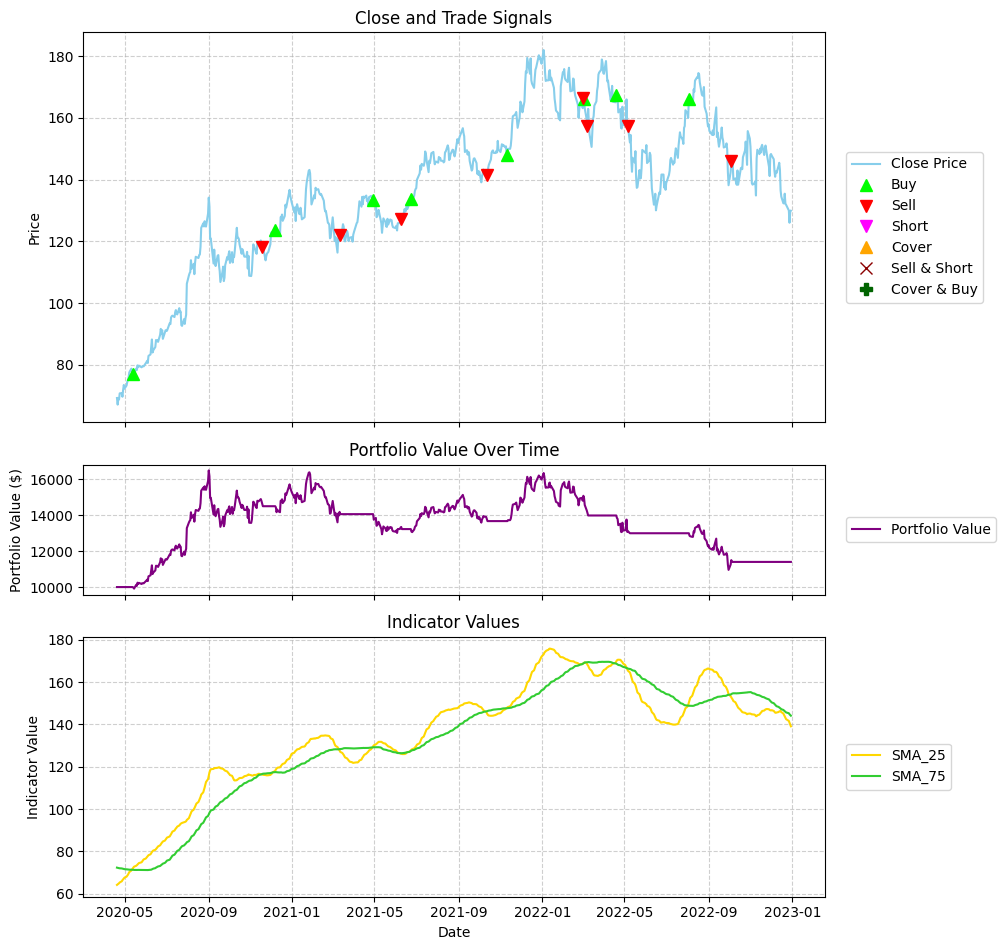
Print of Results
============================================================

🗓️ BACKTEST PERIOD:
  • Period: 2020-04-20 to 2022-12-30
  • Duration: 984 days
  • Trading Periods: 682

📊 BASIC METRICS:
  • Initial Investment: $10,000.00
  • Final Portfolio Value: $13,199.32
  • Total Return: 31.99%
  • Annualized Return: 10.80%
  • Number of Trades: 16
  • Total Commissions: $237.12

📈 BENCHMARK COMPARISON:
  • Benchmark Return: 87.48%
  • Benchmark Final Value: $18,748.45
  • Strategy vs Benchmark: -55.49%

📉 RISK METRICS:
  • Sharpe Ratio: 0.530
  • Sortino Ratio: 0.500
  • Maximum Drawdown: -32.50%
  • Average Drawdown: -14.25%
  • Max Drawdown Duration: 360 days
  • Avg Drawdown Duration: 43.43 days
  • Annualized Volatility: 25.89%

============================================================
To see a list of all premade strategies, use list_premade_strategies() function.
Optimizing Strategies
Use the premade_optimizer function to find the best parameters for your premade strategies or optimize your custom strategies using custom_optimizer function.
# Example for optimizing a premade strategy

# Load packages and functions
from simple_trade import download_data
from simple_trade import premade_optimizer

# Step 1: Load data
ticker = "AAPL"
start_date = "2020-01-01"
end_date = "2023-12-31"

data = download_data(ticker, start_date, end_date)

# Step 2: Load optimization parameters
# Define the parameter grid to search
param_grid = {
    'short_window': [10, 20, 30],
    'long_window': [50, 100, 150],
}

# Step 3: Set base parameters
base_params = {
    'initial_cash': 100000.0,
    'commission_long': 0.001,         # 0.1% commission
    'commission_short': 0.001,
    'trading_type': 'long',           # Only long trades
    'day1_position': 'none',
    'risk_free_rate': 0.02,
    'metric': 'total_return_pct',     # Metric to optimize
    'maximize': True,                 # Maximize the metric
    'parallel': False,                # Sequential execution for this example
    'fig_control': 0                  # No plotting during optimization
}

# Step 4: Run optimization
best_results, best_params, all_results = premade_optimizer(
    data=data,
    strategy_name='sma',
    parameters=base_params,
    param_grid=param_grid
)

# Step 5: Show top 3 parameter combinations
print("\nTop 3 SMA Parameter Combinations:")
sorted_results = sorted(all_results, key=lambda x: x['score'], reverse=True)
for i, result in enumerate(sorted_results[:3]):
    print(f"  {i+1}. {result['params']} -> {result['score']:.2f}%")
Output of Results
Top 3 SMA Parameter Combinations:
  1. {'short_window': 10, 'long_window': 50} -> 99.87%
  2. {'short_window': 20, 'long_window': 50} -> 85.69%
  3. {'short_window': 30, 'long_window': 50} -> 67.08%
Combining Strategies
Use the run_combined_trade function to combine multiple strategies.
# Example for combining premade strategies

# Load packages and functions
from simple_trade import download_data
from simple_trade import run_premade_trade
from simple_trade import run_combined_trade

# Step 1: Download data
print("Downloading stock data...")
symbol = 'AAPL'
start_date = '2020-01-01'
end_date = '2022-12-31'
interval = '1d'
data = download_data(symbol, start_date, end_date, interval=interval)

# Step 2: Set global parameters
global_parameters = {
    'initial_cash': 10000,
    'commission_long': 0.001,
    'commission_short': 0.001,
    'short_borrow_fee_inc_rate': 0.0,
    'long_borrow_fee_inc_rate': 0.0,
    'trading_type': 'long',
    'day1_position': 'none',
    'risk_free_rate': 0.0,
}

# Step 3: Compute RSI strategy
rsi_params = {
    'window': 14,
    'upper': 70,
    'lower': 30,
    'fig_control': 0
}

rsi_params = {**global_parameters, **rsi_params}
rsi_results, rsi_portfolio, _ = run_premade_trade(data, "rsi", rsi_params)

# Step 4: Compute SMA strategy
sma_params = {
    'short_window': 20,
    'long_window': 50,
    'fig_control': 0
}

sma_params = {**global_parameters, **sma_params}
sma_results, sma_portfolio, _ = run_premade_trade(data, "sma", sma_params)

# Step 5: Combine RSI and SMA strategies
strategies = {
    'RSI': {'results': rsi_results, 'portfolio': rsi_portfolio},
    'SMA': {'results': sma_results, 'portfolio': sma_portfolio}
}
combined_results, combined_portfolio, _ = run_combined_trade(
    portfolio_dfs=[rsi_portfolio, sma_portfolio],
    price_data=data,
    price_col='Close',
    combination_logic='majority',
    trading_type='long',
    fig_control=0,
    strategies=strategies,
    strategy_name='Majority',
    initial_cash=200,
    commission_long=0.001,
    commission_short=0.001
)

# Step 6: Show results
print(f"2 Trading Strategy Combination - Final Value: ${combined_results['final_value']:.2f}")
print(f"2 Trading Strategy Combination - Total Return: {combined_results['total_return_pct']}%")
print(f"2 Trading Strategy Combination - Number of Trades: {combined_results['num_trades']}")
print(f"2 Trading Strategy Combination - Sharpe Ratio: {combined_results['sharpe_ratio']:.3f}")
Output of Results
2 Trading Strategy Combination - Final Value: $318.11
2 Trading Strategy Combination - Total Return: 59.16%
2 Trading Strategy Combination - Number of Trades: 13
2 Trading Strategy Combination - Sharpe Ratio: 0.780
Examples
For more detailed examples, please refer to the Jupyter notebooks in the /examples directory:
/examples/indicators: Demonstrations of various technical indicators./examples/backtest: Examples of backtesting different strategies./examples/optimize: Examples of optimizing strategy parameters./examples/combine_trade: Examples of combining different strategies./examples/lists: Examples of listing functions.
Contributing
Contributions are welcome! Please feel free to submit a pull request or open an issue. (Further details can be added here if needed).
License
This project is licensed under the AGPL-3.0 License - see the LICENSE file for details.
1 maintainer

Metadata
1 maintainer
Release files for simple-trade 0.3.4
For a detailed explanation of source distributions (sdists) and built distributions (wheels), please see the package formats documentation.
Source distribution (sdist)
| File | Size | Uploaded | |
|---|---|---|---|
| simple_trade-0.3.4.tar.gz | 238.8 kB | Details |
Built distribution (wheel)
| File | Interpreter | ABI | Platform | Reset |
|---|---|---|---|---|
| simple_trade-0.3.4-py3-none-any.whl | Python 3 | none | any | Details |
Total release size: 589.5 kB
Release files / simple_trade-0.3.4.tar.gz
| Download URL | simple_trade-0.3.4.tar.gz |
|---|---|
| Size | 238.8 kB |
| Tags | Source |
|
SHA-256 checksum How to use checksums |
07fed07db855473249f6344f99947ad15905fea077097800091b073d9176f587
|
|
BLAKE2b-256 checksum How to use checksums |
2da60015b672302cfb544aee589688f154d673af02f96f6d19f16f3954279fd7
|
| Upload date | |
|
Uploaded using Trusted Publishing? What is trusted publishing? |
No |
| Uploaded via |
twine/6.2.0 CPython/3.11.4
|
Release files / simple_trade-0.3.4-py3-none-any.whl
| Download URL | simple_trade-0.3.4-py3-none-any.whl |
|---|---|
| Size | 350.8 kB |
| Tags | Python 3 |
|
SHA-256 checksum How to use checksums |
019798b162788eb25d18076c9a426748313a13f62b2da333cdf1c532f814efe0
|
|
BLAKE2b-256 checksum How to use checksums |
be0e90df8e8526e160fffdd8712328c34eaa8336fa53cbe1ea93048295417f06
|
| Upload date | |
|
Uploaded using Trusted Publishing? What is trusted publishing? |
No |
| Uploaded via |
twine/6.2.0 CPython/3.11.4
|














