
the idea is inspired by PySimpleGui , to quickly create simple kivy apps

Project description
SimpleKivy
pip install simplekivy
Perfect versions:
- kivy==2.2.1
- python >= 3.7
simplekivy is built with kivy to write quickly simple codes
you can write kvlang and creat your own classes and widgets as kivy is flexible
the widgets are added only once via simpleKivyObject + [
#kv_widgets
]
and you can build simplekivy way using s.build
Examples to test:
from simplekivy import SimpleKivy
s = SimpleKivy(title="test app")

box = s.build([s.Label(text="qf47", pos_hint={"center_y": .8})])
floatL = s.build("""
FloatLayout:

    Button:
        text:"test"
        size_hint:.3, .2
        pos_hint: {"center_y": .8}
""")
s + [(
    {s.BoxLayout: box,
    s.BoxLayout(size_hint=(None, None)): [s.Label(text="qfe")],
    floatL: s.Label(text="testo testo"),
    },)
]
#as you know for python dict .. key "objects" should be different objects
from simplekivy import SimpleKivy
s = SimpleKivy(title="test")
dp = s.metrics.dp
s + [
    (# floatlayout <=> ()
        {"size_hint": (1, None)},#<=> add the floatlayout kwargs
        s.Label(text="ffljwfe", pos_hint={"center_x":.5, "center_y":.5}),
        {"height":  dp(200)}, #kwargs as you want will be added
    ),
    [ #boxlayout <=> []
        {"size_hint": (1, .5)},
        s.Button(text="gdddg"),
        s.Button(text="gdgdd")
    ],


]
from simplekivy import SimpleKivy

s = SimpleKivy(title="test app")

dp = s.metrics.dp
inp1 = s.TextInput(size_hint=(.5, None), height=dp(50), pos_hint={"center_x":.5})
inp1_button = s.Button(text="click", on_press=lambda x:print(inp1.text),
                    size_hint=(.5, None), height=dp(50),
                    pos_hint={"center_x":.5})

s + [
    (#floatlayout
        {"size_hint":(1, 1)},
        [#boxlayout
            {"orientation":"vertical", "size_hint":(1, None), "height":dp(200),
            "spacing":"60dp","pos_hint":{"center_y":.5}},
            inp1,
            inp1_button])
]
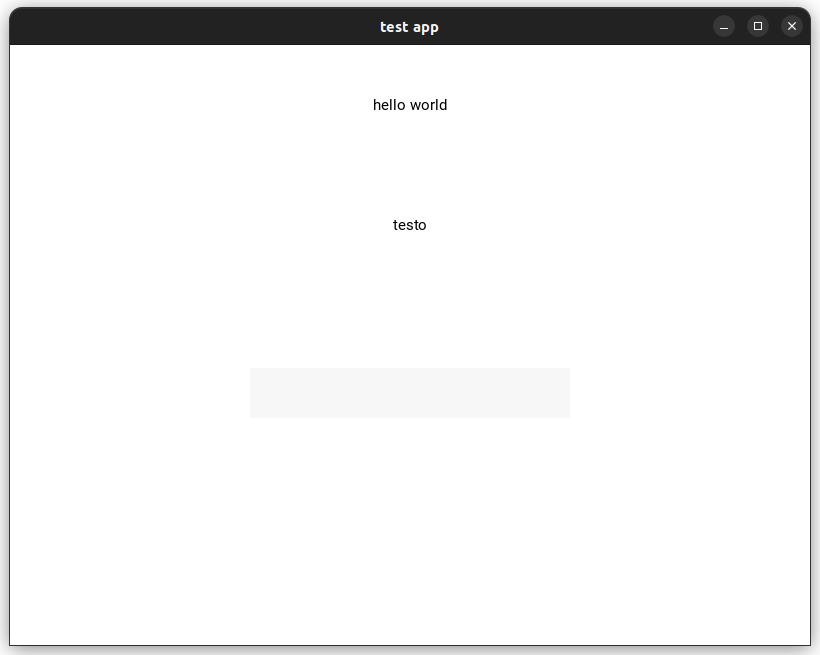
from simplekivy import SimpleKivy
def on_enter(instance):
    print(instance.text)

s = SimpleKivy(title="test app")

ainput = s.TextInput(multiline=False,  size_hint=(1, None),
     height="50dp", pos_hint={"center_x":.5, "center_y":.7})

ainput.bind(on_text_validate=on_enter)

s + [
    [{"orientation":"vertical", "size_hint":(1, .4)},
    s.Label(text="hello world", halign="center"),
    s.Label(text="testo")],
    ({"size_hint":(.4, .6), "pos_hint":{"center_x":.5}},
        ainput
    )
]
you can also add kvlang string directly instead of using
s.lang.Builder
or kivy.lang.Builder or s.build
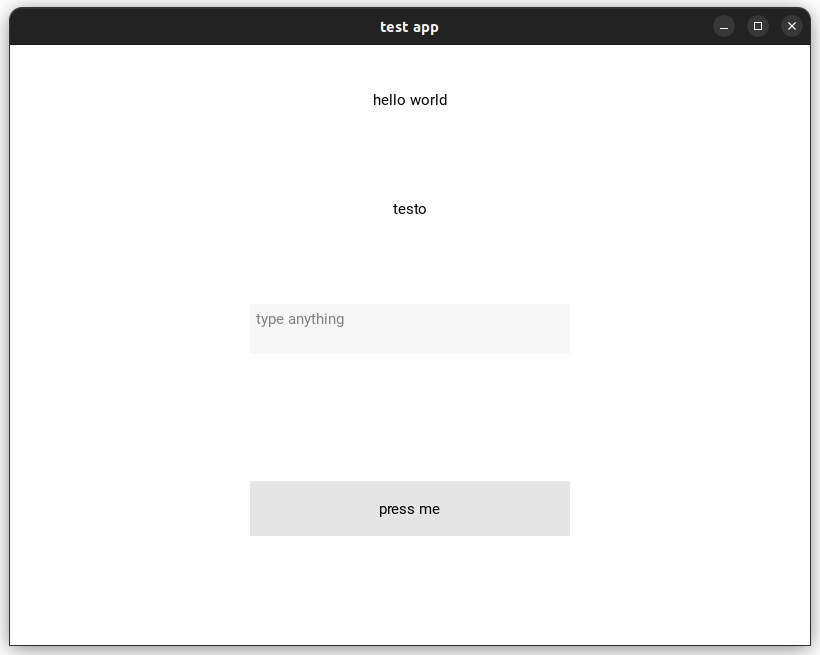
from simplekivy import SimpleKivy
s = SimpleKivy(title="test app", make_app=True)

def on_enter(instance):
    print(instance.text)

def btn_pressed():
    print(ainput.text)


#add a new method to app
s.myapp.btn_pressed = btn_pressed

KV_BTN = """

Button:
    text: "press me"
    size_hint:.4, .2
    pos_hint: {"center_x": .5, "center_y": .5}
    on_press:app.btn_pressed()
"""
ainput = s.TextInput(hint_text="type anything", multiline=False,  size_hint=(1, None),
     height="50dp", pos_hint={"center_x":.5, "center_y":.7})

ainput.bind(on_text_validate=on_enter)

s + [
    [{"orientation":"vertical", "size_hint":(1, .2)},
    s.Label(text="hello world", halign="center"),
    s.Label(text="testo")],
    ({"size_hint":(.4, .4), "pos_hint":{"center_x":.5}},
        ainput
    ),
    ({"size_hint": (1, .4)},
        KV_BTN),
]
Hints
- list => BoxLayout
- tuple => FloatLayout
- set
make_apptoFalseif you do not want to run the kivy App
s = SimpleKivy(make_app=False)
- to reach the main App object do
s.myapp - you can pass to
s.buildalist, tuple, dict and kivy lang string - the more you understand kivy, the more you enjoy its flexibility


Download files
Download the file for your platform. If you're not sure which to choose, learn more about installing packages.
Source Distribution
Built Distribution
Filter files by name, interpreter, ABI, and platform.
If you're not sure about the file name format, learn more about wheel file names.
Copy a direct link to the current filters
File details
Details for the file simplekivy-0.0.4.tar.gz.
File metadata
- Download URL: simplekivy-0.0.4.tar.gz
- Upload date:
- Size: 5.1 kB
- Tags: Source
- Uploaded using Trusted Publishing? No
- Uploaded via: twine/4.0.2 CPython/3.11.4
File hashes
| Algorithm | Hash digest | |
|---|---|---|
| SHA256 |
004d75aceb12384d7461d8032936f89a8c0596b732a357dd1d6a3b5f8e1c2241
|
|
| MD5 |
74d7cfdd7247e5ed335cb25798c68aa4
|
|
| BLAKE2b-256 |
2fd46ae55d1d810dac2da1233ad7dce0a879023c51b55b52f38c4dee64ec7101
|
File details
Details for the file simplekivy-0.0.4-py3-none-any.whl.
File metadata
- Download URL: simplekivy-0.0.4-py3-none-any.whl
- Upload date:
- Size: 5.8 kB
- Tags: Python 3
- Uploaded using Trusted Publishing? No
- Uploaded via: twine/4.0.2 CPython/3.11.4
File hashes
| Algorithm | Hash digest | |
|---|---|---|
| SHA256 |
995d618d2eb5cbeca002833ded04de6a19b6033ead52b6d0f6e3786ec9cd6437
|
|
| MD5 |
e2b7e92ea8cb01168ae0c6feb9e8b9df
|
|
| BLAKE2b-256 |
87cc447a6ef36e75f7cf62b3364214cf10792d0463c11bd683019e7815abc9ed
|






