
the idea is inspired by PySimpleGui , to quickly create simple kivy apps

Project description
SimpleKivy
pip install simplekivy
Perfect versions:
- kivy==2.2.1
- python >= 3.7
simplekivy is built with kivy to write quickly simple codes
you can write kvlang and creat your own classes and widgets as kivy is flexible
the widgets are added only once via simpleKivyObject + [
#kv_widgets
]
and you can build simplekivy way using s.build
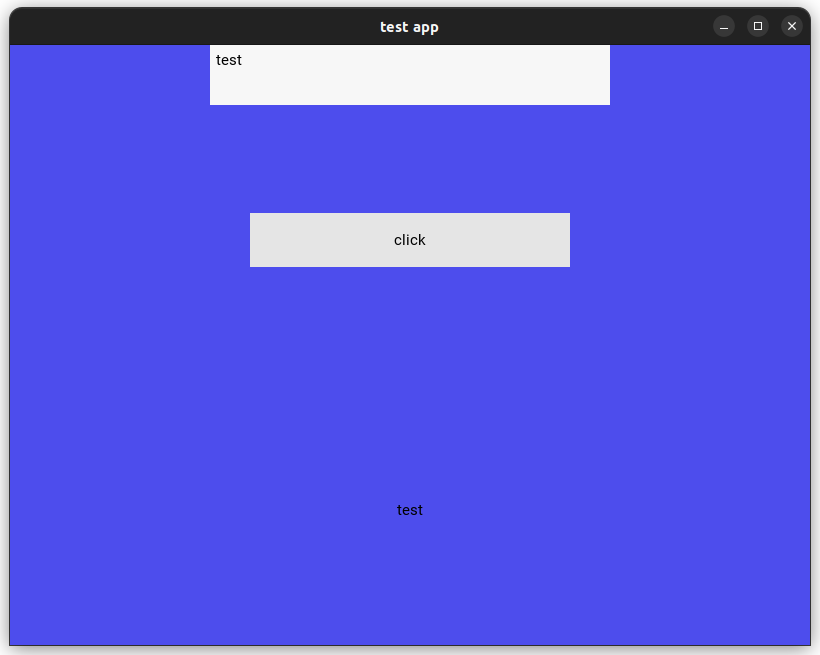
Examples to test:
from simplekivy import SimpleKivy
s = SimpleKivy(title="test app")
dp = s.metrics.dp

def pressed(instance):
    if text_input.text:
        label.text = text_input.text

background = """
BoxLayout:
    canvas:
        Color:
            rgba: 0, 0, .9, .7
        Rectangle:
            pos: self.pos
            size: self.size

"""

text_input =  s.TextInput(hint_text="type", size_hint=(.5, None), height=dp(60), pos_hint={"center_x":.5})
btn = s.Button(text = "click", size_hint=(.4, .2), pos_hint={"center_x":.5, "center_y":.5}, on_press=pressed)
label =  s.Label(text = "type")

# you don't really need to build here and can just pass the list ..
# but iam showing you how to get objets using s.build
# so you may need it somewhere else
front = s.build([{"orientation":"vertical"},
                text_input,
                (btn,),
                label
])

s + [(background,
front
)
]
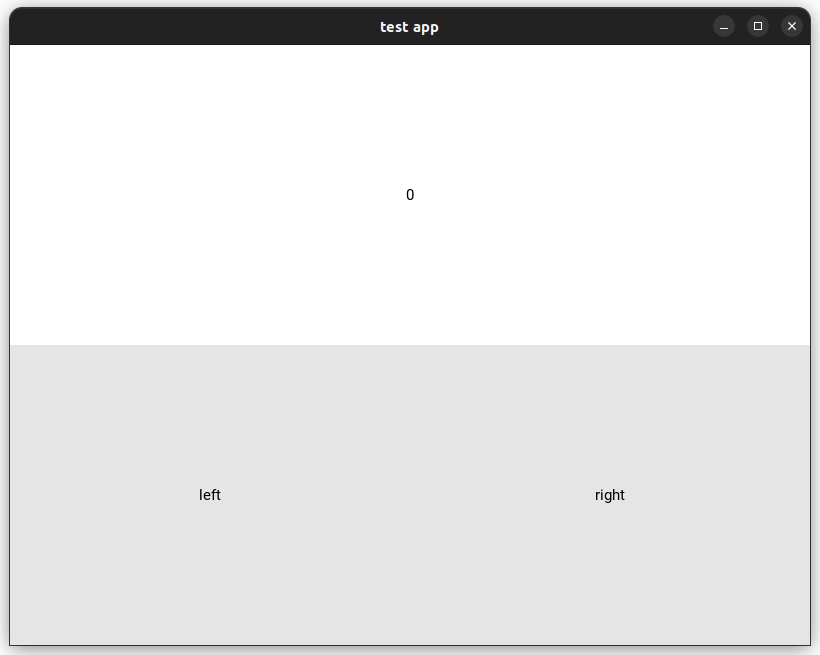
from simplekivy import SimpleKivy
s = SimpleKivy(title="test app")
screen_manager = s.ScreenManager()

class ScreenI(s.Screen):
    def left(self):
        print("------", self, self.name)
        screen_manager.transition.direction = "right"
        screen_manager.current = screen_manager.previous()

    def right(self):
        print("------", self, self.name)
        screen_manager.transition.direction = "left"
        screen_manager.current = screen_manager.next()

manager = {screen_manager: None}
scr = {}

for i in range(4):
    left = s.Button(text="left")
    right = s.Button(text="right")
    screen = ScreenI(name=str(i))
    left.on_press = screen.left
    right.on_press = screen.right
    scr[screen] = [{"orientation":"vertical"},s.Label(text=str(i)),[ left, right]]

manager[screen_manager] = scr
s + [
    manager
]
Hints
- list => BoxLayout
- tuple => FloatLayout
- set
make_apptoFalseif you do not want to run the kivy App
s = SimpleKivy(make_app=False)
- to reach the main App object do
s.myapp - you can pass to
s.buildalist, tuple, dict, set and kivy lang string - the more you understand kivy, the more you enjoy its flexibility


Download files
Download the file for your platform. If you're not sure which to choose, learn more about installing packages.
Source Distribution
Built Distribution
Filter files by name, interpreter, ABI, and platform.
If you're not sure about the file name format, learn more about wheel file names.
Copy a direct link to the current filters
File details
Details for the file simplekivy-0.0.6.tar.gz.
File metadata
- Download URL: simplekivy-0.0.6.tar.gz
- Upload date:
- Size: 4.9 kB
- Tags: Source
- Uploaded using Trusted Publishing? No
- Uploaded via: twine/4.0.2 CPython/3.11.4
File hashes
| Algorithm | Hash digest | |
|---|---|---|
| SHA256 |
6c1953e1c8fe1e66dd39065e487e70411721b1df8213d725c2bd2d5a789af179
|
|
| MD5 |
1415b31cb383f036c69a5d55aaa32d1e
|
|
| BLAKE2b-256 |
c935580c580d5fbb665061faa9723a6787c6c8a880545d8cac1734821cbdc132
|
File details
Details for the file simplekivy-0.0.6-py3-none-any.whl.
File metadata
- Download URL: simplekivy-0.0.6-py3-none-any.whl
- Upload date:
- Size: 5.6 kB
- Tags: Python 3
- Uploaded using Trusted Publishing? No
- Uploaded via: twine/4.0.2 CPython/3.11.4
File hashes
| Algorithm | Hash digest | |
|---|---|---|
| SHA256 |
b60cc63c1ca8a7d2944c1ce4d4a480ebc1cbc415bdb41754a50470f736baa5ac
|
|
| MD5 |
d38dc54fbb1042bb062b1803968fbde9
|
|
| BLAKE2b-256 |
5a9c142320612d173af688f97a1450eb3e10348d69c86e2607e3a952eb2356a5
|






