
Siteprobe
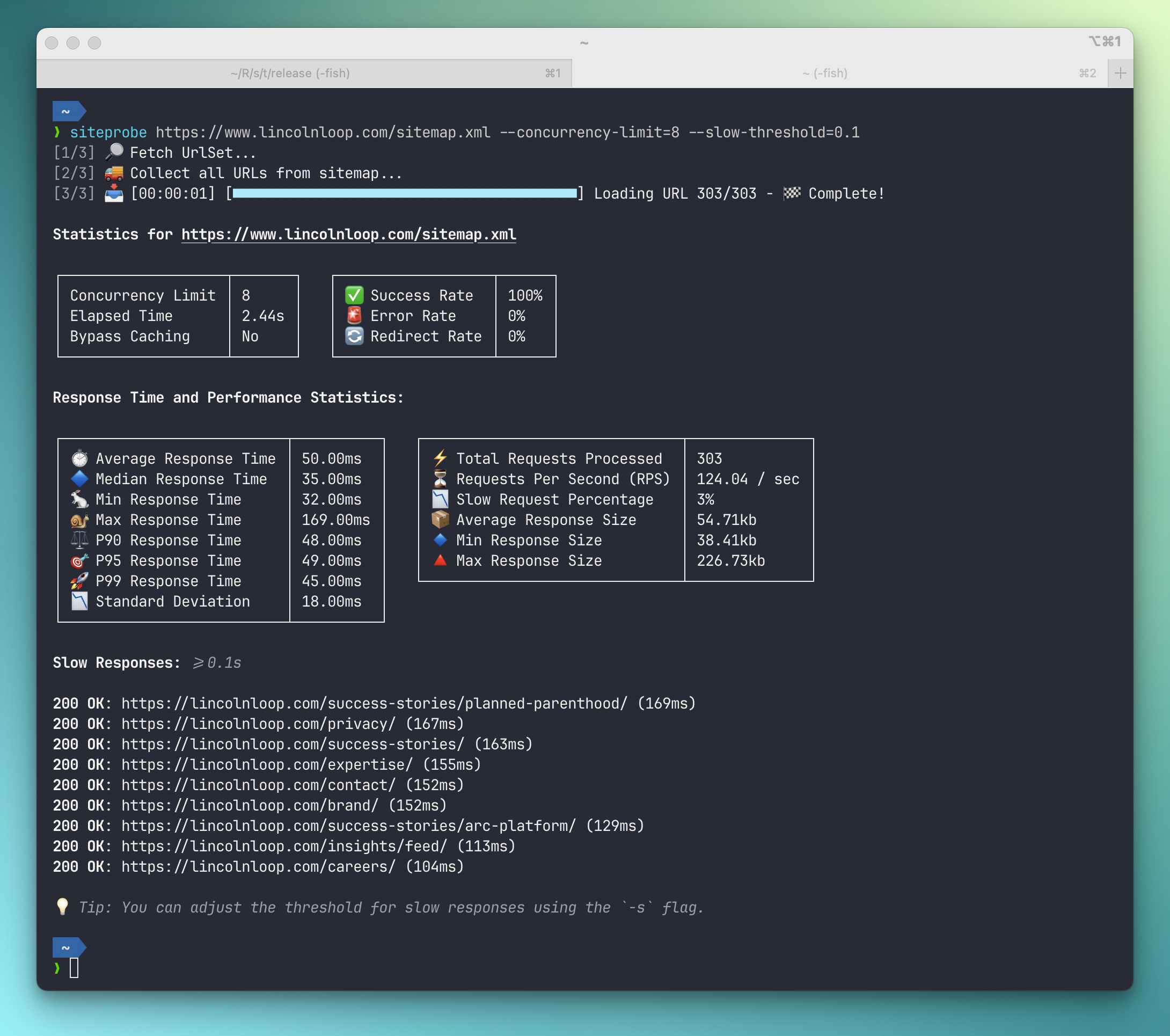
Siteprobe is a Rust-based CLI tool that fetches all URLs from a given sitemap.xml
or a plain list of URLs, checks their existence, and generates a performance report.
It supports various features such as authentication, concurrency control, caching
bypass, and more.
Features
- Fetch and parse sitemap.xml to extract URLs, including nested Sitemap Index files recursively.
- Alternatively read a plain-text list of URLs, from a URL, a local file, or stdin, or pass individual URLs directly on the command line.
- Check the existence and response times of each URL.
- Generate a detailed performance CSV report.
- Support for Basic Authentication.
- Adjustable concurrency limits for request handling.
- Configurable request timeout settings.
- Support for configuring rate limits, such as 300 requests per 5-minute interval.
- Redirect handling with security precautions.
- Filtering and reporting slow URLs based on a threshold.
- Custom User-Agent header support.
- Option to append random timestamps to URLs to bypass caching mechanisms.
- Save downloaded documents for further inspection or use as a static site mirror.
Installation
Run without installing
uvx siteprobe https://example.com/sitemap.xml
# or
pipx run siteprobe https://example.com/sitemap.xml
Install via package manager
# Homebrew (macOS/Linux)
brew install bartTC/siteprobe/siteprobe

# pip / pipx
pip install siteprobe
pipx install siteprobe

# Cargo
cargo install siteprobe
Build from source
Building from source requires Rust 1.86 or newer.
git clone https://github.com/bartTC/siteprobe.git
cd siteprobe
cargo build --release
Usage
siteprobe [SOURCE] [--url <URL>]... [OPTIONS]
Arguments
[SOURCE]- Where to load the URLs from. Either asitemap.xml(or sitemap index) or a plain-text list with one URL per line, given as an http(s) URL, a local file path, or-to read from stdin. The format is detected automatically. Optional if--urlis used.-u, --url <URL>- A URL to probe directly. Can be repeated and combined withSOURCE; all URLs are merged and deduplicated.
URL Sources
Besides a sitemap.xml, siteprobe accepts a plain-text list of URLs. Blank lines
and lines starting with # are ignored; lines that are not http(s) URLs are
skipped with a warning.
# A sitemap or sitemap index
siteprobe https://example.com/sitemap.xml

# A plain-text URL list, remote or local
siteprobe https://example.com/urls.txt
siteprobe ./urls.txt

# Read the list (or a sitemap) from stdin
cat urls.txt | siteprobe -
curl -s https://example.com/sitemap.xml | siteprobe -

# Probe a handful of URLs directly
siteprobe -u https://example.com/ -u https://example.com/about

# Combine a source with extra URLs
siteprobe https://example.com/sitemap.xml -u https://example.com/new-page
Options
Usage: siteprobe [OPTIONS] <SOURCE|--url <URL>>

Arguments:
  [SOURCE]  Where to load the URLs from: a sitemap.xml or a plain-text list with
            one URL per line, given as an http(s) URL, a local file path, or '-'
            to read from stdin. Optional if --url is used.

Options:
  -u, --url <URL>
          A URL to probe directly, without loading a sitemap or list. Can be
          specified multiple times and combined with SOURCE.
      --basic-auth <BASIC_AUTH>
          Basic authentication credentials in the format `username:password`
  -H, --header <HEADERS>
          Custom header to include in each request (format: 'Name: Value'). Can
          be specified multiple times.
  -c, --concurrency-limit <CONCURRENCY_LIMIT>
          Maximum number of concurrent requests allowed [default: 4]
  -l, --rate-limit <RATE_LIMIT>
          The rate limit for all requests in the format 'requests/time[unit]',
          where unit can be seconds (`s`), minutes (`m`), or hours (`h`). E.g.
          '-l 300/5m' for 300 requests per 5 minutes, or '-l 100/1h' for 100
          requests per hour.
  -o, --output-dir <OUTPUT_DIR>
          Directory where all downloaded documents will be saved
  -a, --append-timestamp
          Append a random timestamp to each URL to bypass caching mechanisms
  -r, --report-path <REPORT_PATH>
          File path for storing the generated `report.csv`
  -j, --report-path-json <REPORT_PATH_JSON>
          File path for storing the generated `report.json`
      --report-path-html <REPORT_PATH_HTML>
          File path for storing the generated `report.html`
  -t, --request-timeout <REQUEST_TIMEOUT>
          Default timeout (in seconds) for each request [default: 10]
      --user-agent <USER_AGENT>
          Custom User-Agent header to be used in requests [default: "Mozilla/5.0
          (compatible; Siteprobe/1.5.0)"]
      --slow-num <SLOW_NUM>
          Limit the number of slow documents displayed in the report. [default:
          100]
  -s, --slow-threshold <SLOW_THRESHOLD>
          Show slow responses. The value is the threshold (in seconds) for
          considering a document as 'slow'. E.g. '-s 3' for 3 seconds or '-s
          0.05' for 50ms.
  -f, --follow-redirects
          Controls automatic redirects. When enabled, the client will follow
          HTTP redirects (up to 10 by default). Note that for security, Basic
          Authentication credentials are intentionally not forwarded during
          redirects to prevent unintended credential exposure.
      --retries <RETRIES>
          Number of retries for failed requests (network errors or 5xx
          responses) [default: 0]
      --exit-zero
          Always exit with status code 0 after a completed run, even if URLs
          failed or exceeded the slow threshold. Fatal errors, such as an
          unreadable source, still exit non-zero.
      --json
          Output the JSON report to stdout instead of the normal table output.
          Suppresses all other console output for clean piping.
      --config <CONFIG>
          Path to a TOML config file. Defaults to `.siteprobe.toml` in the
          current directory.
  -h, --help
          Print help
  -V, --version
          Print version

Exit Codes:
  0  All URLs returned 2xx (success)
  1  One or more URLs returned 4xx/5xx or failed, or a fatal error occurred
  2  Invalid command line arguments
  3  One or more URLs exceeded the slow threshold (--slow-threshold)

Use --exit-zero to always exit 0 after a completed run.
Exit Codes
The exit code summarizes the run, so siteprobe can gate a CI pipeline:
| Code | Meaning |
|---|---|
0 |
All URLs returned 2xx. |
1 |
One or more URLs returned 4xx/5xx or failed, or a fatal error occurred (e.g. the source could not be loaded). |
2 |
Invalid command line arguments. |
3 |
One or more URLs exceeded the --slow-threshold. |
A run with both failing and slow URLs exits with 1.
Pass --exit-zero (or set exit_zero = true in .siteprobe.toml) to always exit
with 0 after a completed run, for example when only the report matters and
failing URLs should not fail the job. Fatal errors and invalid arguments still
exit non-zero.
siteprobe https://example.com/sitemap.xml --report-path-html report.html --exit-zero
Authentication & Custom Headers
Siteprobe supports several ways to authenticate requests:
# Basic Authentication
siteprobe https://example.com/sitemap.xml --basic-auth user:password

# Bearer token (via custom header)
siteprobe https://example.com/sitemap.xml -H "Authorization: Bearer <token>"

# Send a session cookie
siteprobe https://example.com/sitemap.xml -H "Cookie: sessionid=abc123def456"
You can combine multiple -H flags to send several custom headers at once:
siteprobe https://example.com/sitemap.xml \
  -H "Authorization: Bearer <token>" \
  -H "Cookie: sessionid=abc123" \
  -H "X-Custom-Header: value"
If both --basic-auth and -H "Authorization: ..." are provided, the -H value
takes precedence.
Example Usage
# Fetch and analyze a sitemap with default settings
siteprobe https://example.com/sitemap.xml

# Save the report to a specific file
siteprobe https://example.com/sitemap.xml --report-path ./results/report.csv --output-dir ./example.com

# Set concurrency limit to 10 and timeout to 5 seconds
siteprobe https://example.com/sitemap.xml --concurrency-limit 10 --request-timeout 5

# Quickly check a few pages without a sitemap
siteprobe -u https://example.com/ -u https://example.com/pricing --slow-threshold 1

# Check the URLs listed in a local text file
siteprobe ./urls.txt --report-path ./results/report.csv
1 maintainer

Metadata
1 maintainer
Release files for siteprobe 1.5.0
For a detailed explanation of source distributions (sdists) and built distributions (wheels), please see the package formats documentation.
Built distributions (wheels)
| File | Actions Reset | |||
|---|---|---|---|---|
| siteprobe-1.5.0-py3-none-manylinux_2_38_x86_64.whl | Python 3 | none | Linux glibc 2.38+ x86-64 | Details for siteprobe-1.5.0-py3-none-manylinux_2_38_x86_64.whl |
| siteprobe-1.5.0-py3-none-manylinux_2_34_aarch64.whl | Python 3 | none | Linux glibc 2.34+ ARM64 | Details for siteprobe-1.5.0-py3-none-manylinux_2_34_aarch64.whl |
| siteprobe-1.5.0-py3-none-macosx_11_0_arm64.whl | Python 3 | none | macOS 11.0+ ARM64 | Details for siteprobe-1.5.0-py3-none-macosx_11_0_arm64.whl |
| siteprobe-1.5.0-py3-none-macosx_10_12_x86_64.whl | Python 3 | none | macOS 10.12+ x86-64 | Details for siteprobe-1.5.0-py3-none-macosx_10_12_x86_64.whl |
Total release size: 13.4 MB
Release files / siteprobe-1.5.0-py3-none-manylinux_2_38_x86_64.whl
| Download URL | siteprobe-1.5.0-py3-none-manylinux_2_38_x86_64.whl |
|---|---|
| Size | 3.5 MB |
| Tags | Linux glibc 2.38+ x86-64 Python 3 |
|
SHA-256 checksum How to use checksums |
3bd38cbf1e36b704afb12a47fc807fc5fc092790715d311cc63f4d5da511a5fd
|
|
BLAKE2b-256 checksum How to use checksums |
6e0a435dfb11c9486c1dbdea0a30cf59dd8c9f66f013086bcc3af38b45b16180
|
| Upload date | |
|
Uploaded using Trusted Publishing? What is trusted publishing? |
Yes |
| Uploaded via |
twine/7.0.0 CPython/3.13.14
|
Provenance
Provenance describes where a file came from. On PyPI, provenance is shared via attestations, which provide a verifiable record of the build or publishing details. View details, limitations and caveats.


PyPI Publish Attestation
PyPI verified that this artifact, at this checksum, originated from the publisher listed below.
Signed by GitHub Actions, verified by PyPI on Sep 30, 2026.
Transparency logRelease files / siteprobe-1.5.0-py3-none-manylinux_2_34_aarch64.whl
| Download URL | siteprobe-1.5.0-py3-none-manylinux_2_34_aarch64.whl |
|---|---|
| Size | 3.4 MB |
| Tags | Linux glibc 2.34+ ARM64 Python 3 |
|
SHA-256 checksum How to use checksums |
aa1f7b01a81843ccb70ac2be294831788d6b33946183279f2d1005a8c9d34b4d
|
|
BLAKE2b-256 checksum How to use checksums |
ef75e09621c4b771e12200d2bcecfe55165889c0bcc1f7272f4136ab8603d287
|
| Upload date | |
|
Uploaded using Trusted Publishing? What is trusted publishing? |
Yes |
| Uploaded via |
twine/7.0.0 CPython/3.13.14
|
Provenance
Provenance describes where a file came from. On PyPI, provenance is shared via attestations, which provide a verifiable record of the build or publishing details. View details, limitations and caveats.
PyPI Publish Attestation
PyPI verified that this artifact, at this checksum, originated from the publisher listed below.
Signed by GitHub Actions, verified by PyPI on Sep 30, 2026.
Transparency logRelease files / siteprobe-1.5.0-py3-none-macosx_11_0_arm64.whl
| Download URL | siteprobe-1.5.0-py3-none-macosx_11_0_arm64.whl |
|---|---|
| Size | 3.2 MB |
| Tags | Python 3 macOS 11.0+ ARM64 |
|
SHA-256 checksum How to use checksums |
71e675102842cdba062e68be9253f81509f7953071edee3cb3cb85b9ff3acf33
|
|
BLAKE2b-256 checksum How to use checksums |
8c3f5d840cde440e6c6063fcd9271c64e126353231208eecc517eaf83803b082
|
| Upload date | |
|
Uploaded using Trusted Publishing? What is trusted publishing? |
Yes |
| Uploaded via |
twine/7.0.0 CPython/3.13.14
|
Provenance
Provenance describes where a file came from. On PyPI, provenance is shared via attestations, which provide a verifiable record of the build or publishing details. View details, limitations and caveats.
PyPI Publish Attestation
PyPI verified that this artifact, at this checksum, originated from the publisher listed below.
Signed by GitHub Actions, verified by PyPI on Sep 30, 2026.
Transparency logRelease files / siteprobe-1.5.0-py3-none-macosx_10_12_x86_64.whl
| Download URL | siteprobe-1.5.0-py3-none-macosx_10_12_x86_64.whl |
|---|---|
| Size | 3.3 MB |
| Tags | Python 3 macOS 10.12+ x86-64 |
|
SHA-256 checksum How to use checksums |
95bf92d63989f75bdb2046d6bad7d92edd9c766f98795dddcfdb21c1d42a7166
|
|
BLAKE2b-256 checksum How to use checksums |
a0dcdeb73928b722363af4b109bcb882eef670ab852becbf5b32dc8d383674c0
|
| Upload date | |
|
Uploaded using Trusted Publishing? What is trusted publishing? |
Yes |
| Uploaded via |
twine/7.0.0 CPython/3.13.14
|
Provenance
Provenance describes where a file came from. On PyPI, provenance is shared via attestations, which provide a verifiable record of the build or publishing details. View details, limitations and caveats.
PyPI Publish Attestation
PyPI verified that this artifact, at this checksum, originated from the publisher listed below.
Signed by GitHub Actions, verified by PyPI on Sep 30, 2026.
Transparency logSecurity for siteprobe 1.5.0
Provenance
Provenance describes where a file came from. On PyPI, provenance is shared via attestations, which provide a verifiable record of the build or publishing details. View details, limitations and caveats.
Full provenance
All 4 files in this release have been uploaded with provenance metadata.
Attestation for siteprobe-1.5.0-py3-none-manylinux_2_38_x86_64.whl
PyPI Publish Attestation
PyPI verified that this artifact, at this checksum, originated from the publisher listed below.
Signed by GitHub Actions, verified by PyPI on Sep 30, 2026.
Transparency logA note on package security
PyPI is a repository for distributing packages, not a service for auditing them. While third-party security researchers and our staff do their best to detect and remove malicious packages, PyPI cannot guarantee the quality, security or suitability of any given package.
To learn more about protecting yourself from malicious actors, visit our package security documentation.














