

Site your state, derive the wire.
situ lets a Python developer write a reactive web UI as one component (real HTML on top, Python signals and handlers below) and declare, per piece of state, where it lives. A real Python→JS compiler reads that declaration and emits a small, app-specific client island; the client/server boundary stays explicit and is enforced at compile time. You author no client JavaScript and can read every line the compiler ships.
It is for Python developers who want a reactive web UI and would keep the whole app in Python. A hypermedia library (htmx, Datastar) hands you a mechanism: swap HTML on an event, wire the targets yourself; situ gives you a structure for the whole UI layer:
- State has a place. Declare where each signal lives (
Local/Url/Server/Synced) and its transport is derived: a live search, a selection, an open dialog, a database command, a shareable URL. You write no fetch, target, or SSE wire by hand. The boundary is compile-checked: a client read ofServerstate is aCompileError. - No client JavaScript, no build step. Real HTML and Python; the compiler emits the
island (no bundler,
node_modules, or separate front-end to deploy) and you can read each line it ships (a few kilobytes, no framework runtime underneath). - A composition model. Components with props, events, slots, per-placement state, and scoped CSS; the compiler folds a whole tree of them into one island at zero runtime cost.
- A component kit (work in progress).
situ_uiprovides typed, HTML-first widgets (Dialog, Tabs, Combobox, DataGrid, Menu), invoked from your templates, so common UI (a dialog, a searchable select, a data grid) ships with the framework. - A meta-framework on top. For CRUD screens, declui turns a typed model into a form, list, tracker, or create/edit screen, with sensible type→widget defaults plus a MetaUI-style rule cascade. You write no component at all.
- One component, any framework. Litestar (the reference), any ASGI host (FastAPI, Starlette, bare uvicorn), or Flask: unchanged. The ASGI adapter is built on the protocol itself, so it imports no web framework and adds no dependency; the Litestar imports are lazy, so neither other path pulls in Litestar.
situ is a young, alpha library extracted from a research programme; the compiler accepts a bounded dialect of Python and fails closed on anything outside it. See Status and the known limits.
The one idea: site each piece of state
Every signal declares its site. The transport follows from that: you never write a fetch, a target, or an SSE wire.
| Site | Where it lives | What the compiler derives |
|---|---|---|
Local[T] |
the browser | compiled to JS: zero network |
Url[T] |
the query string | a shareable link the server re-renders |
Server[Facade] |
the database | a POST command that re-renders one region |
Derived[T] |
the browser, computed from other signals | an update that reruns when they change |
Synced[T] |
(reserved) | a local-first replica (design stage) |
The boundary is a compile-time invariant: a client read of Server-sited state is a
CompileError, so database-backed state cannot reach the browser by accident.
Install
pip install situ                   # the compiler + the generic ASGI adapter (no web framework)
pip install "situ[litestar]"       # + the Litestar mount (the reference adapter)
pip install "situ[flask]"          # + the Flask (WSGI) adapter
pip install "situ[sqlalchemy]"     # + the SQLAlchemy/Dishka session helpers
pip install "situ[model-adapters]" # + attrs/msgspec/pydantic model sources for declui
Requires Python 3.12+.
Sixty seconds of situ
A component is two sibling files sharing a stem, so each gets native editor tooling.
counter.py: the signals and handlers:
from situ import Local

count: Local[int] = 0  # client state — compiled to JS, no network


def bump() -> None:
    global count  # names the local signal this handler writes
    count = count + 1
counter.html is real HTML with shorthand reactive attributes:
<div data-region>
  <button @click="bump">+1</button>
  <strong :text="count"></strong>
</div>
app.py: the controller is one mount call plus the wiring:
from pathlib import Path

import situ
from litestar import Litestar
from litestar.plugins.jinja import JinjaTemplateEngine
from litestar.static_files import create_static_files_router
from litestar.template.config import TemplateConfig
from situ import mount_static_component

HERE = Path(__file__).parent

app = Litestar(
    route_handlers=[
        mount_static_component(
            path="/counter",
            stem=HERE / "counter",  # counter.py + counter.html
            template="page.html",  # situ ships a minimal default
            meta={"name": "Counter"},
        ),
        # serve the runtime shim the generated island loads from /static/_rt.js
        create_static_files_router(path="/static", directories=[situ.static_dir()]),
    ],
    template_config=TemplateConfig(
        directory=situ.templates_dir(), engine=JinjaTemplateEngine
    ),
)
litestar --app app:app run # then open http://localhost:8000/counter
The runtime enforces two rules: every reactive element lives inside <header> or the single <div data-region> (the two roots where binders are wired); data-region is the first attribute on that <div>.
When state needs the database
Declare the site; the seam follows:
search: Local[str] = ""  # live search — compiled to JS, zero network
filter: Url[str] = "all"  # a shareable link the server re-renders
issues: Server[IssuesFacade]  # the store: a facade in handlers, rows in the template


async def close(id):  # `await` makes this a server command:
    await issues.set_status(id, "closed")  # → POST /cmd/close/{id} → region re-render
A handler containing await becomes a POST command; any other handler compiles to
client JS. The Server components guide walks the wiring. The tutorial builds a complete issue tracker this way in six parts (live search, filters, selection, commands, a create dialog), with zero hand-written JavaScript and a generated island of ~7 KB.
Or generate the UI from a model: declui
For CRUD-shaped screens, skip the component too. declui turns a typed model into a working form, list, master-detail, server-backed tracker, or create/edit form, at compile time, onto the same seam:
@dataclass
class Sample:
    title: str  # str  → text input
    shirt: Annotated[Shirt, Field()] = Shirt.medium  # Enum → <select>
    price: Annotated[Decimal, Field()] = Decimal("10.50")  # Decimal → decimal input
    need_by: Annotated[date | None, Field()] = None  # date → date picker


app = Litestar(
    route_handlers=[mount_model(path="/sample", screen=Screen(model=Sample)), ...]
)
Conditional predicates (editable="rating > 50") compile to client binders. @action
methods become gated command buttons that can have a label and navigate on success.
screens=("create",) / ("edit",) generate write forms whose submit calls the facade
(facade.create(**fields)), gated by required= / valid=. Screen(rules=...)
(the MetaUI app sheet) sets presentation by selector across fields and per screen. Models
may be dataclasses, attrs, msgspec, Pydantic, or SQLAlchemy. In the capstone example, an
8-line Screen stands in for the 311 lines of hand-written components in the equivalent
demo.
declui documentation →
Litestar or Flask
The mount has a portable core (situ.mount.core: dispatch, render, the
command/region/feed/window protocol, no framework imported) with thin adapters over it:
- Litestar (the reference):
mount_component/mount_static_component/mount_tree, with per-request DI via Dishka. - Flask (WSGI):
situ.mount.flask.mount_flaskreturns an ordinaryBlueprint; a plainresolve=lambda: storecallable replaces the DI container. The request path imports zero Litestar. Seeexamples/flask/.
Documentation
Full documentation lives in docs/ (a Zensical site;
make docs-serve to browse it locally at http://localhost:8000):
- Quickstart: the counter, explained.
- Tutorial: build an issue tracker in six parts; every listing compiles and is browser-verified.
- Concepts: sites & the seam, handlers & commands, the compiled dialect, composition, the wire protocol.
- Cheat sheet: the whole authoring surface on one page; plus the full binder, API, and error references.
- situ vs. …: React, Vue, Svelte, htmx, Datastar, LiveView, Eliom and the research lineage.
- For AI coding assistants:
llms.txt(index) andllms-full.txt: a single-file, self-contained reference with verified samples and the rules an agent must follow.
Demos & examples
Everything documented runs, browser-verified by an e2e suite that fails on any console error:
uv run litestar --app demos.app:app run       # 17 demos behind one gallery
uv run uvicorn examples.declui.app:app        # the declui example tour (create/edit, rules, …)
uv run --with flask flask --app examples/flask/app.py run   # the Flask adapter
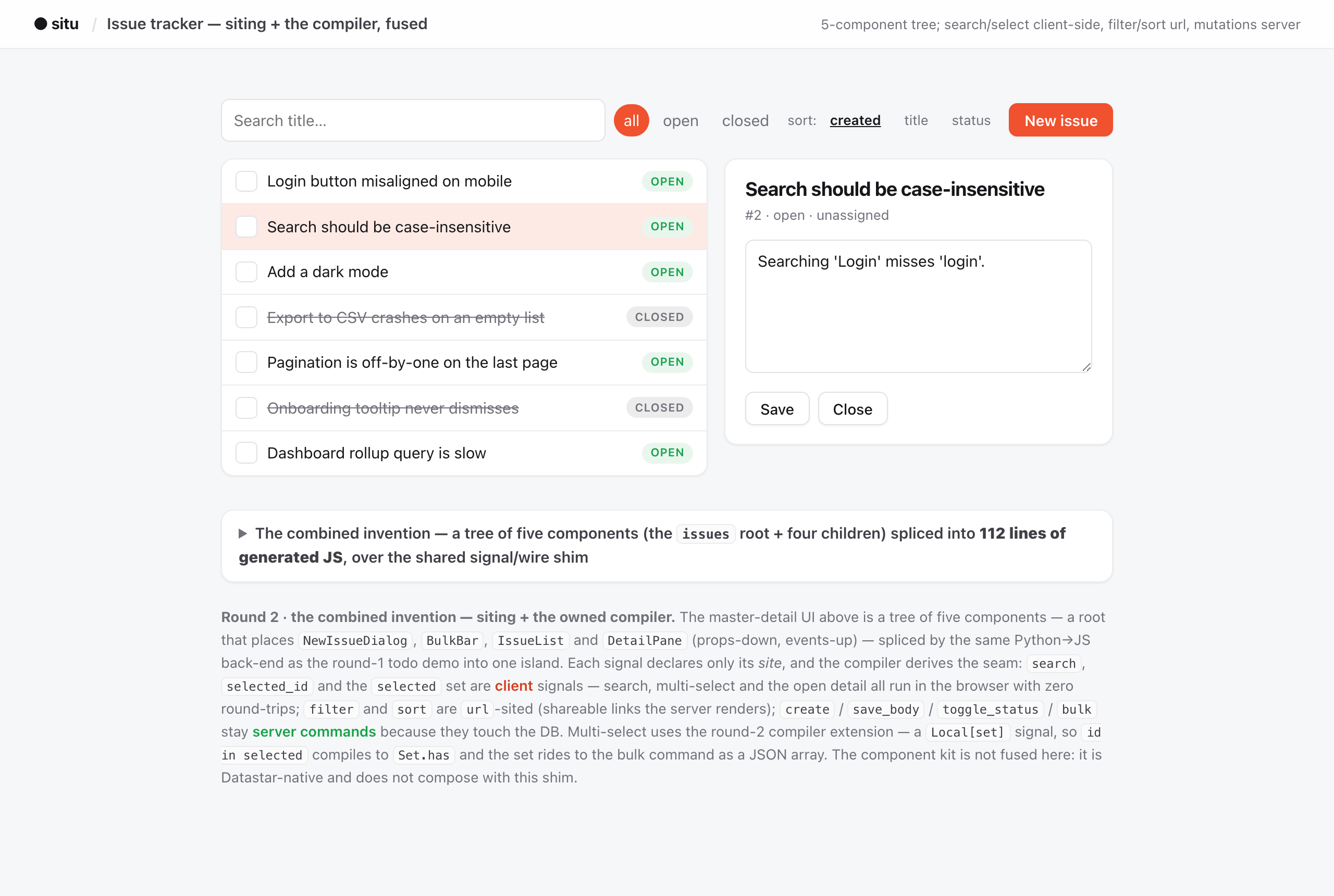
The flagship (/issues, above) is a five-component master-detail tracker whose entire
client is a 117-line generated island; across all thirty shipped apps the islands
measure 6–13 KB over a ~540-line shared shim. Each demo page shows its own source, its
signal→transport table, and the island it serves.
What's in the box
situ.compiler: the Python→JS compiler (parse_front_end,load_front_end,compile_app,splice_tree) and the site markers. Pure standard library.situ.mount: the framework-neutral mount core plus the Litestar route factories and the FlaskBlueprintadapter. Litestar bindings load lazily.situ.declui: the model→UI generator (Field,Screen,Rule,zones,action,mount_model): forms, lists, trackers, create/edit write forms, and the rule cascade.situ_ui: a component kit: 24 components (Dialog, Combobox, DataGrid, Menu, …), aui-*CSS class contract, interactions compiled from Python.situ.siting: theSitecontract and the transport it derives;situ.infra: Jinja string rendering and, behind[sqlalchemy], an async engine + Dishka session provider.situ new <Name>: scaffold a component's.html+.pypair (--serveradds a facade and an async command);situ check: static component-tree resolution for your lint loop (also runnable aspython -m situ.new/python -m situ.check).
Status
Alpha. The compiler accepts a bounded dialect of Python and rejects the rest with a clear error; it does not relocate database I/O to the client.
The dialect is specified as a table of typing rules. Every rule is checked against
CPython: situ runs a differential oracle that generates expressions over operand type pairs,
evaluates them in CPython and in node, and compares. A construct with no rule cannot be
emitted at all. The lowerer has no guards, because an ill-typed program cannot reach it.
The oracle found 1323 divergences in a compiler that passed its whole test suite; the
disagreement baseline is now empty: across all the expressions it generates, as a value and
as a condition, situ agrees with CPython or refuses to compile. Knowing the types also lets the
compiler accept more: k in d, xs[-1], 'ab' * 3 and n % m were all rejected by the
untyped emitter and are now correct. Synced is a reserved site: the
design names it and the implementation is future work. Dishka is required only by the
Litestar mount_component; the Flask adapter takes a plain callable. The full list of
limits is in Status & roadmap.
License
Apache 2.0 © Stefane Fermigier & Abilian SAS
1 maintainer

Metadata
1 maintainer
Release files for situ 0.6.0
For a detailed explanation of source distributions (sdists) and built distributions (wheels), please see the package formats documentation.
Source distribution (sdist)
| File | Size | Uploaded | Provenance | Actions |
|---|---|---|---|---|
| situ-0.6.0.tar.gz | 381.0 kB | Without provenance | Details for situ-0.6.0.tar.gz |
Built distribution (wheel)
| File | Interpreter | ABI | Platform | Actions Reset |
|---|---|---|---|---|
| situ-0.6.0-py3-none-any.whl | Python 3 | none | any | Details for situ-0.6.0-py3-none-any.whl |
Total release size: 827.6 kB
Release files / situ-0.6.0.tar.gz
| Download URL | situ-0.6.0.tar.gz |
|---|---|
| Size | 381.0 kB |
| Tags | Source |
|
SHA-256 checksum How to use checksums |
47bfcd50b99e429eea6692a23a72a1f5004ddae6806f4fc14e6ad581b3c82ab7
|
|
BLAKE2b-256 checksum How to use checksums |
401f7aaa39cfceeeff9a30c8115b31a6c4cfeed751ea4b5554afdd4d4c149548
|
| Upload date | |
|
Uploaded using Trusted Publishing? What is trusted publishing? |
No |
| Uploaded via |
uv/0.13.4 {"installer":{"name":"uv","version":"0.13.4","subcommand":["publish"]},"python":null,"implementation":{"name":null,"version":null},"distro":{"name":"macOS","version":null,"id":null,"libc":null},"system":{"name":null,"release":null},"cpu":null,"openssl_version":null,"setuptools_version":null,"rustc_version":null,"ci":null}
|
Release files / situ-0.6.0-py3-none-any.whl
| Download URL | situ-0.6.0-py3-none-any.whl |
|---|---|
| Size | 446.6 kB |
| Tags | Python 3 |
|
SHA-256 checksum How to use checksums |
036e29227abc1b1c9c962ab0b5c0853573dff98fe2beae7f1cc57eaea03c4b94
|
|
BLAKE2b-256 checksum How to use checksums |
9b0f5061c7bfe07c34de560d222d3700352f24d511613a7f052699ba1686bc4e
|
| Upload date | |
|
Uploaded using Trusted Publishing? What is trusted publishing? |
No |
| Uploaded via |
uv/0.13.4 {"installer":{"name":"uv","version":"0.13.4","subcommand":["publish"]},"python":null,"implementation":{"name":null,"version":null},"distro":{"name":"macOS","version":null,"id":null,"libc":null},"system":{"name":null,"release":null},"cpu":null,"openssl_version":null,"setuptools_version":null,"rustc_version":null,"ci":null}
|
Security for situ 0.6.0
Provenance
Provenance describes where a file came from. On PyPI, provenance is shared via attestations, which provide a verifiable record of the build or publishing details. View details, limitations and caveats.
No provenance found
None of the files in this release were uploaded with provenance metadata.
A note on package security
PyPI is a repository for distributing packages, not a service for auditing them. While third-party security researchers and our staff do their best to detect and remove malicious packages, PyPI cannot guarantee the quality, security or suitability of any given package.
To learn more about protecting yourself from malicious actors, visit our package security documentation.














