






skit is a launcher and a home for your scripts.
skit stores your scripts in one place and makes them painless to launch — Python, shell, and JS/TS go deepest, a dozen kinds in all.
AI writes the scripts. skit gives them a home.
And it's a home you share with your agent: the library you drive from a menu, AI agents drive through a deterministic CLI — checking it before writing yet another one-off script, and (with your OK) saving the good ones back, so they outlive the chat.
What it does
- One home for your scripts and prompts.
skit addcollects scattered scripts and prompts into a searchable library — keep a copy in the library, or reference the original file. Run it bare and it asks what you're adding; hand it a file it can't classify and it asks which kind, instead of erroring out. - Parameters without the pain. Flags,
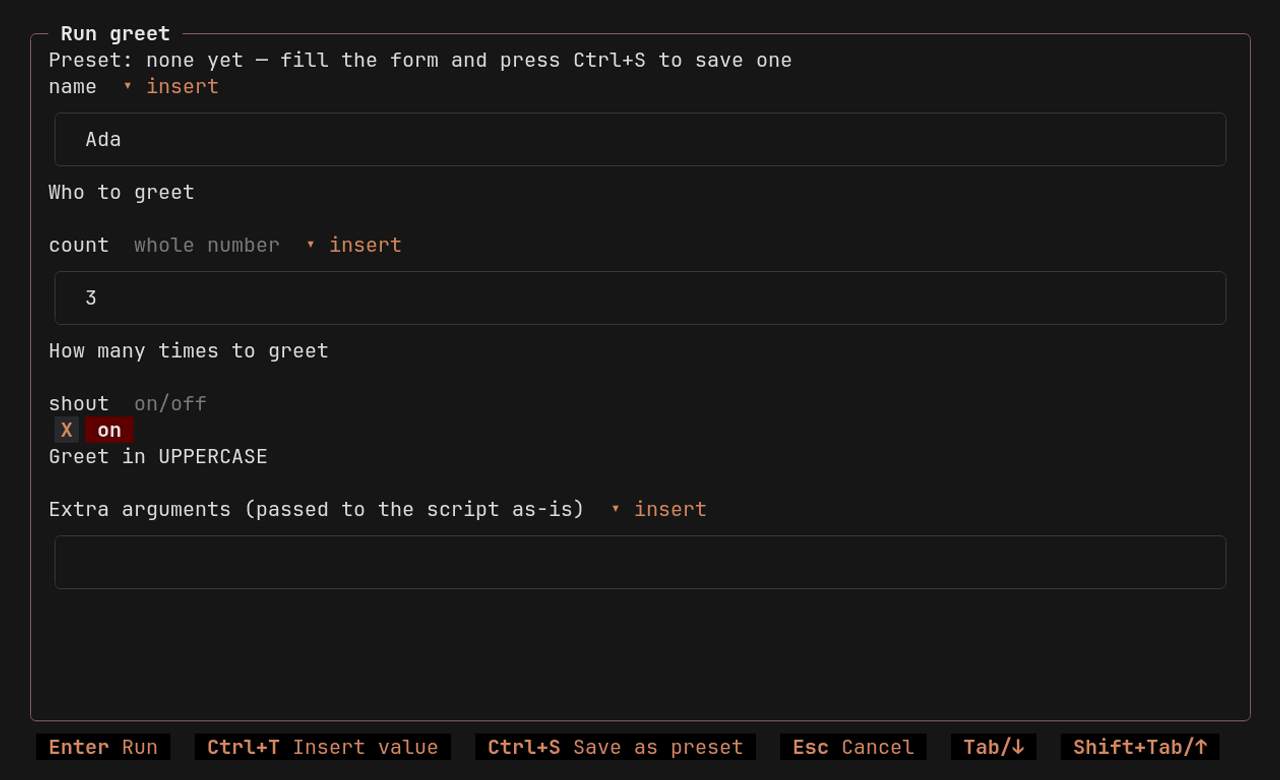
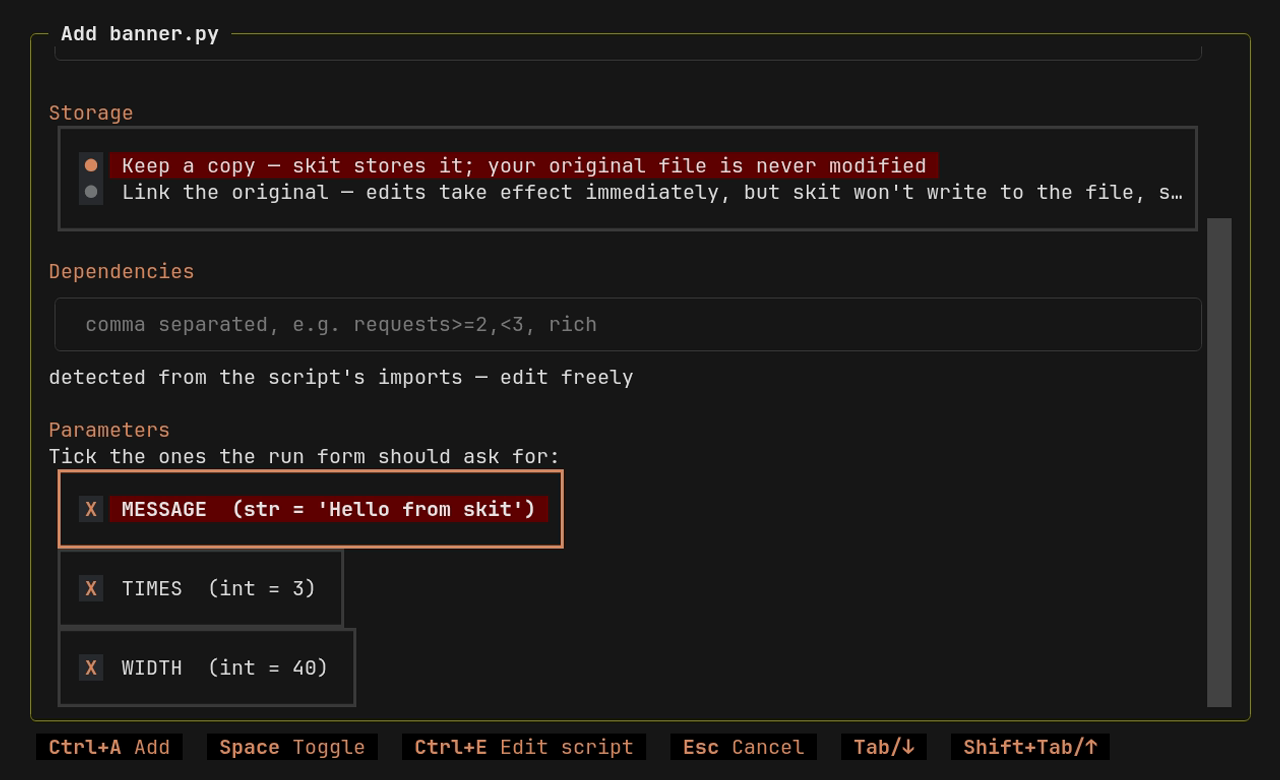
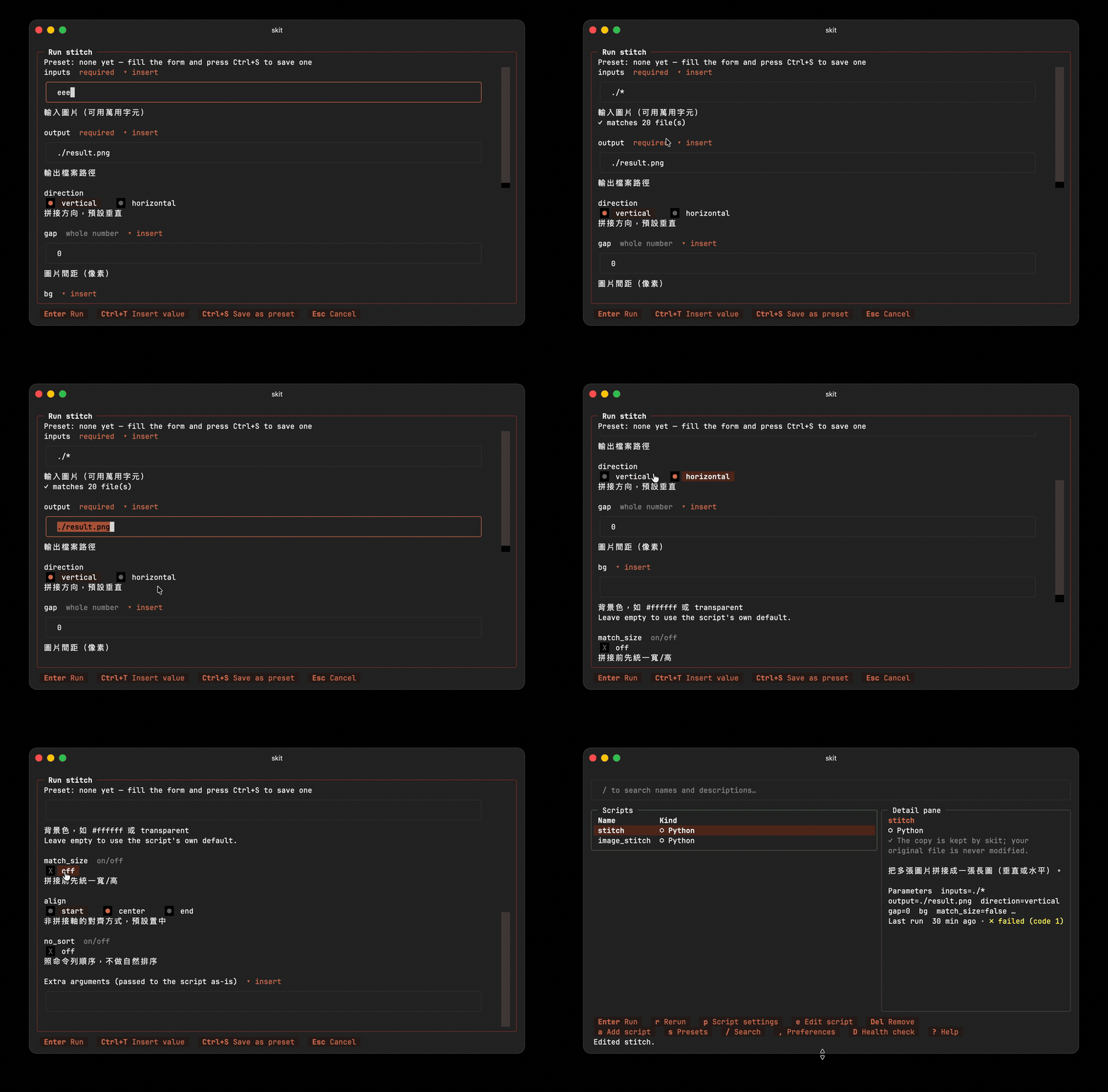
input()calls, and the constants you tick become form fields (choices → pickers, booleans → checkboxes, paths → completion and a file browser, types enforced). - Paths you don't have to type. Every text field carries a
📁 browselink that opens a file picker, and path fields complete as you type — press→to accept the suggestion. You never hand-type a directory again. (Ctrl+T→ File or folder… is the keyboard route to the same picker.) - It remembers. Script defaults arrive prefilled and track the source when it changes; last-used values come back automatically, and
↺ default(Ctrl+O) puts the script's own value back. Save favorites as named presets. Parameters marked secret never touch disk. Tokens like{cwd}and{today}keep presets portable. - No environment mess. Python scripts declare their dependencies inline (PEP 723) and run via uv in isolated environments; JS/TS scripts get a per-script
node_modules, installed from their declared packages on first run. Nothing global either way. Other languages use the tools already on your machine — skit checks that declared external commands are on yourPATHbefore running. - Mouse or keyboard. Plain
skitopens the full TUI; every key hint on screen is also a clickable button. - Automation-ready. Every TUI action is also a CLI command with
--jsonoutput and meaningful exit codes — for shell scripts, CI, and AI agents. - Prompts are first-class library entries. Store a parameterized prompt (managed
{{placeholders}}become form fields) and fire it at your coding agent — claude, codex, opencode, and friends are preconfigured runners, and any CLI is oneskit runner addaway. - Your agent's library too. The official Agent Skill teaches Claude Code, Codex, Cursor, Gemini CLI, and friends the whole drill: discover entries with
skit list, read a parameter schema withskit show, run withskit run --set … --no-input. Oneskit agent installaway — see Works with your AI agent. - Speaks your language. English, 繁體中文, and 简体中文, with more to come. See Languages.
| Problem | What skit does |
|---|---|
| Scripts scattered all over the place | One central menu, with search |
| Scripts that need specific packages or tools | Per-script dependencies for Python (PEP 723 + uv) and JS/TS (npm); for any language, skit checks declared external commands on your PATH |
CLI flags you forget ten minutes later, input() prompts, hard-coded constants meant to be edited by hand |
Static analysis extracts them all into an interactive form — no code changes. Last-used values come prefilled; favorites save as presets. |
| The weird script an AI wrote for you dies with the chat session | Agents check the library first, reuse what's there, and save the keepers — one-off scripts become permanent, parameterized tools |
Nothing to set up per script — no refactoring, no config to maintain. The script an AI wrote last week and the one you barely remember from last year launch the same way.
 |
 |
|---|---|
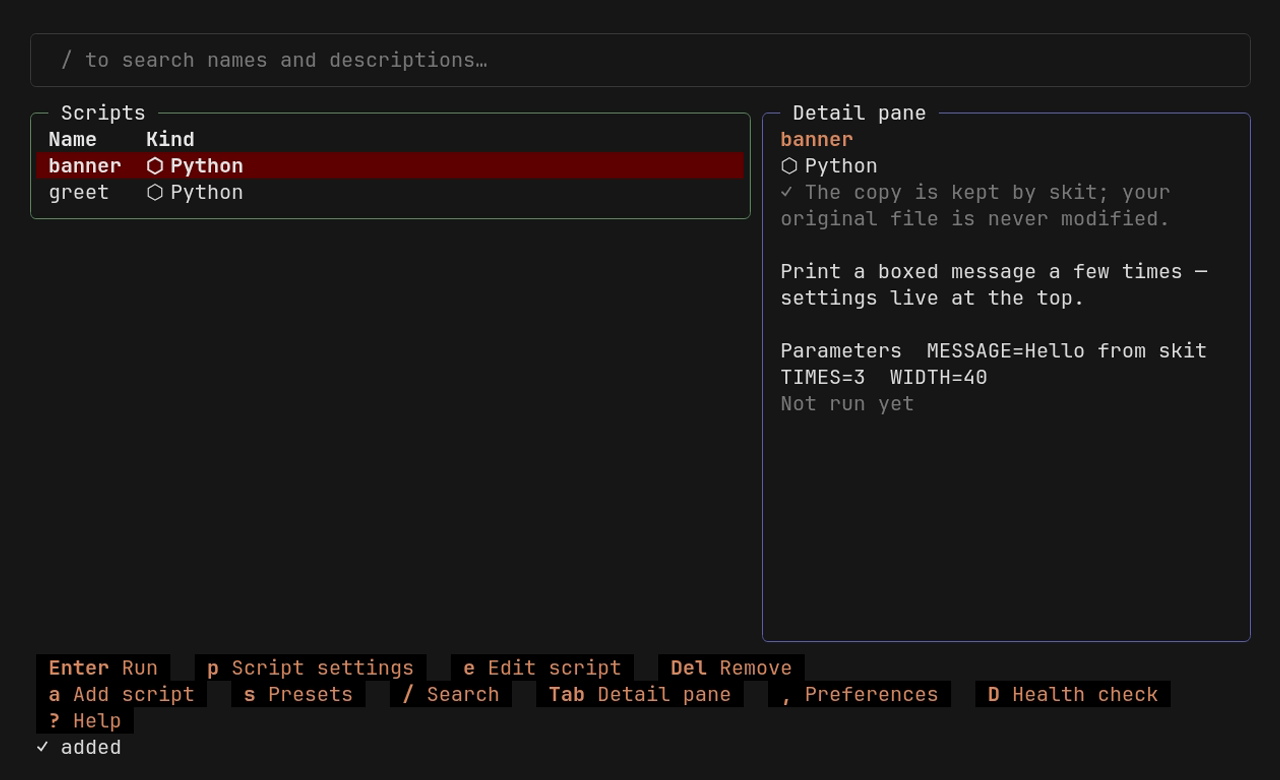
| The library — every action on screen, mouse or keyboard | The run form — generated from the script's own parameters |
 |
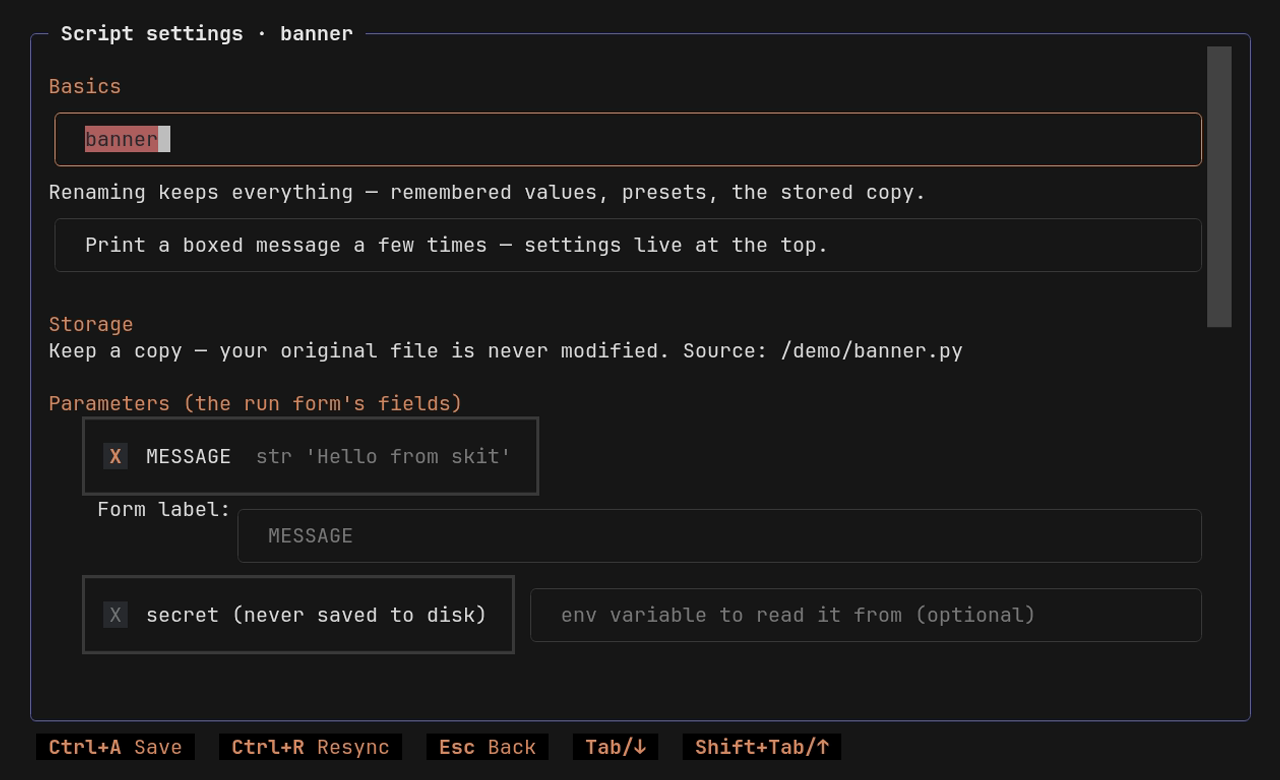 |
| Adding a script — parameters detected statically, tick to manage | Script settings — parameters, secrets, presets, dependencies |
Fully mouse operable — every key hint on screen is also a button.
Language support
Python, shell, and JS/TS get static parameter detection and value injection. The rest launch out of the box, accept declared parameters, and work with their own CLI parsers.
| Kind | Runs via | Params detected | Injection | Reads its own CLI | Deps / needs |
|---|---|---|---|---|---|
| Python | uv run --script |
constants, input() |
✅ | argparse · click · typer | PEP 723 (uv) + needs |
| Shell (bash/sh/zsh) | interpreter | constants, ${VAR:-} env-defaults, read |
✅ | getopts | needs |
| JS / TS | deno › bun › node | const |
✅ | util.parseArgs |
npm (per script) + needs |
| fish | fish | set -q NAME; or set NAME … env-defaults |
— | argparse builtin |
needs |
| PowerShell | pwsh | — | — | param() |
needs |
| Ruby · Perl · Lua · R | interpreter | — | — | — | needs |
| Programs (exe) | direct exec | — | — | — | needs |
| Commands | template fill | — | — | — | needs |
| Prompts | your agent CLI (claude · codex · …) | {{name}} placeholders |
— | — | needs |
You can also declare parameters by hand for any kind — so even plain executables and command templates get the same form / preset / --set experience. needs are external commands — skit checks they're on your PATH before each run (any kind). Python and JS/TS get isolated per-script package dependencies: uv resolves the PEP 723 block, and npm-style deps install into a node_modules next to the stored copy (skit add suggests them from the script's own imports). Managed JS/TS deps apply to copied entries — a referenced script keeps using its own project's node_modules — and installs never run package lifecycle scripts (npm and bun get --ignore-scripts; deno skips them by default). One more evener: when deno is the runner skit picks, it passes --allow-all, so the same script behaves the same under deno, bun, and node. skit bootstraps uv for Python, but never a JS runtime — you supply node, bun, or deno.
Prompts
A prompt entry is a reusable, parameterized piece of text for an AI coding agent. Add a .prompt.md file (or draft one with skit add --prompt); in interactive add review, choose which detected {{placeholders}} become form fields. Up to 30 are selected by default; when detection exceeds 30, none are selected by default, so code samples are not mistaken for variables. Managed fields get the full preset / last-values / --set experience. There are no escape sequences to learn: anything that isn't a placeholder you manage — unmanaged {{holes}} included — travels to the agent byte-for-byte as written, and a per-prompt switch (--no-interpolate, or one checkbox in Entry settings) turns insertion off entirely for prompts that were never written with it in mind. Running one renders the text and invokes the selected runner's configured argv command with it. The bundled Claude, Codex, OpenCode, and Antigravity commands open their interactive sessions; Amp is the deliberate exception, using its official amp -x one-shot mode to execute the prompt and return. The runner is picked on the run form (or pinned per prompt), claude / codex / opencode / amp / antigravity come preconfigured, and skit runner add mycli -- mycli run {{prompt}} registers anything else. The rendered prompt travels as a single process argument — no shell in between. One honest caveat: prompts are not a secrets channel — whatever the rendered text contains ends up in the receiving agent's own session logs.
skit add review.prompt.md            # managed placeholders become form fields
skit run review                      # pick the agent, fill the form, go
skit run review --runner codex --set target=src/app.py --no-input
Install
skit is built on uv (tested against 0.11.26). Don't have it? skit asks first, then downloads a pinned uv into its own private directory — your PATH and global environment stay untouched. A system-wide install is still preferred.
# Install skit with uv tool from PyPI (the package is named skit-cli; the command is skit)
uv tool install skit-cli
In mainland China? Set the mirror by hand for this one command (details in Mainland China (中国大陆)):
export UV_DEFAULT_INDEX=https://pypi.tuna.tsinghua.edu.cn/simple
uv tool install skit-cli
Or install the latest dev version from the main branch.
uv tool install git+https://github.com/t41372/skit          # latest development version
uvx --from git+https://github.com/t41372/skit skit --help   # try it without installing
Update
uv tool upgrade skit-cli   # update to the latest release — also how you "check": it says up to date if you are
skit --version             # the version you're on
uv tool upgrade follows whatever source you installed from: PyPI installs track PyPI releases, git+… installs re-fetch the main branch.
Uninstall
uv tool uninstall skit-cli
That removes skit and its PATH shim. Your library and settings live outside the package, so they survive on purpose — reinstall and you're right back where you left off. To erase those too, delete skit's own directories:
| OS | Directories |
|---|---|
| macOS | ~/Library/Application Support/skit |
| Linux | ~/.local/share/skit · ~/.local/state/skit · ~/.config/skit |
| Windows | %LOCALAPPDATA%\skit |
They hold your tool library, config, presets, and last-used values — plus, if skit ever bootstrapped its own uv, the private uv binary (in …/skit/bin, deleted along with the rest).
# macOS
rm -rf ~/Library/Application\ Support/skit

# Linux — honors XDG_DATA_HOME / XDG_STATE_HOME / XDG_CONFIG_HOME if you've set them
rm -rf ~/.local/share/skit ~/.local/state/skit ~/.config/skit
# Windows (PowerShell)
Remove-Item -Recurse -Force $env:LOCALAPPDATA\skit
Not sure where yours landed? skit doctor prints the resolved library path (and respects any SKIT_DATA_DIR / SKIT_STATE_DIR / SKIT_CONFIG_DIR overrides). That's everything skit owns — it never writes to your PATH, shell, or global uv config, so nothing else needs undoing. The uv download cache and any Python builds uv fetched are shared with the rest of your uv setup, not skit's to remove; if you don't use uv elsewhere and want the space back, uv cache clean clears the cache.
Usage
Two commands are the whole interface:
skit add my_script.py   # add a script
skit add                # not sure what you're adding? it asks
skit                    # open the menu, pick it, fill in the form, run
Everything else happens inside the TUI — on screen, mouse or keyboard, nothing to memorize.
The rest of the CLI exists for automation and AI agents — every TUI action, scriptable:
skit run my_script -p fast    # run with a saved preset
skit run my_script --dry-run  # print the exact command, don't run it
skit run my_script --set width=800 --no-input   # set values explicitly, never prompt
skit show my_script --json    # one script's full parameter schema, machine-readable
skit params my_script         # show managed parameters and last-used values
skit deps my_script --dep "requests>=2"   # set a script's package dependencies
skit list --json              # machine-readable listing
skit config                   # settings: language, editor, mirror, form style
skit --help                   # everything else
Works with your AI agent
skit is a script repository for humans and AI agents: one library — you get the forms, agents get a deterministic CLI. The official Agent Skill teaches compatible agents (Claude Code, Codex, Cursor, Gemini CLI, and many more) to check your library before writing yet another one-off script, to inspect and run what's already there, and to offer to save the useful scripts they write — so they outlive the session that created them.
skit agent install            # pick one of the agent directories found on your machine
skit agent install claude     # or name it: claude / codex / agents (--project for this repo only)
npx skills add t41372/skit    # or install through skills.sh into 70+ agents
Languages
| Language | Status |
|---|---|
| English | ✅ 100%, human-reviewed |
| 繁體中文 (zh-TW) | ✅ 100%, human-reviewed |
| 简体中文 (zh-CN) | ✅ 100%, human-reviewed |
skit follows your system language; switch it in the TUI preferences (for automation: skit config lang zh-TW, or SKIT_LANG=zh-CN skit for one run).
Mainland China (中国大陆)
Four downloads tend to fail in mainland China: PyPI packages, npm packages, the Python builds uv fetches from GitHub, and skit's own uv bootstrap. skit can route all four through domestic mirrors.
Mirror settings live inside skit only: your global uv config is never touched, and existing mirror settings (UV_DEFAULT_INDEX, uv.toml, …) are respected. The npm registry rides NPM_CONFIG_REGISTRY: an existing value of that variable in your environment still wins, but note npm itself ranks it above ~/.npmrc.
Each ecosystem is its own, independent choice — mirror vendors differ per ecosystem, so no single vendor name spans them:
- First run: if PyPI/GitHub look unreachable, skit offers mirror setup — one question per ecosystem, Enter accepts each one's recommended preset.
- Any time: TUI Preferences → mirrors, or:
skit config mirror.pypi tsinghua    # Python packages: tsinghua / aliyun / ustc / a URL / off
skit config mirror.github nju       # Python builds + the uv binary: nju / an https:// base URL / off
skit config mirror.npm npmmirror    # JS/TS packages: npmmirror / a URL / off
skit config mirror off              # master switch: off keeps the URLs; `on` restores them
Custom URLs: pick custom in TUI Preferences (or the first-run wizard), or pass a URL to the axis key directly.
Why skit exists
skit began as an answer to a linux.do forum thread (in Chinese).
Development
Development runs entirely on uv — see CONTRIBUTING.md for the full workflow and quality gates (ruff, ty strict, 100% test coverage, mutation testing with mutmut, zizmor-audited workflows).
uv sync --dev
uv run pytest -q
uv run python scripts/serve_preview.py   # TUI web preview (textual-serve, localhost:8000)
License
1 maintainer

Download files
Download the file for your platform. If you're not sure which to choose, learn more about installing packages.
Source Distribution
Built Distribution
Filter files by name, interpreter, ABI, and platform.
If you're not sure about the file name format, learn more about wheel file names.
Copy a direct link to the current filters
File details
Details for the file skit_cli-0.4.0.tar.gz.
File metadata
- Download URL: skit_cli-0.4.0.tar.gz
- Upload date:
- Size: 553.3 kB
- Tags: Source
- Uploaded using Trusted Publishing? Yes
- Uploaded via:
twine/6.1.0 CPython/3.13.13
File hashes
| Algorithm | Hash digest | |
|---|---|---|
| SHA256 |
7f7afbcd1257dc7bdf94ef6ce6a9fdbc5dd4171a3dbfc58f5b1426ce6a068181
|
|
| MD5 |
2744caf3c16c407af7d70a74070a7c5f
|
|
| BLAKE2b-256 |
4cd41827ee52f659b72ecdc9d28bfed20a2b281d69035128895a2edf44fbe50a
|
Provenance
The following attestation bundles were made for skit_cli-0.4.0.tar.gz:
Publisher:
release.yml on t41372/skit
-
Statement:
-
Statement type:
https://in-toto.io/Statement/v1 -
Predicate type:
https://docs.pypi.org/attestations/publish/v1 -
Subject name:
skit_cli-0.4.0.tar.gz -
Subject digest:
7f7afbcd1257dc7bdf94ef6ce6a9fdbc5dd4171a3dbfc58f5b1426ce6a068181 - Sigstore transparency entry: 2215223612
- Sigstore integration time:
-
Permalink:
t41372/skit@e044d569947e385d206cfa90f12ef69dfcb6ea5e -
Branch / Tag:
refs/tags/v0.4.0 - Owner: https://github.com/t41372
-
Access:
public
-
Token Issuer:
https://token.actions.githubusercontent.com -
Runner Environment:
github-hosted -
Publication workflow:
release.yml@e044d569947e385d206cfa90f12ef69dfcb6ea5e -
Trigger Event:
push
-
Statement type:
File details
Details for the file skit_cli-0.4.0-py3-none-any.whl.
File metadata
- Download URL: skit_cli-0.4.0-py3-none-any.whl
- Upload date:
- Size: 493.4 kB
- Tags: Python 3
- Uploaded using Trusted Publishing? Yes
- Uploaded via:
twine/6.1.0 CPython/3.13.13
File hashes
| Algorithm | Hash digest | |
|---|---|---|
| SHA256 |
404543f2763e24c530ae797b7adb51ccae51b0ab1d99f5aeef8263d8469bef8d
|
|
| MD5 |
82c33d26e787e9ddc35ca7fe11d6f40d
|
|
| BLAKE2b-256 |
9f806b53fb55716b9504941cf7a55356ffc9065f832e2f7a594109ee33d25546
|
Provenance
The following attestation bundles were made for skit_cli-0.4.0-py3-none-any.whl:
Publisher:
release.yml on t41372/skit
-
Statement:
-
Statement type:
https://in-toto.io/Statement/v1 -
Predicate type:
https://docs.pypi.org/attestations/publish/v1 -
Subject name:
skit_cli-0.4.0-py3-none-any.whl -
Subject digest:
404543f2763e24c530ae797b7adb51ccae51b0ab1d99f5aeef8263d8469bef8d - Sigstore transparency entry: 2215223619
- Sigstore integration time:
-
Permalink:
t41372/skit@e044d569947e385d206cfa90f12ef69dfcb6ea5e -
Branch / Tag:
refs/tags/v0.4.0 - Owner: https://github.com/t41372
-
Access:
public
-
Token Issuer:
https://token.actions.githubusercontent.com -
Runner Environment:
github-hosted -
Publication workflow:
release.yml@e044d569947e385d206cfa90f12ef69dfcb6ea5e -
Trigger Event:
push
-
Statement type:














