
Script launcher and parameter manager: pick a script, fill in a form, run — no more opening an IDE just to tweak constants.
Verified details
These details have been verified by PyPIProject links
GitHub Statistics
Maintainers

Project description






skit is a launcher and a home for your Python scripts.
skit stores your Python scripts in one place and makes them painless to launch.
AI writes the scripts. skit gives them a home.
What it does
- One home for your scripts.
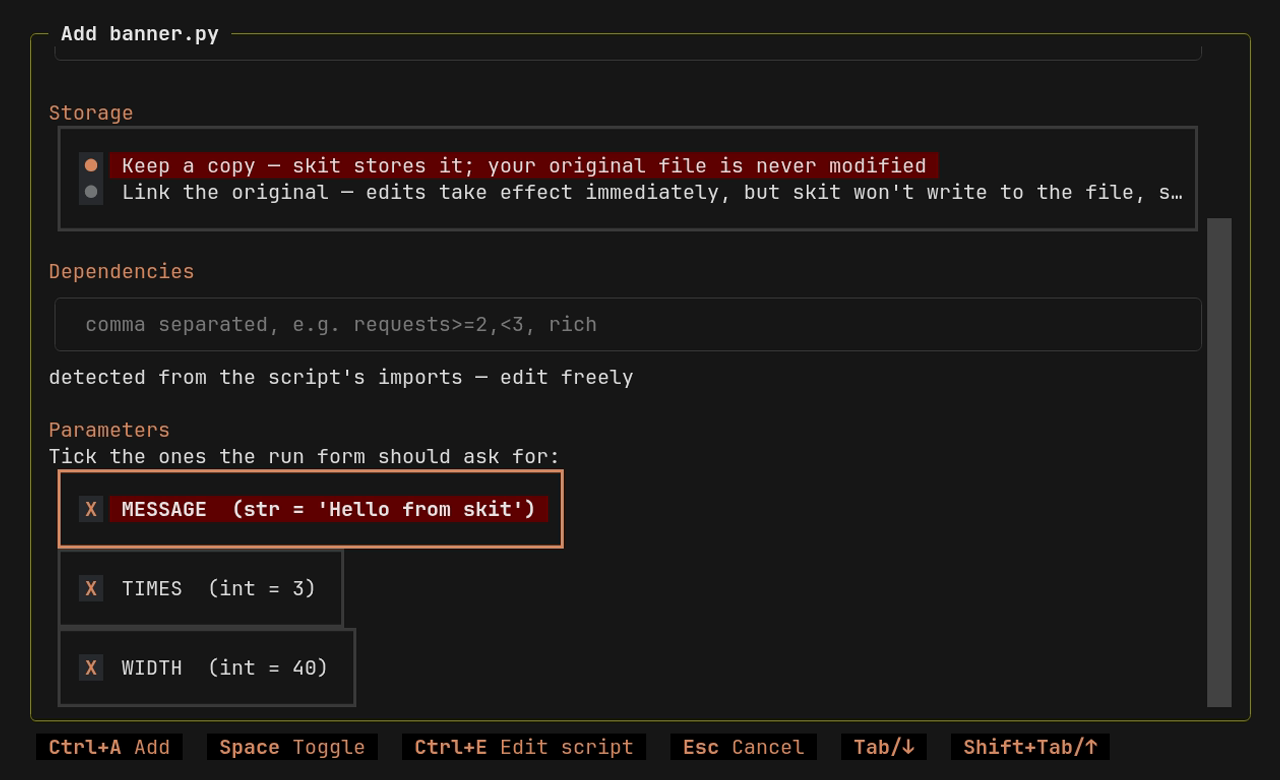
skit addcollects scattered scripts into a searchable library — keep a copy in the library, or reference the original file. - Parameters without the pain. Flags,
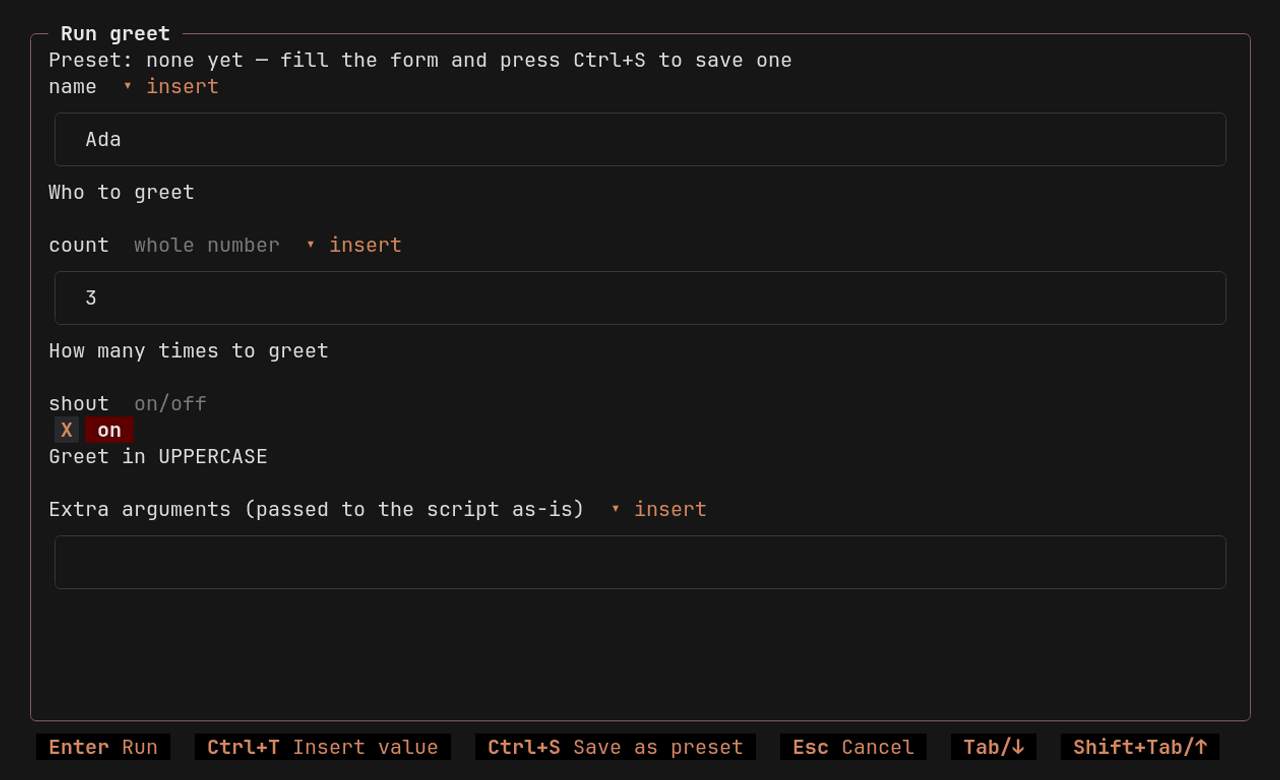
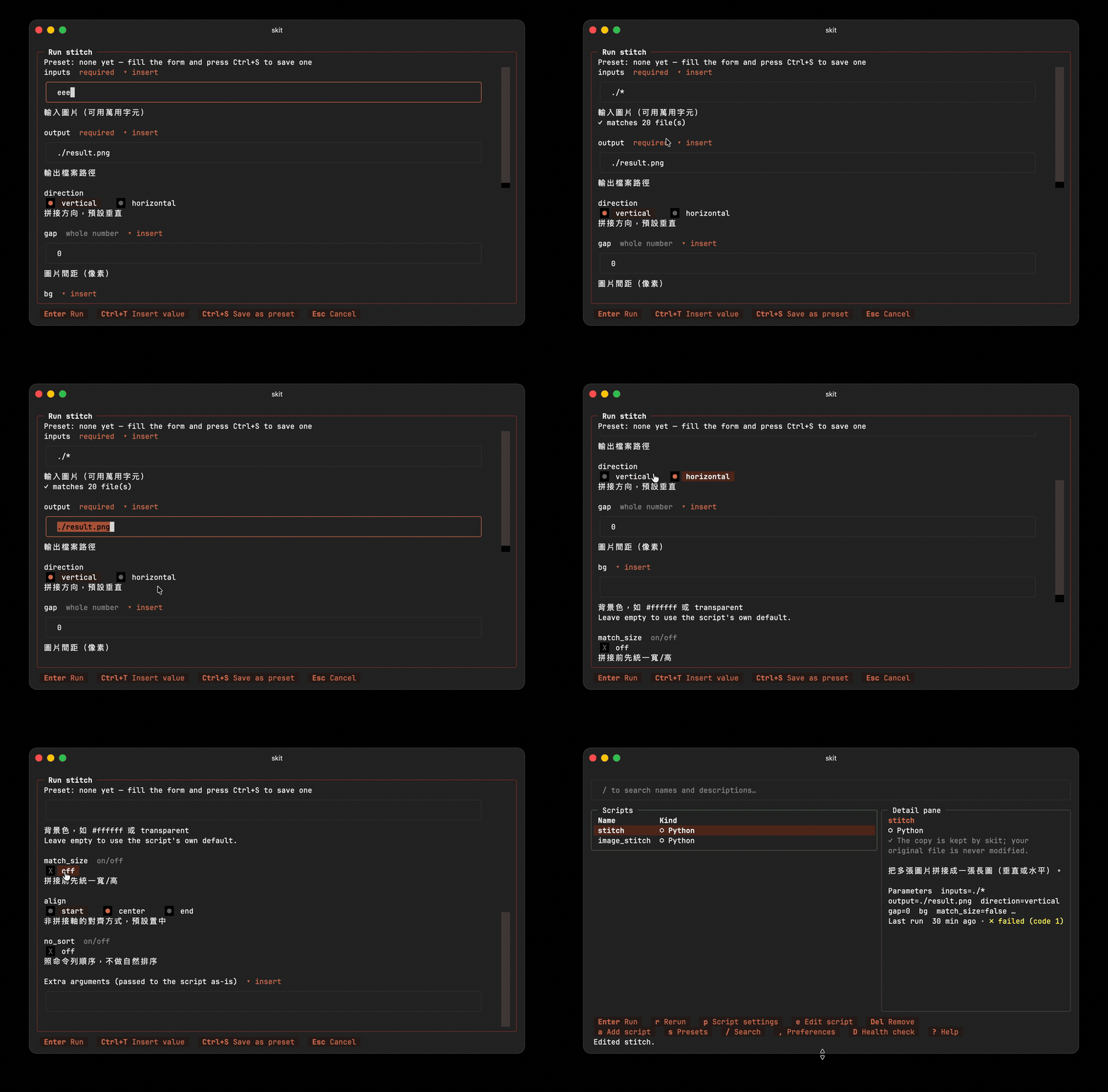
input()calls, and the constants you tick become form fields (choices → pickers, booleans → checkboxes, types enforced). - It remembers. Last-used values come back automatically; save favorites as named presets. Parameters marked secret never touch disk. Tokens like
{cwd}and{today}keep presets portable. - No environment mess. skit declares each script's dependencies in the script itself (PEP 723) and runs it through uv in an isolated, cached environment — no venvs to manage, nothing installed globally.
- Mouse or keyboard. Plain
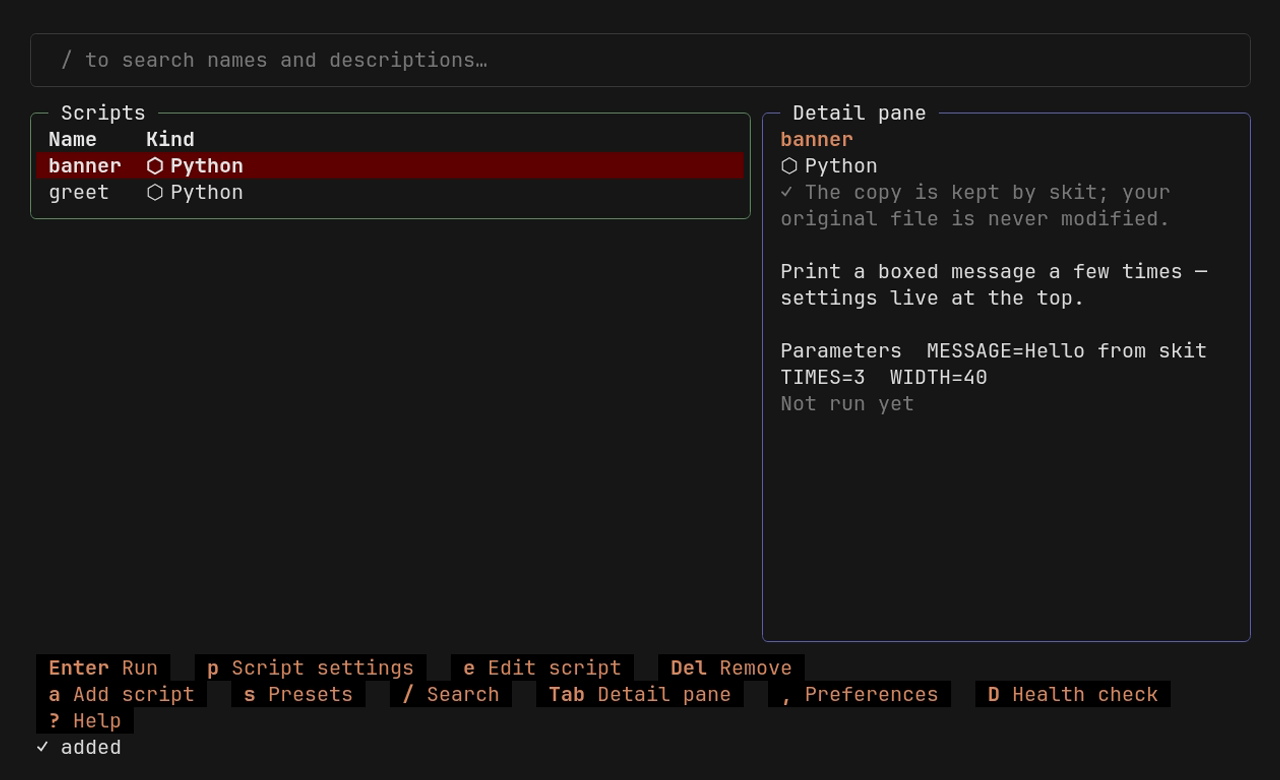
skitopens the full TUI; every key hint on screen is also a clickable button. - Automation-ready. Every TUI action is also a CLI command with
--jsonoutput and meaningful exit codes — for shell scripts, CI, and AI agents. - Speaks your language. English, 繁體中文, and 简体中文, with more to come. See Languages.
| Problem | What skit does |
|---|---|
| Scripts scattered all over the place | One central menu, with search |
| Scripts with weird external dependencies | An isolated environment per script — dependencies declared in the file (PEP 723), resolved by uv |
CLI flags you forget ten minutes later, input() prompts, hard-coded constants meant to be edited by hand |
Static analysis extracts them all into an interactive form — no code changes. Last-used values come prefilled; favorites save as presets. |
Nothing to set up per script — no refactoring, no config to maintain. The script an AI wrote last week and the one you barely remember from last year launch the same way.
 |
 |
|---|---|
| The library — every action on screen, mouse or keyboard | The run form — generated from the script's own parameters |
 |
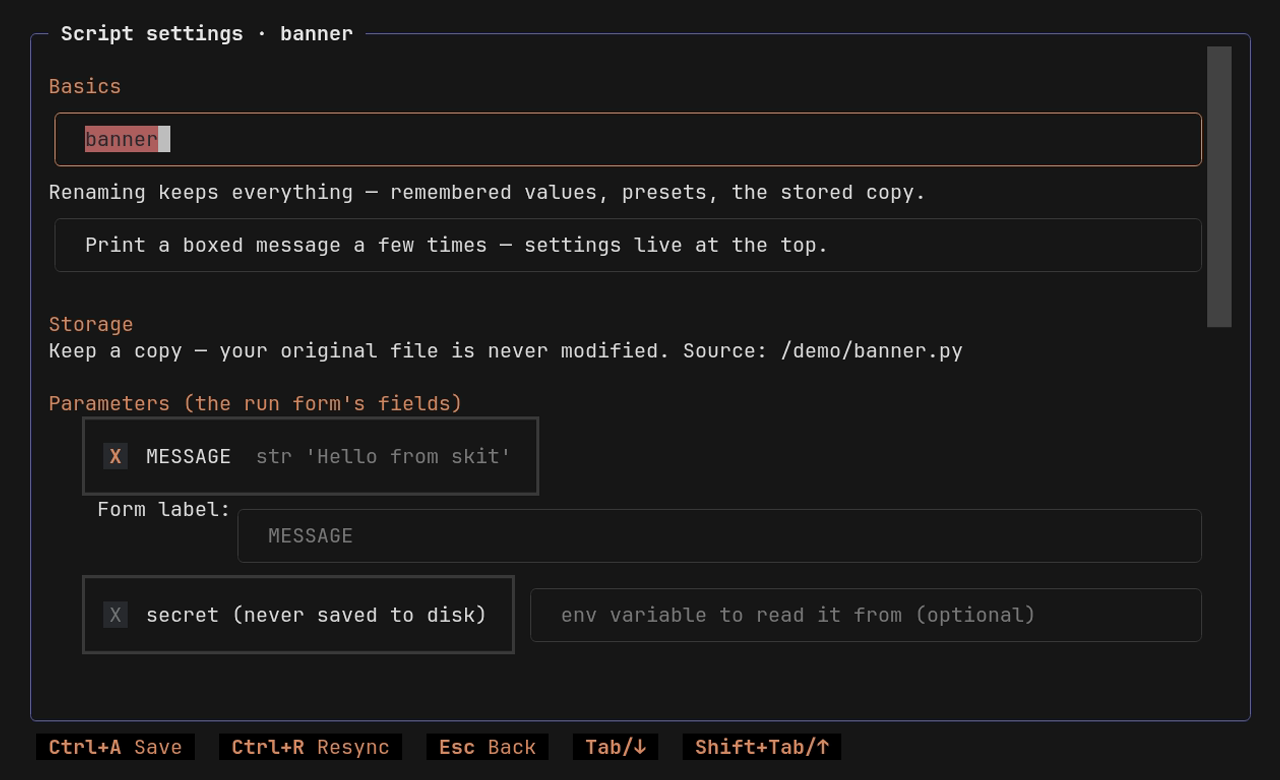 |
| Adding a script — parameters detected statically, tick to manage | Script settings — parameters, secrets, presets, dependencies |
Fully mouse operable — every key hint on screen is also a button.
Install
skit is built on uv (tested against 0.11.26). Don't have it? skit asks first, then downloads a pinned uv into its own private directory — your PATH and global environment stay untouched. A system-wide install is still preferred.
# Install skit with uv tool from PyPI (the package is named skit-cli; the command is skit)
uv tool install skit-cli
In mainland China? Set the mirror by hand for this one command (details in Mainland China (中国大陆)):
export UV_DEFAULT_INDEX=https://pypi.tuna.tsinghua.edu.cn/simple
uv tool install skit-cli
Or install the latest dev version from the main branch.
uv tool install git+https://github.com/t41372/skit          # latest development version
uvx --from git+https://github.com/t41372/skit skit --help   # try it without installing
Uninstall
uv tool uninstall skit-cli
That removes skit and its PATH shim. Your library and settings live outside the package, so they survive on purpose — reinstall and you're right back where you left off. To erase those too, delete skit's own directories:
| OS | Directories |
|---|---|
| macOS | ~/Library/Application Support/skit |
| Linux | ~/.local/share/skit · ~/.local/state/skit · ~/.config/skit |
| Windows | %LOCALAPPDATA%\skit |
They hold your script library, config, presets, and last-used values — plus, if skit ever bootstrapped its own uv, the private uv binary (in …/skit/bin, deleted along with the rest).
# macOS
rm -rf ~/Library/Application\ Support/skit

# Linux — honors XDG_DATA_HOME / XDG_STATE_HOME / XDG_CONFIG_HOME if you've set them
rm -rf ~/.local/share/skit ~/.local/state/skit ~/.config/skit
# Windows (PowerShell)
Remove-Item -Recurse -Force $env:LOCALAPPDATA\skit
Not sure where yours landed? skit doctor prints the resolved library path (and respects any SKIT_DATA_DIR / SKIT_STATE_DIR / SKIT_CONFIG_DIR overrides). That's everything skit owns — it never writes to your PATH, shell, or global uv config, so nothing else needs undoing. The uv download cache and any Python builds uv fetched are shared with the rest of your uv setup, not skit's to remove; if you don't use uv elsewhere and want the space back, uv cache clean clears the cache.
Usage
Two commands are the whole interface:
skit add my_script.py   # add a script
skit                    # open the menu, pick it, fill in the form, run
Everything else happens inside the TUI — on screen, mouse or keyboard, nothing to memorize.
The rest of the CLI exists for automation and AI agents — every TUI action, scriptable:
skit run my_script -p fast    # run with a saved preset
skit run my_script --dry-run  # print the exact command, don't run it
skit params my_script         # show managed parameters and last-used values
skit list --json              # machine-readable listing
skit config                   # settings: language, editor, mirror, form style
skit --help                   # everything else
Languages
| Language | Status |
|---|---|
| English | ✅ 100%, human-reviewed |
| 繁體中文 (zh-TW) | ✅ 100%, human-reviewed |
| 简体中文 (zh-CN) | ✅ 100%, human-reviewed |
skit follows your system language; switch it in the TUI preferences (for automation: skit config lang zh-TW, or SKIT_LANG=zh-CN skit for one run).
Mainland China (中国大陆)
Three downloads tend to fail in mainland China: PyPI packages, the Python builds uv fetches from GitHub, and skit's own uv bootstrap. skit can route all three through domestic mirrors.
Mirror settings live inside skit only: your global uv config is never touched, and existing mirror settings (UV_DEFAULT_INDEX, uv.toml, …) are respected.
- First run: if PyPI/GitHub look unreachable, skit offers to turn mirrors on — just press Enter.
- Any time: TUI Preferences → mirror, or:
skit config mirror tsinghua # or: aliyun / ustc / custom / off
Defaults: PyPI via Tsinghua / Aliyun / USTC; Python builds and the uv binary via NJU. Pick custom to swap any URL.
Why skit exists
skit began as an answer to a linux.do forum thread (in Chinese).
Development
Development runs entirely on uv — see CONTRIBUTING.md for the full workflow and quality gates (ruff, ty strict, 100% test coverage, mutation testing with mutmut, zizmor-audited workflows).
uv sync --dev
uv run pytest -q
uv run python scripts/serve_preview.py   # TUI web preview (textual-serve, localhost:8000)
License
Project details
Verified details
These details have been verified by PyPIProject links
GitHub Statistics
Maintainers
Release history Release notifications | RSS feed


Download files
Download the file for your platform. If you're not sure which to choose, learn more about installing packages.
Source Distribution
Built Distribution
Filter files by name, interpreter, ABI, and platform.
If you're not sure about the file name format, learn more about wheel file names.
Copy a direct link to the current filters
File details
Details for the file skit_cli-0.0.1.tar.gz.
File metadata
- Download URL: skit_cli-0.0.1.tar.gz
- Upload date:
- Size: 191.7 kB
- Tags: Source
- Uploaded using Trusted Publishing? Yes
- Uploaded via: twine/6.1.0 CPython/3.13.13
File hashes
| Algorithm | Hash digest | |
|---|---|---|
| SHA256 |
fc52ea65d2cf740142bdb9b0d991726c2e2119eee55ce09e0c92014857b1ce0d
|
|
| MD5 |
43dbc2b04d4e191731e067923f65551e
|
|
| BLAKE2b-256 |
6687182fb996326d672d3cf73071536304fd29461165f81c8fa04aad5c56cebf
|
Provenance
The following attestation bundles were made for skit_cli-0.0.1.tar.gz:
Publisher:
release.yml on t41372/skit
-
Statement:
-
Statement type:
https://in-toto.io/Statement/v1 -
Predicate type:
https://docs.pypi.org/attestations/publish/v1 -
Subject name:
skit_cli-0.0.1.tar.gz -
Subject digest:
fc52ea65d2cf740142bdb9b0d991726c2e2119eee55ce09e0c92014857b1ce0d - Sigstore transparency entry: 2145330243
- Sigstore integration time:
-
Permalink:
t41372/skit@08b7ed649c0d5d6d38dddf241ed4194ba5e9a300 -
Branch / Tag:
refs/tags/v0.0.1 - Owner: https://github.com/t41372
-
Access:
public
-
Token Issuer:
https://token.actions.githubusercontent.com -
Runner Environment:
github-hosted -
Publication workflow:
release.yml@08b7ed649c0d5d6d38dddf241ed4194ba5e9a300 -
Trigger Event:
push
-
Statement type:
File details
Details for the file skit_cli-0.0.1-py3-none-any.whl.
File metadata
- Download URL: skit_cli-0.0.1-py3-none-any.whl
- Upload date:
- Size: 174.6 kB
- Tags: Python 3
- Uploaded using Trusted Publishing? Yes
- Uploaded via: twine/6.1.0 CPython/3.13.13
File hashes
| Algorithm | Hash digest | |
|---|---|---|
| SHA256 |
32ef2dc7c90631716b0357245aca36d679b717e2ef3f5eecfd2ed422c5c58318
|
|
| MD5 |
59f7d626c4302f014939c22de29106e9
|
|
| BLAKE2b-256 |
f08f85d2be80be74bffc3a5e63e48637a00b23c862985a696f0a44b4150089b0
|
Provenance
The following attestation bundles were made for skit_cli-0.0.1-py3-none-any.whl:
Publisher:
release.yml on t41372/skit
-
Statement:
-
Statement type:
https://in-toto.io/Statement/v1 -
Predicate type:
https://docs.pypi.org/attestations/publish/v1 -
Subject name:
skit_cli-0.0.1-py3-none-any.whl -
Subject digest:
32ef2dc7c90631716b0357245aca36d679b717e2ef3f5eecfd2ed422c5c58318 - Sigstore transparency entry: 2145330278
- Sigstore integration time:
-
Permalink:
t41372/skit@08b7ed649c0d5d6d38dddf241ed4194ba5e9a300 -
Branch / Tag:
refs/tags/v0.0.1 - Owner: https://github.com/t41372
-
Access:
public
-
Token Issuer:
https://token.actions.githubusercontent.com -
Runner Environment:
github-hosted -
Publication workflow:
release.yml@08b7ed649c0d5d6d38dddf241ed4194ba5e9a300 -
Trigger Event:
push
-
Statement type:






