
slida
It's a QT slideshow application written in Python. It only does image slideshows, and it does them pretty much the way I want them.
Some nice (?) features:
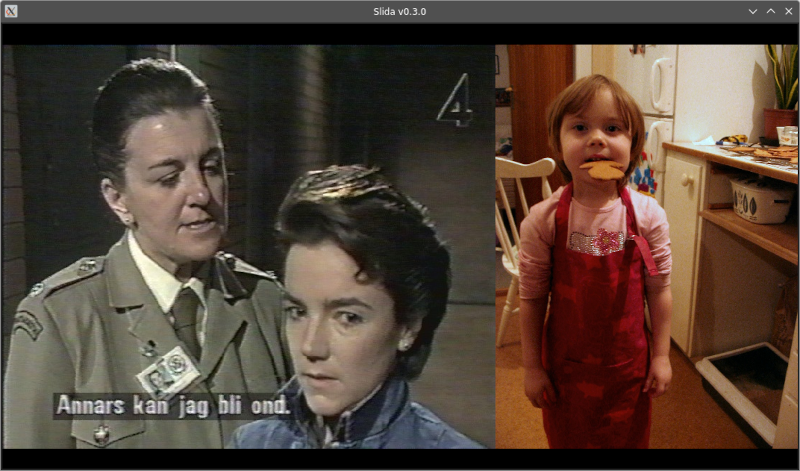
- By default, it will try to optimize the screen area usage by tiling multiple images horizontally, because why waste all that precious real estate on thick black bars? (Example below)
- A bunch of cool transitions
Installation
pip install slida or pipx install slida should do the trick.
Usage
$ slida --help
usage: slida [-h] [--list-transitions] [--print-config] [--auto | --no-auto] [--background BACKGROUND] [--debug | --no-debug] [--hidden | --no-hidden] [--interval INTERVAL]
             [--max-file-size MAX_FILE_SIZE] [--order {name,created,modified,random,size}] [--recursive | --no-recursive] [--reverse | --no-reverse] [--symlinks | --no-symlinks] [--tiling |
             --no-tiling] [--transition-duration TRANSITION_DURATION] [--transition TRANSITIONS] [--exclude-transition EXCLUDE_TRANSITIONS]
             [path ...]

positional arguments:
  path

options:
  -h, --help            show this help message and exit
  --list-transitions    List available transitions and exit
  --print-config        Also print debug info about the current config
  --auto                Enable auto-advance (default)
  --no-auto             Negates --auto
  --background BACKGROUND
                        For valid values, see: https://doc.qt.io/qt-6/qcolor.html#fromString (default: black)
  --debug               Output various debug stuff to console (default)
  --no-debug            Negates --debug
  --hidden              Include hidden files and directories
  --no-hidden           Negates --hidden (default)
  --interval, -i INTERVAL
                        Auto-advance interval, in seconds (default: 20)
  --max-file-size MAX_FILE_SIZE
                        Maximum file size (set to 0 to disable) (default: 20000000)
  --order, -o {name,created,modified,random,size}
                        Default: random
  --recursive, -R       Iterate through subdirectories (default)
  --no-recursive        Negates --recursive
  --reverse, -r         Reverse the image order
  --no-reverse          Negates --reverse (default)
  --symlinks            Follow symlinks (default)
  --no-symlinks         Negates --symlinks
  --tiling              Tile images horizontally (default)
  --no-tiling           Negates --tiling
  --transition-duration, -td TRANSITION_DURATION
                        In seconds; 0 = no transitions (default: 0.3)
  --transition, -t TRANSITIONS
                        Transition to use. Repeat the argument for multiple transitions. Default: use them all
  --exclude-transition, -et EXCLUDE_TRANSITIONS
                        Transition NOT to use. Repeat the argument for multiple transitions
--transition and --exclude-transition govern which effects will be used for transitioning between images. The full list of transitions is available in slida.transitions.TRANSITION_PAIRS. Explicit exclusion overrides explicit inclusion. However, there is one special case: --transition all on the command line overrides all other transition settings and simply includes all of them.
Press ? in the GUI for keyboard mapping info.
Configuration files
A file called slida.yaml will be looked for in the following locations, in order of priority:
- Any directory included as
pathon the command line - Current working directory
slidasubdirectory of user's config directory (e.g.~/.config/slida/on Linux)
If multiple config files are found, they will be merged so that arguments in a higher priority file will overwrite those in lower priority files.
All command line arguments in their long versions (OK, except path, help, list-transitions, and print-config) can be used in these files. However, the syntax for transition settings is a little different; instead of two separate settings, it's one transitions object with the optional string arrays include and exclude (see example below).
To see exactly how the CLI arguments and config files are parsed, and how the resultant configuration looks, just add --print-config:
$ slida --no-auto -td 3 --transition top-left-squares --transition top-squares --print-config
CombinedConfig(FINAL)
  auto: False
  background: black
  debug: True
  hidden: False
  interval: 20
  max-file-size: 20000000
  order: random
  recursive: True
  reverse: False
  symlinks: True
  tiling: True
  transition-duration: 3.0
  transitions: {'include': ['top-left-squares', 'top-squares']}
= Config(DEFAULT)
    auto: True
    background: black
    debug: False
    hidden: False
    interval: 20
    max-file-size: 20000000
    order: random
    recursive: False
    reverse: False
    symlinks: True
    tiling: True
    transition-duration: 0.3
    transitions: {}
+ Config(/home/klaatu/.config/slida/slida.yaml)
    debug: True
    recursive: True
+ Config(CLI)
    auto: False
    transition-duration: 3.0
    transitions: {'include': ['top-left-squares', 'top-squares']}
Example config file
recursive: true
transition-duration: 0.2
order: name
transitions:
  include:
    - clockface
    - top-left-squares
    - flip-x
    - radial
  exclude:
    - slide-down
    - slide-right
    - slide-up
    - slide-left
(Obviously it makes no sense to both include and exclude transitions, but this is an example.)
1 maintainer

Metadata
1 maintainer
Release files for slida 0.7.4
For a detailed explanation of source distributions (sdists) and built distributions (wheels), please see the package formats documentation.
Source distribution (sdist)
| File | Size | Uploaded | |
|---|---|---|---|
| slida-0.7.4.tar.gz | 45.0 kB | Details |
Built distribution (wheel)
| File | Interpreter | ABI | Platform | Reset |
|---|---|---|---|---|
| slida-0.7.4-py3-none-any.whl | Python 3 | none | any | Details |
Total release size: 94.9 kB
Release files / slida-0.7.4.tar.gz
| Download URL | slida-0.7.4.tar.gz |
|---|---|
| Size | 45.0 kB |
| Tags | Source |
|
SHA-256 checksum How to use checksums |
86510173b53e4df30d7b8078fe0a030ea1559a10471ccacedfeefd921da67d7b
|
|
BLAKE2b-256 checksum How to use checksums |
253af6bc9aaf60fe3a2a980af9e1a8c380a168c56b801e10c4c6d2822ff11d16
|
| Upload date | |
|
Uploaded using Trusted Publishing? What is trusted publishing? |
No |
| Uploaded via |
twine/6.1.0 CPython/3.13.5
|
Release files / slida-0.7.4-py3-none-any.whl
| Download URL | slida-0.7.4-py3-none-any.whl |
|---|---|
| Size | 49.9 kB |
| Tags | Python 3 |
|
SHA-256 checksum How to use checksums |
ea28459c765cd8ce50356ad2b6272afb2d8ff59848fb0a395d8b20b9cce94854
|
|
BLAKE2b-256 checksum How to use checksums |
0e0351c01cd1c43b315f7c72ac9c1231a5e8a6d3ecd7bd90d07ea3a729c59429
|
| Upload date | |
|
Uploaded using Trusted Publishing? What is trusted publishing? |
No |
| Uploaded via |
twine/6.1.0 CPython/3.13.5
|














