
No project description provided

Project description
slida
It's a QT slideshow application written in Python. It only does image slideshows, and it does them pretty much the way I want them.
Some nice (?) features:
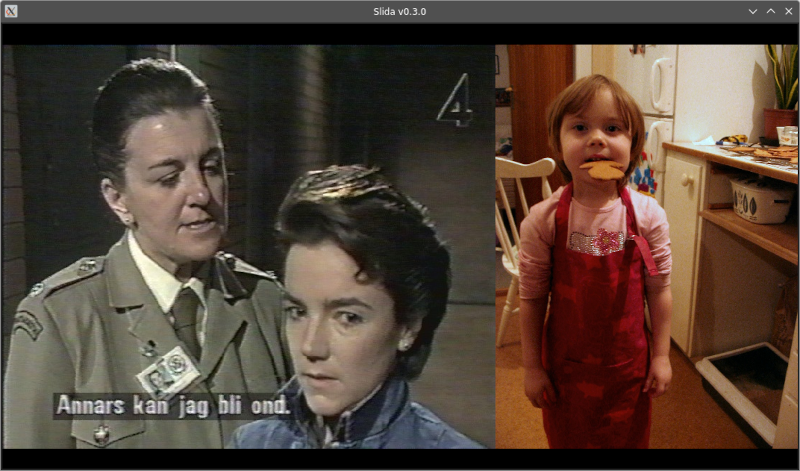
- By default, it will try to optimize the screen area usage by tiling multiple images horizontally, because why waste all that precious real estate on thick black bars? (Example below)
- A bunch of cool transitions
Installation
pip install slida or pipx install slida should do the trick.
Usage
$ slida --help
usage: slida [-h] [--list-transitions] [--print-config] [--auto | --no-auto] [--debug | --no-debug] [--hidden | --no-hidden] [--interval INTERVAL] [--order ORDER] [--recursive |
             --no-recursive] [--reverse | --no-reverse] [--symlinks | --no-symlinks] [--tiling | --no-tiling] [--transition-duration TRANSITION_DURATION] [--transition TRANSITIONS]
             [--exclude-transition EXCLUDE_TRANSITIONS]
             [path ...]

positional arguments:
  path

options:
  -h, --help            show this help message and exit
  --list-transitions    List available transitions and exit
  --print-config        Also print debug info about the current config
  --auto                Enable auto-advance (default)
  --no-auto             Negates --auto
  --debug               Output various debug stuff to console (default)
  --no-debug            Negates --debug
  --hidden              Include hidden files and directories
  --no-hidden           Negates --hidden (default)
  --interval, -i INTERVAL
                        Auto-advance interval, in seconds (default: 20)
  --order, -o ORDER     Default: random
  --recursive, -R       Iterate through subdirectories (default)
  --no-recursive        Negates --recursive
  --reverse, -r         Reverse the image order
  --no-reverse          Negates --reverse (default)
  --symlinks            Follow symlinks (default)
  --no-symlinks         Negates --symlinks
  --tiling              Tile images horizontally (default)
  --no-tiling           Negates --tiling
  --transition-duration, -td TRANSITION_DURATION
                        In seconds; 0 = no transitions (default: 0.3)
  --transition, -t TRANSITIONS
                        Transitions to use. Repeat the argument for multiple transitions. Default: use them all
  --exclude-transition, -et EXCLUDE_TRANSITIONS
                        Transition NOT to use. Repeat the argument for multiple transitions
--transition and --exclude-transition govern which effects will be used for transitioning between images. The full list of transitions is available in slida.transitions.TRANSITION_PAIRS. Explicit exclusion overrides explicit inclusion. However, there is one special case: --transition all on the command line overrides all other transition settings and simply includes all of them.
Press ? in the GUI for keyboard mapping info.
Configuration files
A file called slida.yaml will be looked for in the following locations, in order of priority:
- Any directory included as
pathon the command line - Current working directory
slidasubdirectory of user's config directory (e.g.~/.config/slida/on Linux)
If multiple config files are found, they will be merged so that arguments in a higher priority file will overwrite those in lower priority files.
All command line arguments in their long versions (OK, except path, help, list-transitions, and print-config) can be used in these files. However, the syntax for transition settings is a little different; instead of two separate settings, it's one transitions object with the optional string arrays include and exclude (see example below).
To see exactly how the CLI arguments and config files are parsed, and how the resultant configuration looks, just add --print-config:
$ slida --no-auto -td 3 --transition top-left-squares --transition top-squares --print-config
CombinedUserConfig(FINAL)
  auto: False
  debug: True
  hidden: False
  interval: 20
  order: random
  recursive: True
  reverse: False
  symlinks: True
  tiling: True
  transition-duration: 3.0
  transitions: {'include': ['top-left-squares', 'top-squares']}
= DefaultUserConfig()
    auto: True
    debug: False
    hidden: False
    interval: 20
    order: random
    recursive: False
    reverse: False
    symlinks: True
    tiling: True
    transition-duration: 0.3
    transitions: {}
+ UserConfig(/home/klaatu/.config/slida/slida.yaml)
    debug: True
    recursive: True
+ UserConfig(CLI)
    auto: False
    transition-duration: 3.0
    transitions: {'include': ['top-left-squares', 'top-squares']}
Example config file
recursive: true
transition-duration: 0.2
order: name
transitions:
  include:
    - clockface
    - top-left-squares
    - flip-x
    - radial
  exclude:
    - slide-down
    - slide-right
    - slide-up
    - slide-left
(Obviously it makes no sense to both include and exclude transitions, but this is an example.)


Download files
Download the file for your platform. If you're not sure which to choose, learn more about installing packages.
Source Distribution
Built Distribution
Filter files by name, interpreter, ABI, and platform.
If you're not sure about the file name format, learn more about wheel file names.
Copy a direct link to the current filters
File details
Details for the file slida-0.7.0.tar.gz.
File metadata
- Download URL: slida-0.7.0.tar.gz
- Upload date:
- Size: 44.3 kB
- Tags: Source
- Uploaded using Trusted Publishing? No
- Uploaded via: twine/6.1.0 CPython/3.13.5
File hashes
| Algorithm | Hash digest | |
|---|---|---|
| SHA256 |
5ac62393f67072800790712a5cb88673bb4e42161e6459d134262452d391b2c5
|
|
| MD5 |
181ac7c8fd126be751d9826578dc55ce
|
|
| BLAKE2b-256 |
db8f8a1074d98451439c37c449134ffc9569f9218f144bbdcf7bf369ef6750dd
|
File details
Details for the file slida-0.7.0-py3-none-any.whl.
File metadata
- Download URL: slida-0.7.0-py3-none-any.whl
- Upload date:
- Size: 49.3 kB
- Tags: Python 3
- Uploaded using Trusted Publishing? No
- Uploaded via: twine/6.1.0 CPython/3.13.5
File hashes
| Algorithm | Hash digest | |
|---|---|---|
| SHA256 |
3849c62a9d80da2cb0b6ac4d6545e56d04e394369dd2064124ea348915dcaf2a
|
|
| MD5 |
118948d838bbc9d8c83471901e952436
|
|
| BLAKE2b-256 |
fb2a092185a333bfd6c23049dfa2bba81c137cc545c1acb34aaa20373dd5fc98
|






