
JupyterLab extension for animated slideshow.

Project description
sliveshow

A JupyterLab extension that turns Jupyter notebooks into live, animated Reveal.js slideshows — with scrollable slides, SVG animations, and MyST directive support for Jupyter Book 2.
Install:
pip install sliveshow
PyPI: https://pypi.org/project/sliveshow/
Demo: https://ltshum.github.io/jupyterlite/lab/index.html
(Run all cells before starting the slideshow to display animations correctly.)
Requirements
- JupyterLab >= 4.0.0
Install
pip install sliveshow
Uninstall
pip uninstall sliveshow
Usage
Slideshow
The slideshow uses the Reveal.js framework. Set the slide type of each cell via COMMON TOOLS > Slide Type. Available types: Slide, Sub-Slide, Fragment, Skip.
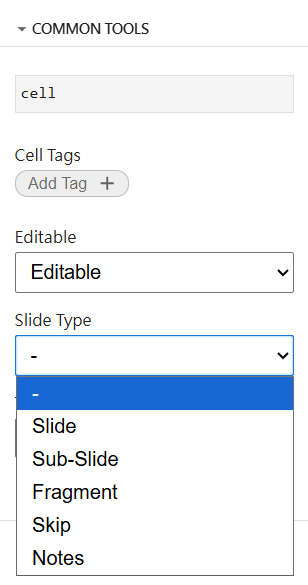
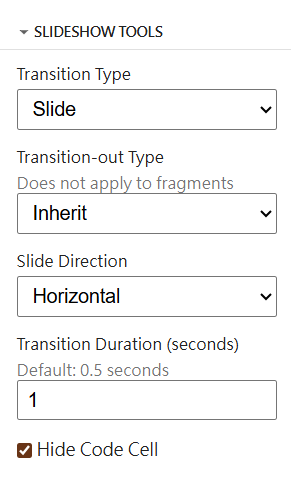
Transition type and duration are set per-cell in SLIDESHOW TOOLS. Available types: Slide, Fade, Zoom. The default can be changed in Settings.
For Slide transitions, direction is Horizontal (Slides) or Vertical (Sub-Slides) by default.
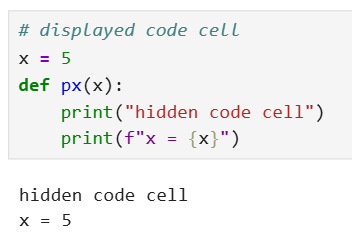
Code cell input can be hidden via Hide Code Cell, showing only the output.
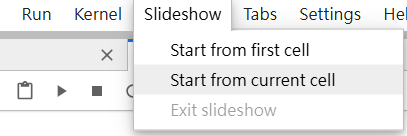
To start a slideshow, use the Slideshow menu → Start from first cell or Start from current cell. To exit, press Escape or use Exit slideshow.
SVG Animation
SVG animations use the Reveal.js Animate plugin by Asvin Goel. Animations load after the slideshow starts.
Method A — Raw HTML in a markdown cell
Add a <div data-animate> block containing your SVG and a JSON config comment directly in a markdown cell:
<div data-animate>
<svg xmlns="http://www.w3.org/2000/svg" width="300" height="300">
  <circle id="c1" cx="150" cy="150" r="60" style="fill:steelblue"/>
</svg>
<!--
{
  "setup": [{
    "element": "#c1",
    "modifier": "attr",
    "parameters": [{ "r": 100 }],
    "duration": 1500,
    "begin": 0
  }]
}
-->
</div>
Method B — {svg-animate} MyST directive (recommended)
Use the {svg-animate} directive in a markdown cell. The same cell works in both the live Reveal.js slideshow and a static Jupyter Book 2 / mystmd export:
:::{svg-animate} Circle animation
:height: 320px
:background: white
<svg xmlns='http://www.w3.org/2000/svg' width='300' height='300'>
  <circle id='c1' cx='150' cy='150' r='60' style='fill:steelblue'/>
</svg>
<!--
{
  "setup": [{ "element": "#c1", "modifier": "attr", "parameters": [{ "r": 100 }], "duration": 1500, "begin": 0 }]
}
-->
:::
To enable {svg-animate} in a mystmd/Jupyter Book 2 build, add the plugin to your myst.yml:
project:
  plugins:
    - svg-animate.mjs
The svg-animate.mjs plugin file is included in the Demo/ folder.
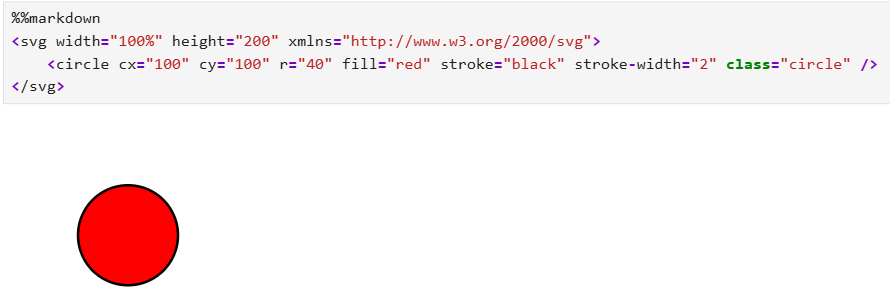
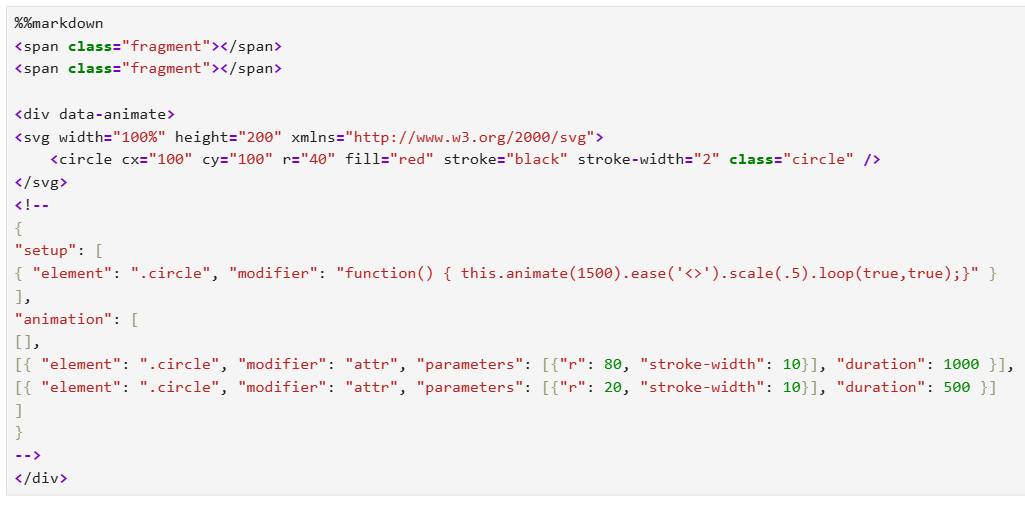
The JSON config controls the animation. setup runs on load; animation runs per fragment. See the Animate plugin README for full options.
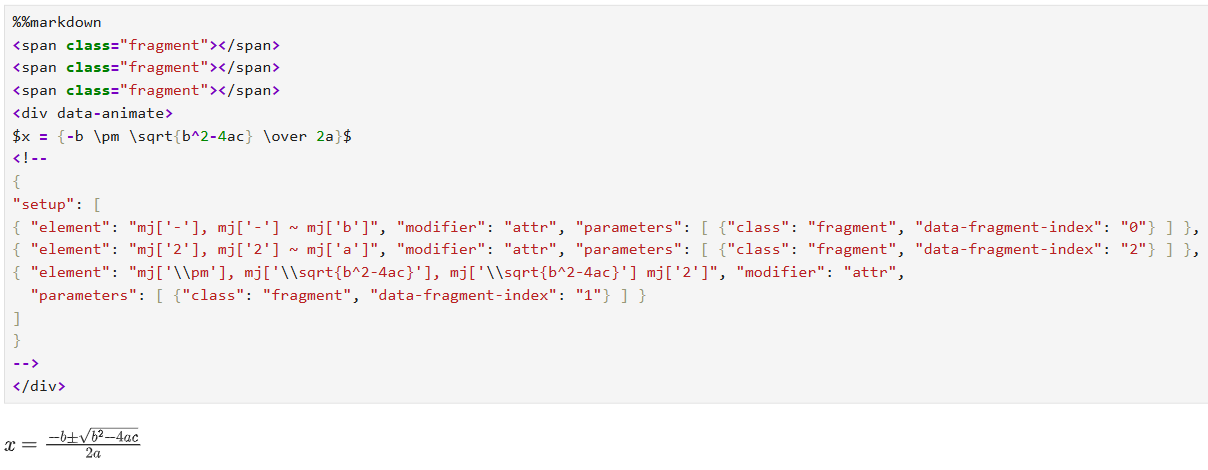
MathJax SVG
MathJax 4 converts math expressions into SVG, which can be animated. Select components with g[data-latex='x'], shortened to mj['x'].
Contributing
Development install
You will need Node.js and JupyterLab installed.
# Clone the repo
git clone https://github.com/AlyanAamirAhmedani/sliveshow
cd sliveshow

# Install in development mode
pip install -e "."

# Link with JupyterLab
jupyter labextension develop . --overwrite

# Build TypeScript
jlpm build
Watch mode (auto-rebuild on save):
# Terminal 1
jlpm watch

# Terminal 2
jupyter lab
Development uninstall
pip uninstall sliveshow
Remove the symlink created by jupyter labextension develop:
jupyter labextension list  # find labextensions folder
# remove the sliveshow symlink from that folder
Packaging
See RELEASE.
Release history Release notifications | RSS feed


Download files
Download the file for your platform. If you're not sure which to choose, learn more about installing packages.
Source Distribution
Built Distribution
Filter files by name, interpreter, ABI, and platform.
If you're not sure about the file name format, learn more about wheel file names.
Copy a direct link to the current filters
File details
Details for the file sliveshow-0.1.6.tar.gz.
File metadata
- Download URL: sliveshow-0.1.6.tar.gz
- Upload date:
- Size: 866.8 kB
- Tags: Source
- Uploaded using Trusted Publishing? No
- Uploaded via: twine/6.2.0 CPython/3.13.7
File hashes
| Algorithm | Hash digest | |
|---|---|---|
| SHA256 |
0e88ed94bd659227f2417173ca6e15bb3bf03eecd0e6b34c4a9f3716c7bd41a7
|
|
| MD5 |
fffe1f158e1731b7f8fd7fc36a16066b
|
|
| BLAKE2b-256 |
3539ea3267e714ff4c3f4563fea420278b177f52725836fc1ed6934e45ca0c79
|
File details
Details for the file sliveshow-0.1.6-py3-none-any.whl.
File metadata
- Download URL: sliveshow-0.1.6-py3-none-any.whl
- Upload date:
- Size: 1.1 MB
- Tags: Python 3
- Uploaded using Trusted Publishing? No
- Uploaded via: twine/6.2.0 CPython/3.13.7
File hashes
| Algorithm | Hash digest | |
|---|---|---|
| SHA256 |
1fbf435a25b71a963cf3bcfb92f7995468f7c5bebe356389552aef4fc6310431
|
|
| MD5 |
0a5feaa7fe9a066dcf8c752ee6bcf164
|
|
| BLAKE2b-256 |
ea144daef94f15e317ca7a1a1c852850f376f7c1230abf5736b71c14af8379be
|






