
nvtop-inspired interactive SLURM cluster dashboard
Verified details
These details have been verified by PyPIProject links
GitHub Statistics
Maintainers

Project description
sltop — SLURM Cluster Top




An nvtop-inspired interactive SLURM cluster dashboard.
Monitor partitions, scheduling rules, the full job queue, and your own running/pending jobs — all from a single, keyboard-driven terminal window powered by Textual.
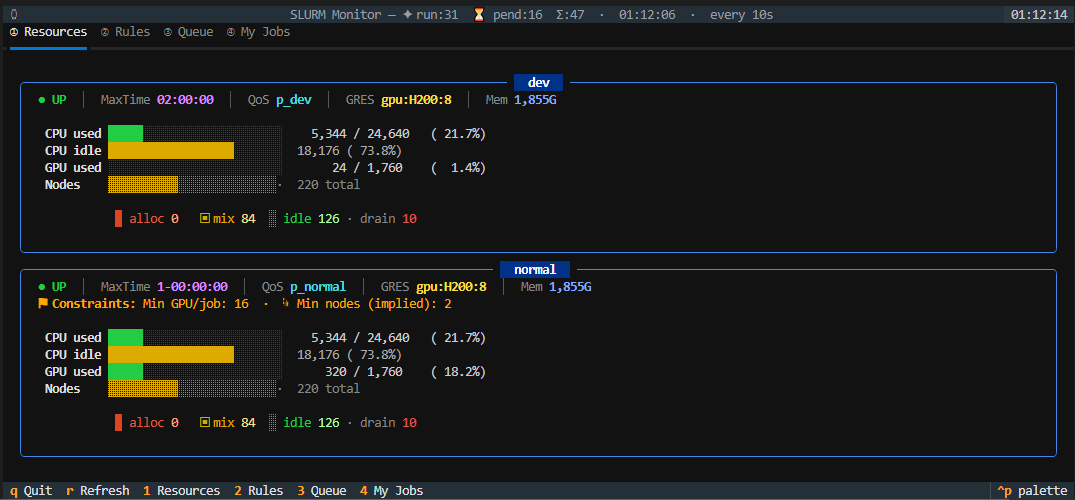
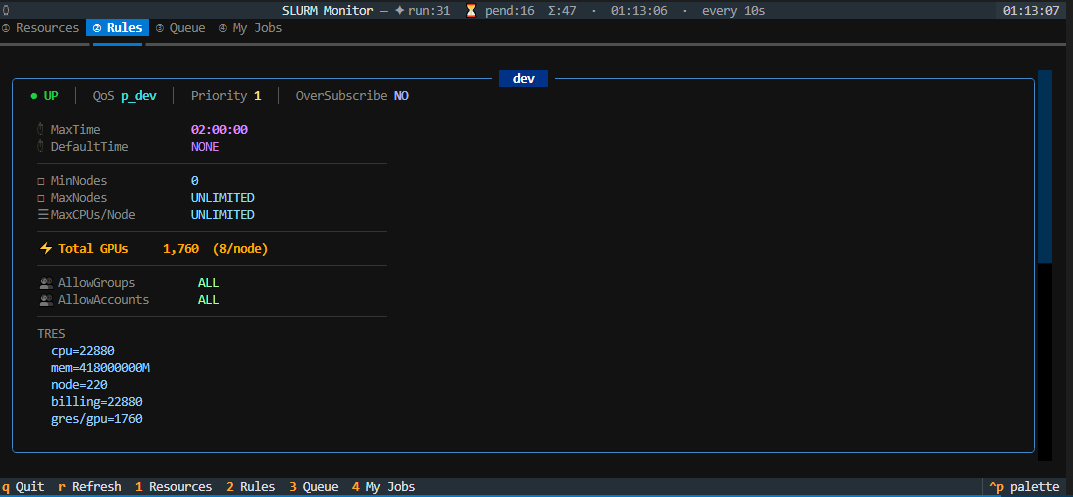
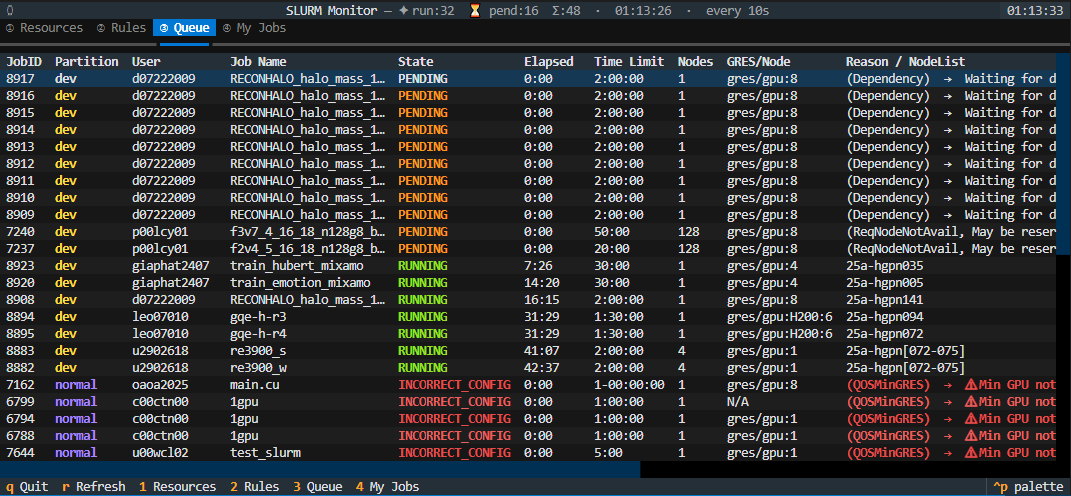
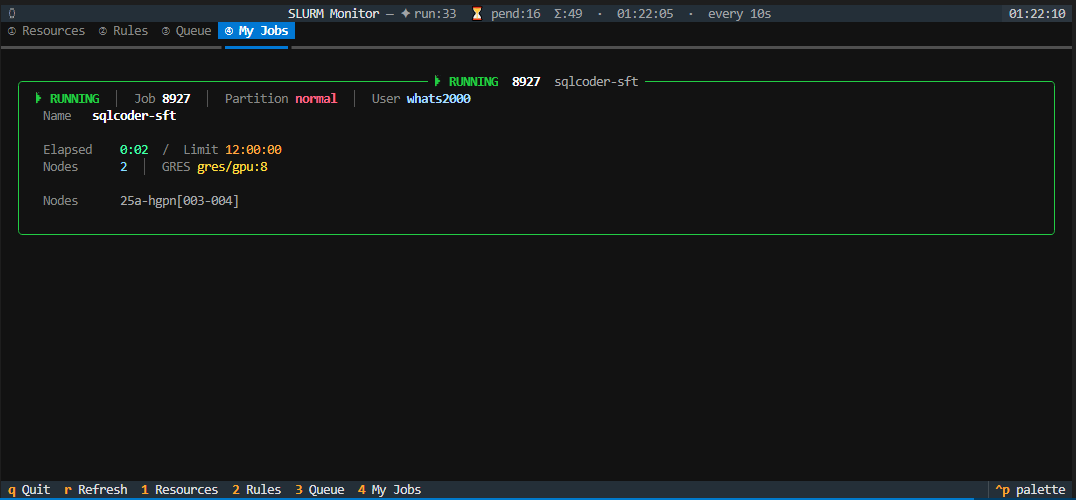
Table of Contents
- Features
- Requirements
- Installation
- Usage
- Dashboard Tabs
- How It Works
- Troubleshooting
- Contributing
- License
Features
- 📊 Resources tab — per-partition CPU/GPU/node utilisation bars with alloc/mix/idle/drain breakdown and cluster-wide totals
- 📋 Rules tab — scheduling constraints (MaxTime, QoS, GPU limits, node limits, TRES) rendered as Rich panels
- 📜 Queue tab — full SLURM job queue with sortable columns (click any header); PENDING config-errors highlighted as
INCORRECT_CONFIGin red with a plain-English explanation - 👤 My Jobs tab — cards for the current user's jobs showing elapsed/limit time, resource requests, GPU mini-bar, and a human-readable translation of every SLURM reason code
- 🔄 Auto-refresh — all tabs update on a configurable interval (default 10 s) with last-refresh timestamp in the subtitle bar
- 🌈 Rich colour UI — explicit RGB colours via Textual + Rich; stacked node-state bars, colour-coded utilisation bars, per-partition colour coding
Requirements
| Requirement | Notes |
|---|---|
| Python ≥ 3.8 | Pure Python — no Bash or SSH required |
SLURM (squeue, scontrol, sinfo, sacctmgr) |
Must be available on the login node |
| textual ≥ 0.50 | Installed automatically as a dependency |
Installation
Via pip (recommended)
pip install sltop
This places the sltop command on your PATH.
Via pipx (isolated)
pipx installs the tool into an isolated environment and exposes the command globally — ideal for shared HPC login nodes.
pipx install sltop
Manual install
# Clone
git clone https://github.com/whats2000/sltop.git
cd sltop

# Install in editable mode
pip install -e .
Usage
sltop [-n SECS] [-p P1,P2] [-u USER]
Simply run sltop from any terminal on your HPC login node:
sltop                      # default 10-second refresh, all partitions, all users
sltop -n 5                 # refresh every 5 seconds
sltop -p gpu,cpu           # filter to specific partitions
sltop -u $USER             # show only your jobs in the Queue tab
Arguments
| Argument | Default | Description |
|---|---|---|
-n / --interval |
10 |
Refresh interval in seconds |
-p / --partitions |
all | Comma-separated partition filter |
-u / --user |
all | Show only jobs for this user in the Queue tab |
Key Bindings
| Key | Action |
|---|---|
Tab |
Next tab |
1 |
Jump to ① Resources tab |
2 |
Jump to ② Rules tab |
3 |
Jump to ③ Queue tab |
4 |
Jump to ④ My Jobs tab |
r |
Force refresh now |
Esc |
Focus the Queue table |
q |
Quit |
Dashboard Tabs
① Resources
Cluster-wide summary panel (total CPU / GPU / node utilisation) followed by one Rich card per partition showing:
- Availability —
UP/DOWNindicator - MaxTime & QoS — scheduler policy labels
- GRES & per-node memory — hardware totals
- Constraints — min/max GPU and node limits (with implied-node inference)
- CPU / GPU / Node bars — colour-coded stacked bars (alloc / mix / idle / drain)
② Rules
One Rich card per partition with the full set of scontrol show partition fields plus QoS GPU limits from sacctmgr, including:
- Time limits (Max / Default)
- Node and CPU constraints
- GPU totals and per-node limits
- Access lists (AllowGroups / AllowAccounts)
- TRES breakdown
③ Queue
Full squeue output as a sortable DataTable. Click any column header to sort ascending; click again to reverse; third click clears the sort.
PENDING jobs whose reason code indicates a configuration error (e.g. QOSMinGRES, InvalidAccount) are flagged as INCORRECT_CONFIG in red with a human-readable explanation appended.
④ My Jobs
Rich Panel cards for every job belonging to the current Unix user, showing:
- Job state with colour and symbol
- Job ID, partition (colour-coded), user
- Elapsed time / time limit
- Node count and GRES request
- GPU mini-bar (request vs partition total)
- Plain-English translation of the SLURM reason code
How It Works
Login Node
┌──────────────────────────────────────────────┐
│ sltop                                        │
│  ├─ sinfo    ──► Resources / Rules tabs      │
│  ├─ scontrol ──► Rules tab                   │
│  ├─ sacctmgr ──► QoS GPU limits              │
│  ├─ squeue   ──► Queue / My Jobs tabs        │
│  └─ Textual TUI render loop                  │
└──────────────────────────────────────────────┘
On mount, sltop fires a single _do_refresh() pass and schedules it to repeat every --interval seconds. Each pass calls the four SLURM CLI tools, builds Rich renderables, and pushes them into the Textual widget tree — no background threads or SSH connections required.
Troubleshooting
No partition data.
sinfo returned no output. Make sure SLURM is available on the current node (which sinfo).
Rules or QoS data is missing
scontrol or sacctmgr may not be available, or you may lack the permissions to query QoS data. sltop silently omits unavailable data rather than crashing.
Queue shows no jobs
There are currently no jobs matching the optional --user / --partitions filter. Run without filters to see all jobs.
textual not found
Install it manually: pip install "textual>=0.50".
Contributing
Contributions, bug reports and feature requests are welcome!
- Fork the repository
- Create a feature branch:
git checkout -b feat/my-feature - Commit your changes with a descriptive message
- Open a Pull Request
License
This project is licensed under the MIT License — see the LICENSE file for details.
Project details
Verified details
These details have been verified by PyPIProject links
GitHub Statistics
Maintainers


Download files
Download the file for your platform. If you're not sure which to choose, learn more about installing packages.
Source Distribution
Built Distribution
Filter files by name, interpreter, ABI, and platform.
If you're not sure about the file name format, learn more about wheel file names.
Copy a direct link to the current filters
File details
Details for the file sltop-0.2.0.tar.gz.
File metadata
- Download URL: sltop-0.2.0.tar.gz
- Upload date:
- Size: 22.3 kB
- Tags: Source
- Uploaded using Trusted Publishing? Yes
- Uploaded via: twine/6.1.0 CPython/3.13.12
File hashes
| Algorithm | Hash digest | |
|---|---|---|
| SHA256 |
5261aa65e8a542e36b7ccccffd233769534628f7381c9c68991ed6856ca4de0a
|
|
| MD5 |
db2c2934bd0444db8e336ab9f4ddbc40
|
|
| BLAKE2b-256 |
4959e8ff1c77d8499e1b27fdac92eea159d6e5ebf4af726f20f88ef845e228ec
|
Provenance
The following attestation bundles were made for sltop-0.2.0.tar.gz:
Publisher:
publish.yml on whats2000/sltop
-
Statement:
-
Statement type:
https://in-toto.io/Statement/v1 -
Predicate type:
https://docs.pypi.org/attestations/publish/v1 -
Subject name:
sltop-0.2.0.tar.gz -
Subject digest:
5261aa65e8a542e36b7ccccffd233769534628f7381c9c68991ed6856ca4de0a - Sigstore transparency entry: 1265545460
- Sigstore integration time:
-
Permalink:
whats2000/sltop@3f181a4766bbe09030c4fae388984d43397068cf -
Branch / Tag:
refs/tags/v0.2.0 - Owner: https://github.com/whats2000
-
Access:
public
-
Token Issuer:
https://token.actions.githubusercontent.com -
Runner Environment:
github-hosted -
Publication workflow:
publish.yml@3f181a4766bbe09030c4fae388984d43397068cf -
Trigger Event:
push
-
Statement type:
File details
Details for the file sltop-0.2.0-py3-none-any.whl.
File metadata
- Download URL: sltop-0.2.0-py3-none-any.whl
- Upload date:
- Size: 22.5 kB
- Tags: Python 3
- Uploaded using Trusted Publishing? Yes
- Uploaded via: twine/6.1.0 CPython/3.13.12
File hashes
| Algorithm | Hash digest | |
|---|---|---|
| SHA256 |
e5f3f13a530bd8821d3c6642b03e2f439537a80a57863d1848db58f7fe427cd9
|
|
| MD5 |
85de2784340f05830d1310e54cbcd10d
|
|
| BLAKE2b-256 |
1f627942bcfd13763523d393889576cbf9df02c2545363706910c28881021d23
|
Provenance
The following attestation bundles were made for sltop-0.2.0-py3-none-any.whl:
Publisher:
publish.yml on whats2000/sltop
-
Statement:
-
Statement type:
https://in-toto.io/Statement/v1 -
Predicate type:
https://docs.pypi.org/attestations/publish/v1 -
Subject name:
sltop-0.2.0-py3-none-any.whl -
Subject digest:
e5f3f13a530bd8821d3c6642b03e2f439537a80a57863d1848db58f7fe427cd9 - Sigstore transparency entry: 1265545523
- Sigstore integration time:
-
Permalink:
whats2000/sltop@3f181a4766bbe09030c4fae388984d43397068cf -
Branch / Tag:
refs/tags/v0.2.0 - Owner: https://github.com/whats2000
-
Access:
public
-
Token Issuer:
https://token.actions.githubusercontent.com -
Runner Environment:
github-hosted -
Publication workflow:
publish.yml@3f181a4766bbe09030c4fae388984d43397068cf -
Trigger Event:
push
-
Statement type:






