
Slurm AIO
A modern, cross-platform GUI for managing and monitoring SLURM clusters, designed for simplicity and efficiency.
✨ Features
-
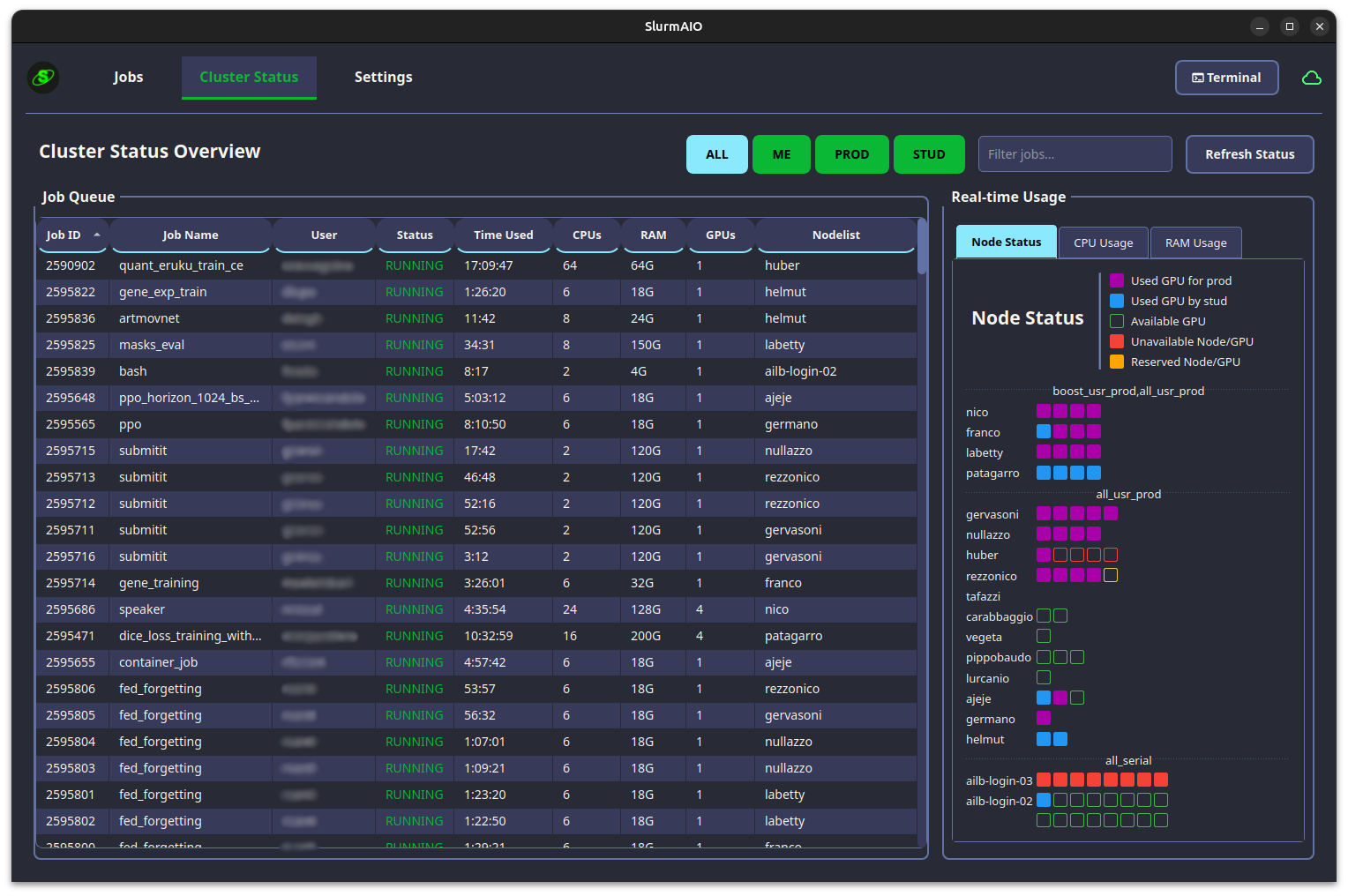
Real-time Monitoring: Visualize cluster status (Nodes, CPU, GPU, and RAM usage) and track the job queue as it happens.
-
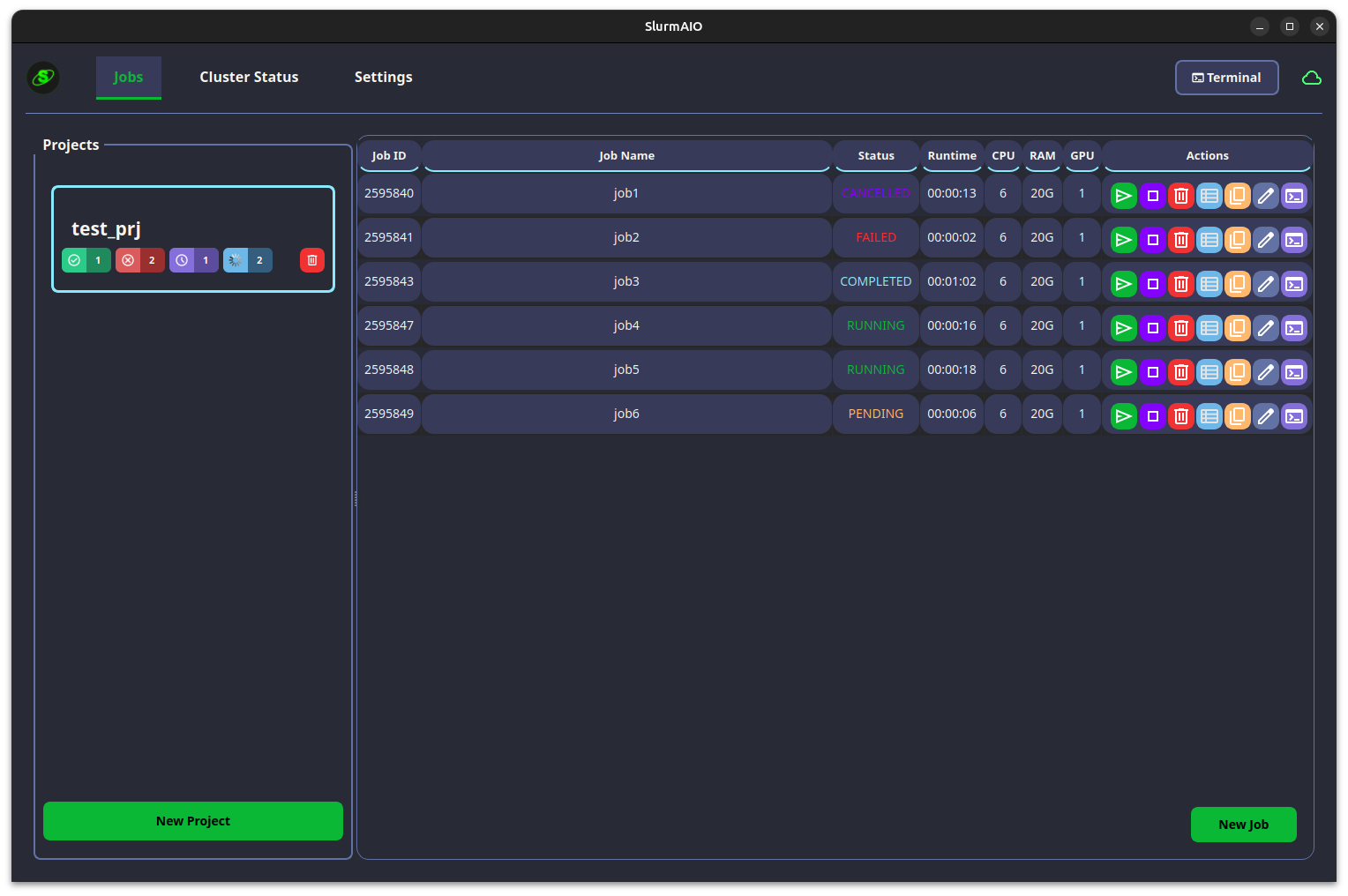
Project-Based Organization: Group your jobs into projects for better management and clarity.
-
Intuitive Job Management: Easily create, submit, modify, duplicate, and cancel jobs through a user-friendly interface.
-
Integrated Tools:
- Browse remote directories on the cluster.
- Open an SSH terminal directly to the cluster or a running job's node.
- View job output and error logs in real-time.
-
Notifications: Get Discord notifications for job status changes (start, completion, failure).
-
Modern UI: A clean, dark-themed interface with helpful toast notifications.
📦 Installation Options
You can install Slurm AIO in two ways:
1. Install via pip (Recommended)
pip install slurm-aio-gui
After installation, run the app using:
slurm-aio-gui
2. Install from source
Prerequisites
-
Python 3.8+
-
Access to a SLURM cluster via SSH
-
sshpassis required for password-based terminal authentication on Linux/macOS.- Ubuntu/Debian:
sudo apt-get install sshpass - macOS (Homebrew):
brew install sshpass
- Ubuntu/Debian:
Steps
-
Clone the repository:
git clone https://github.com/Morelli-01/slurm_gui.git
cd slurm_gui
-
Install the dependencies:
pip install -r requirements.txt
-
Run the application:
python main_application.pyThe first time you run the application, you will be prompted to enter your cluster's SSH connection details.
📸 Screenshots
Visualization of the cluster status and the jobs panel.
📄 License
This project is licensed under the MIT License.
1 maintainer

Metadata
1 maintainer
Release files for slurm-aio-gui 1.1.8
For a detailed explanation of source distributions (sdists) and built distributions (wheels), please see the package formats documentation.
Source distribution (sdist)
| File | Size | Uploaded | Provenance | Actions |
|---|---|---|---|---|
| slurm_aio_gui-1.1.8.tar.gz | 494.6 kB | Without provenance | Details for slurm_aio_gui-1.1.8.tar.gz |
Built distribution (wheel)
| File | Interpreter | ABI | Platform | Actions Reset |
|---|---|---|---|---|
| slurm_aio_gui-1.1.8-py3-none-any.whl | Python 3 | none | any | Details for slurm_aio_gui-1.1.8-py3-none-any.whl |
Total release size: 1.0 MB
Release files / slurm_aio_gui-1.1.8.tar.gz
| Download URL | slurm_aio_gui-1.1.8.tar.gz |
|---|---|
| Size | 494.6 kB |
| Tags | Source |
|
SHA-256 checksum How to use checksums |
103e27776f6cd373e5210a979be03196e1cf0e0a25c0428635cd44447faa9c9c
|
|
BLAKE2b-256 checksum How to use checksums |
211fce9489986a7de38e6b1f54dc9272791c6327bc97869ed28e6cf38fe15935
|
| Upload date | |
|
Uploaded using Trusted Publishing? What is trusted publishing? |
No |
| Uploaded via |
twine/7.0.0 CPython/3.14.4
|
Release files / slurm_aio_gui-1.1.8-py3-none-any.whl
| Download URL | slurm_aio_gui-1.1.8-py3-none-any.whl |
|---|---|
| Size | 512.7 kB |
| Tags | Python 3 |
|
SHA-256 checksum How to use checksums |
ea1bb526f41260a01ea91e1cbc1cc3113c7224907dfe6bacf7e29c19d26d04e0
|
|
BLAKE2b-256 checksum How to use checksums |
7d2ca49cbb7c0c0c47af3647c4d91d0182d32e33326c4aedffadc0c3edb7b1f0
|
| Upload date | |
|
Uploaded using Trusted Publishing? What is trusted publishing? |
No |
| Uploaded via |
twine/7.0.0 CPython/3.14.4
|
Security for slurm-aio-gui 1.1.8
Provenance
Provenance describes where a file came from. On PyPI, provenance is shared via attestations, which provide a verifiable record of the build or publishing details. View details, limitations and caveats.
No provenance found
None of the files in this release were uploaded with provenance metadata.
A note on package security
PyPI is a repository for distributing packages, not a service for auditing them. While third-party security researchers and our staff do their best to detect and remove malicious packages, PyPI cannot guarantee the quality, security or suitability of any given package.
To learn more about protecting yourself from malicious actors, visit our package security documentation.














