
A modern, cross-platform GUI for managing and monitoring SLURM clusters.

Project description
Slurm AIO
A modern, cross-platform GUI for managing and monitoring SLURM clusters, designed for simplicity and efficiency.
✨ Features
-
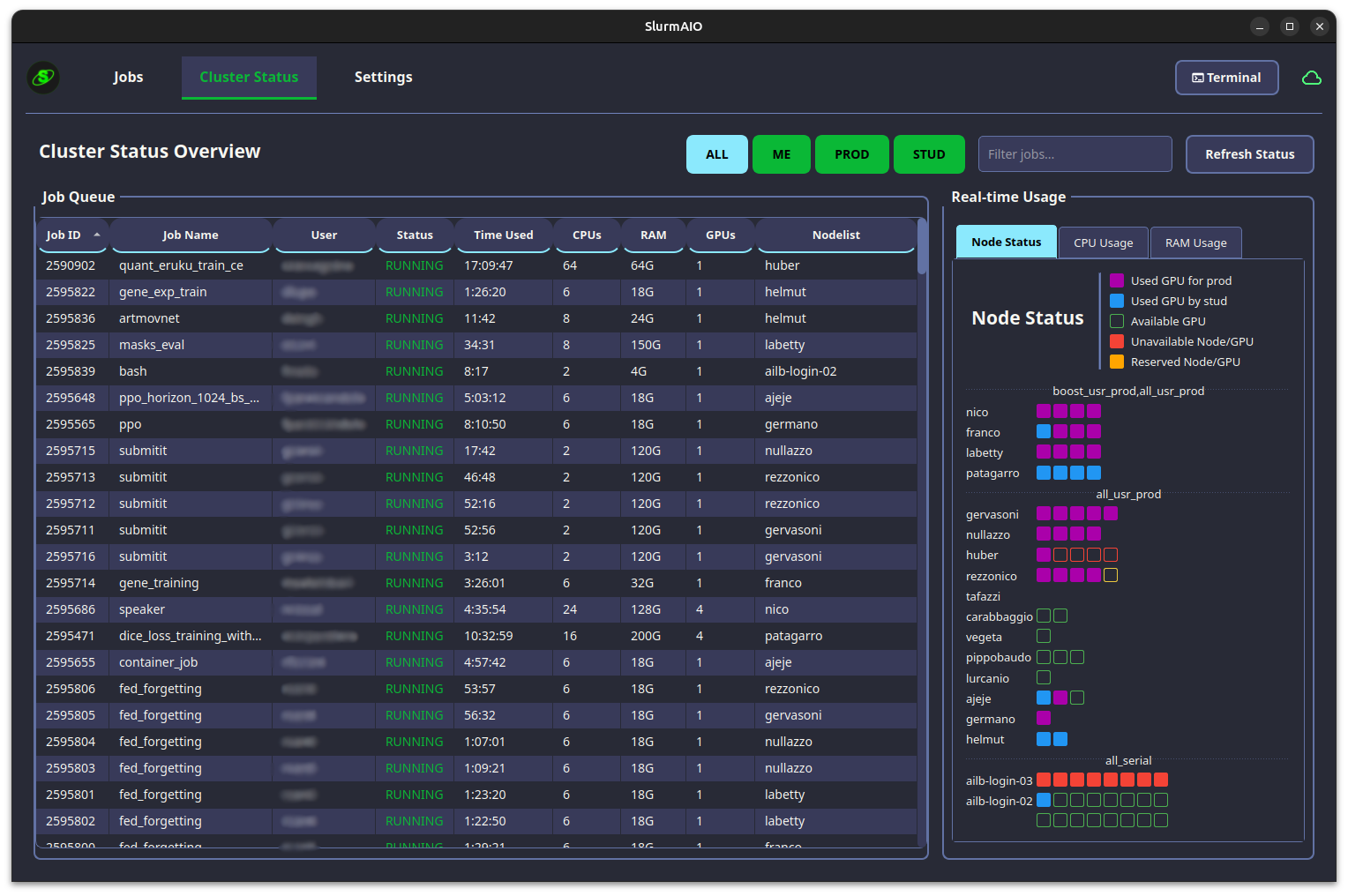
Real-time Monitoring: Visualize cluster status (Nodes, CPU, GPU, and RAM usage) and track the job queue as it happens.
-
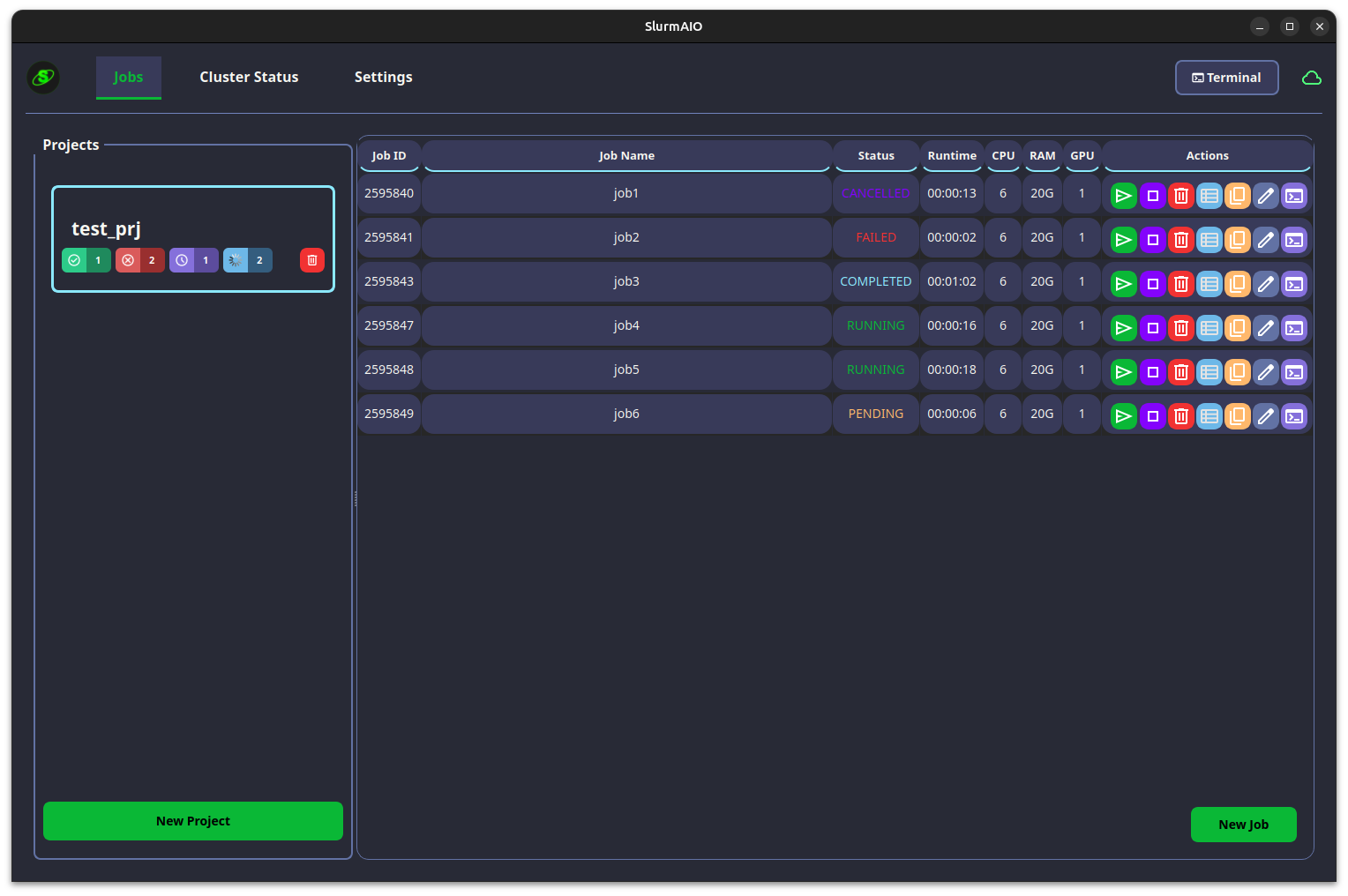
Project-Based Organization: Group your jobs into projects for better management and clarity.
-
Intuitive Job Management: Easily create, submit, modify, duplicate, and cancel jobs through a user-friendly interface.
-
Integrated Tools:
- Browse remote directories on the cluster.
- Open an SSH terminal directly to the cluster or a running job's node.
- View job output and error logs in real-time.
-
Notifications: Get Discord notifications for job status changes (start, completion, failure).
-
Modern UI: A clean, dark-themed interface with helpful toast notifications.
📦 Installation Options
You can install Slurm AIO in two ways:
1. Install via pip (Recommended)
pip install slurm-aio-gui
After installation, run the app using:
slurm-aio-gui
2. Install from source
Prerequisites
-
Python 3.8+
-
Access to a SLURM cluster via SSH
-
sshpassis required for password-based terminal authentication on Linux/macOS.- Ubuntu/Debian:
sudo apt-get install sshpass - macOS (Homebrew):
brew install sshpass
- Ubuntu/Debian:
Steps
-
Clone the repository:
git clone https://github.com/Morelli-01/slurm_gui.git
cd slurm_gui
-
Install the dependencies:
pip install -r requirements.txt
-
Run the application:
python main_application.pyThe first time you run the application, you will be prompted to enter your cluster's SSH connection details.
📸 Screenshots
Visualization of the cluster status and the jobs panel.
📄 License
This project is licensed under the MIT License.
Release history Release notifications | RSS feed


Download files
Download the file for your platform. If you're not sure which to choose, learn more about installing packages.
Source Distribution
Built Distribution
Filter files by name, interpreter, ABI, and platform.
If you're not sure about the file name format, learn more about wheel file names.
Copy a direct link to the current filters
File details
Details for the file slurm_aio_gui-1.1.2.tar.gz.
File metadata
- Download URL: slurm_aio_gui-1.1.2.tar.gz
- Upload date:
- Size: 483.4 kB
- Tags: Source
- Uploaded using Trusted Publishing? No
- Uploaded via: twine/6.1.0 CPython/3.12.3
File hashes
| Algorithm | Hash digest | |
|---|---|---|
| SHA256 |
c7eabadde27331473d6353e222acd305ecc2b901099938b1130f7a6fa0271d84
|
|
| MD5 |
7ddf747a358f58ebac823ba6e4faffa7
|
|
| BLAKE2b-256 |
80fcee508dfd13ff96e36e1c69a1d98d01d88292c70216857f35e18276070954
|
File details
Details for the file slurm_aio_gui-1.1.2-py3-none-any.whl.
File metadata
- Download URL: slurm_aio_gui-1.1.2-py3-none-any.whl
- Upload date:
- Size: 501.5 kB
- Tags: Python 3
- Uploaded using Trusted Publishing? No
- Uploaded via: twine/6.1.0 CPython/3.12.3
File hashes
| Algorithm | Hash digest | |
|---|---|---|
| SHA256 |
5ef2c8be7fd5107c82ed81b215274bee40d88f30135c21902eae3ada35e28c9c
|
|
| MD5 |
36fc89e5767f3814a3a2fa0aef728ff5
|
|
| BLAKE2b-256 |
7ee3de707d8e78685b56c16000fd1a551df96b82843a18268654bc19b11d4912
|






