
Live, process-isolated node-local hardware telemetry for active Slurm jobs
Verified details
These details have been verified by PyPIProject links
GitHub Statistics
Maintainers

Project description
slurmwatch
See exactly what your Slurm job is doing to the hardware — live, per process, in one screen.
CPU, memory, and per-GPU telemetry for a running job, with an allocation-efficiency verdict that tells you when you're wasting cores or GPUs.


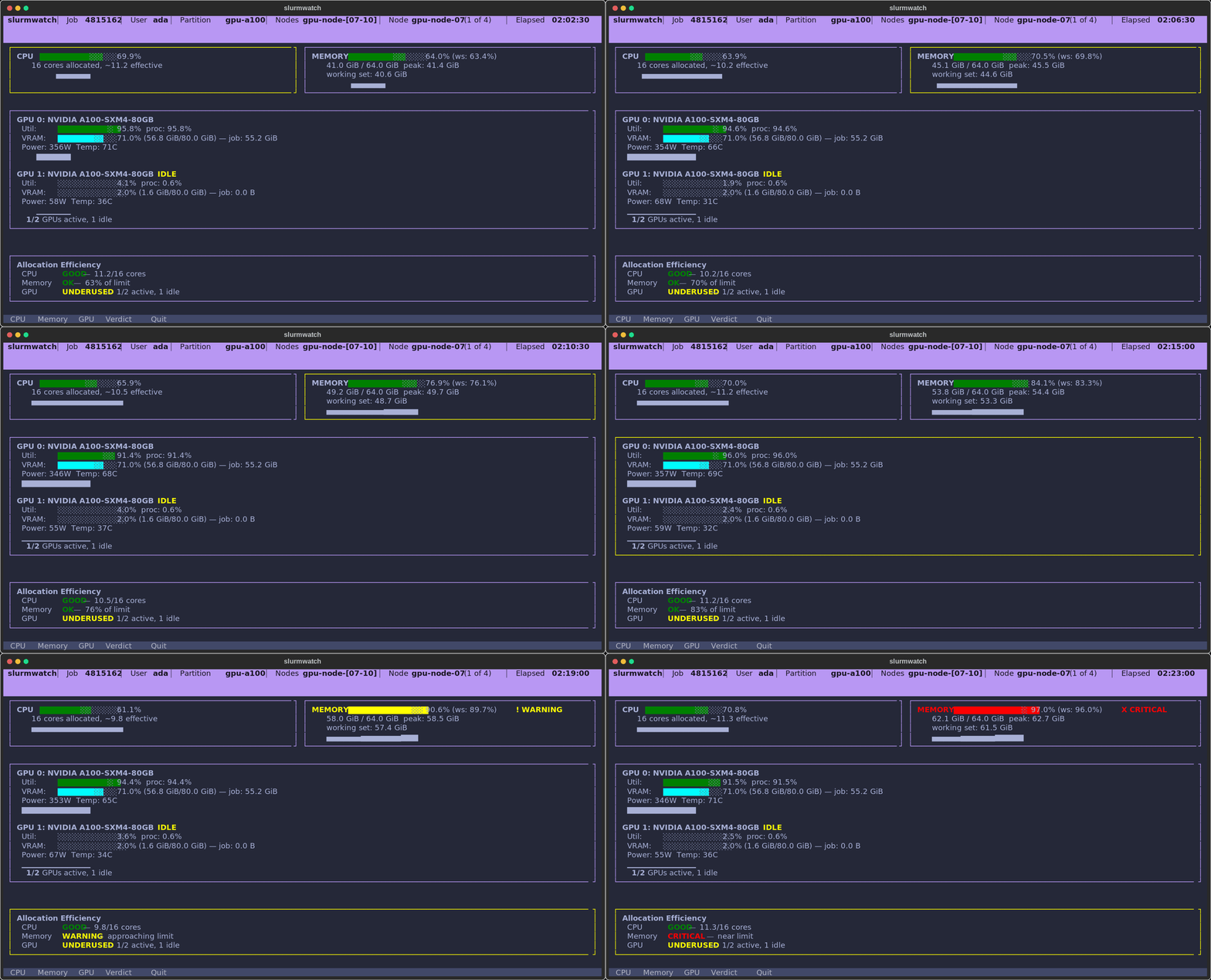
A real allocation, caught in the act: CPU healthy, memory climbing into the OOM warning band, one A100 pinned at 92% while the second sits idle — and a verdict that says so.
Why slurmwatch?
You asked Slurm for 16 cores and 2 GPUs. Are you using them? On a shared cluster, the difference between a busy allocation and a half-idle one is real money and real queue time — but the usual tools make you SSH around, juggle nvidia-smi and /proc, and mentally subtract page cache from memory to guess.
slurmwatch answers the question directly:
- 🎯 Allocation-efficiency verdict — a plain-language readout (
GOOD/UNDERUSED/IDLE/WARNING) for CPU, memory, and GPU, so you know at a glance whether to downsize your request. - 🔬 Per-process GPU attribution — reads the job's PIDs from its cgroup and asks NVML which of your processes are on each GPU, so a neighbor's job on a shared node never inflates your numbers.
- 🧠 Honest memory — working-set (RSS minus reclaimable cache) with a configurable OOM guard, so you see real pressure before the kernel kills you.
- 🛰️ Works from anywhere — on the compute node you get full live telemetry; from a login node,
slurmwatch <jobid>auto-falls back to Slurm's own accounting and still prints memory + CPU for any of your running jobs. - ⚙️ Zero config — just
slurmwatch <jobid>. Auto-discovers your jobs, auto-detects cgroup v1/v2, auto-detects whether it's on the node. No flags to memorize.
Install
pip install "slurmwatch[nvidia]"     # with NVIDIA GPU monitoring
pip install slurmwatch               # CPU + memory only

# isolated, if you prefer:
pipx install "slurmwatch[nvidia]"
uv tool install "slurmwatch[nvidia]"
Requires Python 3.10+ and Linux with cgroup v1 or v2. GPU monitoring is NVIDIA-only (via pynvml).
Quick start
slurmwatch                       # auto-discover and attach to your running job
slurmwatch 12345                 # attach to a specific job (array: 12345_3, het: 12345+1)
slurmwatch --demo                # try the live TUI right now — no Slurm needed
slurmwatch 12345 --once --json   # one machine-readable snapshot, then exit
slurmwatch 12345 --log run.jsonl # headless logging (JSON Lines or CSV)
Tip: for full live telemetry, run on the node executing the job:
srun --jobid 12345 --overlap slurmwatch 12345
Usage
On the compute node vs. anywhere else
- On the node (
srun --overlap, or a batch step) → full live telemetry: per-GPU utilization, per-process attribution, working-set memory, sparklines. - From a login node → slurmwatch can't reach the job's cgroups, so it automatically queries Slurm (
sstat) and prints a usage summary instead — no flag needed:
$ slurmwatch 51397890            # from a login node
Job 51397890  gpu  RUNNING  on midway3-0602
  Memory   peak 174.6 GiB / 200.0 GiB (87%)
  CPU      3:29:03 CPU-time  ~2.9 of 4 cores (avg since start)
  GPU      3 allocated — run slurmwatch on the compute node for live GPU utilization
  source: sstat (remote; run on the node for working-set & live GPU util)
(GPU utilization isn't available remotely — Slurm accounting tracks GPU count, not per-device util. Everything else is.)
Command-line options
| Option | Description |
|---|---|
job_id |
Job to monitor (optional; auto-discovers your running jobs). Array tasks (12345_3) and het components (12345+1) resolve to the right cgroup. |
--once |
Take one snapshot, print to stdout, exit |
--log FILE |
Run headless, appending snapshots to FILE |
--append |
With --log, append instead of overwriting |
--format {json,csv} |
Output format for --once/--log (default: --log infers from extension, else JSON; --once prints CSV) |
--json |
Shorthand for --format json |
--interval SECONDS |
Polling interval (default 0.5 TUI / 1.0 headless; must be > 0) |
--ascii |
ASCII-only glyphs (no Unicode blocks) |
--demo |
Simulated data — no Slurm needed |
--verbose |
Verbose diagnostics on stderr |
--version |
Print version and exit |
Exit codes: 0 success · 1 runtime failure (job not found / wrong node / Slurm error) · 2 bad configuration. Errors go to stderr so --once/--log output stays clean for pipelines.
Interactive TUI keys
| Key | Action | Key | Action | |
|---|---|---|---|---|
c |
Focus CPU | ↑ / ↓ |
Scroll | |
m |
Focus Memory | PgUp / PgDn |
Page scroll | |
g |
Focus GPU | q / Esc |
Quit | |
v |
Focus Verdict |
With no job_id and several running jobs, a picker appears — arrow keys + Enter (or click).
Environment variables
| Variable | Default | Description |
|---|---|---|
SLURMWATCH_MOCK |
— | 1 enables demo/simulation mode (no Slurm needed) |
SLURMWATCH_POLL_INTERVAL |
0.5 |
TUI polling interval (seconds; min 0.05) |
SLURMWATCH_HEADLESS_INTERVAL |
1.0 |
Headless polling interval (seconds; min 0.05) |
SLURMWATCH_OOM_WARN |
0.85 |
Memory warning threshold (fraction of limit) |
SLURMWATCH_OOM_CRIT |
0.90 |
Memory critical threshold (fraction of limit) |
SLURMWATCH_HISTORY_SECONDS |
60 |
Sparkline history length (seconds) |
SLURMWATCH_CPU_UNDERUSE |
0.5 |
Flag CPU underuse below this many effective cores |
SLURMWATCH_GPU_IDLE_PCT |
5.0 |
Per-process GPU util (%) below which a GPU counts as idle |
SLURMWATCH_ASCII |
0 |
ASCII-only output (1/true) |
SLURMWATCH_FORMAT |
— | Default --log/--once format (json/csv); explicit --format wins |
SLURMWATCH_CSV_DIALECT |
excel |
Python csv dialect for CSV output |
What it measures
CPU — utilization as a percentage of the cores allocated on this node (multi-node jobs are scaled to node-local limits). Reads cgroup cpuacct/cpu.stat when present, and falls back to summing /proc/<pid>/stat — so CPU is measured even on clusters that constrain jobs with cpuset only. Reports effective cores ("~1.2 of 16 used") and warns on underuse.
Memory — working set (RSS minus reclaimable page cache), peak (with a fallback for kernels < 5.19 that lack memory.peak), and a configurable OOM guard that flags warning/critical before the kernel does. Falls back to node RAM when the cgroup limit is unlimited.
GPU (NVIDIA) — the right devices are selected from scontrol show job -d (IDX list) plus CUDA UUID/MIG tokens, so it works with ConstrainDevices and multiple jobs per node. Per-process VRAM and SM utilization attributed to your PIDs, plus device-wide util, VRAM, power, temperature, and genuine throttling detection. CPU-only jobs never show other users' GPUs.
Verdict — the summary panel that grades whether each resource is actually being used, and flags idle GPUs, single-core workloads on big allocations, and negligible memory pressure.
Output formats
JSON Lines (default for --log):
{"timestamp": 1705312234.567, "job_id": "12345", "hostname": "cn001", "cpu": {...}, "memory": {...}, "gpus": [...]}
CSV — rows padded to a fixed 8-GPU column layout, so every row has identical columns (loads cleanly into pandas):
timestamp,job_id,hostname,elapsed_seconds,cpu_cores,cpu_percent,cpu_effective_cores,...
1705312234.567,12345,cn001,3600,16,45.50,7.28,...
Use as a library
import asyncio
from slurmwatch import TelemetryCollector, resolve_job_context

async def sample(job_id: str):
    ctx = resolve_job_context(job_id)
    collector = TelemetryCollector(ctx)
    await collector.start()
    try:
        snapshot = await collector.next_snapshot()
        print(snapshot.to_json())
    finally:
        await collector.stop()

asyncio.run(sample("12345"))
Limitations
- NVIDIA-only GPU support (AMD/ROCm not yet supported).
- Single-node view — multi-node jobs show per-node data for the node you're on.
- Live GPU utilization and working-set memory require running on the job's node; from elsewhere you get the
sstatsummary (peak memory + CPU time + allocation) for your own jobs.
License
MIT © Youzhi Yu
Project details
Verified details
These details have been verified by PyPIProject links
GitHub Statistics
Maintainers
Release history Release notifications | RSS feed


Download files
Download the file for your platform. If you're not sure which to choose, learn more about installing packages.
Source Distribution
Built Distribution
Filter files by name, interpreter, ABI, and platform.
If you're not sure about the file name format, learn more about wheel file names.
Copy a direct link to the current filters
File details
Details for the file slurmwatch-0.1.0.tar.gz.
File metadata
- Download URL: slurmwatch-0.1.0.tar.gz
- Upload date:
- Size: 1.3 MB
- Tags: Source
- Uploaded using Trusted Publishing? Yes
- Uploaded via: twine/6.1.0 CPython/3.13.12
File hashes
| Algorithm | Hash digest | |
|---|---|---|
| SHA256 |
8aa6ac4dc4ebdfba022d05232a1d4c910b4497533909c3800ff685055159d013
|
|
| MD5 |
4961cac20e512af76e79ea61496ac3b1
|
|
| BLAKE2b-256 |
a40f5f0f93f0ad7263ff873a68baeaff0bdae07b7b7b2fe611c307c6f790924d
|
Provenance
The following attestation bundles were made for slurmwatch-0.1.0.tar.gz:
Publisher:
release.yml on PursuitOfDataScience/slurmwatch
-
Statement:
-
Statement type:
https://in-toto.io/Statement/v1 -
Predicate type:
https://docs.pypi.org/attestations/publish/v1 -
Subject name:
slurmwatch-0.1.0.tar.gz -
Subject digest:
8aa6ac4dc4ebdfba022d05232a1d4c910b4497533909c3800ff685055159d013 - Sigstore transparency entry: 2064181329
- Sigstore integration time:
-
Permalink:
PursuitOfDataScience/slurmwatch@485b5149d97ecfa835f6f9176ef6252a43afcf13 -
Branch / Tag:
refs/tags/v0.1.0 - Owner: https://github.com/PursuitOfDataScience
-
Access:
private
-
Token Issuer:
https://token.actions.githubusercontent.com -
Runner Environment:
github-hosted -
Publication workflow:
release.yml@485b5149d97ecfa835f6f9176ef6252a43afcf13 -
Trigger Event:
push
-
Statement type:
File details
Details for the file slurmwatch-0.1.0-py3-none-any.whl.
File metadata
- Download URL: slurmwatch-0.1.0-py3-none-any.whl
- Upload date:
- Size: 37.1 kB
- Tags: Python 3
- Uploaded using Trusted Publishing? Yes
- Uploaded via: twine/6.1.0 CPython/3.13.12
File hashes
| Algorithm | Hash digest | |
|---|---|---|
| SHA256 |
e38a53e8c74b331680b97feeac36dec89809da54fa6e5660df65502e6bcb76a1
|
|
| MD5 |
3112033f47668f13adca1a725684bc0c
|
|
| BLAKE2b-256 |
9e2190370afe542b4f44707ca792c724dcbc48b8e07ee26b91c0726324de5e90
|
Provenance
The following attestation bundles were made for slurmwatch-0.1.0-py3-none-any.whl:
Publisher:
release.yml on PursuitOfDataScience/slurmwatch
-
Statement:
-
Statement type:
https://in-toto.io/Statement/v1 -
Predicate type:
https://docs.pypi.org/attestations/publish/v1 -
Subject name:
slurmwatch-0.1.0-py3-none-any.whl -
Subject digest:
e38a53e8c74b331680b97feeac36dec89809da54fa6e5660df65502e6bcb76a1 - Sigstore transparency entry: 2064181349
- Sigstore integration time:
-
Permalink:
PursuitOfDataScience/slurmwatch@485b5149d97ecfa835f6f9176ef6252a43afcf13 -
Branch / Tag:
refs/tags/v0.1.0 - Owner: https://github.com/PursuitOfDataScience
-
Access:
private
-
Token Issuer:
https://token.actions.githubusercontent.com -
Runner Environment:
github-hosted -
Publication workflow:
release.yml@485b5149d97ecfa835f6f9176ef6252a43afcf13 -
Trigger Event:
push
-
Statement type:






