
slurmwatch
Live per-process CPU / memory / GPU telemetry for a running Slurm job — the facts, so you can judge.


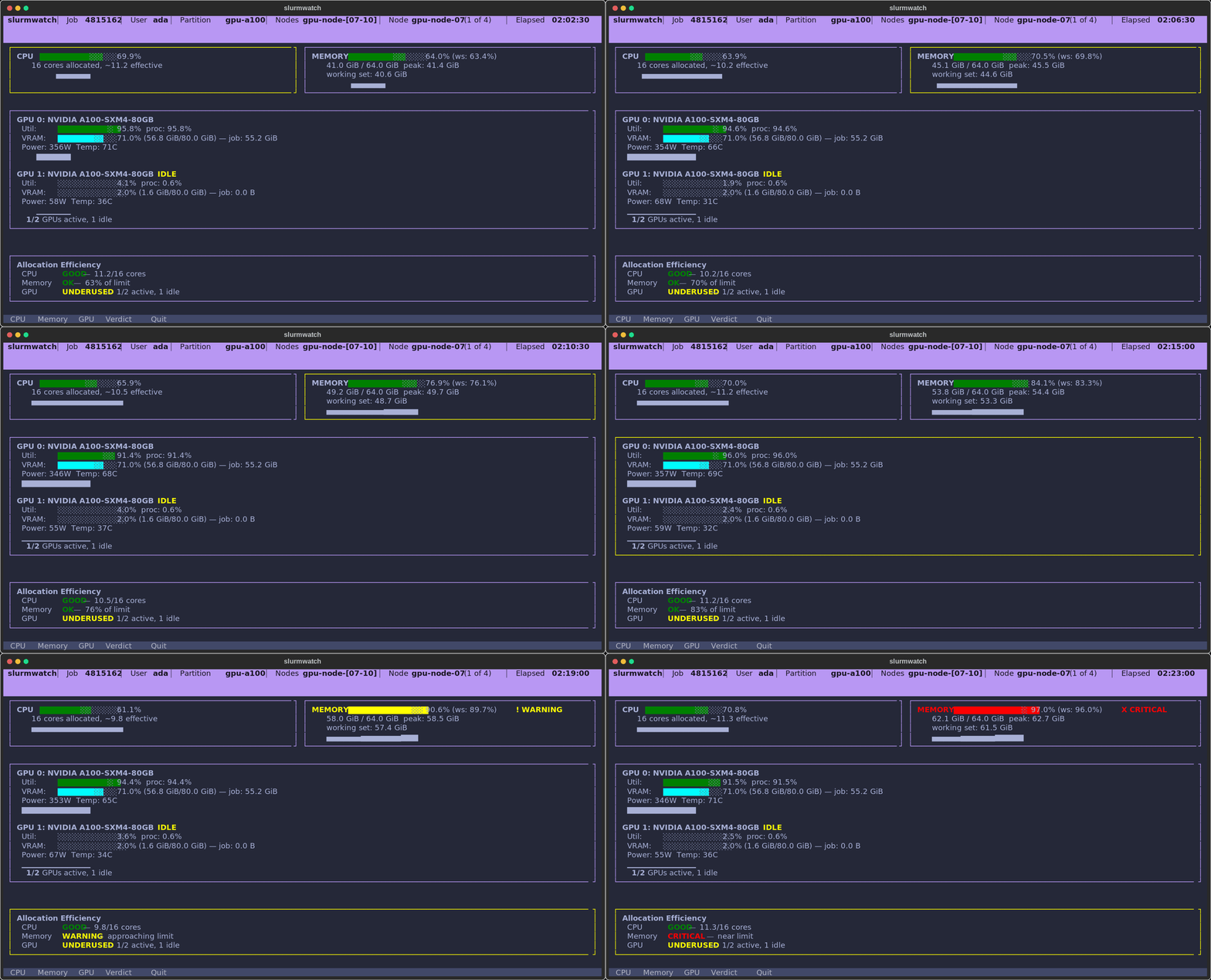
See whether your running job is actually using the CPU, memory, and GPUs you requested — live, in your terminal.
Install
pip install slurmwatch # or: uv tool install slurmwatch / pipx install slurmwatch
Python 3.10+ on Linux (cgroup v1/v2). GPU monitoring auto-activates on NVIDIA nodes, and is skipped on CPU-only ones.
Usage
slurmwatch 12345    # watch a specific job
slurmwatch          # or auto-discover your running job
sw 12345            # "sw" is a short alias
slurmwatch --help   # everything else
Keys — c/m/g drill into CPU / memory / GPU · o/e follow the job's stdout / stderr live · type a node number (or ←/→) to switch node · p expand a truncated path · q back/quit.
It counts only your PIDs (a neighbour on a shared node never inflates your numbers), tracks the real working set against your --mem, and flags an idle GPU that's still holding VRAM — the stuff nvidia-smi and htop won't tell you about your job.
Point it at a pending job and, instead of an error, you get why it's waiting, when it'll start and where you sit in line, and where it could run right now — with the exact scontrol update to requeue into a partition that fits.
Run it from a login node or on the node itself — it attaches either way, and falls back to an sstat summary when it can't.
1 maintainer

Metadata
1 maintainer
Release files for slurmwatch 1.2.4
For a detailed explanation of source distributions (sdists) and built distributions (wheels), please see the package formats documentation.
Source distribution (sdist)
| File | Size | Uploaded | |
|---|---|---|---|
| slurmwatch-1.2.4.tar.gz | 4.8 MB | Details |
Built distribution (wheel)
| File | Interpreter | ABI | Platform | Reset |
|---|---|---|---|---|
| slurmwatch-1.2.4-py3-none-any.whl | Python 3 | none | any | Details |
Total release size: 5.2 MB
Release files / slurmwatch-1.2.4.tar.gz
| Download URL | slurmwatch-1.2.4.tar.gz |
|---|---|
| Size | 4.8 MB |
| Tags | Source |
|
SHA-256 checksum How to use checksums |
28257c1df87f91ffc63bec9ca9c6e7f6c0d09e8ffade09f1553ed446cd5989dc
|
|
BLAKE2b-256 checksum How to use checksums |
9b9fc77e7cd382b9bb7eb279f3e17aed328a37240d623a93b3238571fcaf169a
|
| Upload date | |
|
Uploaded using Trusted Publishing? What is trusted publishing? |
Yes |
| Uploaded via |
twine/7.0.0 CPython/3.13.14
|
Provenance
Provenance describes where a file came from. On PyPI, provenance is shared via attestations, which provide a verifiable record of the build or publishing details. View details, limitations and caveats.


PyPI Publish Attestation
PyPI verified that this artifact, at this checksum, originated from the publisher listed below.
Signed by GitHub Actions, verified by PyPI on Sep 10, 2026.
Transparency logRelease files / slurmwatch-1.2.4-py3-none-any.whl
| Download URL | slurmwatch-1.2.4-py3-none-any.whl |
|---|---|
| Size | 354.3 kB |
| Tags | Python 3 |
|
SHA-256 checksum How to use checksums |
5941750df63e9179e7d3ee79c87030ad34122fc329a78fd6b3ad1da2d7d1f079
|
|
BLAKE2b-256 checksum How to use checksums |
813442786dd87760fd11d884e198a371a527eef0414d7838a599c01ca18c2dc6
|
| Upload date | |
|
Uploaded using Trusted Publishing? What is trusted publishing? |
Yes |
| Uploaded via |
twine/7.0.0 CPython/3.13.14
|
Provenance
Provenance describes where a file came from. On PyPI, provenance is shared via attestations, which provide a verifiable record of the build or publishing details. View details, limitations and caveats.
PyPI Publish Attestation
PyPI verified that this artifact, at this checksum, originated from the publisher listed below.
Signed by GitHub Actions, verified by PyPI on Sep 10, 2026.
Transparency log













