
slurmwatch
Live per-process CPU / memory / GPU telemetry for a running Slurm job — the facts, so you can judge.


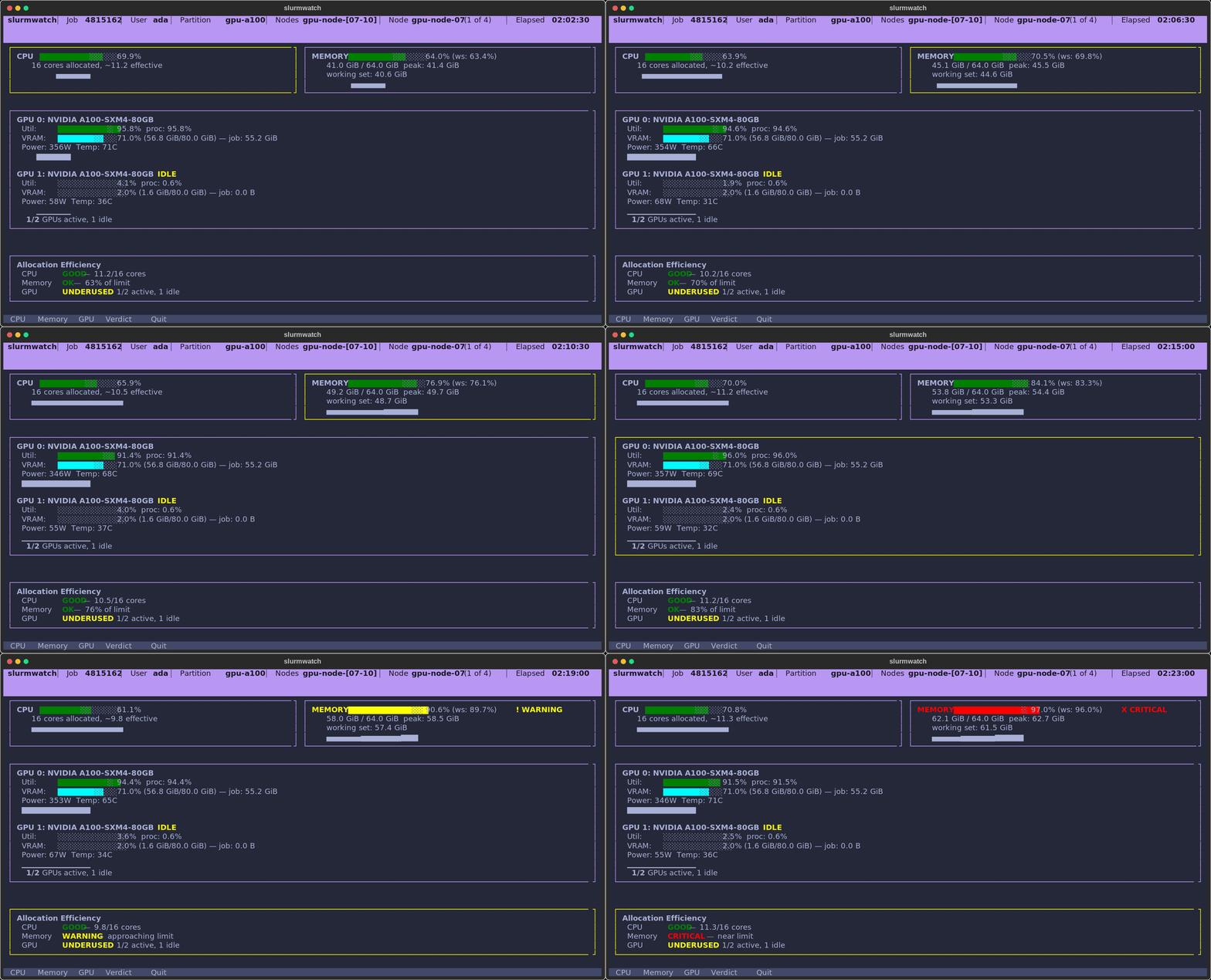
See whether your running job is actually using the CPU, memory, and GPUs you requested — live, in your terminal.
Install
pip install slurmwatch # or: uv tool install slurmwatch / pipx install slurmwatch
Python 3.10+ on Linux (cgroup v1/v2). GPU monitoring auto-activates on NVIDIA nodes, and is skipped on CPU-only ones.
Usage
slurmwatch 12345    # watch a specific job
slurmwatch          # or auto-discover your running job
sw 12345            # "sw" is a short alias
slurmwatch --help   # everything else
Keys — c/m/g drill into CPU / memory / GPU · type a node number (or ←/→) to switch node · p expand a truncated path · q back/quit.
It counts only your PIDs (a neighbour on a shared node never inflates your numbers), tracks the real working set against your --mem, and flags an idle GPU that's still holding VRAM — the stuff nvidia-smi and htop won't tell you about your job.
Point it at a pending job and, instead of an error, you get why it's waiting, when it'll start and where you sit in line, and where it could run right now — with the exact scontrol update to requeue into a partition that fits.
Run it from a login node or on the node itself — it attaches either way, and falls back to an sstat summary when it can't.
1 maintainer

Download files
Download the file for your platform. If you're not sure which to choose, learn more about installing packages.
Source Distribution
Built Distribution
Filter files by name, interpreter, ABI, and platform.
If you're not sure about the file name format, learn more about wheel file names.
Copy a direct link to the current filters
File details
Details for the file slurmwatch-0.9.8.tar.gz.
File metadata
- Download URL: slurmwatch-0.9.8.tar.gz
- Upload date:
- Size: 4.2 MB
- Tags: Source
- Uploaded using Trusted Publishing? Yes
- Uploaded via:
twine/6.1.0 CPython/3.13.14
File hashes
| Algorithm | Hash digest | |
|---|---|---|
| SHA256 |
c0c1f6cc1bfaf6362ca8cdb8415fa1b08c5284b8981f5def2312fb578eec49eb
|
|
| MD5 |
ec4a3b810955cf29d8d25eade85aede0
|
|
| BLAKE2b-256 |
22cef7ee727d79b24f6b5c3f8bc09f2cb46336b2d8aaa31832c0988e8615293a
|
Provenance
The following attestation bundles were made for slurmwatch-0.9.8.tar.gz:
Publisher:
release.yml on PursuitOfDataScience/slurmwatch
-
Statement:
-
Statement type:
https://in-toto.io/Statement/v1 -
Predicate type:
https://docs.pypi.org/attestations/publish/v1 -
Subject name:
slurmwatch-0.9.8.tar.gz -
Subject digest:
c0c1f6cc1bfaf6362ca8cdb8415fa1b08c5284b8981f5def2312fb578eec49eb - Sigstore transparency entry: 2235079329
- Sigstore integration time:
-
Permalink:
PursuitOfDataScience/slurmwatch@8006579cd35d147b11a586f2ce0183dd62b83298 -
Branch / Tag:
refs/tags/v0.9.8 - Owner: https://github.com/PursuitOfDataScience
-
Access:
public
-
Token Issuer:
https://token.actions.githubusercontent.com -
Runner Environment:
github-hosted -
Publication workflow:
release.yml@8006579cd35d147b11a586f2ce0183dd62b83298 -
Trigger Event:
push
-
Statement type:
File details
Details for the file slurmwatch-0.9.8-py3-none-any.whl.
File metadata
- Download URL: slurmwatch-0.9.8-py3-none-any.whl
- Upload date:
- Size: 161.9 kB
- Tags: Python 3
- Uploaded using Trusted Publishing? Yes
- Uploaded via:
twine/6.1.0 CPython/3.13.14
File hashes
| Algorithm | Hash digest | |
|---|---|---|
| SHA256 |
949dbd9dea6bc82f79d2a98295729d9c8ad1f69b1f47ec44c41bdc5c42f6d84e
|
|
| MD5 |
b56ff9312c9d5324433ef6d95c41c1b4
|
|
| BLAKE2b-256 |
c62539660a19ab57ff1d261dfd2f6fa0ae97710ae23cd5d2f16630443a10131e
|
Provenance
The following attestation bundles were made for slurmwatch-0.9.8-py3-none-any.whl:
Publisher:
release.yml on PursuitOfDataScience/slurmwatch
-
Statement:
-
Statement type:
https://in-toto.io/Statement/v1 -
Predicate type:
https://docs.pypi.org/attestations/publish/v1 -
Subject name:
slurmwatch-0.9.8-py3-none-any.whl -
Subject digest:
949dbd9dea6bc82f79d2a98295729d9c8ad1f69b1f47ec44c41bdc5c42f6d84e - Sigstore transparency entry: 2235079657
- Sigstore integration time:
-
Permalink:
PursuitOfDataScience/slurmwatch@8006579cd35d147b11a586f2ce0183dd62b83298 -
Branch / Tag:
refs/tags/v0.9.8 - Owner: https://github.com/PursuitOfDataScience
-
Access:
public
-
Token Issuer:
https://token.actions.githubusercontent.com -
Runner Environment:
github-hosted -
Publication workflow:
release.yml@8006579cd35d147b11a586f2ce0183dd62b83298 -
Trigger Event:
push
-
Statement type:







