
Smart image downsampling for image classification datasets

Project description
smartdownsample
Blazing-fast image downsampling for large datasets
SmartDownsample selects the most diverse images from large collections using parallel processing and intelligent caching. Perfect for reducing dataset size while preserving visual variability - now optimized to handle 24,000+ images in minutes instead of hours.
Installation
pip install smartdownsample
Features
- ⚡ 10-50x faster than v0.1.x with parallel processing
- 🔄 Smart caching - repeated runs are near-instant
- 🎯 Intelligent selection - maintains maximum visual diversity
- 📊 Scales efficiently - handles 100,000+ images with ease
- 🔧 Production ready - battle-tested on large camera trap datasets
Usage
from smartdownsample import select_distinct

# Example list of image paths
my_image_list = [
    "path/to/img1.jpg",
    "path/to/img2.jpg",
    "path/to/img3.jpg",
    "path/to/img4.jpg"
]

# Simple usage - automatically uses all CPU cores
selected = select_distinct(
    image_paths=my_image_list,
    target_count=100
)

# For large datasets (10k+ images) - enable caching for fastest performance
selected = select_distinct(
    image_paths=my_image_list,
    target_count=1000,
    n_workers=8,  # Use 8 CPU cores
    cache_dir="./cache"  # Cache hashes for instant reruns
)

# With visual verification to see excluded vs included images
selected = select_distinct(
    image_paths=my_image_list,
    target_count=100,
    show_verification=True
)

print(f"Selected {len(selected)} images")
Performance
| Dataset Size | v0.1.x | v0.2.0 (first run) | v0.2.0 (cached) |
|---|---|---|---|
| 1,000 images | 2 min | 10 sec | 1 sec |
| 10,000 images | 30 min | 1 min | 5 sec |
| 24,000 images | 2-4 hours | 5-10 min | <1 min |
| 100,000 images | 12+ hours | 30-45 min | 2-3 min |
Parameters
| Parameter | Default | Description |
|---|---|---|
image_paths |
Required | List of image file paths (str or Path objects) |
target_count |
Required | Exact number of images to select |
window_size |
100 |
Rolling window size for diversity comparison |
random_seed |
42 |
Random seed for reproducible results |
show_progress |
True |
Whether to display progress bars |
show_verification |
False |
Show visual verification comparing excluded vs included images |
n_workers |
CPU count - 1 |
Number of parallel workers for processing |
cache_dir |
None |
Directory to cache computed hashes (dramatically speeds up reruns) |
hash_size |
8 |
Perceptual hash size (8 is 2x faster than 16 with minimal quality loss) |
batch_size |
100 |
Images to process per batch |
Step by Step
- Sort paths by directory. Within each folder, files are naturally ordered (e.g.,
img1.jpg,img2.jpg,img10.jpg) so related images remain grouped. - Compute perceptual hashes for all valid image paths.
- Apply rolling window selection on the hash array to choose indices of the most diverse images. This runs in O(n) time, scales to large classes of 100k+ images, and compares each candidate only to a sliding window of recent selections.
- Return results as
[valid_paths[i] for i in selected_indices]. - Optional verification plot: If
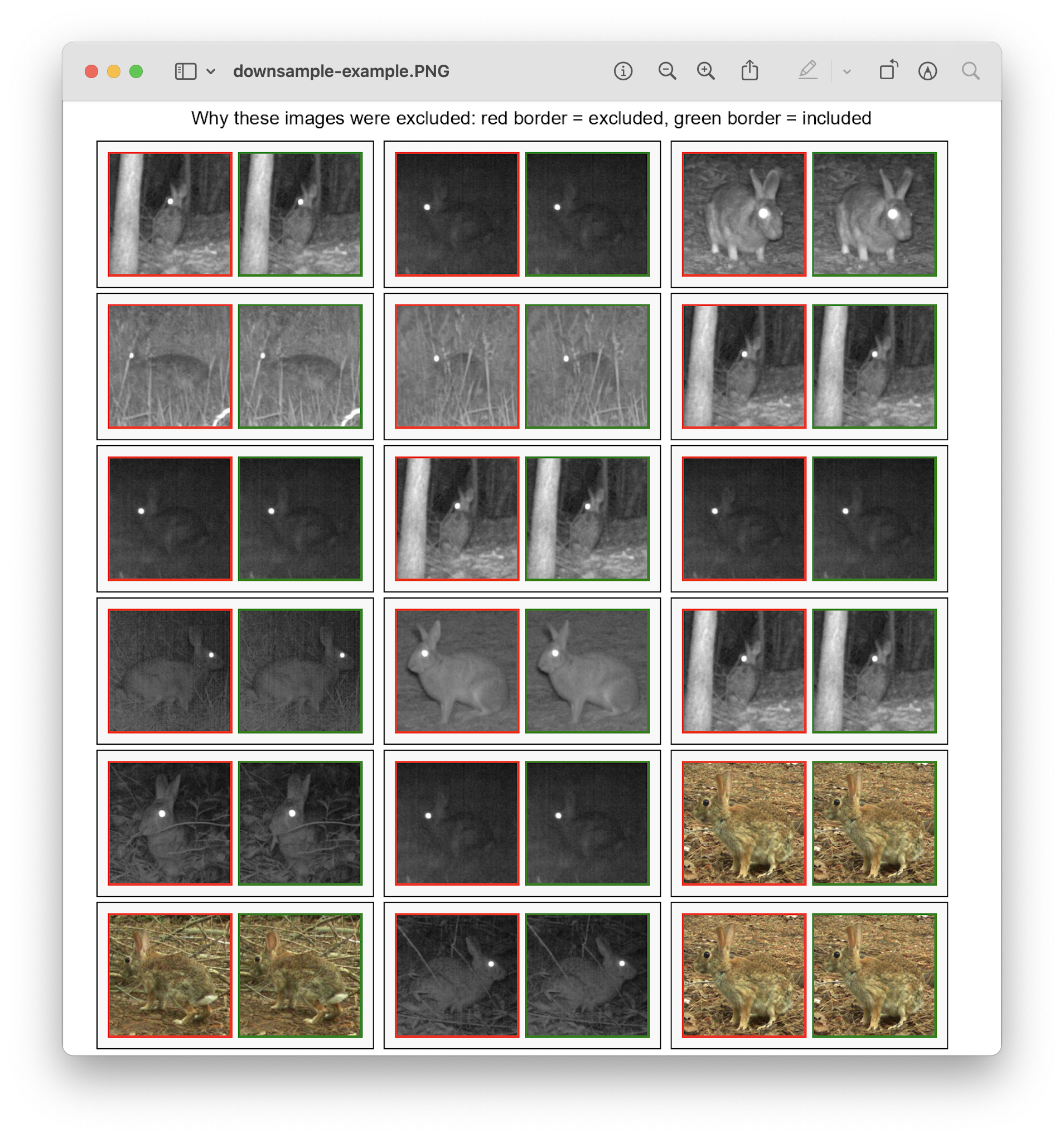
show_verification=True, the algorithm displays a visual check of 18 randomly selected excluded images and their included counterpart. The visualization opens automatically in your default image viewer without saving files to disk.
License
MIT License – see LICENSE file.
Release history Release notifications | RSS feed


Download files
Download the file for your platform. If you're not sure which to choose, learn more about installing packages.
Source Distribution
Built Distribution
Filter files by name, interpreter, ABI, and platform.
If you're not sure about the file name format, learn more about wheel file names.
Copy a direct link to the current filters
File details
Details for the file smartdownsample-0.2.0.tar.gz.
File metadata
- Download URL: smartdownsample-0.2.0.tar.gz
- Upload date:
- Size: 13.3 kB
- Tags: Source
- Uploaded using Trusted Publishing? No
- Uploaded via: twine/6.1.0 CPython/3.9.23
File hashes
| Algorithm | Hash digest | |
|---|---|---|
| SHA256 |
fe6e7f98d23fd0f316fc23a8dc75114a3b9a811eed6896c83287f483e6148815
|
|
| MD5 |
854cbbed00972b4fed65489acb2821ad
|
|
| BLAKE2b-256 |
972e678cd0aafedc9b12ecbb04c891aa1d525725c0594fa53b2e86c91405abae
|
File details
Details for the file smartdownsample-0.2.0-py3-none-any.whl.
File metadata
- Download URL: smartdownsample-0.2.0-py3-none-any.whl
- Upload date:
- Size: 10.8 kB
- Tags: Python 3
- Uploaded using Trusted Publishing? No
- Uploaded via: twine/6.1.0 CPython/3.9.23
File hashes
| Algorithm | Hash digest | |
|---|---|---|
| SHA256 |
0a60bdfd89284b7c292fffd0b56bdb0b503776e8e81e65f0d0b4ee33fc0f507b
|
|
| MD5 |
72532eb17cd4c389cdfbd583bf6adb34
|
|
| BLAKE2b-256 |
18b0d4d38ed4353209a81708dda0247b4f5ec8634545f62f77da02560835f5d9
|






