
smartlocate - Intelligent File Indexer
smartlocate is a tool for Linux that uses YOLO and many other AI tools (no GPU required! Everything is done locally) to detect objects in images, describe images and creates a database of detected objects, image descriptions, text contents and so on, and makes them searchable. This database is stored locally and allows you to search for specific objects in images. smartlocate uses an SQLite database to efficiently store and search data.
If the parameter --ocr is set while indexing, all images are also OCRed and the found text is searchable. You can set the language with --lang_ocr tr for example. Default is ["de", "en"].
If the parameter --describe is set while indexing, the model Salesforce/blip-image-captioning-large will be used to generate descriptions of images automatically, which also then can be searched.
Quickstart
# Install the tool
python3 -mvenv ~/smartlocate/
source ~/smartlocate/bin/activate
pip install smartlocate

# Index files (Using all possible indexing methods)
smartlocate ~/Documents --index

# Index files (using OCR, face-recognition, qr-code detection)
smartlocate ~/Documents --index --ocr --face_recognition --qrcodes

# Index files (Using all possible indexing methods), run hourly (won't work with new faces)
smartlocate ~/Documents --index --run_hourly

# Search for cats
smartlocate "cat"

# Search for cat in /home/username/Documents
smartlocate cat /home/username/Documents

# Search for "cat and dog" (order doesn't matter) in /home/username/Documents
smartlocate cat and dog /home/username/Documents

# Search for "cat and dog" (exactly in that order) in /home/username/Documents
smartlocate "cat and dog" /home/username/Documents --exact

# Help
smartlocate --help
Screenshots
Indexing
This shows the indexing process, with --face_recognition enabled. This means it asks for a name the first time a face is shown, but later on, it detects it automatically and can associate the face with a name, making it easily searchable.
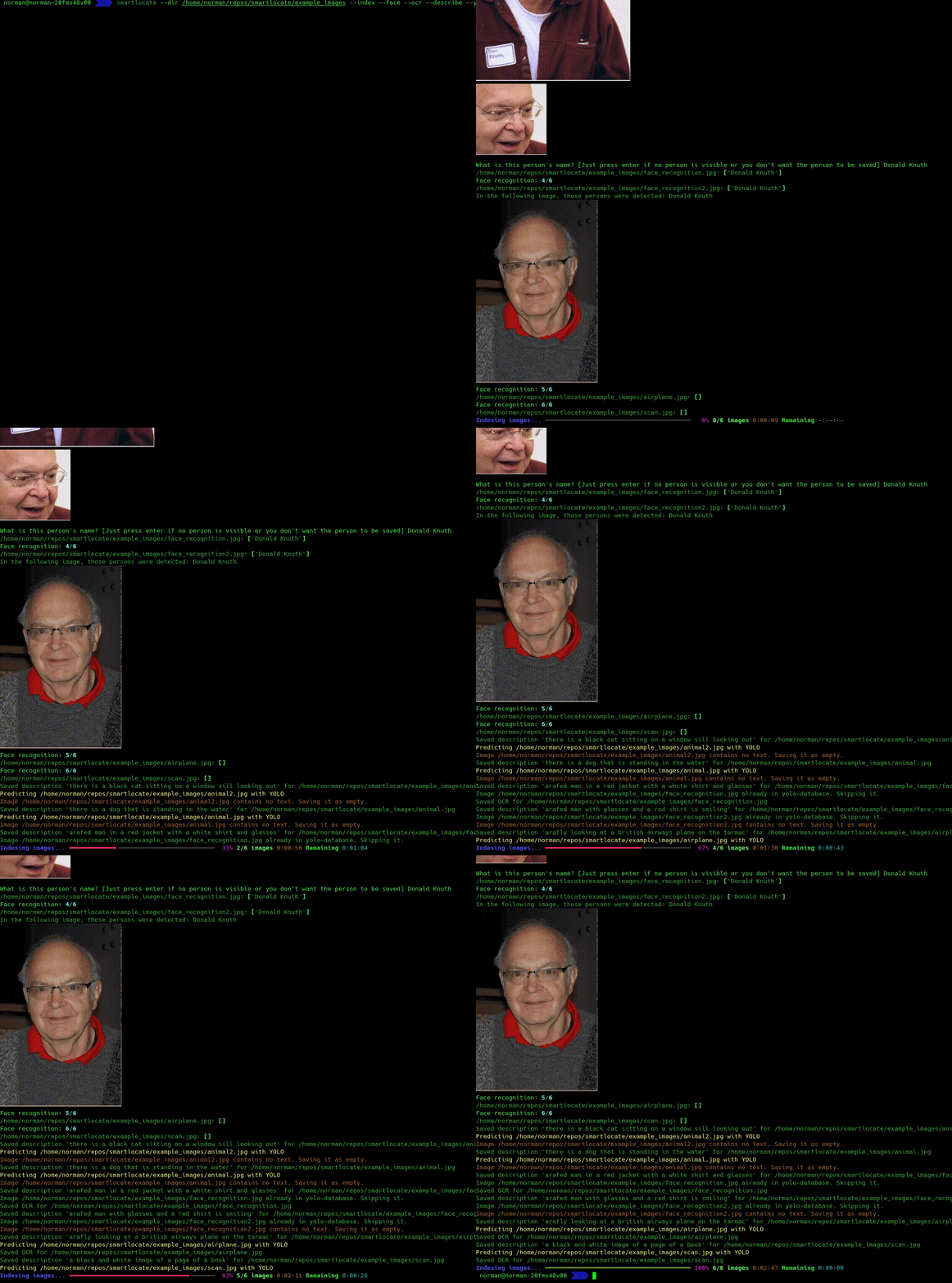
Face recognition while indexing
While indexing, with --face_recognition, faces are recognized. If the face cannot be automatically determined, it will ask you for the name of the person. For later images, this person will (most probably) be automatically detected again without any intervention.
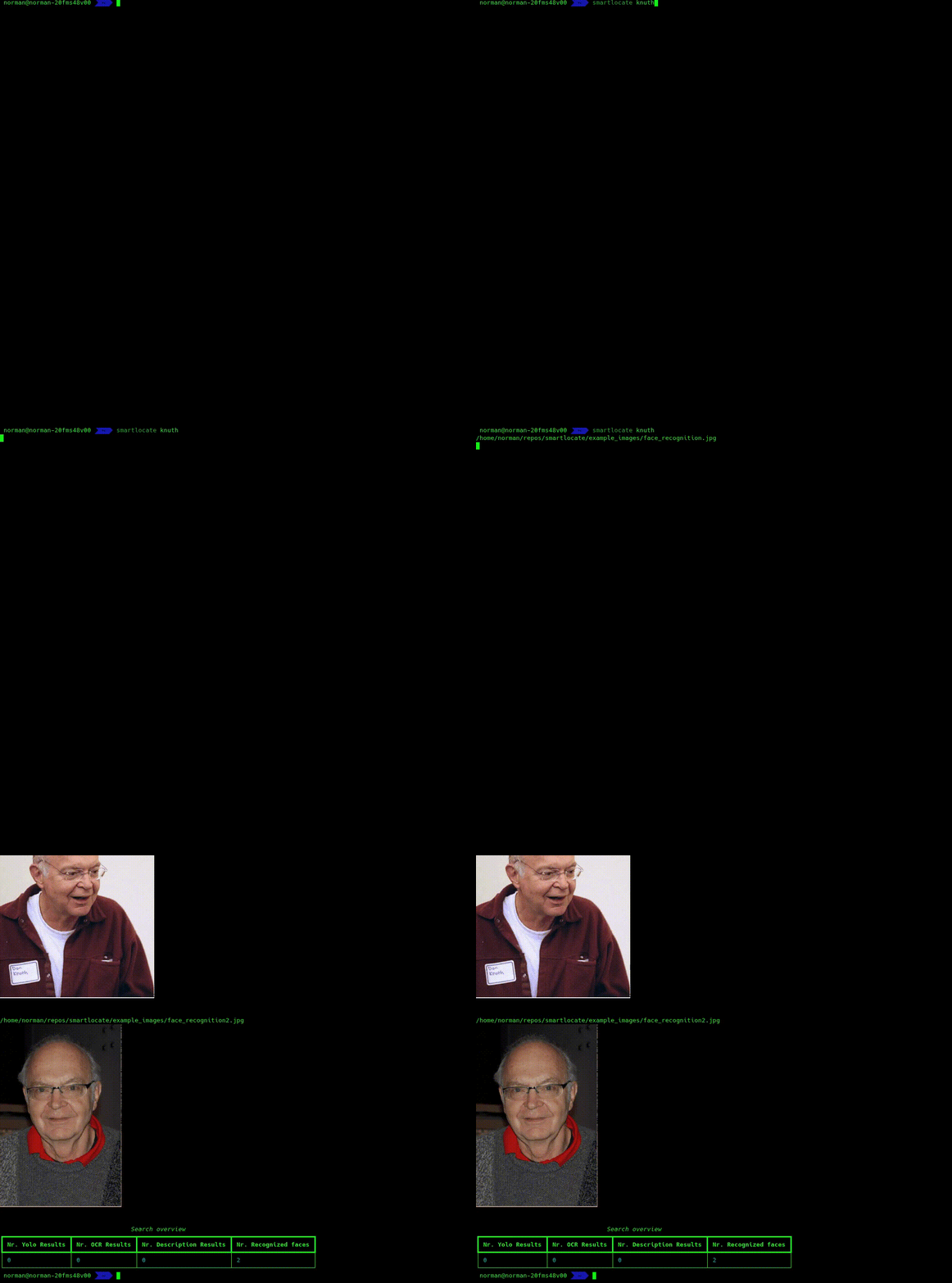
If you don't want to wait manually for a long time, you can run smartlocate with --dont_ask_new_faces. This will skip images where person are found, but cannot be determined. This way, you can run it through a whole folder over night without manual intervention, and then run it again after it's done without that option, so that you get asked for all new faces. This way, you don't get longer waiting periods before entering names again.
Searching
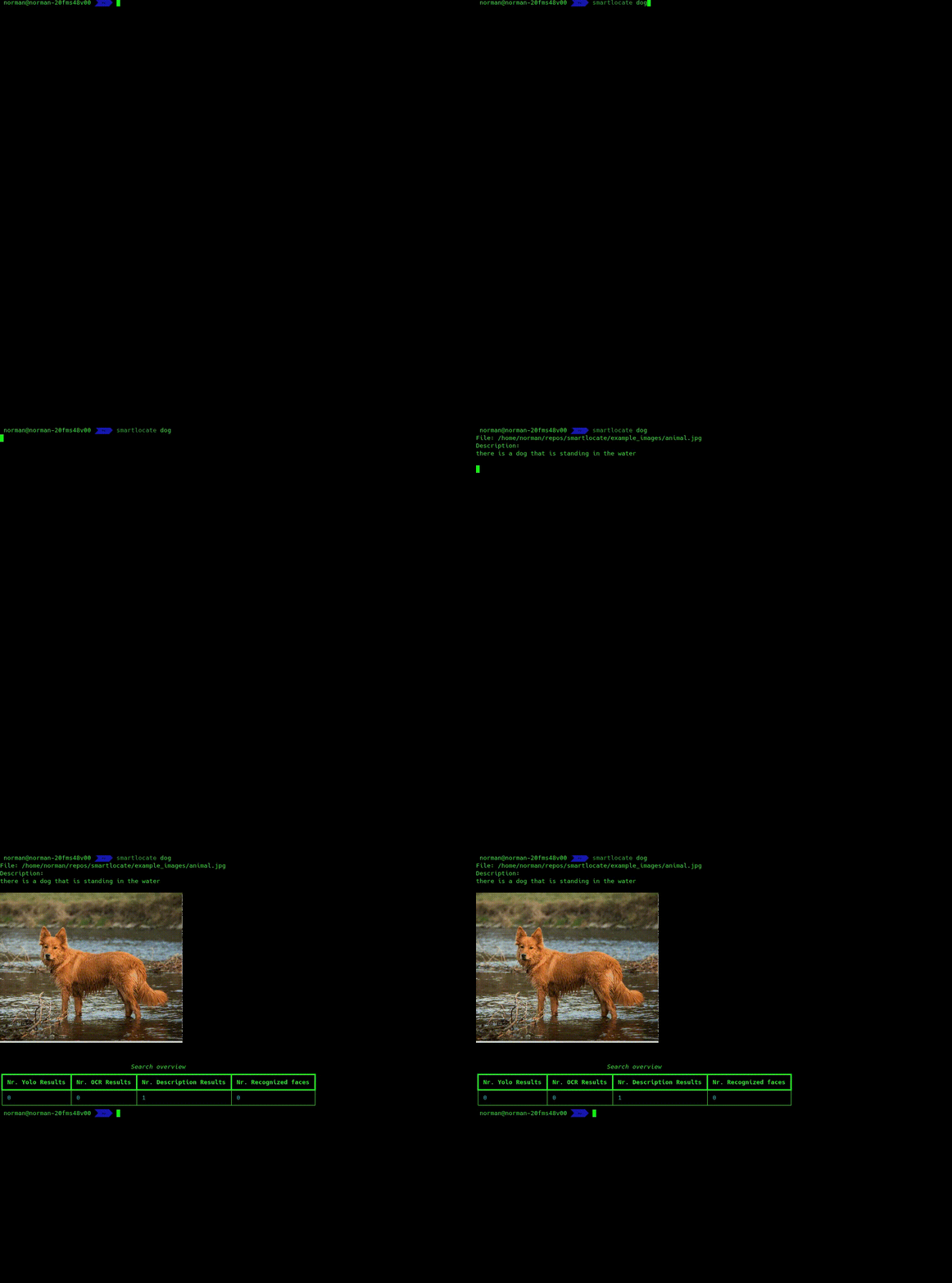
Images of cats and dogs
These images were not manually labelled. Those labels were found by AI!
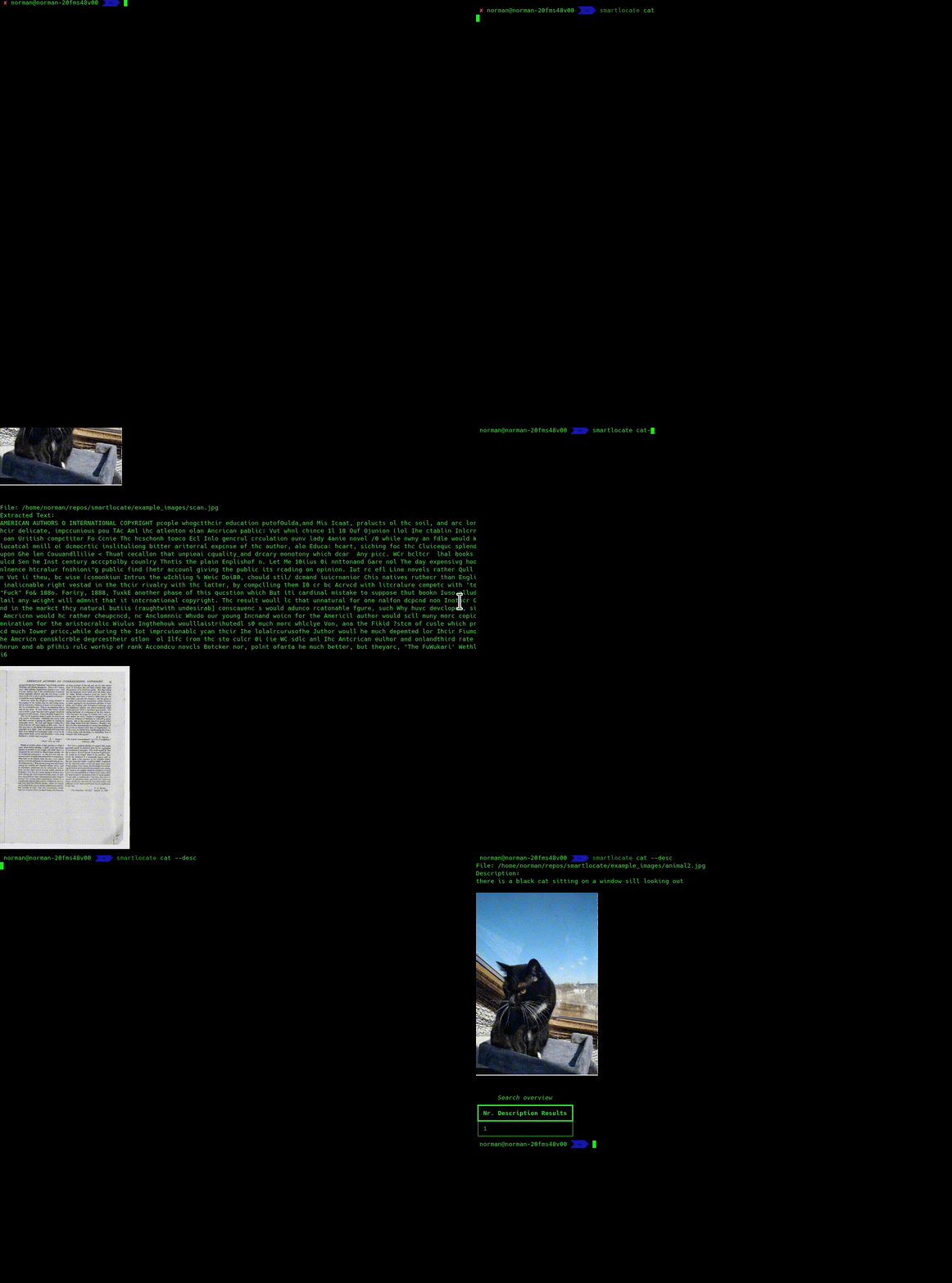
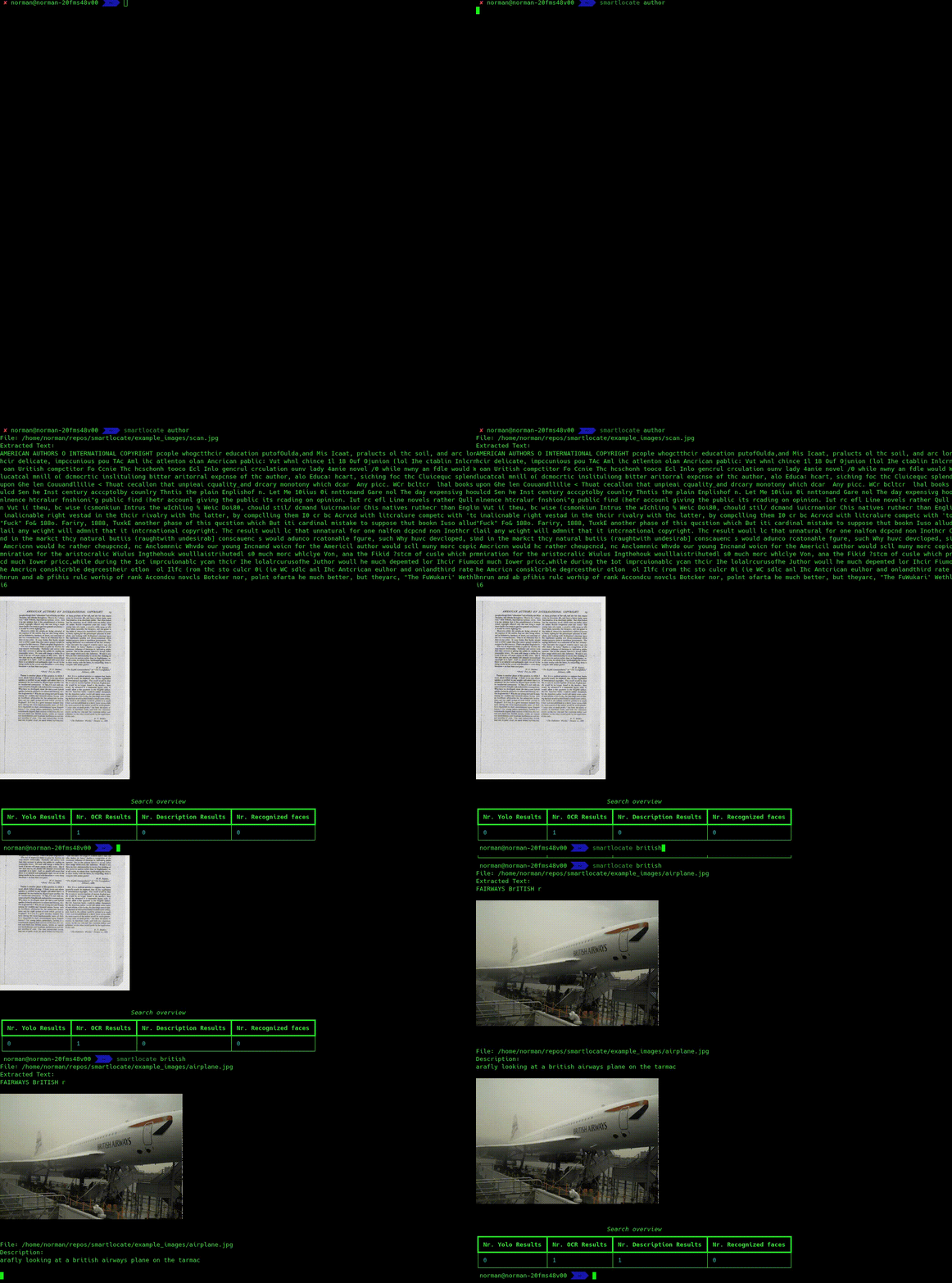
Searching through Documents
This is a search on OCR'ed documents.
Features
- Easy to install and use.
- Object detection in images using YOLO.
- OCR is done via easyocr, when
--ocrwas set during indexing. Allows you to use%as a wildcard. - Qr-Code-Detection and indexing.
- Documents are converted with pandoc. Allowed document types are:
['.doc', '.docx', '.pptx', '.ppt', '.odp', '.odt', '.md', '.txt', '.pdf']. Use--documentswhile indexing for finding documents. - Stores detected objects in a local SQLite database (
~/.smartlocate_db). - Fast searching for specific objects in images.
- Supports Sixel graphics for visualizing results.
- Automatic face recognition (use
--face_recognitionwhile indexing). It will ask you (hopefully only once) per person what their name is, so it can recognize them later on automatically. You only have to label a person once (or a few times, when the images are VERY different), and after being labelled once, it will auto-detect them in other images as well.
Installation
Get latest official release
This will get the latest officially released version from pypi.
python3 -mvenv ~/smartlocate/
source ~/smartlocate/bin/activate
pip3 install smartlocate
Run latest version
- Clone the repository:
git clone --depth 1 https://github.com/NormanTUD/smartlocate.git
- Navigate to the directory and run the following command to install the tool:
cd smartlocate
./smartlocate --index --dir ~/Pictures
smartlocate will automatically install all necessary dependencies, and YOLO is already included. This is done on first execution, which may take some time. But this only has to be done once!
Usage
Indexing Images
To index images in a specific directory, run the following command:
smartlocate --dir /path/to/images --index
YOLO and an image description AI will be used to detect objects in images, and pandoc is used for indexing all kinds of documents, and the results will be stored in the database.
You need to re-run the index every time new images are added or changed.
Searching for Objects
To search for a specific object (e.g., "cat"), run the following command:
smartlocate cat
The tool will search the indexed images for the object and display the results.
Options
--index: Indexes images in the specified directory.--size SIZE: Specifies the size to which images should be resized when indexing. Default is 400.--dir DIR: Specifies the directory to search or index.--debug: Enables debug mode to output detailed logs.--no_sixel: Hide Sixel graphics.--qrcodes: Enable indexing of qr-codes/search only qr-codes--describe: Saves descriptions of images (generated by AI) as well and makes them searchable--exact: Searches exactly what is entered, without splitting--ocr: Enable OCR.--documents: Enable documents.--lang_ocr: OCR languages, default: de, en. Accepts multiple languages.--delete_non_existing_files: Deletes non-existing files from the database.--shuffle_index: Shuffles the list of files before indexing.--model MODEL: Specifies the YOLO model for object detection.--threshold THRESHOLD: Sets the confidence threshold for object detection (0-1).--dbfile DBFILE: Specifies the path to the SQLite database file.--exclude PATH: Excludes a path from indexing/searching. Can be used multiple times.--dont_ask_new_faces: Don't ask for new faces (useful for automatically tagging all photos that can be tagged automatically).
Example Commands
Indexing images in a directory:
smartlocate --dir /home/user/images --index
Search for images containing the object "cat":
smartlocate cat
Indexing:
Indexing with YOLO, Description and OCR:
smartlocate --dir /home/user/images --index
Database
The results of image indexing are stored in the SQLite database ~/.smartlocate_db. This database contains information about detected
objects in the images. The index must be re-run whenever new images are added or changes are made.
Manage single images
Simply run smartlocate /path/to/an/image/file.jpg to see an overview of the image file's data and modify it.
Requirements
- Python 3.x
- All python-dependencies will be automatically installed when the tool is first run.
Ideas
Future ideas would be to expand this to other formats than images as well. Imagine you could say:
smartlocate "text about cats"
and get all .txt, .md, .docx, .tex and so on files in which something about cats is written. Currently, document indexing is only done via a full-text search.
Same for videos and audio files. If someone wants to do it, feel free to contribute!
Troubleshooting
The SQlite3-file is too large
When the sqlite3-file is too large, you can vacuum it:
smartlocate --vacuum
This will not delete any data, but just free up claimed, but yet unreleased space.
License
Licensed under GPL2.
1 maintainer

Metadata
1 maintainer
Release files for smartlocate 2025.2.17.post1
For a detailed explanation of source distributions (sdists) and built distributions (wheels), please see the package formats documentation.
Source distribution (sdist)
| File | Size | Uploaded | Provenance | Actions |
|---|---|---|---|---|
| smartlocate-2025.2.17.post1.tar.gz | 37.6 kB | With provenance | Details for smartlocate-2025.2.17.post1.tar.gz |
Built distribution (wheel)
| File | Interpreter | ABI | Platform | Actions Reset |
|---|---|---|---|---|
| smartlocate-2025.2.17.post1-py3-none-any.whl | Python 3 | none | any | Details for smartlocate-2025.2.17.post1-py3-none-any.whl |
Total release size: 124.1 kB
Release files / smartlocate-2025.2.17.post1.tar.gz
| Download URL | smartlocate-2025.2.17.post1.tar.gz |
|---|---|
| Size | 37.6 kB |
| Tags | Source |
|
SHA-256 checksum How to use checksums |
84606f73e87379c4a99e33ee7fcadeaaf1703362c0735c318e3736bf317f460b
|
|
BLAKE2b-256 checksum How to use checksums |
78ef77cd80a1e2e6bac266ad4f8853b3a8fca348cf107358fb704583324ffa54
|
| Upload date | |
|
Uploaded using Trusted Publishing? What is trusted publishing? |
Yes |
| Uploaded via |
twine/6.1.0 CPython/3.12.8
|
Provenance
Provenance describes where a file came from. On PyPI, provenance is shared via attestations, which provide a verifiable record of the build or publishing details. View details, limitations and caveats.


PyPI Publish Attestation
PyPI verified that this artifact, at this checksum, originated from the publisher listed below.
Signed by GitHub Actions, verified by PyPI on Feb 17, 2025.
Transparency logRelease files / smartlocate-2025.2.17.post1-py3-none-any.whl
| Download URL | smartlocate-2025.2.17.post1-py3-none-any.whl |
|---|---|
| Size | 86.5 kB |
| Tags | Python 3 |
|
SHA-256 checksum How to use checksums |
5bb406898707bf72d3bad154bfed6e049db2d3e2935b50614ea22ec795ae0653
|
|
BLAKE2b-256 checksum How to use checksums |
317a02c8f0c2a7b4cd4738643dbe326d0c300b6c2754f03ce2de967a9af1b0dd
|
| Upload date | |
|
Uploaded using Trusted Publishing? What is trusted publishing? |
Yes |
| Uploaded via |
twine/6.1.0 CPython/3.12.8
|
Provenance
Provenance describes where a file came from. On PyPI, provenance is shared via attestations, which provide a verifiable record of the build or publishing details. View details, limitations and caveats.
PyPI Publish Attestation
PyPI verified that this artifact, at this checksum, originated from the publisher listed below.
Signed by GitHub Actions, verified by PyPI on Feb 17, 2025.
Transparency logSecurity for smartlocate 2025.2.17.post1
Provenance
Provenance describes where a file came from. On PyPI, provenance is shared via attestations, which provide a verifiable record of the build or publishing details. View details, limitations and caveats.
Full provenance
Both files in this release have been uploaded with provenance metadata.
Attestation for smartlocate-2025.2.17.post1.tar.gz
PyPI Publish Attestation
PyPI verified that this artifact, at this checksum, originated from the publisher listed below.
Signed by GitHub Actions, verified by PyPI on Feb 17, 2025.
Transparency logA note on package security
PyPI is a repository for distributing packages, not a service for auditing them. While third-party security researchers and our staff do their best to detect and remove malicious packages, PyPI cannot guarantee the quality, security or suitability of any given package.
To learn more about protecting yourself from malicious actors, visit our package security documentation.














