
Similiar to locate, but looks at the content
Verified details
These details have been verified by PyPIProject links
GitHub Statistics
Maintainers

Project description
smartlocate - YOLO and OCR File Indexer
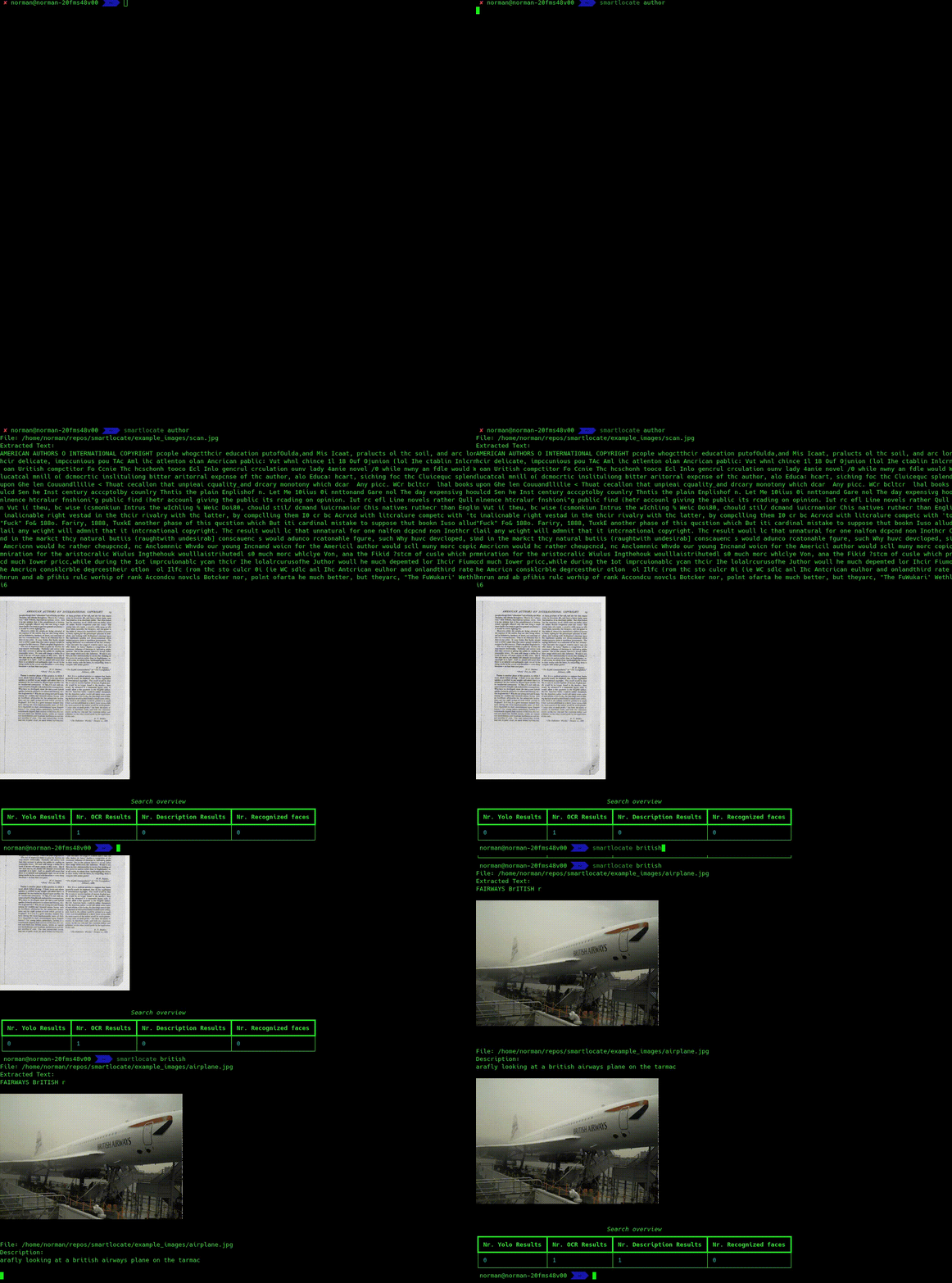
smartlocate is a tool for Linux that uses YOLO (You Only Look Once) to detect objects in images and creates a database of detected objects. This database is stored locally and allows you to search for specific objects in images. smartlocate uses an SQLite database to efficiently store and search image data.
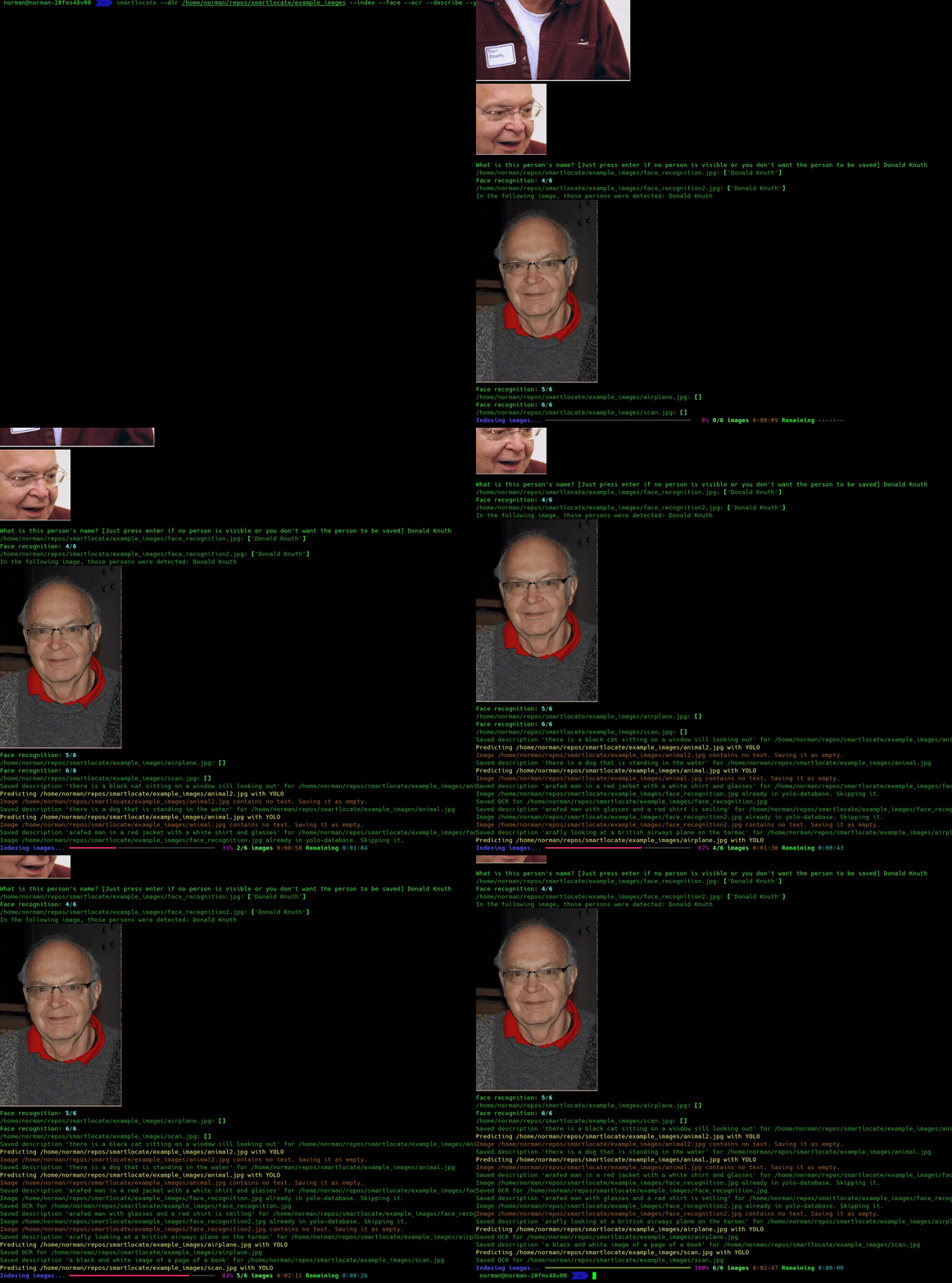
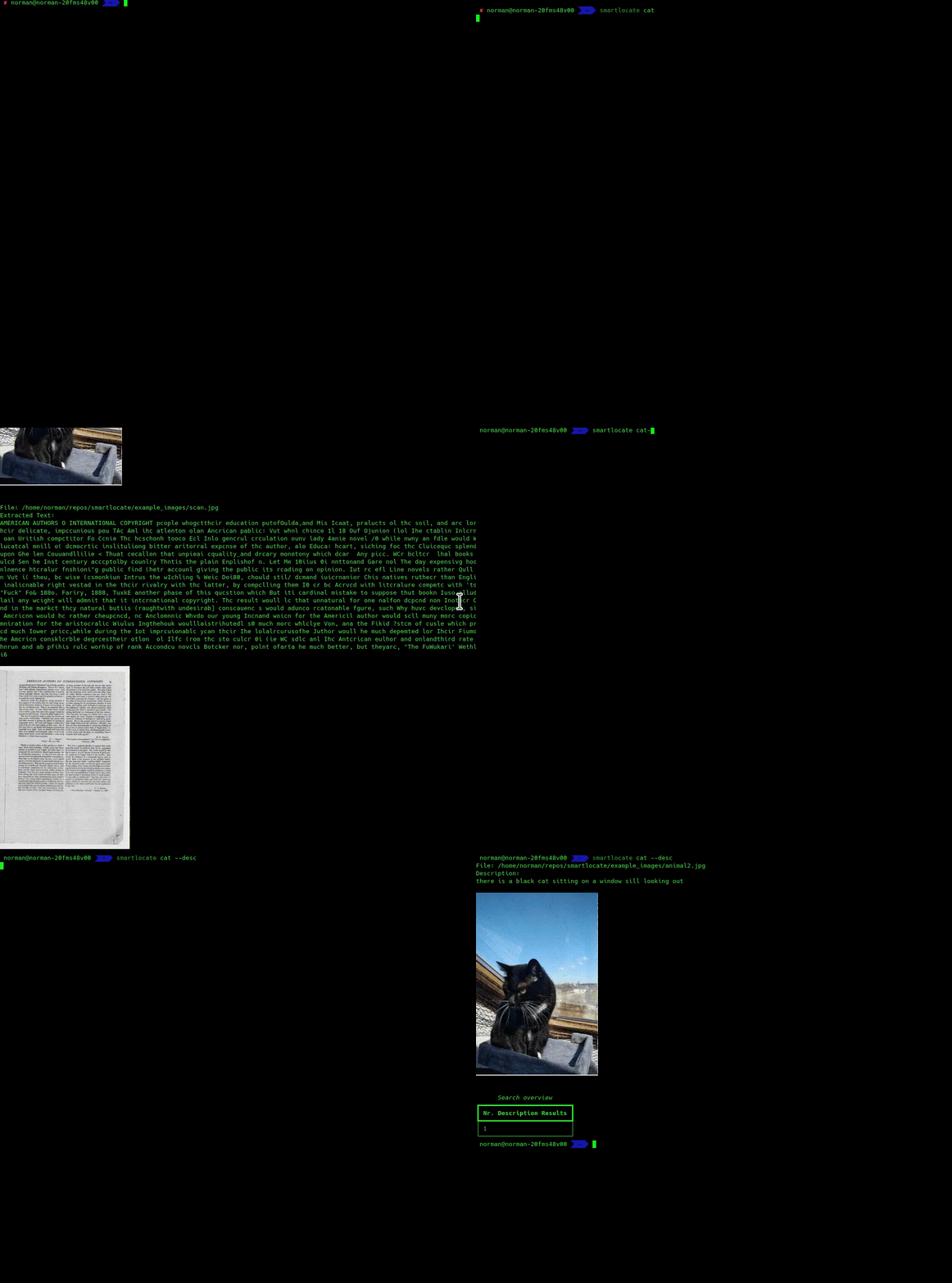
If the parameter --ocr is set while indexing, all images are also OCRed and the found text is searchable. You can set the language with --lang_ocr tr for example. Default is ["de", "en"].
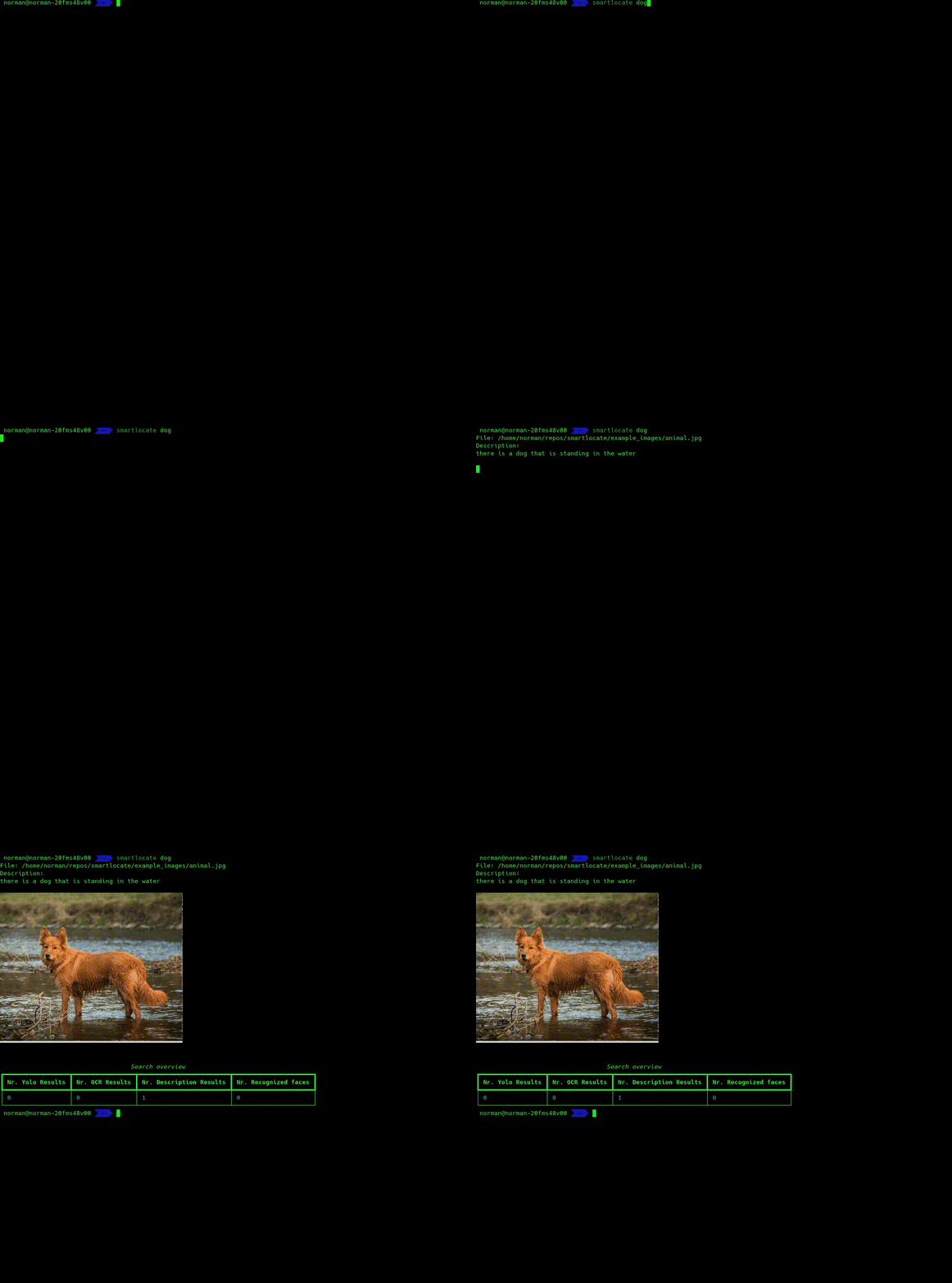
If the parameter --describe is set while indexing, the model Salesforce/blip-image-captioning-large will be used to generate descriptions of images automatically, which also then can be searched.
Features
- Object detection in images using YOLO.
- OCR is done via easyocr, when
--ocrwas set during indexing. Allows you to use%as a wildcard. - Stores detected objects in a local SQLite database (
~/.smartlocate_db). - Fast searching for specific objects in images.
- Supports Sixel graphics for visualizing results.
- Easy to install and use.
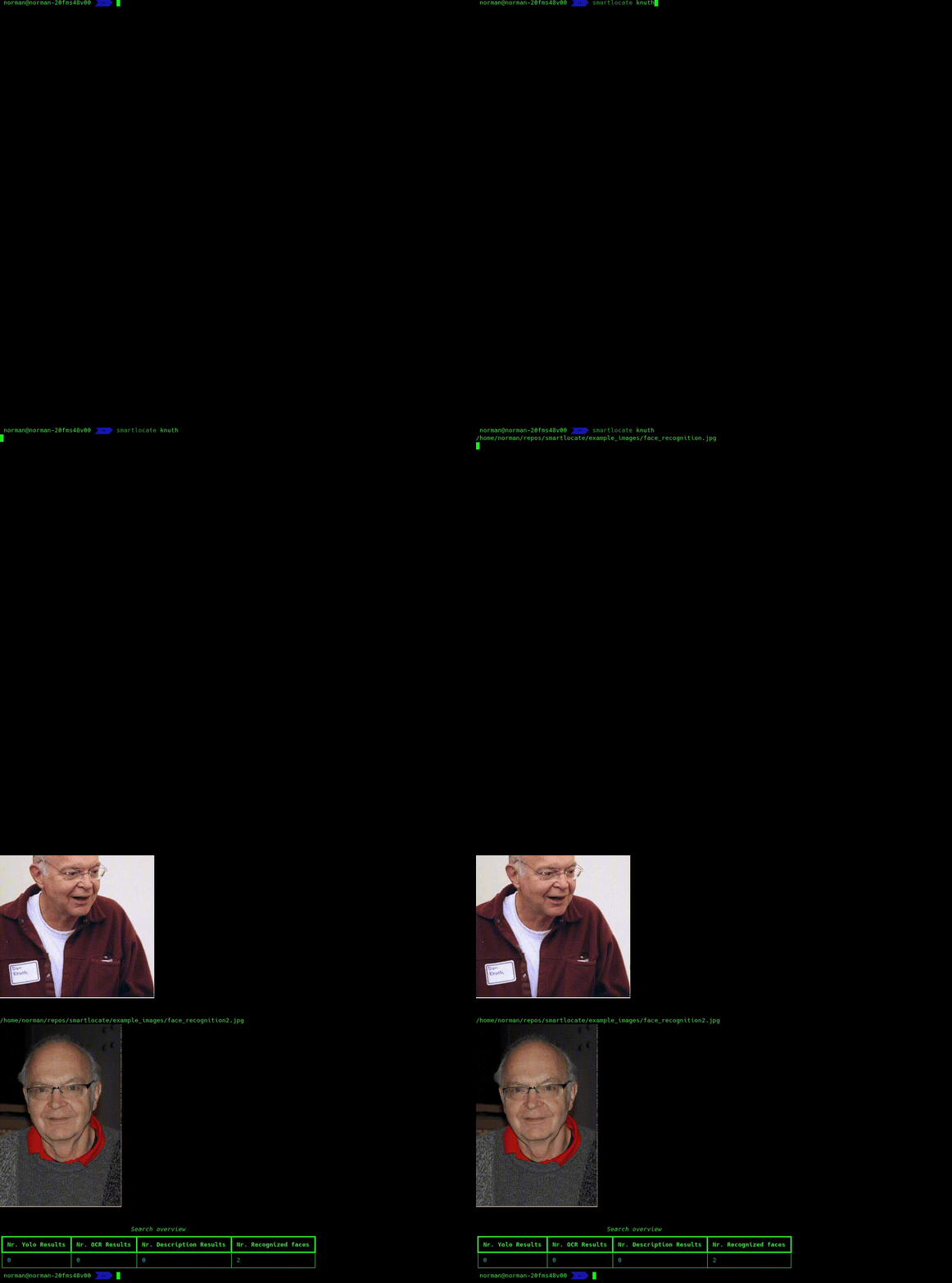
- Automatic face recognition (use
--face_recognitionwhile indexing). It will ask you (hopefully only once) per person what their name is, so it can recognize them later on automatically.
Installation
- Clone the repository:
git clone --depth 1 https://github.com/NormanTUD/smartlocate.git
- Navigate to the directory and run the following command to install the tool:
cd smartlocate
./smartlocate --index --dir ~/Pictures
smartlocate will automatically install all necessary dependencies, and YOLO is already included. This is done on first execution, which may take some time. But this only has to be done once!
Usage
Indexing Images
To index images in a specific directory, run the following command:
smartlocate --dir /path/to/images --index
YOLO will be used to detect objects, and the results will be stored in the database. You need to re-run the index every time new images are added or changed.
Searching for Objects
To search for a specific object (e.g., "cat"), run the following command:
smartlocate cat
The tool will search the indexed images for the object and display the results.
Additional Options
--index: Indexes images in the specified directory.--size SIZE: Specifies the size to which images should be resized when indexing. Default is 400.--dir DIR: Specifies the directory to search or index.--debug: Enables debug mode to output detailed logs.--no_sixel: Hide Sixel graphics.--describe: Saves descriptions of images (generated by AI) as well and makes them searchable--exact: Searches exactly what is entered, without splitting--ocr: Enable OCR.--lang_ocr: OCR languages, default: de, en. Accepts multiple languages.--delete_non_existing_files: Deletes non-existing files from the database.--shuffle_index: Shuffles the list of files before indexing.--model MODEL: Specifies the YOLO model for object detection.--threshold THRESHOLD: Sets the confidence threshold for object detection (0-1).--dbfile DBFILE: Specifies the path to the SQLite database file.--exclude PATH: Excludes a path from indexing/searching. Can be used multiple times.--dont_ask_new_faces: Don't ask for new faces (useful for automatically tagging all photos that can be tagged automatically).
Example Commands
Indexing images in a directory:
smartlocate --dir /home/user/images --index
Search for images containing the object "cat":
smartlocate cat
Indexing:
Indexing with YOLO, Description and OCR:
smartlocate --dir /home/user/images --index --debug --ocr --describe
Database
The results of image indexing are stored in the SQLite database ~/.smartlocate_db. This database contains information about detected
objects in the images. The index must be re-run whenever new images are added or changes are made.
Manage single images
Simply run smartlocate /path/to/an/image/file.jpg to see an overview of the image file's data and modify it.
Requirements
- Python 3.x
- All dependencies will be automatically installed when the tool is first run.
Ideas
Future ideas would be to expand this to other formats than images as well. Imagine you could say:
smartlocate "text about cats"
and get all .txt, .md, .docx and so on files in which something about cats is written.
Same for videos and audio files. If someone wants to do it, feel free to contribute!
License
Licensed under GPL2.
Project details
Verified details
These details have been verified by PyPIProject links
GitHub Statistics
Maintainers
Release history Release notifications | RSS feed


Download files
Download the file for your platform. If you're not sure which to choose, learn more about installing packages.
Source Distribution
Built Distribution
Filter files by name, interpreter, ABI, and platform.
If you're not sure about the file name format, learn more about wheel file names.
Copy a direct link to the current filters
File details
Details for the file smartlocate-2025.1.7.post3.tar.gz.
File metadata
- Download URL: smartlocate-2025.1.7.post3.tar.gz
- Upload date:
- Size: 29.2 kB
- Tags: Source
- Uploaded using Trusted Publishing? Yes
- Uploaded via: twine/6.0.1 CPython/3.12.8
File hashes
| Algorithm | Hash digest | |
|---|---|---|
| SHA256 |
74d1b2412067adc4c8cd582fd75b9707c80e07db145ec3d309b4a7eff14aa0fc
|
|
| MD5 |
86124f3961606f3fb420a0a76a11435e
|
|
| BLAKE2b-256 |
26a6c91d924ec512567be03bb055d0fca0381b870e2e8667e034e8d6973ba92b
|
Provenance
The following attestation bundles were made for smartlocate-2025.1.7.post3.tar.gz:
Publisher:
python-publish.yml on NormanTUD/smartlocate
-
Statement:
-
Statement type:
https://in-toto.io/Statement/v1 -
Predicate type:
https://docs.pypi.org/attestations/publish/v1 -
Subject name:
smartlocate-2025.1.7.post3.tar.gz -
Subject digest:
74d1b2412067adc4c8cd582fd75b9707c80e07db145ec3d309b4a7eff14aa0fc - Sigstore transparency entry: 160416480
- Sigstore integration time:
-
Permalink:
NormanTUD/smartlocate@f6d6b7e6ab0d2bf279f93428c7d1aeea5b821ff4 -
Branch / Tag:
refs/tags/v0.1.6 - Owner: https://github.com/NormanTUD
-
Access:
public
-
Token Issuer:
https://token.actions.githubusercontent.com -
Runner Environment:
github-hosted -
Publication workflow:
python-publish.yml@f6d6b7e6ab0d2bf279f93428c7d1aeea5b821ff4 -
Trigger Event:
release
-
Statement type:
File details
Details for the file smartlocate-2025.1.7.post3-py3-none-any.whl.
File metadata
- Download URL: smartlocate-2025.1.7.post3-py3-none-any.whl
- Upload date:
- Size: 68.9 kB
- Tags: Python 3
- Uploaded using Trusted Publishing? Yes
- Uploaded via: twine/6.0.1 CPython/3.12.8
File hashes
| Algorithm | Hash digest | |
|---|---|---|
| SHA256 |
9f3afc12b462e55d7a5af0d670cc73df30057e3302f6865eb8fb532195e19528
|
|
| MD5 |
4e4cd87c9fdece54c0ac3a585a87e772
|
|
| BLAKE2b-256 |
6ceaab7ab0b464a038b6f6e4263bd98582c69f0f910c2bdc4d113d58f01327f6
|
Provenance
The following attestation bundles were made for smartlocate-2025.1.7.post3-py3-none-any.whl:
Publisher:
python-publish.yml on NormanTUD/smartlocate
-
Statement:
-
Statement type:
https://in-toto.io/Statement/v1 -
Predicate type:
https://docs.pypi.org/attestations/publish/v1 -
Subject name:
smartlocate-2025.1.7.post3-py3-none-any.whl -
Subject digest:
9f3afc12b462e55d7a5af0d670cc73df30057e3302f6865eb8fb532195e19528 - Sigstore transparency entry: 160416482
- Sigstore integration time:
-
Permalink:
NormanTUD/smartlocate@f6d6b7e6ab0d2bf279f93428c7d1aeea5b821ff4 -
Branch / Tag:
refs/tags/v0.1.6 - Owner: https://github.com/NormanTUD
-
Access:
public
-
Token Issuer:
https://token.actions.githubusercontent.com -
Runner Environment:
github-hosted -
Publication workflow:
python-publish.yml@f6d6b7e6ab0d2bf279f93428c7d1aeea5b821ff4 -
Trigger Event:
release
-
Statement type:






