
SmartPassLib v4.0.0
Smart Passwords Library: Cryptographic password generation and management without storage. Generate passwords from secrets, verify knowledge without exposure, manage metadata securely.
Now with Cross-Platform Determinism: Same secret + same parameters = identical password on C#, Python, Go, Kotlin, JavaScript and any language with SHA-256.
Decentralized by Design: Unlike traditional password managers that store encrypted vaults on central servers, smartpasslib stores nothing. Your secrets never leave your device. Passwords are regenerated on-demand — no cloud, no database, no trust required.












⚠️ Disclaimer
By using this software, you agree to the full disclaimer terms.
Summary: Software provided "AS IS" without warranty. You assume all risks.
Full legal disclaimer: See DISCLAIMER.md
🔄 Breaking Change (v4.0.0)
⚠️ This version is NOT backward compatible with v1.x.x, v2.x.x, or v3.x.x
Passwords generated with older versions cannot be regenerated with v4.0.0.
📖 Full migration instructions → see MIGRATION.md
Core Principles:
- Zero-Storage Security: No passwords or secret phrases are ever stored or transmitted
- Decentralized Architecture: No central servers, no cloud dependency, no third-party trust required
- Cross-Platform Deterministic Generation: Identical secret + parameters = identical password on any language (SHA-256 based)
- Metadata Only: Store only verification metadata (public keys, descriptions, lengths)
- On-Demand Regeneration: Passwords are recalculated when needed, never retrieved from storage
- Cryptographically Secure: Uses
secretsmodule and SHA-256
What You Can Do:
- Smart Passwords: Generate deterministic passwords from secret phrases (cross-platform!)
- Strong Random Passwords: Cryptographically secure passwords with character diversity
- Authentication Codes: Generate secure 2FA/MFA codes with guaranteed character sets
- Base Passwords: Simple cryptographically secure random passwords for general use
- Key Generation: Create public/private verification keys from secrets
- Secret Verification: Prove knowledge of secrets without revealing them (public key verification)
- Metadata Management: Store and update password metadata (descriptions, lengths) without storing passwords
- Deterministic & Non-Deterministic: Both reproducible and random password generation options
Decentralized Password Management
Unlike traditional password managers that store your encrypted vault on central servers, smartpasslib is decentralized by design:
- No central storage — passwords are never stored anywhere
- No server dependency — generation happens on your device
- No third-party trust — your secret is yours alone
- No cloud lock-in — metadata can be synced via any channel (USB, Nextcloud, Signal, paper)
Your passwords exist only when you generate them. Your secrets never leave your device.
Key Features:
- Decentralized & Serverless: No central database, no cloud lock-in, complete user sovereignty
- No Password Database: Eliminates the need for password storage
- No Secret Storage: Secret phrases never leave your control
- Cross-Platform Determinism: Same results on C#, Python, Go, Kotlin, JavaScript
- Public Key Verification: Verify secrets without exposing them
- Multiple Generator Types: Smart, strong, base, and code generators
- Store Only Public Metadata: Descriptions and public keys can be stored; private keys and secrets are NEVER persisted
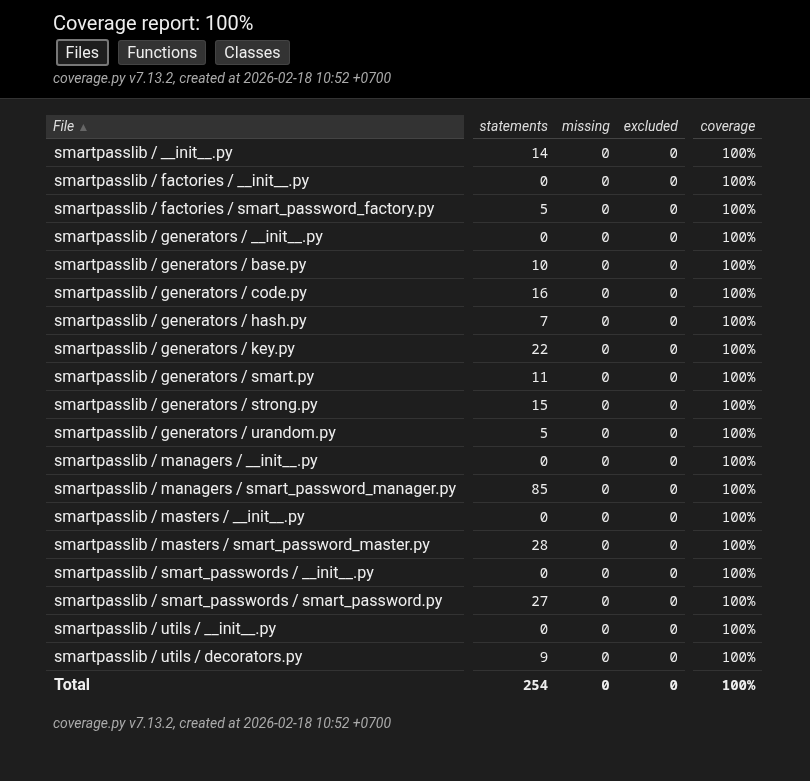
- Full Test Coverage: 100% tested for reliability and security
Security Model:
- Proof of Knowledge: Verify you know a secret without storing or transmitting it
- Decentralized Trust: No third party needed — you control your secrets completely
- Deterministic Security: Same input = same output, always reproducible across platforms
- Dynamic Iteration Counts: Private key uses 15-30 iterations, public key uses 45-60 iterations (deterministic per secret)
- No Vulnerable Metadata Storage: Only public keys and descriptions can be stored (optional). Private keys and secret phrases are NEVER stored anywhere
- Zero Storage of Secrets: Secret phrases exist only in your memory, private keys are derived on-demand and never persisted
- No Recovery Backdoors: Lost secret = permanently lost passwords (by design)
Research Paradigms & Publications
- Pointer-Based Security Paradigm - Architectural Shift from Data Protection to Data Non-Existence
- Local Data Regeneration Paradigm - Ontological Shift from Data Transmission to Synchronous State Discovery
Technical Foundation
The library implements cross-platform deterministic password generation - passwords are generated reproducibly from secret phrases using SHA-256 cryptographic hash function.
Why SHA-256 instead of SHA3-512:
- Cross-platform standard - Available in every programming language by default
- NIST certified - FIPS 180-4 compliant, used in Bitcoin, TLS, JWT
- 256-bit security - Quantum-resistant (128-bit effective with Grover's algorithm)
- Performance - Faster on 32-bit and 64-bit systems
- Sufficient for passwords - 256 bits of entropy is impossible to brute force
Key principle: Instead of storing passwords, you store verification metadata. The actual password is regenerated on-demand from your secret.
Cross-Platform Guarantee:
- Same secret phrase + same length = identical password on any platform
- Implemented in C#, Python, Go, Kotlin, JavaScript
- Based on SHA-256 (NIST standard) — not language-specific
Decentralized Architecture:
- No central authority required
- Metadata can be synced via any channel (USB, cloud, even paper)
- Your security depends only on your secret phrase, not on any service provider
- Works offline — no internet connection required
What's NOT stored:
- Your secret phrase
- The actual password
- Any reversible password data
What IS stored (optional):
- Public verification key (hash of secret)
- Service description
- Password length parameter
Security model: Proof of secret knowledge without secret storage.
Installation
pip install smartpasslib
File Locations
Configuration files are stored in:
| Platform | Configuration Path |
|---|---|
| Linux | ~/.config/smart_password_manager/passwords.json |
| Windows | C:\Users\Username\.config\smart_password_manager\passwords.json |
Legacy Migration:
- Old
~/.cases.jsonfiles from v1.x.x/v2.x.x/v3.x.x are NOT compatible with v4.0.0 - Public keys in old files use different derivation (fixed iterations, no salt)
- These files will not be migrated automatically
- If you have existing metadata, you need to recreate entries manually
- Keep old file as backup:
~/.cases.json.v3.bak - See MIGRATION.md for detailed instructions
Quick Start
from smartpasslib import SmartPasswordMaster

# Your secret phrase is the only key needed (min 12 characters!)
secret = "my_strong_secret_key"

# Generate the password (CROSS-PLATFORM!)
password = SmartPasswordMaster.generate_smart_password(
    secret=secret,
    length=12
)
print(f"Your generated password: {password}")
Verification Without Storage
from smartpasslib import SmartPasswordMaster

# Generate a public verification key (store this, not the password)
public_key = SmartPasswordMaster.generate_public_key(
    secret="my_strong_secret_key"
)

# Later, verify you know the secret without revealing it
is_valid = SmartPasswordMaster.check_public_key(
    secret="my_strong_secret_key",
    public_key=public_key
)
print(is_valid)  # True
Core Components
SmartPasswordMaster - Main Interface
from smartpasslib import SmartPasswordMaster

# Generate different types of passwords
base_password = SmartPasswordMaster.generate_base_password(length=12)
# Output example: MG-QwPHu6a*y

strong_password = SmartPasswordMaster.generate_strong_password(length=14)
# Output example: 7u-IOW7$#K*FHd

smart_password = SmartPasswordMaster.generate_smart_password("my_strong_secret_key", 12)
# Output deterministic password (min 12 chars secret required)

# Generate and verify keys
public_key = SmartPasswordMaster.generate_public_key("my_strong_secret_key")
is_valid = SmartPasswordMaster.check_public_key("my_strong_secret_key", public_key)
print(f"Verification: {is_valid}")  # Verification: True

# Generate secure codes
auth_code = SmartPasswordMaster.generate_code(8)
# Output example: oLi&D@3s
SmartPasswordManager - Metadata Storage
from smartpasslib import SmartPasswordManager, SmartPassword, SmartPasswordMaster

manager = SmartPasswordManager()

# Store verification metadata (not the password and not secret phrase!)
public_key = SmartPasswordMaster.generate_public_key("MyStrongSecretPhrase2026!")
smart_pass = SmartPassword(
    public_key=public_key,
    description="GitHub account",
    length=18
)
manager.add_smart_password(smart_pass)

# Retrieve and regenerate password when needed
stored_metadata = manager.get_smart_password(public_key)
regenerated_password = SmartPasswordMaster.generate_smart_password(
    "MyStrongSecretPhrase2026!",
    stored_metadata.length
)
print(regenerated_password)
Generators
Base Generator - Cryptographically secure random passwords:
from smartpasslib.generators.base import BasePasswordGenerator
password = BasePasswordGenerator.generate(12)
# Output example: Q#1&tesRzeza
Strong Generator - Cryptographically secure with character diversity:
from smartpasslib.generators.strong import StrongPasswordGenerator
password = StrongPasswordGenerator.generate(14)
# Output example: Ft7n!vJu6&9@V4
Code Generator - Secure codes for authentication:
from smartpasslib.generators.code import CodeGenerator
code = CodeGenerator.generate(6)
# Output example: M$yVc9
Smart Generator - Deterministic passwords from seeds (CROSS-PLATFORM):
from smartpasslib.generators.smart import SmartPasswordGenerator

password = SmartPasswordGenerator.generate("my_strong_secret_key", 12)
# Same secret + length = identical password on Python, Go, Kotlin, JS, C#
Advanced Usage
Password Management System
from smartpasslib import SmartPasswordManager, SmartPassword, SmartPasswordMaster

class PasswordVault:
    def __init__(self):
        self.manager = SmartPasswordManager()

    def add_service(self, service_name: str, secret: str, length: int = 16):
        if len(secret) < 12:
            raise ValueError("Secret must be at least 12 characters")
        public_key = SmartPasswordMaster.generate_public_key(secret)
        metadata = SmartPassword(
            public_key=public_key,
            description=service_name,
            length=length
        )
        self.manager.add_smart_password(metadata)
        return public_key

    def get_password(self, public_key: str, secret: str) -> str:
        metadata = self.manager.get_smart_password(public_key)
        if metadata:
            return SmartPasswordMaster.generate_smart_password(secret, metadata.length)
        return None

# Usage
vault = PasswordVault()
key = vault.add_service("My Account", "my_account_secret_2026!", 20)
password = vault.get_password(key, "my_account_secret_2026!")
Security Warnings
Decentralized Nature
There is no "forgot password" button. This is by design:
- No central server can reset your passwords
- No support team can recover your access
- Your secret phrase is the ONLY key
This is the price of true decentralization — you are completely in control.
Security Requirements
Secret Phrase
- Minimum 12 characters (enforced by library)
- Maximum length: No enforced limit, but 12-100 recommended
- Case-sensitive
- Use mix of: uppercase, lowercase, numbers, symbols
- Never store digitally
- NEVER use your password description as secret phrase
Strong Secret Examples
✅ "MyCatHippo2026"          — mixed case + numbers
✅ "P@ssw0rd!LongSecret"     — special chars + numbers + length
✅ "GitHubPersonal2026!"     — description + extra chars (but not the description alone)
Weak Secret Examples (avoid)
❌ "short"                   — too short, raises ValueError
❌ "GitHub Account"          — using description as secret (weak!)
❌ "password"                — dictionary word, too short
❌ "1234567890"              — only digits, too short
Password Length Requirements
- Minimum length: 12 characters (enforced)
- Maximum length: 100 characters (enforced)
- Code generator: 4-100 characters
Secret Phrase Security
Your secret phrase is the cryptographic master key
- Permanent data loss: Lost secret phrase = irreversible loss of all derived passwords
- No recovery mechanisms: No password recovery, no secret reset, no administrative override
- Deterministic generation: Identical input = identical output on any platform
- Single point of failure: Secret phrase is the sole authentication factor
- Secure storage required: Digital storage of secret phrases is prohibited
Critical: Test password regeneration with non-essential accounts before production use Note: Always test password generation in your specific environment. Implementation security depends on proper usage. NEVER use your password description as secret phrase
Cross-Platform Implementations
The same deterministic algorithm is available in multiple languages. smartpasslib Python produces identical passwords to:
| Language | Repository |
|---|---|
| JavaScript | smartpasslib-js |
| Kotlin | smartpasslib-kotlin |
| Go | smartpasslib-go |
| C# | smartpasslib-csharp |
Ecosystem
Core Libraries:
- smartpasslib - Python (this)
- smartpasslib-js - JavaScript
- smartpasslib-kotlin - Kotlin
- smartpasslib-go - Go
- smartpasslib-csharp - C#
CLI Applications:
- CLI Smart Password Manager (Python)
- CLI Smart Password Generator (Python)
- CLI Smart Password Manager (C#)
- CLI Smart Password Generator (C#)
Desktop Applications:
Other:
License
Copyright (©) 2026, Alexander Suvorov
Support
- Issues: GitHub Issues
- Documentation: Inline code documentation
- Tests: 100% coverage ensures reliability
For Developers
Development Setup
pip install -r data/requirements-dev.txt
pytest -v --cov=smartpasslib --cov-report=html
python -m build
Testing Coverage
100% test coverage - All components thoroughly tested
API Stability
Public API (stable):
SmartPasswordMaster- Main interface classSmartPasswordManager- Metadata managementSmartPassword- Password metadata container
Internal API (subject to change):
smartpasslib.generators.*smartpasslib.utils.*
1 maintainer

Metadata
1 maintainer
Release files for smartpasslib 4.0.0
For a detailed explanation of source distributions (sdists) and built distributions (wheels), please see the package formats documentation.
Source distribution (sdist)
| File | Size | Uploaded | |
|---|---|---|---|
| smartpasslib-4.0.0.tar.gz | 26.4 kB | Details |
Built distribution (wheel)
| File | Interpreter | ABI | Platform | Reset |
|---|---|---|---|---|
| smartpasslib-4.0.0-py3-none-any.whl | Python 3 | none | any | Details |
Total release size: 58.4 kB
Release files / smartpasslib-4.0.0.tar.gz
| Download URL | smartpasslib-4.0.0.tar.gz |
|---|---|
| Size | 26.4 kB |
| Tags | Source |
|
SHA-256 checksum How to use checksums |
b7473656b8b98579de64307f4aad80beffe32321d19741cb04e4a2465af0e1b1
|
|
BLAKE2b-256 checksum How to use checksums |
45eab23222b3a4aad3d8af0ddd0808abfa38061f0289b9e2dbc75033a12b1f0c
|
| Upload date | |
|
Uploaded using Trusted Publishing? What is trusted publishing? |
No |
| Uploaded via |
twine/6.2.0 CPython/3.14.4
|
Release files / smartpasslib-4.0.0-py3-none-any.whl
| Download URL | smartpasslib-4.0.0-py3-none-any.whl |
|---|---|
| Size | 32.0 kB |
| Tags | Python 3 |
|
SHA-256 checksum How to use checksums |
2009d08376dd28068200b323064cf2c6c72bdd246683e63471ee0a0e3ba365aa
|
|
BLAKE2b-256 checksum How to use checksums |
e0922bef45656ce757071886d41fc459a1fed224c56cc3003f9bbc2eb4f845ce
|
| Upload date | |
|
Uploaded using Trusted Publishing? What is trusted publishing? |
No |
| Uploaded via |
twine/6.2.0 CPython/3.14.4
|














