
Smart Passwords Library: Cryptographic password generation and management without storage. Generate passwords from secrets, verify knowledge without exposure, manage metadata securely.

Project description
SmartPassLib v4.0.0
Smart Passwords Library: Cryptographic password generation and management without storage. Generate passwords from secrets, verify knowledge without exposure, manage metadata securely.
Now with Cross-Platform Determinism: Same secret + same parameters = identical password on C#, Python, Go, Kotlin, JavaScript and any language with SHA-256.
Decentralized by Design: Unlike traditional password managers that store encrypted vaults on central servers, smartpasslib stores nothing. Your secrets never leave your device. Passwords are regenerated on-demand — no cloud, no database, no trust required.












⚠️ Disclaimer
By using this software, you agree to the full disclaimer terms.
Summary: Software provided "AS IS" without warranty. You assume all risks.
Full legal disclaimer: See DISCLAIMER.md
🔄 Breaking Change (v4.0.0)
⚠️ This version is NOT backward compatible with v1.x.x, v2.x.x, or v3.x.x
Passwords generated with older versions cannot be regenerated with v4.0.0.
📖 Full migration instructions → see MIGRATION.md
Core Principles:
- Zero-Storage Security: No passwords or secret phrases are ever stored or transmitted
- Decentralized Architecture: No central servers, no cloud dependency, no third-party trust required
- Cross-Platform Deterministic Generation: Identical secret + parameters = identical password on any language (SHA-256 based)
- Metadata Only: Store only verification metadata (public keys, descriptions, lengths)
- On-Demand Regeneration: Passwords are recalculated when needed, never retrieved from storage
- Cryptographically Secure: Uses
secretsmodule and SHA-256
What You Can Do:
- Smart Passwords: Generate deterministic passwords from secret phrases (cross-platform!)
- Strong Random Passwords: Cryptographically secure passwords with character diversity
- Authentication Codes: Generate secure 2FA/MFA codes with guaranteed character sets
- Base Passwords: Simple cryptographically secure random passwords for general use
- Key Generation: Create public/private verification keys from secrets
- Secret Verification: Prove knowledge of secrets without revealing them (public key verification)
- Metadata Management: Store and update password metadata (descriptions, lengths) without storing passwords
- Deterministic & Non-Deterministic: Both reproducible and random password generation options
Decentralized Password Management
Unlike traditional password managers that store your encrypted vault on central servers, smartpasslib is decentralized by design:
- No central storage — passwords are never stored anywhere
- No server dependency — generation happens on your device
- No third-party trust — your secret is yours alone
- No cloud lock-in — metadata can be synced via any channel (USB, Nextcloud, Signal, paper)
Your passwords exist only when you generate them. Your secrets never leave your device.
Key Features:
- Decentralized & Serverless: No central database, no cloud lock-in, complete user sovereignty
- No Password Database: Eliminates the need for password storage
- No Secret Storage: Secret phrases never leave your control
- Cross-Platform Determinism: Same results on C#, Python, Go, Kotlin, JavaScript
- Public Key Verification: Verify secrets without exposing them
- Multiple Generator Types: Smart, strong, base, and code generators
- Store Only Public Metadata: Descriptions and public keys can be stored; private keys and secrets are NEVER persisted
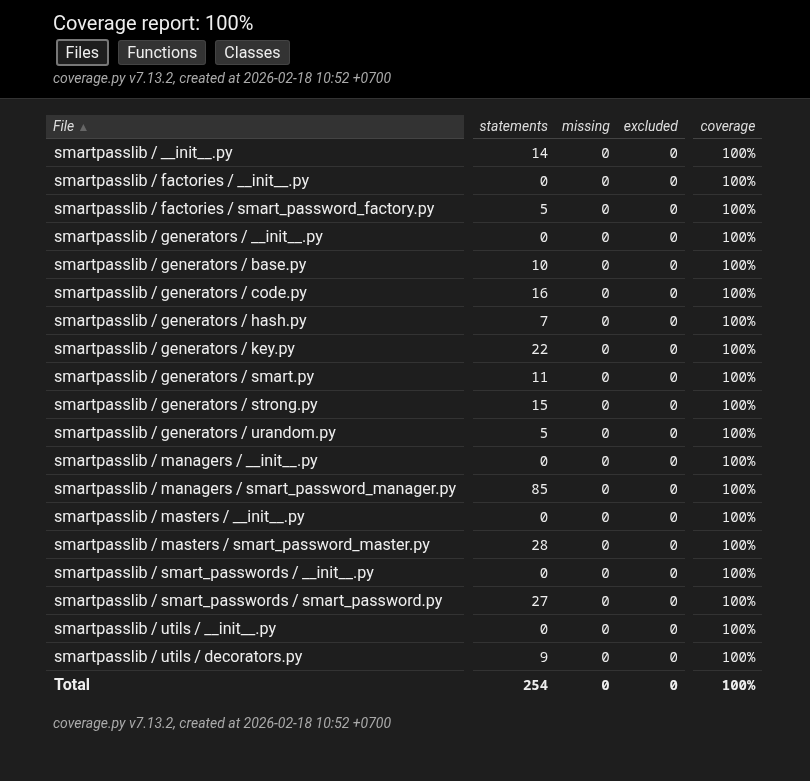
- Full Test Coverage: 100% tested for reliability and security
Security Model:
- Proof of Knowledge: Verify you know a secret without storing or transmitting it
- Decentralized Trust: No third party needed — you control your secrets completely
- Deterministic Security: Same input = same output, always reproducible across platforms
- Dynamic Iteration Counts: Private key uses 15-30 iterations, public key uses 45-60 iterations (deterministic per secret)
- No Vulnerable Metadata Storage: Only public keys and descriptions can be stored (optional). Private keys and secret phrases are NEVER stored anywhere
- Zero Storage of Secrets: Secret phrases exist only in your memory, private keys are derived on-demand and never persisted
- No Recovery Backdoors: Lost secret = permanently lost passwords (by design)
Research Paradigms & Publications
- Pointer-Based Security Paradigm - Architectural Shift from Data Protection to Data Non-Existence
- Local Data Regeneration Paradigm - Ontological Shift from Data Transmission to Synchronous State Discovery
Technical Foundation
The library implements cross-platform deterministic password generation - passwords are generated reproducibly from secret phrases using SHA-256 cryptographic hash function.
Why SHA-256 instead of SHA3-512:
- Cross-platform standard - Available in every programming language by default
- NIST certified - FIPS 180-4 compliant, used in Bitcoin, TLS, JWT
- 256-bit security - Quantum-resistant (128-bit effective with Grover's algorithm)
- Performance - Faster on 32-bit and 64-bit systems
- Sufficient for passwords - 256 bits of entropy is impossible to brute force
Key principle: Instead of storing passwords, you store verification metadata. The actual password is regenerated on-demand from your secret.
Cross-Platform Guarantee:
- Same secret phrase + same length = identical password on any platform
- Implemented in C#, Python, Go, Kotlin, JavaScript
- Based on SHA-256 (NIST standard) — not language-specific
Decentralized Architecture:
- No central authority required
- Metadata can be synced via any channel (USB, cloud, even paper)
- Your security depends only on your secret phrase, not on any service provider
- Works offline — no internet connection required
What's NOT stored:
- Your secret phrase
- The actual password
- Any reversible password data
What IS stored (optional):
- Public verification key (hash of secret)
- Service description
- Password length parameter
Security model: Proof of secret knowledge without secret storage.
Installation
pip install smartpasslib
File Locations
Configuration files are stored in:
| Platform | Configuration Path |
|---|---|
| Linux | ~/.config/smart_password_manager/passwords.json |
| Windows | C:\Users\Username\.config\smart_password_manager\passwords.json |
Legacy Migration:
- Old
~/.cases.jsonfiles from v1.x.x/v2.x.x/v3.x.x are NOT compatible with v4.0.0 - Public keys in old files use different derivation (fixed iterations, no salt)
- These files will not be migrated automatically
- If you have existing metadata, you need to recreate entries manually
- Keep old file as backup:
~/.cases.json.v3.bak - See MIGRATION.md for detailed instructions
Quick Start
from smartpasslib import SmartPasswordMaster

# Your secret phrase is the only key needed (min 12 characters!)
secret = "my_strong_secret_key"

# Generate the password (CROSS-PLATFORM!)
password = SmartPasswordMaster.generate_smart_password(
    secret=secret,
    length=12
)
print(f"Your generated password: {password}")
Verification Without Storage
from smartpasslib import SmartPasswordMaster

# Generate a public verification key (store this, not the password)
public_key = SmartPasswordMaster.generate_public_key(
    secret="my_strong_secret_key"
)

# Later, verify you know the secret without revealing it
is_valid = SmartPasswordMaster.check_public_key(
    secret="my_strong_secret_key",
    public_key=public_key
)
print(is_valid)  # True
Core Components
SmartPasswordMaster - Main Interface
from smartpasslib import SmartPasswordMaster

# Generate different types of passwords
base_password = SmartPasswordMaster.generate_base_password(length=12)
# Output example: MG-QwPHu6a*y

strong_password = SmartPasswordMaster.generate_strong_password(length=14)
# Output example: 7u-IOW7$#K*FHd

smart_password = SmartPasswordMaster.generate_smart_password("my_strong_secret_key", 12)
# Output deterministic password (min 12 chars secret required)

# Generate and verify keys
public_key = SmartPasswordMaster.generate_public_key("my_strong_secret_key")
is_valid = SmartPasswordMaster.check_public_key("my_strong_secret_key", public_key)
print(f"Verification: {is_valid}")  # Verification: True

# Generate secure codes
auth_code = SmartPasswordMaster.generate_code(8)
# Output example: oLi&D@3s
SmartPasswordManager - Metadata Storage
from smartpasslib import SmartPasswordManager, SmartPassword, SmartPasswordMaster

manager = SmartPasswordManager()

# Store verification metadata (not the password and not secret phrase!)
public_key = SmartPasswordMaster.generate_public_key("MyStrongSecretPhrase2026!")
smart_pass = SmartPassword(
    public_key=public_key,
    description="GitHub account",
    length=18
)
manager.add_smart_password(smart_pass)

# Retrieve and regenerate password when needed
stored_metadata = manager.get_smart_password(public_key)
regenerated_password = SmartPasswordMaster.generate_smart_password(
    "MyStrongSecretPhrase2026!",
    stored_metadata.length
)
print(regenerated_password)
Generators
Base Generator - Cryptographically secure random passwords:
from smartpasslib.generators.base import BasePasswordGenerator
password = BasePasswordGenerator.generate(12)
# Output example: Q#1&tesRzeza
Strong Generator - Cryptographically secure with character diversity:
from smartpasslib.generators.strong import StrongPasswordGenerator
password = StrongPasswordGenerator.generate(14)
# Output example: Ft7n!vJu6&9@V4
Code Generator - Secure codes for authentication:
from smartpasslib.generators.code import CodeGenerator
code = CodeGenerator.generate(6)
# Output example: M$yVc9
Smart Generator - Deterministic passwords from seeds (CROSS-PLATFORM):
from smartpasslib.generators.smart import SmartPasswordGenerator

password = SmartPasswordGenerator.generate("my_strong_secret_key", 12)
# Same secret + length = identical password on Python, Go, Kotlin, JS, C#
Advanced Usage
Password Management System
from smartpasslib import SmartPasswordManager, SmartPassword, SmartPasswordMaster

class PasswordVault:
    def __init__(self):
        self.manager = SmartPasswordManager()

    def add_service(self, service_name: str, secret: str, length: int = 16):
        if len(secret) < 12:
            raise ValueError("Secret must be at least 12 characters")
        public_key = SmartPasswordMaster.generate_public_key(secret)
        metadata = SmartPassword(
            public_key=public_key,
            description=service_name,
            length=length
        )
        self.manager.add_smart_password(metadata)
        return public_key

    def get_password(self, public_key: str, secret: str) -> str:
        metadata = self.manager.get_smart_password(public_key)
        if metadata:
            return SmartPasswordMaster.generate_smart_password(secret, metadata.length)
        return None

# Usage
vault = PasswordVault()
key = vault.add_service("My Account", "my_account_secret_2026!", 20)
password = vault.get_password(key, "my_account_secret_2026!")
Security Warnings
Decentralized Nature
There is no "forgot password" button. This is by design:
- No central server can reset your passwords
- No support team can recover your access
- Your secret phrase is the ONLY key
This is the price of true decentralization — you are completely in control.
Security Requirements
Secret Phrase
- Minimum 12 characters (enforced by library)
- Maximum length: No enforced limit, but 12-100 recommended
- Case-sensitive
- Use mix of: uppercase, lowercase, numbers, symbols
- Never store digitally
- NEVER use your password description as secret phrase
Strong Secret Examples
✅ "MyCatHippo2026"          — mixed case + numbers
✅ "P@ssw0rd!LongSecret"     — special chars + numbers + length
✅ "GitHubPersonal2026!"     — description + extra chars (but not the description alone)
Weak Secret Examples (avoid)
❌ "short"                   — too short, raises ValueError
❌ "GitHub Account"          — using description as secret (weak!)
❌ "password"                — dictionary word, too short
❌ "1234567890"              — only digits, too short
Password Length Requirements
- Minimum length: 12 characters (enforced)
- Maximum length: 100 characters (enforced)
- Code generator: 4-100 characters
Secret Phrase Security
Your secret phrase is the cryptographic master key
- Permanent data loss: Lost secret phrase = irreversible loss of all derived passwords
- No recovery mechanisms: No password recovery, no secret reset, no administrative override
- Deterministic generation: Identical input = identical output on any platform
- Single point of failure: Secret phrase is the sole authentication factor
- Secure storage required: Digital storage of secret phrases is prohibited
Critical: Test password regeneration with non-essential accounts before production use Note: Always test password generation in your specific environment. Implementation security depends on proper usage. NEVER use your password description as secret phrase
Cross-Platform Implementations
The same deterministic algorithm is available in multiple languages. smartpasslib Python produces identical passwords to:
| Language | Repository |
|---|---|
| JavaScript | smartpasslib-js |
| Kotlin | smartpasslib-kotlin |
| Go | smartpasslib-go |
| C# | smartpasslib-csharp |
Ecosystem
Core Libraries:
- smartpasslib - Python (this)
- smartpasslib-js - JavaScript
- smartpasslib-kotlin - Kotlin
- smartpasslib-go - Go
- smartpasslib-csharp - C#
CLI Applications:
- CLI Smart Password Manager (Python)
- CLI Smart Password Generator (Python)
- CLI Smart Password Manager (C#)
- CLI Smart Password Generator (C#)
Desktop Applications:
Other:
License
Copyright (©) 2026, Alexander Suvorov
Support
- Issues: GitHub Issues
- Documentation: Inline code documentation
- Tests: 100% coverage ensures reliability
For Developers
Development Setup
pip install -r data/requirements-dev.txt
pytest -v --cov=smartpasslib --cov-report=html
python -m build
Testing Coverage
100% test coverage - All components thoroughly tested
API Stability
Public API (stable):
SmartPasswordMaster- Main interface classSmartPasswordManager- Metadata managementSmartPassword- Password metadata container
Internal API (subject to change):
smartpasslib.generators.*smartpasslib.utils.*
Release history Release notifications | RSS feed


Download files
Download the file for your platform. If you're not sure which to choose, learn more about installing packages.
Source Distribution
Built Distribution
Filter files by name, interpreter, ABI, and platform.
If you're not sure about the file name format, learn more about wheel file names.
Copy a direct link to the current filters
File details
Details for the file smartpasslib-4.0.0.tar.gz.
File metadata
- Download URL: smartpasslib-4.0.0.tar.gz
- Upload date:
- Size: 26.4 kB
- Tags: Source
- Uploaded using Trusted Publishing? No
- Uploaded via: twine/6.2.0 CPython/3.14.4
File hashes
| Algorithm | Hash digest | |
|---|---|---|
| SHA256 |
b7473656b8b98579de64307f4aad80beffe32321d19741cb04e4a2465af0e1b1
|
|
| MD5 |
8f755ea3bcb1d2b5a2daad6749481d96
|
|
| BLAKE2b-256 |
45eab23222b3a4aad3d8af0ddd0808abfa38061f0289b9e2dbc75033a12b1f0c
|
File details
Details for the file smartpasslib-4.0.0-py3-none-any.whl.
File metadata
- Download URL: smartpasslib-4.0.0-py3-none-any.whl
- Upload date:
- Size: 32.0 kB
- Tags: Python 3
- Uploaded using Trusted Publishing? No
- Uploaded via: twine/6.2.0 CPython/3.14.4
File hashes
| Algorithm | Hash digest | |
|---|---|---|
| SHA256 |
2009d08376dd28068200b323064cf2c6c72bdd246683e63471ee0a0e3ba365aa
|
|
| MD5 |
b6689b92f6df45590e356c79b250dc45
|
|
| BLAKE2b-256 |
e0922bef45656ce757071886d41fc459a1fed224c56cc3003f9bbc2eb4f845ce
|






