
SMLP - Symbolic Machine Learning Prover
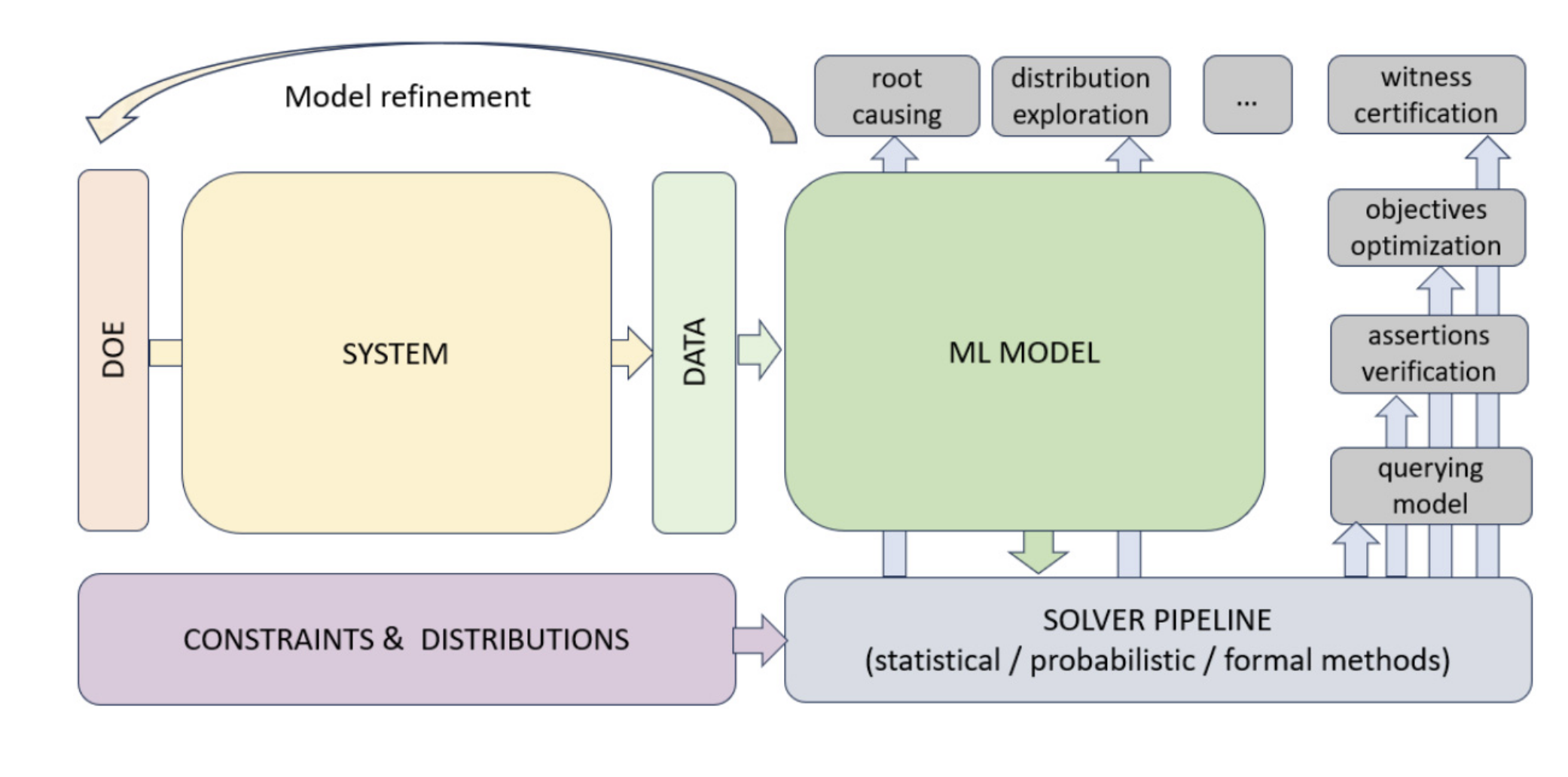
SMLP is a general purpose tool for verification and optimisation of systems modelled using machine learning.
SMLP uses symbolic reasoning for ML model exploration and optimisation under verification and stability constraints.
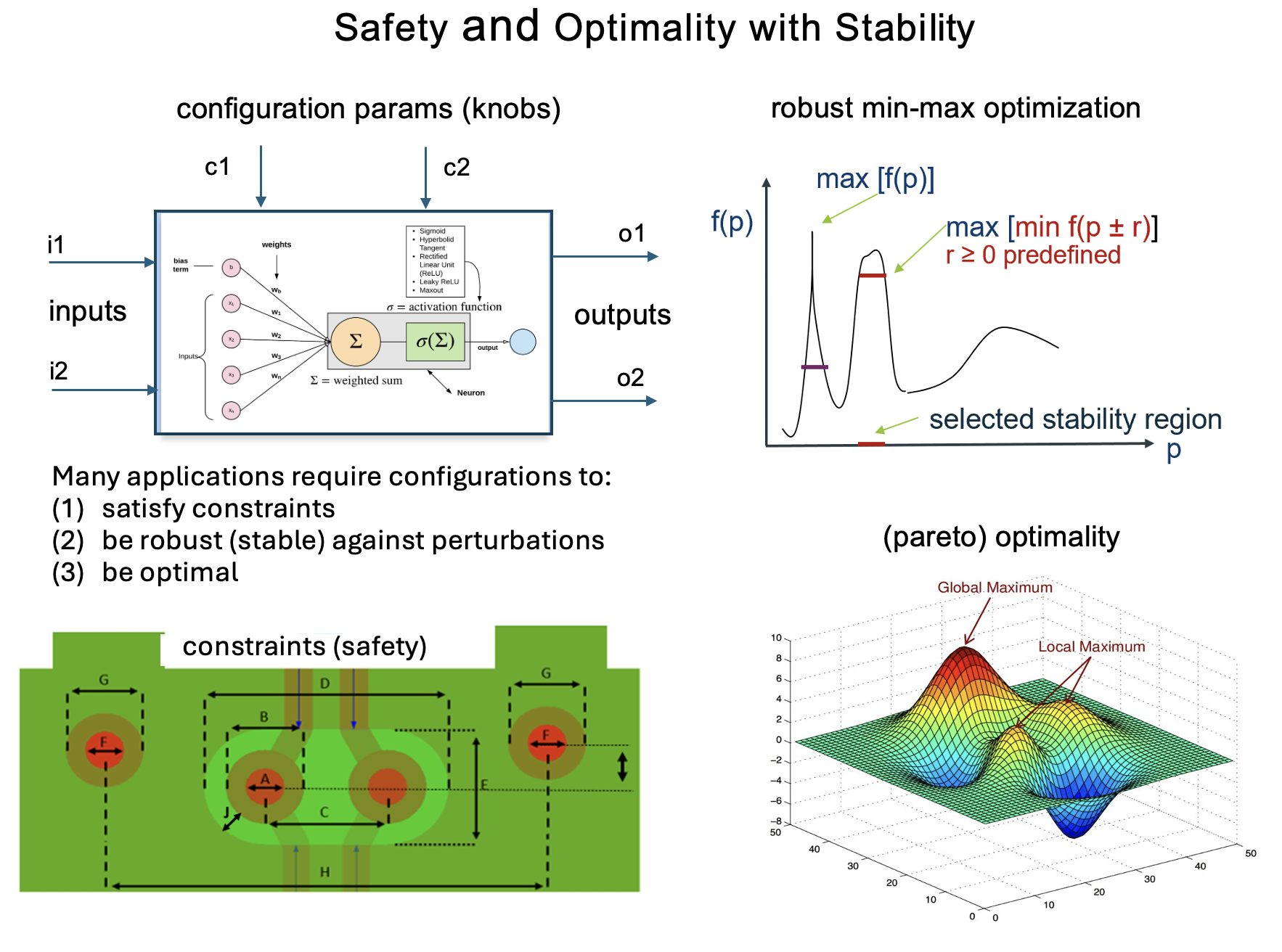
Industry adoption: SMLP is used at Intel for optimization of package/board layouts and signal integrity
SMLP applications in Intel and why stability is important
SMLP has been successfully used at Intel to optimize package and board layouts under noisy, real‑world signal‑integrity data collected in the lab. Because this data is inherently noisy—and because ML models are often intentionally approximate to avoid overfitting—robustness is essential when searching for reliable optimal solutions. SMLP addresses this through its notion of stability, ensuring that selected optima remain valid under data and model uncertainty. In most cases the stability radius (*) is actually as large as 10% of the value of the variable in the configuration. This is because the sampling error from analog equipment can be dependent on the intended value itself.
(*) The smallest perturbation (measured by a norm, e.g., Chebyshev) that makes an optimal solution either non-optimal or infeasible.
Combination of robustness and formal assurance of results validity is a distinctive strength of SMLP, not found in other optimization or model‑analysis tools.
SMLP exploration modes:
- optimization
- verification
- synthesis
- query
- root cause analysis
Systems analysed by SMLP can be represented as:
- black-box functions: via sampling input -- output behaviour only tabular data is needed
- explicit expressions involving polynomials
- machine learning models:
- neural networks
- decision trees
- random forests
- polynomial models
SMLP supports:
- symbolic constrains
- stability constraints
- parameter optimization
Papers:
- SMLP: Symbolic Machine Learning Prover, (CAV'24) [pdf] [bib]
- Combining Constraint Solving and Bayesian Techniques for System Optimization, (IJCAI'22) [pdf] [bib]
- Selecting Stable Safe Configurations for Systems Modelled by Neural Networks with ReLU Activation, (FMCAD'20), [pdf] [bib]
Installation
pip installation (recommended)
MacOS
- install Python 3.11; for example via Python version management [pyenv]
pyenv install 3.11
pyenv local 3.11
- install smlptech package:
pip install smlptech
Ubuntu 24.04
SMLP Installation Guide for Ubuntu 24.04
This guide describes how to install smlptech on Ubuntu 24.04.
Prerequisites
- Ubuntu 24.04
sudoaccess- Internet access (for apt, pip, and wget)
Step 1 — Install system dependencies
sudo apt-get update
sudo apt-get install -y \
    jq \
    libgomp1 \
    tcsh \
    wget \
| Dependency | Used by | Mandatory |
|---|---|---|
| jq | Quickstart and Tutorial | No |
| libgomp1 | SMLP | Yes |
| tcsh | Tutorial | No |
| wget | Mathsat installation | No |
Step 2 — Install Python 3.11 with Tk support
sudo add-apt-repository -y ppa:deadsnakes/ppa
sudo apt-get update
sudo apt-get install -y python3.11 python3.11-venv python3.11-tk
Step 3 — Install smlptech in virtual environment
Installs smlptech into an isolated virtual environment under ~/.venv.
No sudo required for the installation itself.
python3.11 -m venv ~/.venv
export PATH=~/.venv/bin:$PATH
source ~/.venv/bin/activate
pip3.11 install smlptech
To make the virtual environment available in every new shell session, add the following line to ~/.bashrc:
export PATH=~/.venv/bin:$PATH
Step 4 — (Recommended) Validate the installation
Run the following checks to confirm the installation is working:
# Confirm smlp is importable and print its version
python3.11 -c "import smlp; from importlib.metadata import version; print('smlp version:', version('smlptech'))"

# Confirm Tk is available (required for GUI components and PNG files generation in non-GUI environment)
python3.11 -c "import tkinter; print('tkinter Tcl/Tk:', tkinter.TclVersion)"
Both commands should complete without errors.
Step 5 — (Optional) Install MathSAT
MathSAT is a Satisfiability Modulo Theories (SMT) solver developed as a joint project between Fondazione Bruno Kessler (FBK) and the University of Trento (DISI) in Italy. It is optionally used by SMLP.
⚠️ Licensing limitations
Please, read MathSat5 license terms before using MathSat
- MathSAT5 is available for research and evaluation purposes only. It can not be used in a commercial environment, particularly as part of a commercial product, without written permission. MathSAT5 is provided as is, without any warranty.
To install MathSat and validate installation:
wget https://raw.githubusercontent.com/SMLP-Systems/smlp/refs/heads/master/scripts/docker/run_mathsat_build
chmod +x run_mathsat_build
./run_mathsat_build && rm -rf /tmp/mathsat* && external/mathsat-5.6.8-linux-x86_64-reentrant/bin/mathsat -version
Summary
| Step | Description | Required |
|---|---|---|
| 1 | System dependencies | Yes |
| 2 | Python 3.11 + Tk via deadsnakes PPA | Yes |
| 3 | Install smlptech | Yes |
| 4 | Validate installation | No |
| 5 | MathSAT SMT solver | Optional |
Docker
MacOS
docker run -it mdmitry1/python311-dev-mac:latest
Within docker container prepend SMLP Python script with xvfb-run.
For example:
xvfb-run smlp -h
Linux
docker run -it mdmitry1/python311-dev:latest
Within docker container prepend SMLP Python script with xvfb-run.
For example:
xvfb-run smlp -h
Linux with GUI support using VNC
Starting VNC server within container:
./start_vnc
scripts/bin/enter_container
Starting VNC server within container:
./start_vnc
Recommended VNC clients:
- Ubuntu:
remmina - Windows: RealVNC®
RealVNC® installation instructions for Windows
Step 1:
Download RealVNC®
Step 2:
Install RealVNC
Step 3: Forward Port 5900 from Windows to WSL2
Step 3.1 - in WSL2 window
Get your WSL2 IP address from running below command:
hostname -I
Step 3.2
Open Command Prompt and choose Run as administrator option
Step 3.3 - in Windows Command Prompt Window
Use the first IP in the output (e.g., 172.31.26.155). All the rest should be ignored
Run the following in powershell, replacing <WSL2_IP> with your IP:
netsh interface portproxy add v4tov4 listenport=5900 listenaddress=0.0.0.0 connectport=5900 connectaddress=<WSL2_IP>
Allow the port through Windows Firewall:
New-NetFirewallRule -DisplayName "WSL2 VNC" -Direction Inbound -Protocol TCP -LocalPort 5900 -Action Allow
Verify the proxy is set:
netsh interface portproxy show all
Step 4: Connect with VNC
Connection should be performed after running ./start_vnc command within Docker container
- Launch VNC Signing in VNC is optional
- In VNC connect to:
locahost:5900
- Ignore non-secure connection warning
Updating the Port Proxy After WSL2 Restart
WSL2's IP address may change after restart. In this case, Step 3 should be repeated after the reboot
Linux with GUI support using X11
- Entering Docker container with X11 support on native Linux
scripts/bin/enter_container_x11_forwarding
Dependencies: socat
- Entering Docker container with X11 support on wslg
scripts/bin/enter_container_wslg
Dependencies: WSL2 with WSLG enabled
- Installation test:
tests/install/test_container_install mdmitry1/python311-dev
Quickstart
Problem: find minimal distance between point (2,1) and unit circle
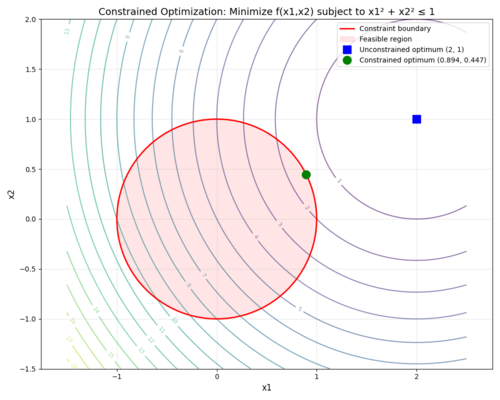
Analytical solution for this problem is:
f(x*) = 6 - 2√5 ≈ 1.527864, where x* = (2/√5,1/√5) ≈ (0.894427, 0.447214)
Let's solve this problem using SMLP.
Download and unzip quickstart.zip (or if you cloned smlp cd to quickstart)
Let's treat this problem as black-box function optimization.
Step 1: Generate samples of the distance function from the point (2,1) (for simplicity we use square of the distance as this does not change the optimum point):
Run:
./constraint_dora_dataset.py
This should generate Constraint_dora.csv.gz, inside Constraint_dora.csv we have:
X1,X2,Y1
-1.5,-1.5,18.5
-1.495995995995996,-1.5,18.471988004020037
-1.491991991991992,-1.5,18.4440080721362
-1.487987987987988,-1.5,18.41606020434849
......
Step 2: Create specification file (or use provided `constraint_dora.json`) where we specify types and ranges of variables and that the solution should be constrained to the unit circle:
{
  "version": "1.2",
  "variables": [
    {"label":"X1", "interface":"knob", "type":"real", "range":[-1.5,2.5], "rad-abs": 0.0},
    {"label":"X2", "interface":"knob", "type":"real", "range":[-1.5,2.0], "rad-abs": 0.0},
    {"label":"Y1", "interface":"output", "type":"real"}
  ],
  "beta": "X1*X1+X2*X2<=1",
  "objectives": {
    "objective1": "-Y1"
  }
}
Legend:
   X1 - first controllable variable
   X2 - second controlllable variable
   Y1 - output function
   rad-abs - sensitivity radius.
             Zero radius means that solution sensitivity check is skipped
   beta - constraint depending on controllable variables
   objective1 - optimization goal
Note SMLP by default maximizes the objective function so we use -Y1 as the objective function.
Step 3: Run SMLP on data file and specification file:
smlp -data ./Constraint_dora.csv.gz -spec ./constraint_dora.json -pref Constraint_dora -out_dir results -mode optimize -model poly_sklearn -epsilon 0.0000005
SMLP command line arguments:
 -data ./Constraint_dora.csv.gz        # input CSV dataset
 -spec ./constraint_dora.json.json     # JSON spec file
 -pref Constraint_dora                 # output file prefix
 -out_dir results                      # output directory
 -mode optimize                        # operation mode
 -model poly_sklearn                   # model type
 -epsilon 0.0000005                    # convergence threshold
3 graphs will pop-up which show quality of the generated model on train/test/train+test datasets, (these need to be closed to proceed).
The generated results can be found in results/ folder.
results/Constraint_dora_Constraint_dora_optimization_results.csv contains the generated solution:
X1 = 0.89453125
X2 = 0.4470043182373047
Y1 = 1.5278653812777188
Solution found by SMLP corresponds to the analytical solution (constraint_dora_poly_optimization_results_expected.txt) with the specified precision:
X1 = 0.89453125
X2 = 0.4470043182373047
Y1 = 1.5278653812779421
Steps 1 - 3 are wrapped in a script: ./quickstart.sh
Step 4: As an example, let's modify the problem in order to get solution in rational numbers.
Let's change circle radius to 2/√5, so squared radius will be 4/5.
In order to do this, edit specification file `constraint_dora.json` and change the right side of the inequality in the constraint to be 4/5:
`"beta": "X1*X1+X2*X2<=4/5,"`
Run the script from current directory
./quickstart.sh
Expected SMLP results are within 0.03% accuracy for f(x*) and x*:
Working directory: <current_directory_realpath>/quickstart/Constraint_dora_results_<timestamp>
X1 = 0.800048828125
X2 = 0.3999021053314209
Y1 = 1.8000002980730385
Analytical solution for this modified problem:
f(x*) = 9/5 = 1.8, where x* = (4/5,2/5) = (0.8, 0.4)
Tutorial
- Black-box optimization Eggholder Function
- Constrained DORA (Distance to Optimal with Radial Adjustment)
- Binh and Korn (BNH) Multi-Objective Problem
- Intel Signal Integrity domain example
Manual
Comments/Feedback/Discussions: [GitHub] or [Zulip Chat]
Coming soon:
NLP, LLM, Agentic
Current development is in PR #21
See Extended Manual for details.
NLP:
- NLP based text classification. Applicable to spam detection, sentiment analysis, and more.
- NLP based root cause analysis: which words or collections of words are most correlative to classification decision (especially, for the positive class).
LLM:
- LLM training from scratch
- LLM finetuning
- RAG (with HuggingFace and with LangChain)
Agentic:
- SMLP Agent
1 maintainer

Download files
Download the file for your platform. If you're not sure which to choose, learn more about installing packages.
Source Distributions
Built Distributions
Filter files by name, interpreter, ABI, and platform.
If you're not sure about the file name format, learn more about wheel file names.
Copy a direct link to the current filters
File details
Details for the file smlptech-1.2.0-cp311-cp311-manylinux_2_24_x86_64.manylinux_2_28_x86_64.whl.
File metadata
- Download URL: smlptech-1.2.0-cp311-cp311-manylinux_2_24_x86_64.manylinux_2_28_x86_64.whl
- Upload date:
- Size: 13.3 MB
- Tags: CPython 3.11, manylinux: glibc 2.24+ x86-64, manylinux: glibc 2.28+ x86-64
- Uploaded using Trusted Publishing? No
- Uploaded via:
twine/6.1.0 CPython/3.13.12
File hashes
| Algorithm | Hash digest | |
|---|---|---|
| SHA256 |
b2d8dc789640e28cf658aa2486491ed2b10a5627204ed55d3da885303fb1c2bd
|
|
| MD5 |
8e4c5f78633863f937c266cb202a38f5
|
|
| BLAKE2b-256 |
b442aa6435818dfff151d552dff071449e579ab6425047822dc5c1bfecf4fb22
|
File details
Details for the file smlptech-1.2.0-cp311-cp311-macosx_26_0_arm64.whl.
File metadata
- Download URL: smlptech-1.2.0-cp311-cp311-macosx_26_0_arm64.whl
- Upload date:
- Size: 10.5 MB
- Tags: CPython 3.11, macOS 26.0+ ARM64
- Uploaded using Trusted Publishing? No
- Uploaded via:
twine/6.2.0 CPython/3.11.12
File hashes
| Algorithm | Hash digest | |
|---|---|---|
| SHA256 |
7394ce30338135ed5da0134704d5ac772421ffc91b88bd7492edc6ff8df8caed
|
|
| MD5 |
e67db1b03291dbf68e0c3db137f236b0
|
|
| BLAKE2b-256 |
73154b1853d30b439f15384b0c74f195af66afdadd99a40b28dbe637cb17808c
|














