
SMLP - The Symbolic Machine Learning Prover

Project description
SMLP -- Symbolic Machine Learning Prover
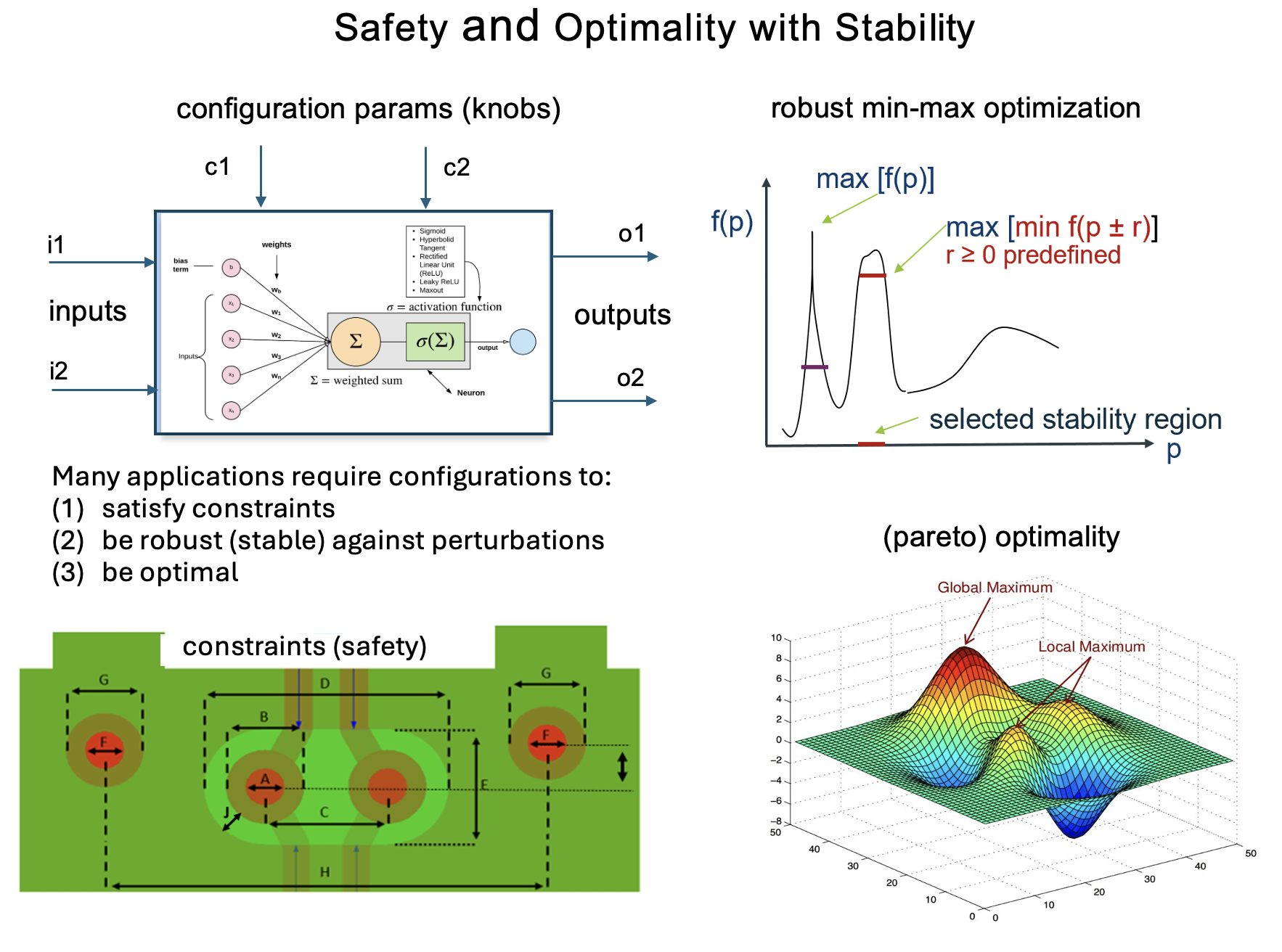
Success story: used at Intel for optimization of package/board layouts and signal integrity
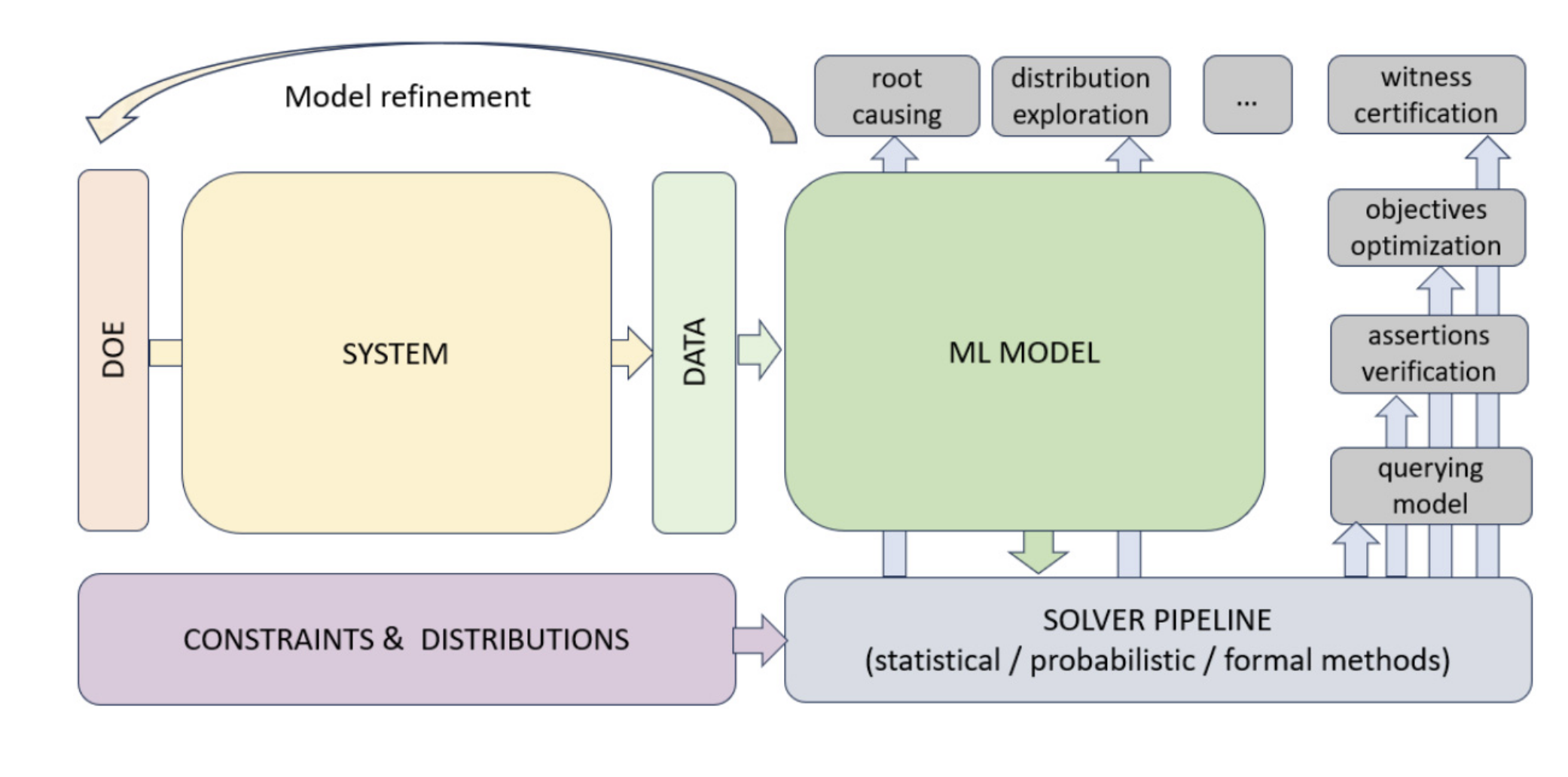
SMLP is a general purpose tool for verification and optimisation of systems modelled using machine learning.
SMLP uses symbolic reasoning for ML model exploration and optimisation under verification and stability constraints.
SMLP modes:
- optmization
- verification
- synthesis
- exploration
- root cause analysis
Systems analysed by SMLP can be represented as:
- black-box functions: via sampling input -- output behaviour only tabular data is needed
- explicit expressions involving polynomials
- machine learning models:
- neural networks
- decision trees
- random forests
- polynomial models
SMLP supports:
- symbolic constrains
- stability constraints
- parameter optimization
Papers:
- SMLP: Symbolic Machine Learning Prover, (CAV'24) [pdf] [bib]
- Combining Constraint Solving and Bayesian Techniques for System Optimization, (IJCAI'22) [pdf] [bib]
- Selecting Stable Safe Configurations for Systems Modelled by Neural Networks with ReLU Activation, (FMCAD'20), [pdf] [bib]
Installation
pip installation (recommended)
MacOS
- install Python 3.11; for example via Python version management [pyenv]
pyenv install 3.11
pyenv local 3.11
- install smlptech package:
pip install smlptech
Ubuntu 24.04
-
cd scripts/venv/
Docker
MacOS
docker run -it mdmitry1/python311-dev-mac:latest
Within docker container prepend SMLP Python script with xvfb-run.
For example:
xvfb-run smlp -h
Linux
docker run -it mdmitry1/python311-dev:latest
Within docker container prepend SMLP Python script with xvfb-run.
For example:
xvfb-run smlp -h
Linux with GUI support using VNC
Starting VNC server within container:
./start_vnc
scripts/bin/enter_container
Starting VNC server within container:
./start_vnc
Recommended VNC client:
-
Ubuntu:
remmina -
Windows: RealVNC®
Details - see RealVNC® installation instructions
Linux with GUI support using X11
- Entering Docker container with X11 support on native Linux
scripts/bin/enter_container_x11_forwarding
Dependencies: socat
- Entering Docker container with X11 support on wslg
scripts/bin/enter_container_wslg
Dependencies: WSL2 with WSLG enabled
- Installation test:
tests/install/test_container_install mdmitry1/python311-dev
Sources
Installation on a stock Ubuntu-22.04
	sudo apt install \
		python3-pip ninja-build z3 libz3-dev libboost-python-dev texlive \
		pkg-config libgmp-dev libpython3-all-dev python-is-python3
	# get a recent version of the meson configure tool
	pip install --user meson

	# obtain sources
	git clone https://github.com/fbrausse/kay.git
	git clone https://github.com/smlp-systems/smlp.git
	cd smlp/utils/poly

	# workaround <https://bugs.launchpad.net/ubuntu/+source/swig/+bug/1746755>
	echo 'export PYTHONPATH=$HOME/.local/lib/python3/dist-packages:$PYTHONPATH' >> ~/.profile
	# get $HOME/.local/bin into PATH and get PYTHONPATH
	mkdir -p $HOME/.local/bin
	source ~/.profile

	# setup, build & install libsmlp
	meson setup -Dkay-prefix=$HOME/kay --prefix $HOME/.local build
	ninja -C build install

	# tensorflow-2.16 has a change leading to the error:
	# 'The filepath provided must end in .keras (Keras model format).'
	pip install --user \
		pandas tensorflow==2.15.1 scikit-learn pycaret seaborn \
		mrmr-selection jenkspy pysubgroup pyDOE doepy
MacOS
Installation instructions for Ubuntu-22.04 can be followed using `homebrew` in place of `apt`Tutorial
- Black-box optimization Eggholder Function
- Constrained DORA (Distance to Optimal with Radial Adjustment)
- Binh and Korn (BNH) Multi-Objective Problem
- Intel Signal Integrity domain example
Manual
Comments/Feedback/Discussions: [GitHub] or [Zulip Chat]
Coming soon:
NLP, LLM, Agentic
NLP:
- NLP based text classification. Applicable to spam detection, sentiment analysis, and more.
- NLP based root cause analysis: which words or collections of words are most correlative to classification decision (especially, for the positive class).
LLM:
- LLM training from scratch
- LLM finetuning
- RAG (with HuggingFace and with LangChain)
Agentic:
- SMLP Agent
Release history Release notifications | RSS feed

Download files
Download the file for your platform. If you're not sure which to choose, learn more about installing packages.
Source Distributions
Built Distributions
Filter files by name, interpreter, ABI, and platform.
If you're not sure about the file name format, learn more about wheel file names.
Copy a direct link to the current filters
File details
Details for the file smlptech-1.1.1-cp311-cp311-manylinux_2_26_x86_64.manylinux_2_28_x86_64.whl.
File metadata
- Download URL: smlptech-1.1.1-cp311-cp311-manylinux_2_26_x86_64.manylinux_2_28_x86_64.whl
- Upload date:
- Size: 15.2 MB
- Tags: CPython 3.11, manylinux: glibc 2.26+ x86-64, manylinux: glibc 2.28+ x86-64
- Uploaded using Trusted Publishing? No
- Uploaded via: twine/6.1.0 CPython/3.13.11
File hashes
| Algorithm | Hash digest | |
|---|---|---|
| SHA256 |
ce1ee2e45d8d1091871f03b1dcbc2d60916e64f550bfd7570cf080c8c0430a41
|
|
| MD5 |
384ff884274dd5ef3674d20cebb4ff84
|
|
| BLAKE2b-256 |
242bc49d123628a6714ee6c9aab3ccda57a1b07867e7d137761597c96bef44c6
|
File details
Details for the file smlptech-1.1.1-cp311-cp311-macosx_26_0_arm64.whl.
File metadata
- Download URL: smlptech-1.1.1-cp311-cp311-macosx_26_0_arm64.whl
- Upload date:
- Size: 10.4 MB
- Tags: CPython 3.11, macOS 26.0+ ARM64
- Uploaded using Trusted Publishing? No
- Uploaded via: twine/6.2.0 CPython/3.11.12
File hashes
| Algorithm | Hash digest | |
|---|---|---|
| SHA256 |
ae3ee304677677da84db0a797bebcc7f1a0f80b02c6facf94582c4a785876272
|
|
| MD5 |
04e5035a3350a1112c8c95df775f9345
|
|
| BLAKE2b-256 |
8cfe22590db89b3795179052603a3b241fd63c40cda463e34fe5d70b37882e10
|






