
Small, dependable HTML cleaner/minifier with sensible defaults

Project description

smol-html
Small, dependable HTML cleaner/minifier with sensible defaults.
Credits
This package is built on top of excellent open-source projects:
- minify-html (MIT License) – High-performance HTML minifier.
- lxml (BSD-like License) – Fast and feature-rich XML/HTML parsing and cleaning.
- BeautifulSoup4 (MIT License) – Python library for parsing and navigating HTML/XML.
- Brotli (MIT License) – Compression algorithm developed by Google.
We are grateful to the maintainers and contributors of these projects — smol-html wouldn’t be possible without their work.
Motivation
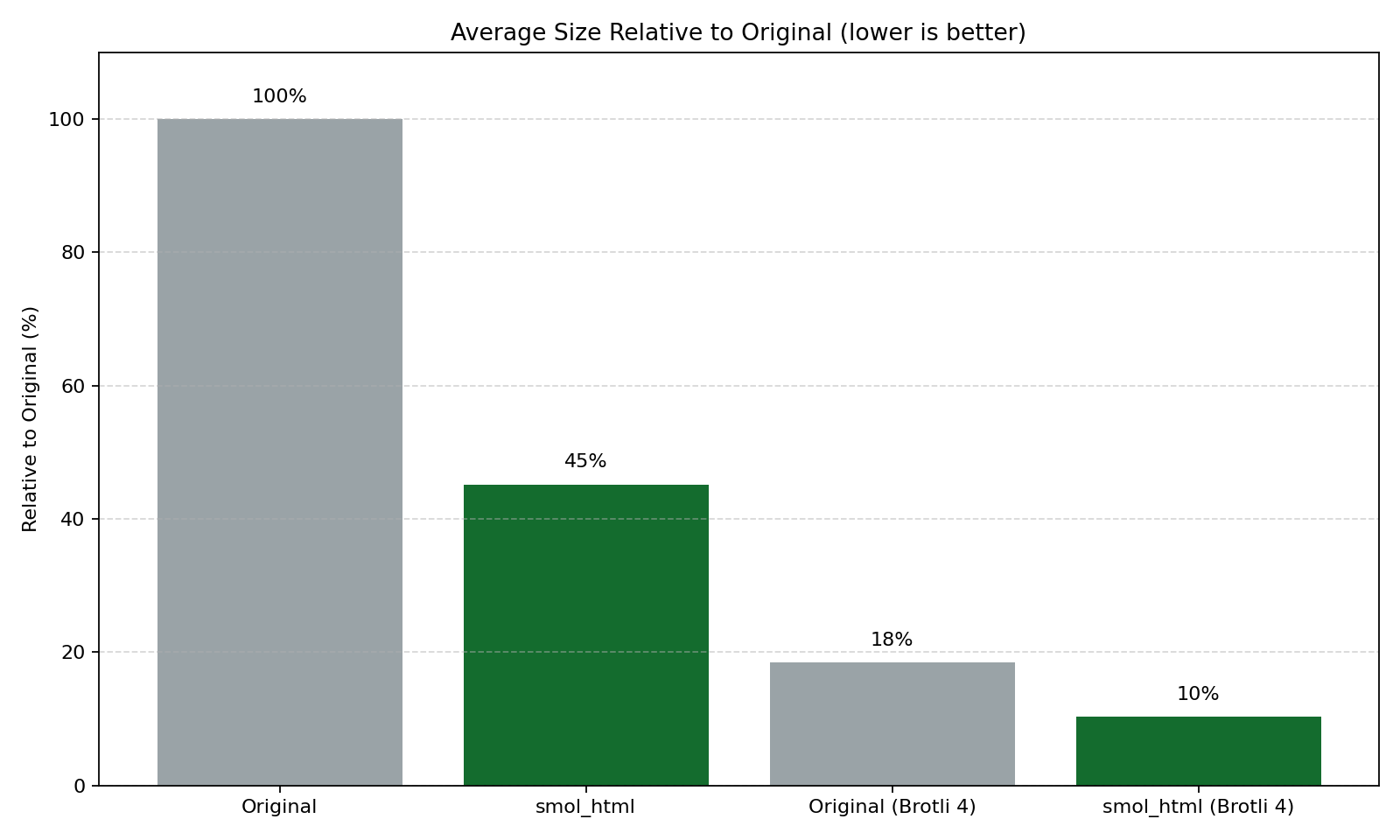
Nosible is a search engine, which means we need to store and process a very large number of webpages. To make this tractable, we strip out visual chrome and other non-essential components that don’t matter for downstream tasks (indexing, ranking, retrieval, and LLM pipelines) while preserving the important content and structure. This package cleans and minifies HTML, greatly reducing size on disk; combined with Brotli compression (by Google), the savings are even larger.
📦 Installation
pip install smol-html
⚡ Installing with uv
uv pip install smol-html
Requirements
- Python: 3.9
- Dependencies:
- beautifulsoup4>=4.0.1
- brotli>=0.5.2
- lxml[html-clean]>=1.3.2
- minify-html>=0.2.6
Quick Start
Clean an HTML string (or page contents):
from smol_html import SmolHtmlCleaner

html = """
<html>
  <head><title> Example </title></head>
  <body>
    <div>  Hello <span> world </span> </div>
  </body>
</html>
"""

# All constructor arguments are keyword-only and optional.
cleaner = SmolHtmlCleaner()
cleaned = cleaner.make_smol(raw_html=html)

print(cleaned)
Customization
SmolHtmlCleaner exposes keyword-only parameters with practical defaults. You can:
- Pass overrides to the constructor, or
- Adjust attributes on the instance after creation.
from smol_html import SmolHtmlCleaner

cleaner = SmolHtmlCleaner()
cleaner.attr_stop_words.add("advert")  # e.g., add a custom stop word
Usage Examples
Minimal:
from smol_html import SmolHtmlCleaner

cleaner = SmolHtmlCleaner()
out = cleaner.make_smol(raw_html="<p>Hi <!-- note --> <a href='x'>link</a></p>")
Customize a few options:
from smol_html import SmolHtmlCleaner

cleaner = SmolHtmlCleaner(
    attr_stop_words={"nav", "advert"},
    remove_header_lists=False,
    minify=True,
)

out = cleaner.make_smol(raw_html="<p>Hi</p>")
Compressed Bytes Output
Produce compressed bytes using Brotli with make_smol_bytes.
- By default, the compressed bytes are URL-safe Base64 encoded (
base64_encode=True). - If you enable Base64, you must decode before Brotli-decompressing.
- You can disable Base64 by passing
base64_encode=Falseand decompress directly.
Default (Base64-encoded) output:
from smol_html import SmolHtmlCleaner
import base64
import brotli  # only needed if you want to decompress here in the example

html = """
<html>
  <body>
    <div>  Hello <span> world </span> </div>
  </body>
</html>
"""

cleaner = SmolHtmlCleaner()

# Get compressed bytes (quality 11 is strong compression)
compressed = cleaner.make_smol_bytes(raw_html=html, compression_level=11)

# Because Base64 is enabled by default, decode before decompressing
decoded = base64.urlsafe_b64decode(compressed)
decompressed = brotli.decompress(decoded).decode("utf-8")
print(decompressed)

# Or write Base64-encoded compressed output directly to a file
with open("page.html.br.b64", "wb") as f:
    f.write(compressed)
Disable Base64 and decompress directly:
from smol_html import SmolHtmlCleaner
import brotli

cleaner = SmolHtmlCleaner()
compressed_raw = cleaner.make_smol_bytes(
    raw_html="<p>Hi</p>",
    compression_level=11,
    base64_encode=False,
)
print(brotli.decompress(compressed_raw).decode("utf-8"))
Parameter Reference
To improve readability, the reference is split into two tables:
- What it does and when to change
- Types and default values
What It Does
| Parameter | What it does | When to change |
|---|---|---|
non_text_to_keep |
Whitelist of empty/non-text tags to preserve (e.g., images, figures, tables, line breaks). | If important non-text elements are being removed or you want to keep/drop more empty tags. |
attr_stop_words |
Tokens matched against id/class/role/item_type on small elements; matches are removed as likely non-content. |
Add tokens like advert, hero, menu to aggressively drop UI chrome, or remove tokens if content is lost. |
remove_header_lists |
Removes links/lists/images within <header> to reduce nav clutter. |
Set False if your header contains meaningful content you want to keep. |
remove_footer_lists |
Removes links/lists/images within <footer> to reduce boilerplate. |
Set False for content-heavy footers you need. |
minify |
Minifies output HTML using minify_html. |
Set False for readability or debugging; use --pretty in the CLI. |
minify_kwargs |
Extra options passed to minify_html.minify. |
Tune minification behavior (e.g., whitespace, comments) without changing cleaning. |
meta |
lxml Cleaner option: remove <meta> content when True. |
Usually leave False; enable only for strict sanitation. |
page_structure |
lxml Cleaner option: remove page-structure tags (e.g., <head>, <body>) when True. |
Rarely needed; keep False to preserve structure. |
links |
lxml Cleaner option: sanitize/clean links. | Leave True unless you need raw anchors untouched. |
scripts |
lxml Cleaner option: remove <script> tags when True. |
Keep False to preserve scripts; usually safe to remove via javascript=True anyway. |
javascript |
lxml Cleaner option: remove JS and event handlers. | Set False only if you truly need inline JS (not recommended). |
comments |
lxml Cleaner option: remove HTML comments. | Set False to retain comments for debugging. |
style |
lxml Cleaner option: remove CSS and style attributes. | Set False to keep inline styles/CSS. |
processing_instructions |
lxml Cleaner option: remove processing instructions. | Rarely change; keep for safety. |
embedded |
lxml Cleaner option: remove embedded content (e.g., <embed>, <object>). |
Set False to keep embedded media. |
frames |
lxml Cleaner option: remove frames/iframes. | Set False if iframes contain needed content. |
forms |
lxml Cleaner option: remove form elements. | Set False if you need to keep forms/inputs. |
annoying_tags |
lxml Cleaner option: remove tags considered "annoying" by lxml (e.g., <blink>, <marquee>). |
Rarely change. |
kill_tags |
Additional explicit tags to remove entirely. | Add site-specific or custom tags to drop. |
remove_unknown_tags |
lxml Cleaner option: drop unknown/invalid tags. | Set False if you rely on custom elements. |
safe_attrs_only |
Only allow attributes listed in safe_attrs. |
Set False if you need to keep arbitrary attributes. |
safe_attrs |
Allowed HTML attributes when safe_attrs_only=True. |
Extend to keep additional attributes you trust. |
Types and Defaults
| Parameter | Type | Default |
|---|---|---|
non_text_to_keep |
set[str] |
media/meta/table/br tags |
attr_stop_words |
set[str] |
common UI/navigation tokens |
remove_header_lists |
bool |
True |
remove_footer_lists |
bool |
True |
minify |
bool |
True |
minify_kwargs |
dict |
{} |
meta |
bool |
False |
page_structure |
bool |
False |
links |
bool |
True |
scripts |
bool |
False |
javascript |
bool |
True |
comments |
bool |
True |
style |
bool |
True |
processing_instructions |
bool |
True |
embedded |
bool |
True |
frames |
bool |
True |
forms |
bool |
True |
annoying_tags |
bool |
True |
kill_tags |
set[str] | None |
None |
remove_unknown_tags |
bool |
True |
safe_attrs_only |
bool |
True |
safe_attrs |
set[str] |
curated set |
make_smol_bytes Options
| Parameter | Type | Default |
|---|---|---|
compression_level |
int |
4 |
base64_encode |
bool |
True |


Download files
Download the file for your platform. If you're not sure which to choose, learn more about installing packages.
Source Distribution
Built Distribution
Filter files by name, interpreter, ABI, and platform.
If you're not sure about the file name format, learn more about wheel file names.
Copy a direct link to the current filters
File details
Details for the file smol_html-0.1.7.tar.gz.
File metadata
- Download URL: smol_html-0.1.7.tar.gz
- Upload date:
- Size: 2.2 MB
- Tags: Source
- Uploaded using Trusted Publishing? No
- Uploaded via: twine/6.2.0 CPython/3.12.11
File hashes
| Algorithm | Hash digest | |
|---|---|---|
| SHA256 |
ff57820672e134208371e3c0d006a5a829194823cdd2aa9b8e79b8448836b8ca
|
|
| MD5 |
6a854d5b55e7ba4589d6d053456a1756
|
|
| BLAKE2b-256 |
68c74f3d54d4fda589e0a10468fd6c4593de93b57ec6421caf6158ef8f6f7592
|
File details
Details for the file smol_html-0.1.7-py3-none-any.whl.
File metadata
- Download URL: smol_html-0.1.7-py3-none-any.whl
- Upload date:
- Size: 5.2 kB
- Tags: Python 3
- Uploaded using Trusted Publishing? No
- Uploaded via: twine/6.2.0 CPython/3.12.11
File hashes
| Algorithm | Hash digest | |
|---|---|---|
| SHA256 |
95a16111892713fb2e08bb23bd3aaf22b3fcae3c7bbb7f5b36e0c6806766edd0
|
|
| MD5 |
ac309679ae009642e6387cf16c1ae215
|
|
| BLAKE2b-256 |
e66fcd9a490b0d29e59baa746e0dcf524313083abe33362dcacd669df0a8e58a
|






