
Transform pixelated geometries from raster data into smooth natural looking features
Verified details
These details have been verified by PyPIProject links
GitHub Statistics
Maintainers

Project description






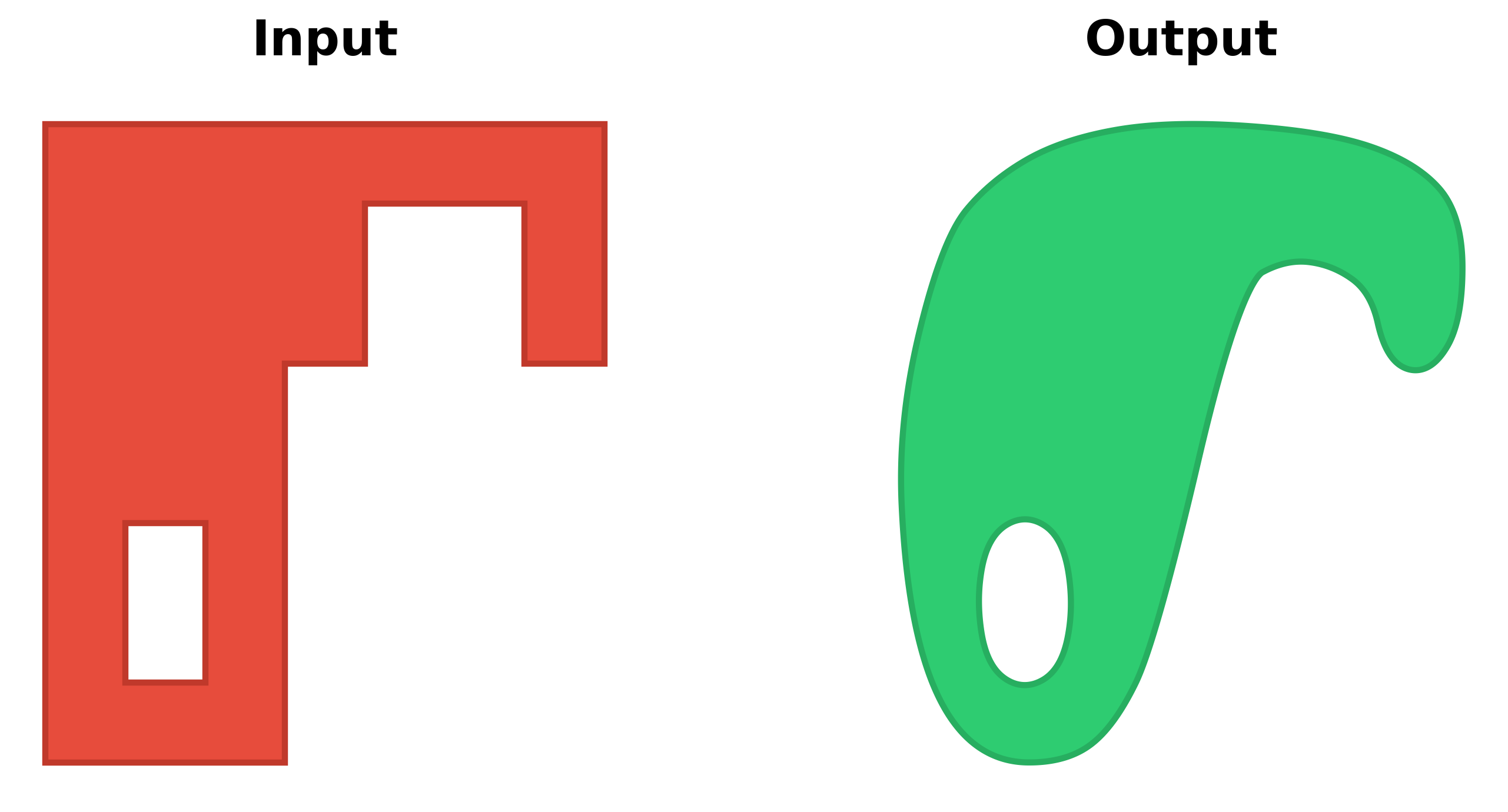
A Python package for smoothing and refining geometries derived from raster data classifications. Smoothify transforms jagged polygons and lines resulting from raster-to-vector conversion into smooth, visually appealing features using an optimized implementation of Chaikin's corner-cutting algorithm.
Problem
Polygons and lines derived from classified raster data (e.g., ML model predictions, spectral indices, or remote sensing classifications) often have unnatural "stair-stepped" or "pixelated" edges that:
- Are visually unappealing in maps and GIS applications
- Can be difficult to work with in downstream vector processing
- Don't represent the real-world features they're meant to depict
Solution
Smoothify applies an optimized implementation of Chaikin's corner-cutting algorithm along with other geometric processing to create smooth, natural-looking features while:
- Preserving the general shape and area of polygons
- Supporting all shapely geometry types
- Handling shapes with interior holes
- Efficiently processing large datasets with multiprocessing
Installation
uv add smoothify
or
pip install smoothify
or
conda install conda-forge::smoothify
Quick Start
import geopandas as gpd
from smoothify import smoothify

# Load your polygonized raster data
polygon_gdf = gpd.read_file("path/to/your/polygons.gpkg")

# Apply smoothing (segment_length auto-detected from geometry)
smoothed_gdf = smoothify(
    geom=polygon_gdf,
    smooth_iterations=3,  # More iterations = smoother result
    num_cores=4  # Use parallel processing for large datasets
)

# Or specify segment_length explicitly (generally recommended)
smoothed_gdf = smoothify(
    geom=polygon_gdf,
    segment_length=10.0,  # Use the original raster resolution
    smooth_iterations=3,
    num_cores=4
)

# Save the result
smoothed_gdf.to_file("smoothed_polygons.gpkg")
Examples
Example notebooks:
Basic Polygon Smoothing
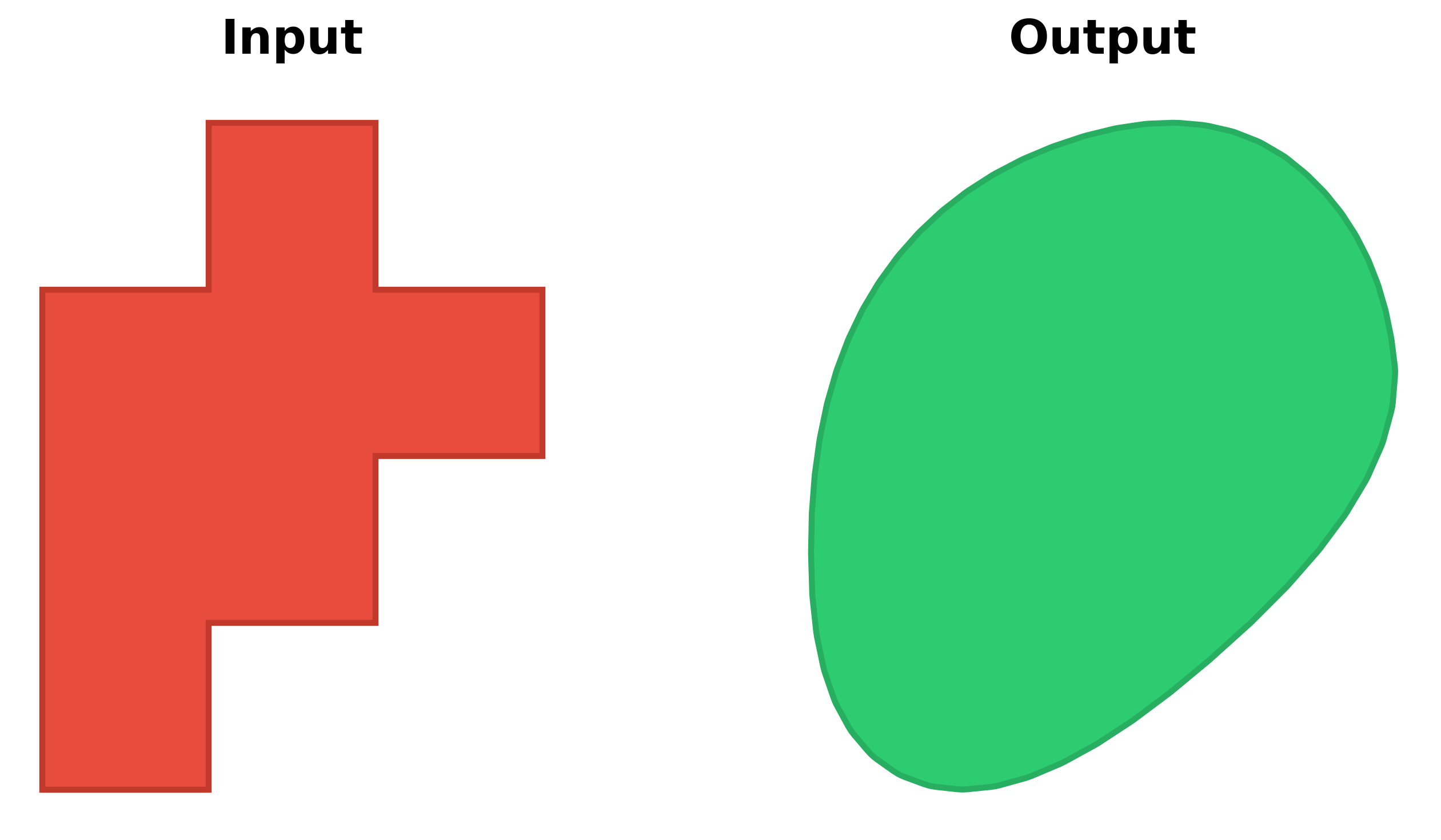
Transform pixelated polygons from raster data into smooth, natural-looking features:
LineString Smoothing
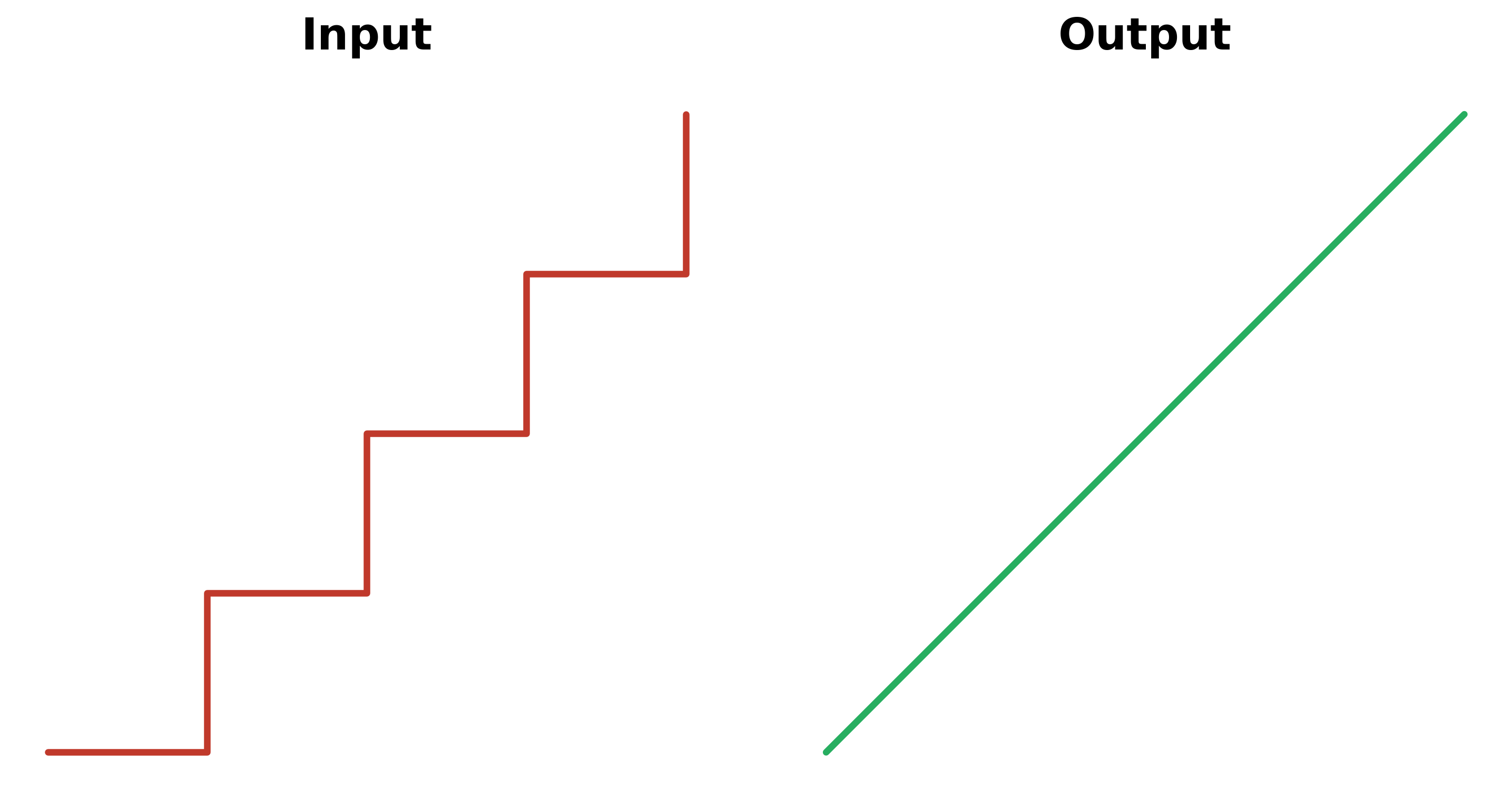
Works perfectly for roads, streams, and other linear features:
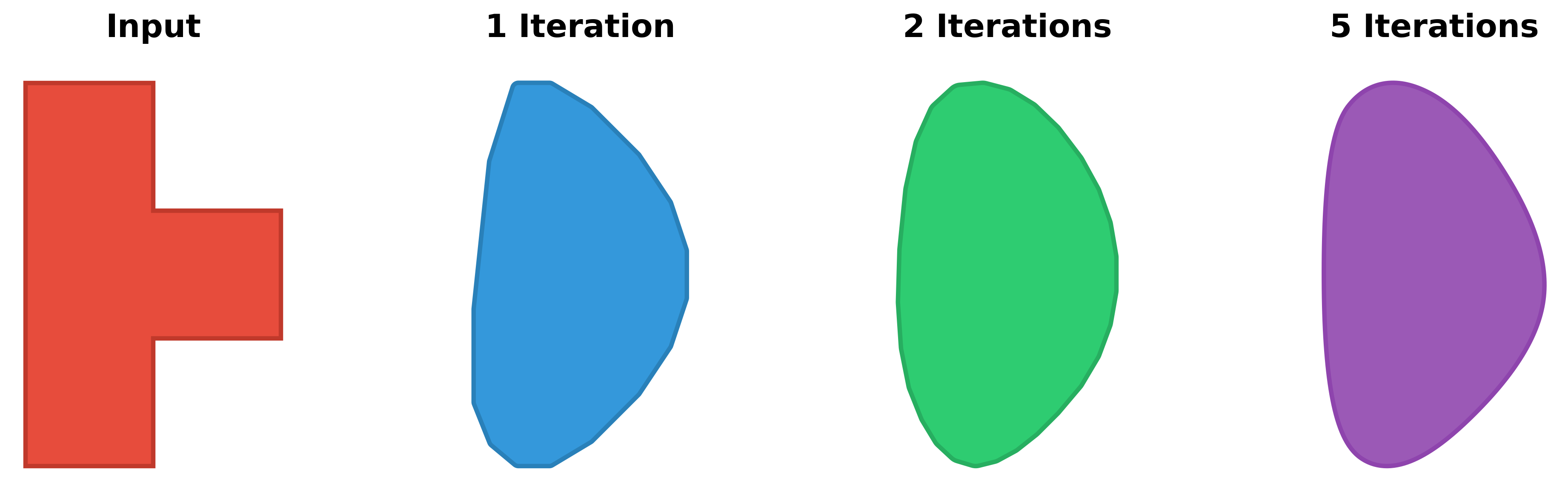
Controlling Smoothness with Iterations
The smooth_iterations parameter controls how smooth the result will be:
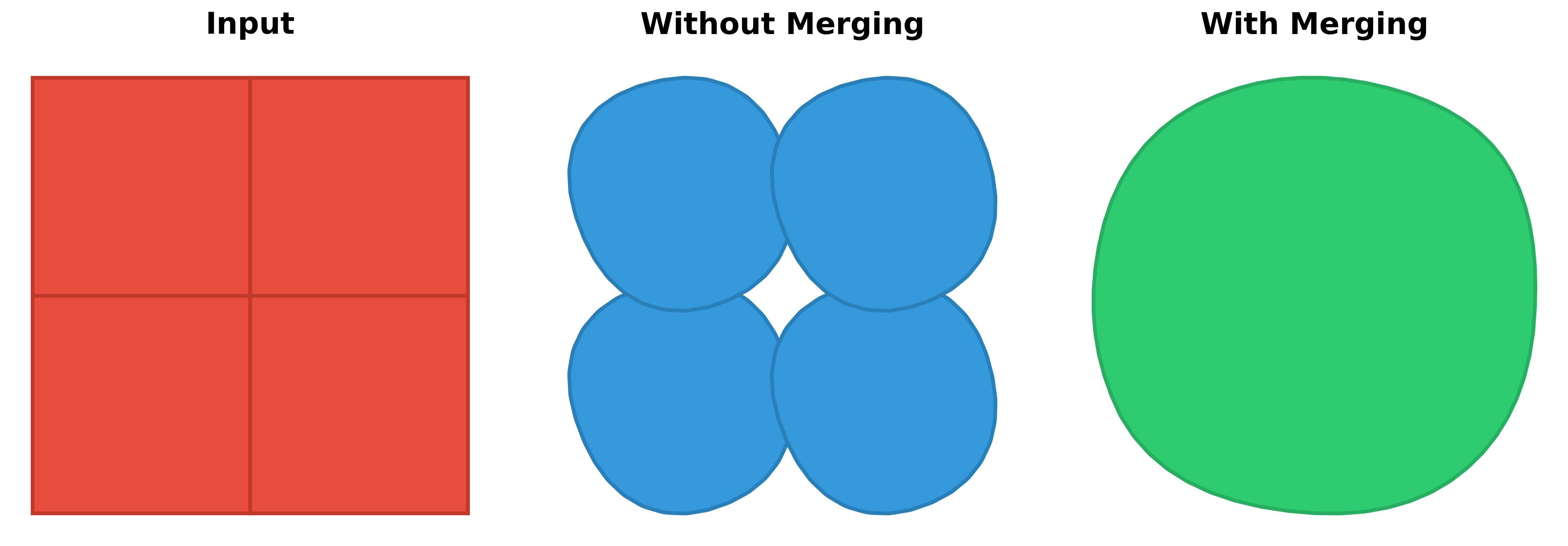
Merging Adjacent Geometries
When processing multiple adjacent polygons, allowing merge_collection = True produces a combined result:
General Usage
The smoothify() function accepts three types of input:
1. GeoDataFrame
import geopandas as gpd
from smoothify import smoothify
# By default this will dissolve adjacent polygons before smoothing
gdf = gpd.read_file("polygons.gpkg")
smoothed_gdf = smoothify(
    geom=gdf,
    segment_length=10.0,
    smooth_iterations=3,
    num_cores=4
)

# Dissolve geometries by a specific field before smoothing
# Useful for merging adjacent polygons with the same classification
gdf_with_classes = gpd.read_file("classified_polygons.gpkg")
smoothed_by_class = smoothify(
    geom=gdf_with_classes,
    segment_length=10.0,
    smooth_iterations=3,
    merge_collection=True,
    merge_field="land_type",  # Merge adjacent geometries with same land_type
    num_cores=4
)
2. Single Geometry
from shapely.geometry import Polygon
from smoothify import smoothify

polygon = Polygon([(0, 0), (10, 0), (10, 10), (0, 10)])
smoothed_polygon = smoothify(
    geom=polygon,
    smooth_iterations=3
)
3. List of Geometries or GeometryCollection
from shapely.geometry import Polygon, LineString
from smoothify import smoothify

geometries = [
    Polygon([(0, 0), (10, 0), (10, 10), (0, 10)]),
    LineString([(0, 0), (5, 5), (10, 0)])
]
smoothed = smoothify(
    geom=geometries,
    segment_length=1.0,
    smooth_iterations=3
)
Parameters
| Parameter | Type | Default | Description |
|---|---|---|---|
geom |
GeoDataFrame, BaseGeometry, or list[BaseGeometry] | Required | The geometry/geometries to smooth |
segment_length |
float | None | Resolution of the original raster data in map units. If None (default), automatically detects by finding the minimum segment length (from a data sample). Recommended to specify explicitly when known |
smooth_iterations |
int | 3 | Number of Chaikin corner-cutting iterations (typically 3-5). Higher values = smoother output with more vertices |
num_cores |
int | 0 | Number of CPU cores for parallel processing (0 = all available cores, 1 = serial) |
merge_collection |
bool | True | Whether to merge/dissolve adjacent geometries in collections before smoothing |
merge_field |
str | None | GeoDataFrame only: Column name to use for dissolving geometries. Only valid when merge_collection=True. If None, dissolves all geometries together. If specified, dissolves geometries grouped by the column values |
merge_multipolygons |
bool | True | Whether to merge adjacent polygons within MultiPolygons before smoothing |
merge_holes |
bool | True | Whether to join holes that touch or nearly touch (e.g. diagonally adjacent raster cells) before smoothing, so they smooth into one coherent opening instead of separate overlapping shapes |
preserve_area |
bool | True | Whether to restore original area after smoothing via buffering (applies to Polygons only) |
area_tolerance |
float | 0.01 | Percentage of original area allowed as error (e.g., 0.01 = 0.01% error = 99.99% preservation). Only affects Polygons when preserve_area=True |
How It Works
Smoothify uses an advanced multi-step smoothing pipeline:
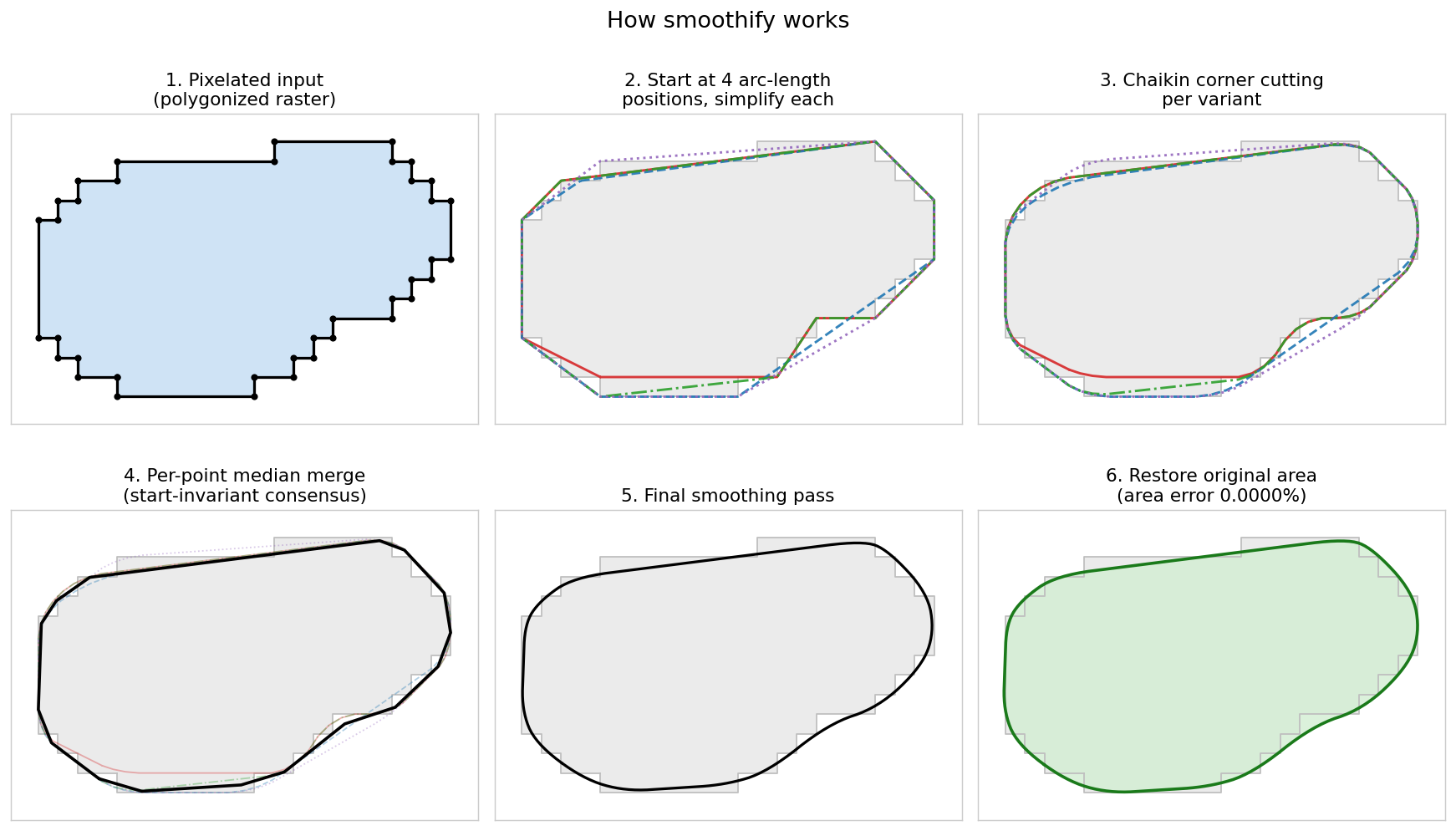
- Joins touching holes (for Polygons, when
merge_holes=True) so they smooth as one opening - Adds intermediate vertices along line segments (segmentize)
- Generates multiple rotated variants (for Polygons) to avoid artifacts
- Simplifies each variant to remove noise
- Applies Chaikin corner cutting to smooth
- Merges all variants via union to eliminate start-point artifacts
- Applies final smoothing pass
- Optionally restores original area via buffering (for Polygons)
- Detects and repairs any sharp folds left by features near the smoothing scale (e.g. one-pixel-wide arms), using a small morphological opening/closing bounded at
segment_length / 4
Invalid Geometries
Smoothify does not repair invalid input. If it encounters an invalid geometry (e.g. a self-intersecting polygon), it returns that geometry unchanged and emits a warning, instead of crashing or silently producing an empty geometry. This is consistent whether you pass a single geometry, a list/collection, or a GeoDataFrame.
If you want invalid geometries smoothed, repair them first with shapely's make_valid():
# GeoDataFrame
gdf.geometry = gdf.geometry.make_valid()
smoothed_gdf = smoothify(gdf, segment_length=10.0)

# Single geometry
from shapely import make_valid
smoothed = smoothify(make_valid(polygon), segment_length=1.0)
Performance Considerations
- Parallel Processing: For large GeoDataFrames or collections, use
num_cores= 0 to enable parallel processing - Duplicate Shapes: Geometries that are translated copies of the same shape (common in raster-derived data, e.g. single-pixel polygons) are automatically smoothed once and the result reused
- Smoothing Iterations: Values of 3-5 typically provide good results. Higher values create smoother output but increase processing time and vertex count
- Memory Usage: Scales with geometry complexity. The algorithm creates multiple variants during smoothing
- Optimal segment_length: Anything from about half the original raster pixel size and up should produce reasonable output — larger values produce more rounded output, smaller values stay more faithful to the original geometry
Running the Tests
Smoothify uses pytest. After cloning the repository, install the development dependencies and run the suite with uv:
# Install dependencies (including the dev group)
uv sync

# Run all tests
uv run pytest tests/

# Run with coverage
uv run pytest tests/ --cov=smoothify --cov-report=html

# Run a single test
uv run pytest tests/test_chaikin.py::TestChaikinCornerCutting::test_simple_square_polygon
If you prefer not to use uv, install the dev dependencies into your environment and run pytest tests/ directly.
Contributing
Contributions are welcome! Please feel free to submit a Pull Request.
- Fork the repository
- Create your feature branch (
git checkout -b feature/amazing-feature) - Commit your changes (
git commit -m 'Add some amazing feature') - Push to the branch (
git push origin feature/amazing-feature) - Open a Pull Request
License
This project is licensed under the MIT License - see the LICENSE file for details.
Project details
Verified details
These details have been verified by PyPIProject links
GitHub Statistics
Maintainers
Release history Release notifications | RSS feed


Download files
Download the file for your platform. If you're not sure which to choose, learn more about installing packages.
Source Distribution
Built Distribution
Filter files by name, interpreter, ABI, and platform.
If you're not sure about the file name format, learn more about wheel file names.
Copy a direct link to the current filters
File details
Details for the file smoothify-0.3.0.tar.gz.
File metadata
- Download URL: smoothify-0.3.0.tar.gz
- Upload date:
- Size: 8.7 MB
- Tags: Source
- Uploaded using Trusted Publishing? Yes
- Uploaded via: twine/6.1.0 CPython/3.13.12
File hashes
| Algorithm | Hash digest | |
|---|---|---|
| SHA256 |
6b0572c5566c3f63138e030bb5402deba93c08ce833f03cbbca3535ddd13c3df
|
|
| MD5 |
813144a9fc83f704cb46010d8184c16d
|
|
| BLAKE2b-256 |
c8d50b960ec13615c5dd358e1f377e1f7819ba58c06ff23bd53aacb7d6cc3bd1
|
Provenance
The following attestation bundles were made for smoothify-0.3.0.tar.gz:
Publisher:
publish.yml on DPIRD-DMA/Smoothify
-
Statement:
-
Statement type:
https://in-toto.io/Statement/v1 -
Predicate type:
https://docs.pypi.org/attestations/publish/v1 -
Subject name:
smoothify-0.3.0.tar.gz -
Subject digest:
6b0572c5566c3f63138e030bb5402deba93c08ce833f03cbbca3535ddd13c3df - Sigstore transparency entry: 1797768039
- Sigstore integration time:
-
Permalink:
DPIRD-DMA/Smoothify@4953b877d40c7d4d75bd7eac39c810ba20795cd4 -
Branch / Tag:
refs/tags/v0.3.0 - Owner: https://github.com/DPIRD-DMA
-
Access:
public
-
Token Issuer:
https://token.actions.githubusercontent.com -
Runner Environment:
github-hosted -
Publication workflow:
publish.yml@4953b877d40c7d4d75bd7eac39c810ba20795cd4 -
Trigger Event:
push
-
Statement type:
File details
Details for the file smoothify-0.3.0-py3-none-any.whl.
File metadata
- Download URL: smoothify-0.3.0-py3-none-any.whl
- Upload date:
- Size: 23.7 kB
- Tags: Python 3
- Uploaded using Trusted Publishing? Yes
- Uploaded via: twine/6.1.0 CPython/3.13.12
File hashes
| Algorithm | Hash digest | |
|---|---|---|
| SHA256 |
2d67c54cc0b5ec8be9e4dedb71b6ad47eef8410b0e4bac6093826b3b2faa8573
|
|
| MD5 |
1fa238f89a39c0282cb400a86f688cae
|
|
| BLAKE2b-256 |
8678694c7ceaa2cc7718a0d1b8c200057015283ef0f7be925b8c203dfaaad563
|
Provenance
The following attestation bundles were made for smoothify-0.3.0-py3-none-any.whl:
Publisher:
publish.yml on DPIRD-DMA/Smoothify
-
Statement:
-
Statement type:
https://in-toto.io/Statement/v1 -
Predicate type:
https://docs.pypi.org/attestations/publish/v1 -
Subject name:
smoothify-0.3.0-py3-none-any.whl -
Subject digest:
2d67c54cc0b5ec8be9e4dedb71b6ad47eef8410b0e4bac6093826b3b2faa8573 - Sigstore transparency entry: 1797768168
- Sigstore integration time:
-
Permalink:
DPIRD-DMA/Smoothify@4953b877d40c7d4d75bd7eac39c810ba20795cd4 -
Branch / Tag:
refs/tags/v0.3.0 - Owner: https://github.com/DPIRD-DMA
-
Access:
public
-
Token Issuer:
https://token.actions.githubusercontent.com -
Runner Environment:
github-hosted -
Publication workflow:
publish.yml@4953b877d40c7d4d75bd7eac39c810ba20795cd4 -
Trigger Event:
push
-
Statement type:






