
Simple node deletion tool for onnx.

Project description
snd4onnx
Simple node deletion tool for onnx. I only test very miscellaneous and limited patterns as a hobby. There are probably a large number of bugs. Pull requests are welcome.
https://github.com/PINTO0309/simple-onnx-processing-tools




1. Setup
1-1. HostPC
### option
$ echo export PATH="~/.local/bin:$PATH" >> ~/.bashrc \
&& source ~/.bashrc

### run
$ pip install -U onnx \
&& python3 -m pip install -U onnx_graphsurgeon --index-url https://pypi.ngc.nvidia.com \
&& pip install -U snd4onnx
1-2. Docker
https://github.com/PINTO0309/simple-onnx-processing-tools#docker
2. CLI Usage
$ snd4onnx -h

usage:
    snd4onnx [-h]
    -rn REMOVE_NODE_NAMES [REMOVE_NODE_NAMES ...]
    -if INPUT_ONNX_FILE_PATH
    -of OUTPUT_ONNX_FILE_PATH
    [-n]

optional arguments:
  -h, --help
        show this help message and exit.

  -rn REMOVE_NODE_NAMES [REMOVE_NODE_NAMES ...], --remove_node_names REMOVE_NODE_NAMES [REMOVE_NODE_NAMES ...]
        ONNX node name to be deleted.

  -if INPUT_ONNX_FILE_PATH, --input_onnx_file_path INPUT_ONNX_FILE_PATH
        Input onnx file path.

  -of OUTPUT_ONNX_FILE_PATH, --output_onnx_file_path OUTPUT_ONNX_FILE_PATH
        Output onnx file path.

  -n, --non_verbose
        Do not show all information logs. Only error logs are displayed.
3. In-script Usage
>>> from snd4onnx import remove
>>> help(remove)

Help on function remove in module snd4onnx.onnx_remove_node:

remove(
    remove_node_names: List[str],
    input_onnx_file_path: Union[str, NoneType] = '',
    output_onnx_file_path: Union[str, NoneType] = '',
    onnx_graph: Union[onnx.onnx_ml_pb2.ModelProto, NoneType] = None,
    non_verbose: Union[bool, NoneType] = False
) -> onnx.onnx_ml_pb2.ModelProto

    Parameters
    ----------
    remove_node_names: List[str]
        List of OP names to be deleted.
        e.g. remove_node_names = ['op_name1', 'op_name2', 'op_name3', ...]

    input_onnx_file_path: Optional[str]
        Input onnx file path.
        Either input_onnx_file_path or onnx_graph must be specified.

    output_onnx_file_path: Optional[str]
        Output onnx file path.
        If output_onnx_file_path is not specified, no .onnx file is output.

    onnx_graph: Optional[onnx.ModelProto]
        onnx.ModelProto.
        Either input_onnx_file_path or onnx_graph must be specified.
        onnx_graph If specified, ignore input_onnx_file_path and process onnx_graph.

    non_verbose: Optional[bool]
        Do not show all information logs. Only error logs are displayed.
        Default: False

    Returns
    -------
    removed_graph: onnx.ModelProto
        OP removed onnx ModelProto.
4. CLI Execution
$ snd4onnx \
--remove_node_names node_name_a node_name_b \
--input_onnx_file_path input.onnx \
--output_onnx_file_path output.onnx
5. In-script Execution
from snd4onnx import remove

onnx_graph = remove(
    remove_node_names=['node_name_a', 'node_name_b'],
    input_onnx_file_path='input.onnx',
)

# or

onnx_graph = remove(
    remove_node_names=['node_name_a', 'node_name_b'],
    onnx_graph=graph,
)
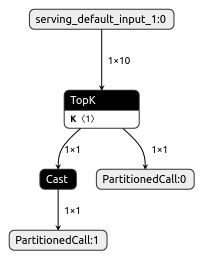
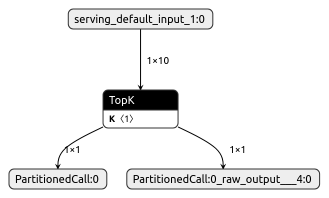
6. Sample
6-1. sample.1
| Before | After |
|---|---|
 |
 |
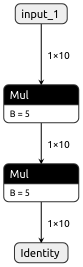
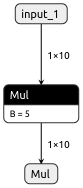
6-2. sample.2
| Before | After |
|---|---|
 |
 |
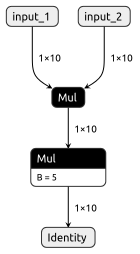
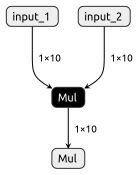
6-3. sample.3
| Before | After |
|---|---|
 |
 |
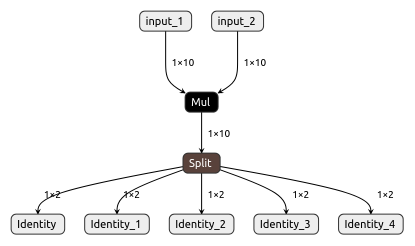
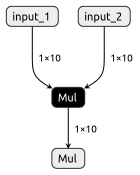
6-4. sample.4
| Before | After |
|---|---|
 |
 |
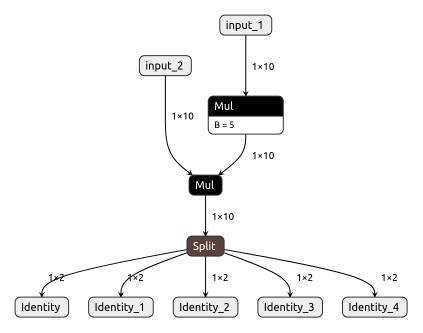
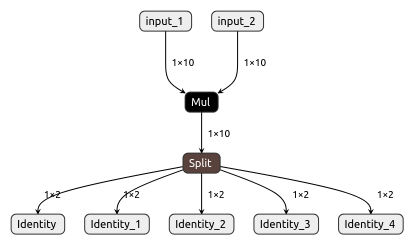
6-5. sample.5
| Before | After |
|---|---|
 |
 |
7. Reference
- https://docs.nvidia.com/deeplearning/tensorrt/onnx-graphsurgeon/docs/index.html
- https://github.com/NVIDIA/TensorRT/tree/main/tools/onnx-graphsurgeon
- https://github.com/PINTO0309/scs4onnx
- https://github.com/PINTO0309/sne4onnx
- https://github.com/PINTO0309/snc4onnx
- https://github.com/PINTO0309/sog4onnx
- https://github.com/PINTO0309/PINTO_model_zoo
8. Issues
https://github.com/PINTO0309/simple-onnx-processing-tools/issues
Release history Release notifications | RSS feed


Download files
Download the file for your platform. If you're not sure which to choose, learn more about installing packages.
Source Distribution
Built Distribution
Filter files by name, interpreter, ABI, and platform.
If you're not sure about the file name format, learn more about wheel file names.
Copy a direct link to the current filters
File details
Details for the file snd4onnx-1.1.7.tar.gz.
File metadata
- Download URL: snd4onnx-1.1.7.tar.gz
- Upload date:
- Size: 10.1 kB
- Tags: Source
- Uploaded using Trusted Publishing? No
- Uploaded via: twine/6.2.0 CPython/3.9.23
File hashes
| Algorithm | Hash digest | |
|---|---|---|
| SHA256 |
a50e8c3bef341193977b31f43777514e48deec71199467c2540c6ed4e5039f63
|
|
| MD5 |
e2b1edd49ebf51157472ef07d7f11534
|
|
| BLAKE2b-256 |
854c84032b3a38a4dc3a5608238ebcb4427faeea79c8c2e794fb0de43a50825d
|
File details
Details for the file snd4onnx-1.1.7-py3-none-any.whl.
File metadata
- Download URL: snd4onnx-1.1.7-py3-none-any.whl
- Upload date:
- Size: 9.3 kB
- Tags: Python 3
- Uploaded using Trusted Publishing? No
- Uploaded via: twine/6.2.0 CPython/3.9.23
File hashes
| Algorithm | Hash digest | |
|---|---|---|
| SHA256 |
246c90e60ecae68dda9d50b5bc4edb401efdbd8dd0bab3ab8f340d4313451b46
|
|
| MD5 |
6eb84f8530cdbee513d695200f980637
|
|
| BLAKE2b-256 |
2812b1afdd587cc1b3f4d2b60440bd9633e034a124960778fb26306ad2dfaa03
|






